A Web App Needs Traffic Distribution? Create a Load Balancer
A single web server becomes a bottleneck and a single point of failure. If it is busy or unavailable, the CloudTrips website cannot serve new requests.
Create a public Azure Load Balancer with two private backend VMs. Users send traffic to one public frontend IP, and the load balancer selects a backend for each new network flow.
Internet
   |
Public frontend IP
   |
Azure Load Balancer
   |-------------------|
Private WEB01       Private WEB02
Azure Load Balancer operates at Layer 4, the Transport layer of the OSI networking model. At this layer, it distributes connections using source and destination IP addresses, the TCP or UDP protocol, and port numbers. It does not read application content such as HTTP paths or headers. A later Application Gateway trip introduces that Layer 7 behavior.
This trip uses the network foundation from App Needs a Private Network? Create a VNet. Keep
vnet-cloudtrips-test-weu,snet-app, andnsg-cloudtrips-app-test-weu. The Azure Firewall lab is not required and should already be removed.
The load balancer, public IP, VMs, disks, and outbound data can incur charges. Complete the verification in this trip, then deallocate or delete the VMs when you are not continuing immediately.
Allow HTTP to the Backend Subnet
The existing subnet NSG permits HTTPS only to members of the CloudTrips application security group. This lab serves a simple HTTP page on TCP port 80, so add a separate rule.
Open nsg-cloudtrips-app-test-weu, select Settings > Inbound security
rules, and select Add. Configure:
Source: Service Tag
Source service tag: Internet
Source port ranges: *
Destination: IP Addresses
Destination IP addresses/CIDR ranges: 10.20.1.0/24
Service: HTTP
Action: Allow
Priority: 110
Name: Allow-HTTP-LoadBalancer
Description: Allow public HTTP traffic distributed by the test load balancer
Select Add.
Keep the existing Allow-HTTPS-Internet rule. The two custom rules serve
different ports:
Allow-HTTPS-Internet:      Internet -> application ASG -> TCP 443
Allow-HTTP-LoadBalancer:   Internet -> snet-app       -> TCP 80
For an HTTP request on port 80, the priority-100 HTTPS rule does not match because its port is 443. Evaluation continues to the priority-110 HTTP rule, which allows the request. The current Load Balancer uses port 80, so it does not use the HTTPS rule.
The two VMs will have no public IP addresses, so the load balancer frontend is their public entry point. Azure Load Balancer preserves the client’s source IP for inbound traffic; the NSG therefore needs to allow the Internet source.
Azure Load Balancer also sends small test connections to each backend to check
whether its service port is available. These health probes come from the
Azure-managed AzureLoadBalancer service tag, not from the public user. Every
NSG includes a default inbound rule named AllowAzureLoadBalancerInBound that
allows this platform traffic. Therefore, the custom HTTP rule permits real
client requests, while the default rule separately permits Azure’s health
checks. A custom deny rule with a lower priority number could still override
the default probe rule and make healthy backends appear unavailable.
Create the Public Load Balancer
In the Azure portal, search for Load balancers. Select Create > Standard Load Balancer.
On Basics, configure:
Subscription: CloudTrips TEST
Resource group: rg-cloudtrips-network-test-weu
Name: lb-cloudtrips-web-test-weu
Region: West Europe
SKU: Standard
Type: Public
Tier: Regional
Basic Load Balancer has been retired. Standard is the supported SKU and also supports later zone-redundant and cross-region designs.
On Frontend IP configuration, add:
Name: fe-cloudtrips-web-test-weu
IP version: IPv4
IP type: IP address
Public IP address: Create new
Public IP name: pip-cloudtrips-lb-test-weu
SKU: Standard
Availability zone: Zone-redundant
Routing preference: Microsoft network
If the region does not show an availability-zone field, continue without it.
On Backend pools, add:
Name: be-cloudtrips-web-test-weu
Virtual network: vnet-cloudtrips-test-weu
Backend pool configuration: NIC
The pool is empty for now. The two VM network interfaces will join it after the load balancer exists.
Create the Initial Load-Balancing Rule
A load-balancing rule connects the public frontend port to the backend port. It also requires a health probe so the load balancer does not send new flows to a backend whose port is closed.
On Inbound rules, select Add a load balancing rule and configure:
Name: rule-http-80
IP version: IPv4
Frontend IP address: fe-cloudtrips-web-test-weu
Backend pool: be-cloudtrips-web-test-weu
Protocol: TCP
Port: 80
Backend port: 80
Health probe: Create new
Health probe name: probe-tcp-80
Health probe protocol: TCP
Health probe port: 80
Session persistence: None
Idle timeout: 15 minutes
TCP reset: Enabled
Floating IP: Disabled
Outbound SNAT: Use outbound rules to provide backend pool members internet access
Do not create an outbound rule for this lab. The web servers use software already included in Ubuntu and do not need to download packages. If a later workload requires outbound internet access, configure an explicit NAT Gateway or Load Balancer outbound rule rather than relying on default outbound access.
This trip uses the smallest useful TCP probe because a load-balancing rule
needs backend health information. It verifies that TCP port 80 accepts a
connection; an application-aware design can instead use an HTTP or HTTPS probe
that validates a specific path and success status.
On Tags, add:
Application: CloudTrips
Environment: TEST
Purpose: WebTrafficDistribution
Select Review + create, and then select Create. Open the deployed load balancer and record its frontend public IP address.
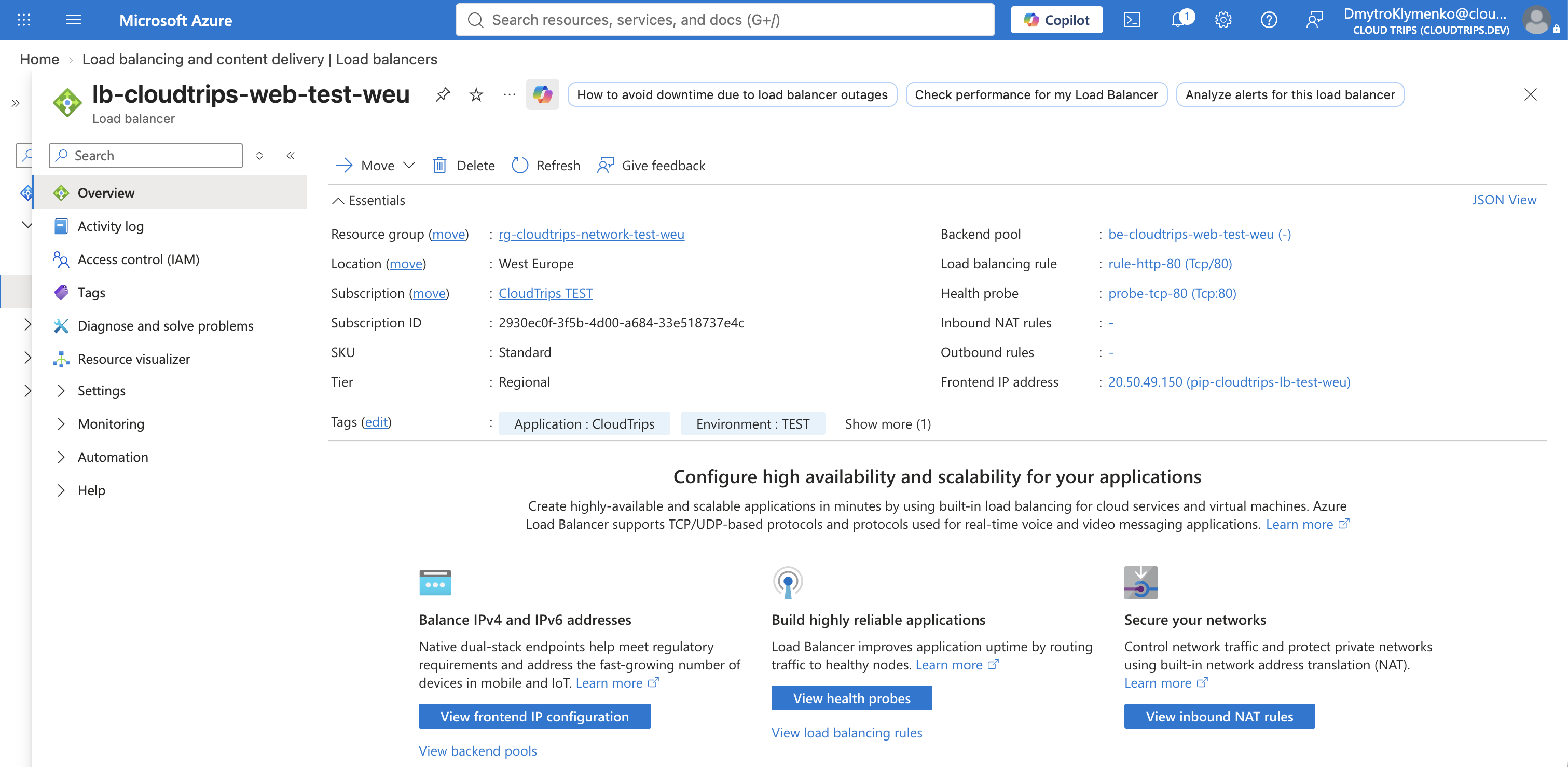
The public IP identifies the service. It does not belong to either backend VM. The load balancer can therefore keep the same frontend while backend instances are added, removed, or replaced.
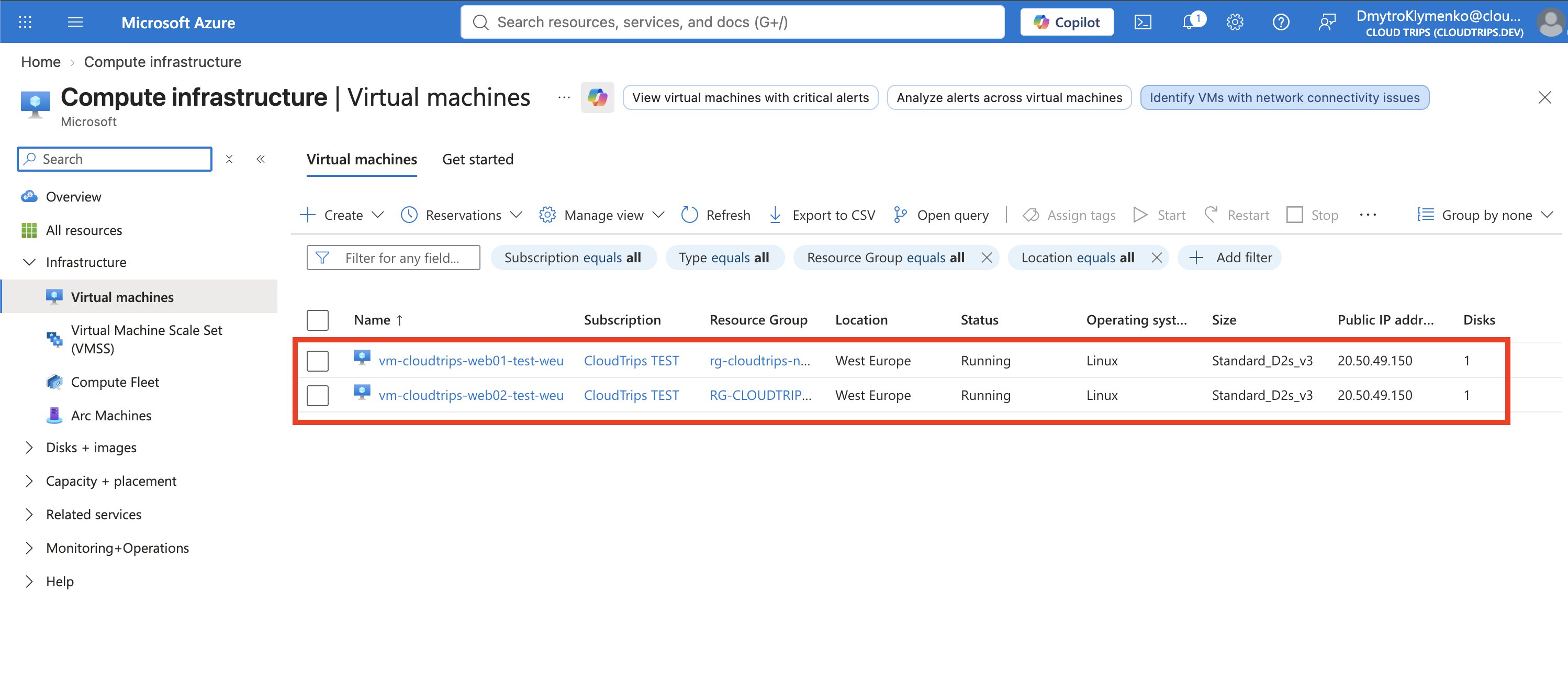
Create Two Private Web VMs
Create the first VM in the Azure portal:
Resource group: rg-cloudtrips-network-test-weu
Name: vm-cloudtrips-web01-test-weu
Region: West Europe
Availability options: No infrastructure redundancy required
Security type: Standard
Image: Ubuntu Server 24.04 LTS - x64 Gen2
Size: Standard_D2s_v3
Authentication type: Password or SSH public key
Username: azureuser
Public inbound ports: None
Use a Standard SSD OS disk and enable deletion of the disk with the VM. On Networking, configure:
Virtual network: vnet-cloudtrips-test-weu
Subnet: snet-app
Public IP: None
NIC network security group: None
Delete NIC when VM is deleted: Enabled
Load balancing options: Azure load balancer
Load balancer: lb-cloudtrips-web-test-weu
Backend pool: be-cloudtrips-web-test-weu
None for the NIC NSG is intentional because snet-app already has
nsg-cloudtrips-app-test-weu. Add the tags Application: CloudTrips,
Environment: TEST, and Purpose: LoadBalancerBackend, and create the VM.
Repeat the same configuration for:
Name: vm-cloudtrips-web02-test-weuThis lab uses two ordinary VMs to make distribution visible. A production design would normally place instances across availability zones or use a Virtual Machine Scale Set.
Start a Different Test Page on Each VM
Open vm-cloudtrips-web01-test-weu, select Operations > Run command >
RunShellScript, and run:
sudo mkdir -p /opt/cloudtrips-web
printf '%s\n' 'CloudTrips response from WEB01' | sudo tee /opt/cloudtrips-web/index.html >/dev/null
printf '%s\n' \
  '[Unit]' \
  'Description=CloudTrips test web server' \
  'After=network.target' \
  '' \
  '[Service]' \
  'ExecStart=/usr/bin/python3 -m http.server 80 --bind 0.0.0.0 --directory /opt/cloudtrips-web' \
  'Restart=always' \
  '' \
  '[Install]' \
  'WantedBy=multi-user.target' \
  | sudo tee /etc/systemd/system/cloudtrips-web.service >/dev/null
sudo systemctl daemon-reload
sudo systemctl enable --now cloudtrips-web
curl --silent http://127.0.0.1
The final line should return:
CloudTrips response from WEB01On vm-cloudtrips-web02-test-weu, run the same script but replace both
occurrences of WEB01 with WEB02. Its local test should return:
CloudTrips response from WEB02The permanent systemd service restarts the small Python web server when its VM restarts. It is suitable for this lab, not as a production web server.
Verify the Backend Pool and Rule
Open lb-cloudtrips-web-test-weu. Under Settings > Backend pools, open
be-cloudtrips-web-test-weu and confirm that both VM NIC IP configurations are
present.
Then open Load balancing rules and confirm:
rule-http-80: frontend TCP 80 -> backend TCP 80
Backend pool: be-cloudtrips-web-test-weu
Health probe: probe-tcp-80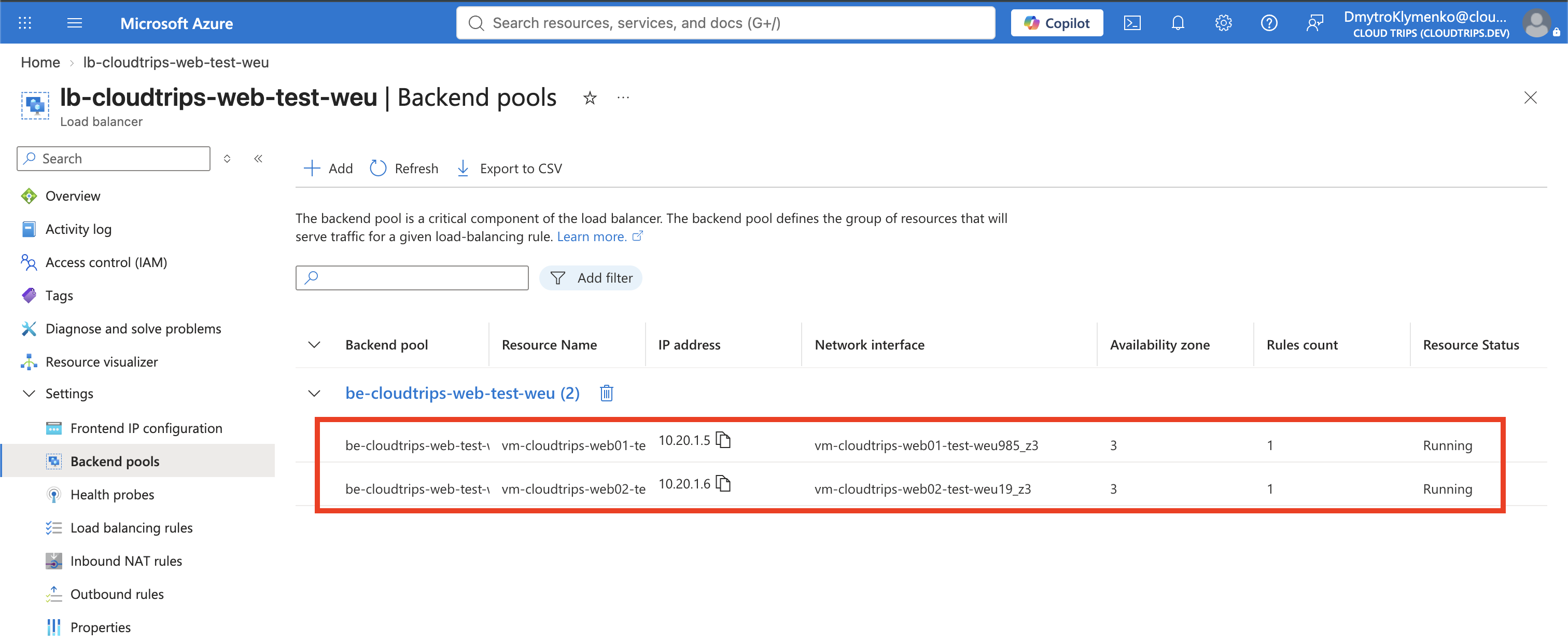
The backend pool answers which servers can receive traffic. The rule answers which frontend traffic is distributed and to which backend port. The probe answers which pool members are currently eligible.
Test Traffic Distribution
From a terminal on your Mac, replace the placeholder with the load balancer’s frontend public IP and run:
for request in {1..10}; do
  curl --connect-timeout 5 http://<load-balancer-public-ip>
done
The output should contain responses from both backends:
CloudTrips response from WEB01
CloudTrips response from WEB02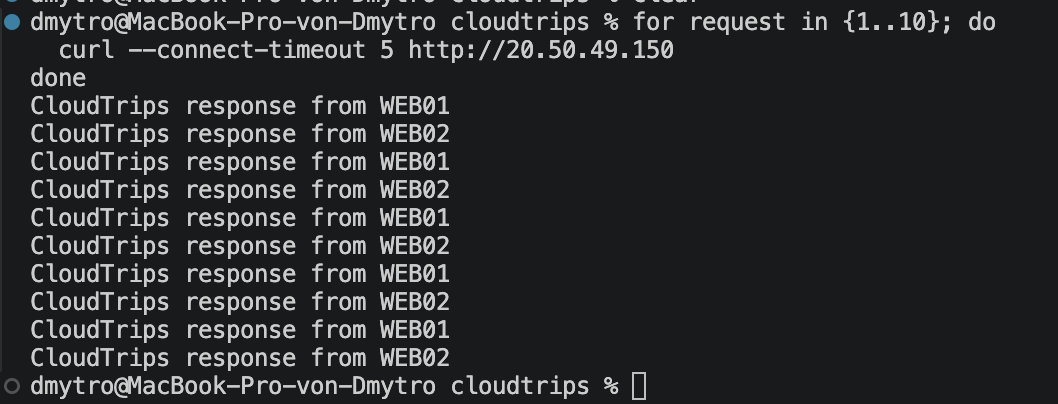
Azure Load Balancer hashes each network flow; it does not promise strict WEB01, WEB02, WEB01 alternation. Several consecutive requests can reach the same VM. Seeing both names across multiple new connections proves that the one frontend distributes traffic to both private backends.
Continue or Clean Up
Continue with A Public App Needs DDoS Protection? Enable DDoS Protection. Keep the load balancer, public IP, TCP probe, rule, backend VMs, NICs, disks, and HTTP NSG rule. Deallocate the VMs only if you will not continue immediately.
If you stop here, delete the two VMs with their NICs and disks, then delete
lb-cloudtrips-web-test-weu, pip-cloudtrips-lb-test-weu, and the
Allow-HTTP-LoadBalancer NSG rule. Keep the VNet, subnets, NSG, ASG, and route
table for later networking trips.