Custom Service Should Expose Private Link? Configure a Private Link Service
Private endpoints are not limited to Microsoft PaaS resources. A service provider can place a custom application behind a Standard Load Balancer and publish one internal frontend through Azure Private Link Service.
Build this provider-and-consumer path for the existing CloudTrips web service:
WEB02 consumer
    |
    v
Private Endpoint in snet-data
    |
    | Azure Private Link
    v
Private Link Service NAT IP in snet-pls
    |
    v
Internal Load Balancer frontend -> WEB01 / WEB02
This trip builds on A Web App Needs Traffic Distribution? Create a Load Balancer and Storage Must Stay Private? Create a Private Endpoint. Keep both web VMs and their running HTTP services,
vnet-cloudtrips-test-weu, andsnet-data. The existing public Load Balancer remains unchanged; this trip creates a separate internal Load Balancer because its frontend must use a private VNet address.
Understand Provider and Consumer
Private Link connects two roles:
- The provider runs a service and makes it available privately. Here, CloudTrips provides the website running on WEB01 and WEB02. The provider creates the Load Balancer and Private Link Service.
- The consumer wants to call that service from its own network. The consumer creates a private endpoint, which gives the provider’s service a private IP address inside the consumer’s VNet.
In a real design, the provider and consumer are often different companies, subscriptions, or VNets. For example, a software company provides a private API and a customer consumes that API without sending traffic over the Internet.
Consumer network                          Provider network
----------------                          ----------------
Client                                    WEB01 / WEB02
  |                                             ^
  v                                             |
Private Endpoint -- Azure Private Link --> Private Link Service
                                                ^
                                                |
                                      Internal Load Balancer
This low-cost lab places both roles in the same subscription and VNet. WEB01
and WEB02 remain the provider’s application servers, while WEB02 is also
reused as the test client after the consumer private endpoint is created in
snet-data. Reusing one VM makes the roles less visually separate, but the
Azure resources still have distinct responsibilities:
| Resource | Role |
|---|---|
pls-cloudtrips-web-test-weu |
Provider publishes the service |
pep-cloudtrips-custom-web-test-weu |
Consumer connects to the published service |
Private Link Service performs source NAT so overlapping provider and consumer address spaces do not create ambiguity. The application normally sees the Private Link Service NAT address, not the consumer’s original private IP.
Compare the Last Three Trips
The previous two trips connected to Azure Storage, which is a Microsoft-owned PaaS service. This trip uses the same Private Link platform differently: you are the provider and publish your own service running on VMs.
| Question | Storage private endpoint | Storage service endpoint | Custom Private Link Service |
|---|---|---|---|
| Who owns the service? | Microsoft owns Azure Storage | Microsoft owns Azure Storage | CloudTrips owns WEB01 and WEB02 |
| What does the client connect through? | Private endpoint | Service endpoint route | Private endpoint connected to the provider’s Private Link Service |
| Destination address | Private IP in the consumer VNet | Public Storage IP | Private IP in the consumer VNet |
| DNS behavior | Private DNS resolves Storage to the private IP | DNS still resolves to a public Storage IP | Custom DNS is optional; this lab tests the private IP directly |
| Provider-side access control | Storage approves the private endpoint connection | Storage firewall allows snet-app |
CloudTrips approves the private endpoint connection |
| Load Balancer required? | No | No | Yes, for the custom service in this lab |
| Public endpoint required? | No; Storage public access was disabled | Yes; it remains public but restricted by the Storage firewall | No public endpoint is required for Private Link consumers |
Use a private endpoint to Azure Storage when a Microsoft PaaS resource must appear privately inside your VNet. Use a service endpoint when reaching the PaaS public endpoint over the Azure backbone with simpler subnet-based access control is sufficient. Use Private Link Service when you own the application and want other consumers to reach it through private endpoints.
Private Link Service and private endpoints incur charges for provisioned time and processed data. Remove this lab when testing is complete.
Create the Private Link Service NAT Subnet
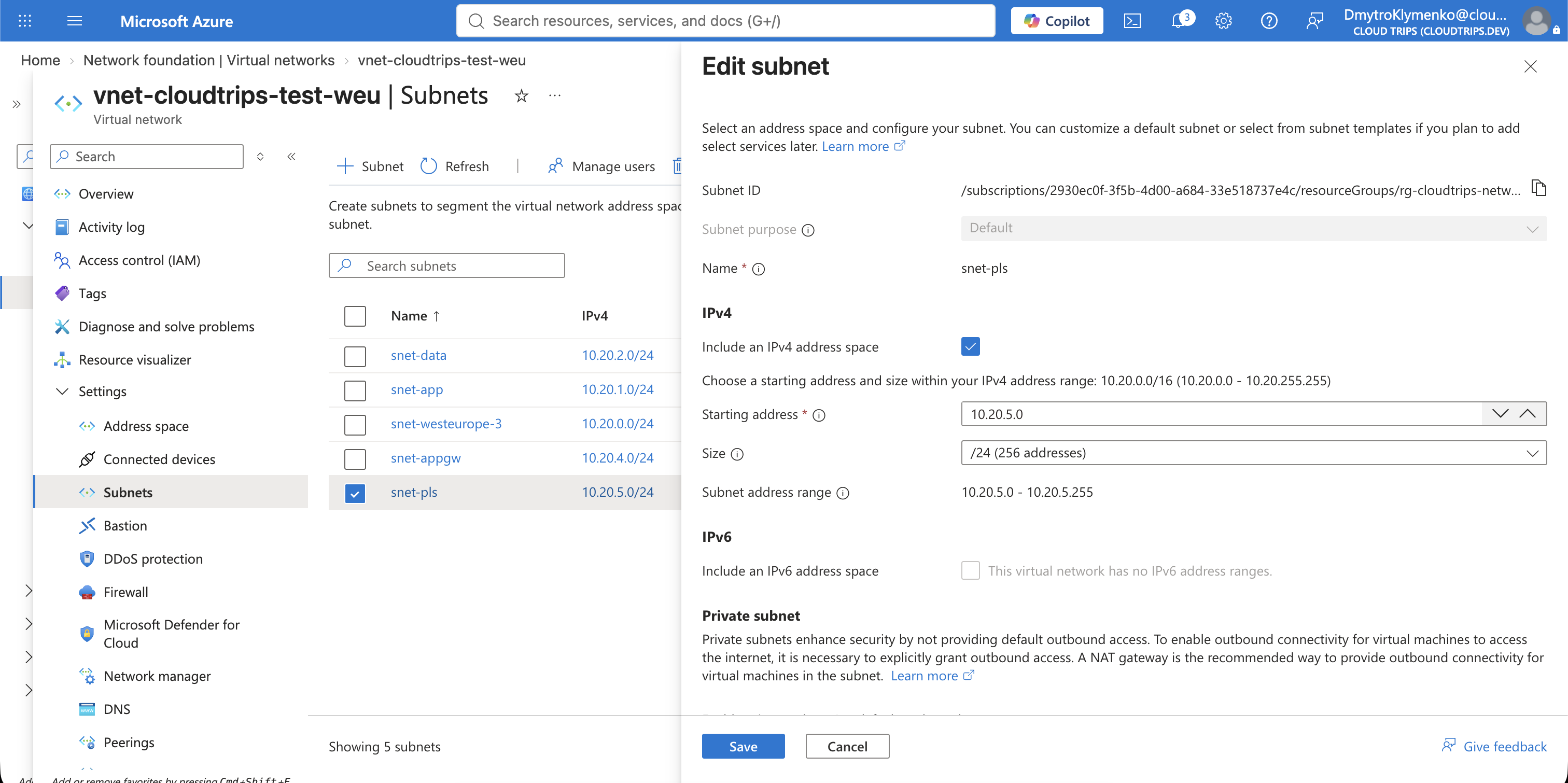
Open Virtual networks > vnet-cloudtrips-test-weu > Settings >
Subnets, select + Subnet, and configure:
Name: snet-pls
Starting address: 10.20.5.0
Subnet size: /24
Default outbound access: Disabled
Private link service network policy: Disabled
Leave delegation, NSG, route table, NAT Gateway, and service endpoints
unconfigured. 10.20.5.0/24 does not overlap snet-app at 10.20.1.0/24,
snet-data at 10.20.2.0/24, or the Application Gateway subnet at
10.20.4.0/24. Select Save.
The equivalent CLI commands are:
az network vnet subnet create \
  --resource-group rg-cloudtrips-network-test-weu \
  --vnet-name vnet-cloudtrips-test-weu \
  --name snet-pls \
  --address-prefixes 10.20.5.0/24 \
  --default-outbound false

az network vnet subnet update \
  --resource-group rg-cloudtrips-network-test-weu \
  --vnet-name vnet-cloudtrips-test-weu \
  --name snet-pls \
  --disable-private-link-service-network-policies true
Create a Separate Internal Load Balancer
The existing lb-cloudtrips-web-test-weu is a public Load Balancer. Its Add
frontend IP configuration screen therefore asks for a public IP address and
does not offer VNet or subnet fields. Do not add a frontend there.
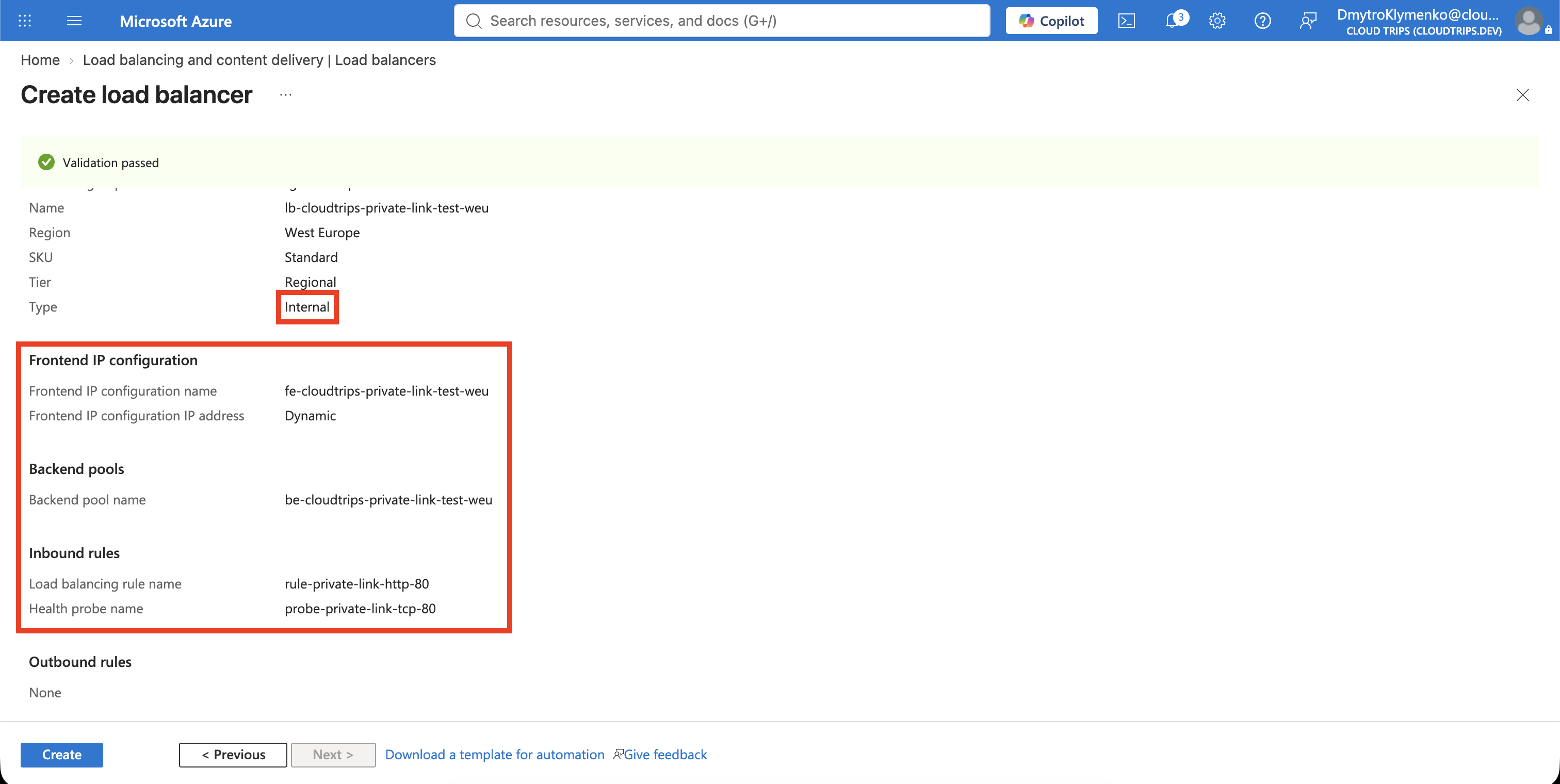
Search for Load balancers, select Create > Standard Load Balancer, and configure Basics:
Subscription: CloudTrips TEST
Resource group: rg-cloudtrips-network-test-weu
Name: lb-cloudtrips-private-link-test-weu
Region: West Europe
SKU: Standard
Type: Internal
Tier: Regional
On Frontend IP configuration, add:
Name: fe-cloudtrips-private-link-test-weu
Virtual network: vnet-cloudtrips-test-weu
Subnet: snet-app
IP address assignment: Dynamic
Availability zone: Zone-redundant, if available
On Backend pools, add be-cloudtrips-private-link-test-weu for
vnet-cloudtrips-test-weu with NIC configuration. Add the primary IP
configurations of both WEB01 and WEB02 to this pool. A VM NIC can participate
in backend pools on more than one Load Balancer, so this does not remove the
VMs from the existing public Load Balancer.
On Inbound rules, add a Load Balancer rule and create its health probe:
Name: rule-private-link-http-80
IP version: IPv4
Frontend IP address: fe-cloudtrips-private-link-test-weu
Backend pool: be-cloudtrips-private-link-test-weu
Protocol: TCP
Port: 80
Backend port: 80
Health probe: Create new
Health probe name: probe-private-link-tcp-80
Health probe protocol: TCP
Health probe port: 80
Session persistence: None
Idle timeout: 15 minutes
TCP reset: Enabled
Floating IP: Disabled
Select Review + create > Create. Open the deployed internal Load Balancer and confirm that both web backends are healthy. This inbound rule does not configure outbound Internet access for the backend VMs; outbound connectivity is outside this lab and is not required for serving the test page.
Create the Private Link Service
Search for Private link services, select + Create, and configure Basics:
Subscription: CloudTrips TEST
Resource group: rg-cloudtrips-network-test-weu
Name: pls-cloudtrips-web-test-weu
Region: West Europe
On Outbound settings, configure:
Load balancer: lb-cloudtrips-private-link-test-weu
Load balancer frontend IP address: fe-cloudtrips-private-link-test-weu
Source NAT virtual network: vnet-cloudtrips-test-weu
Source NAT subnet: snet-pls
Enable TCP proxy V2: No
Private IP address allocation: Dynamic
Keep Visibility restricted to the current subscription for this lab. Keep Auto-approval empty so the provider must explicitly approve consumer requests. Select Review + create > Create.
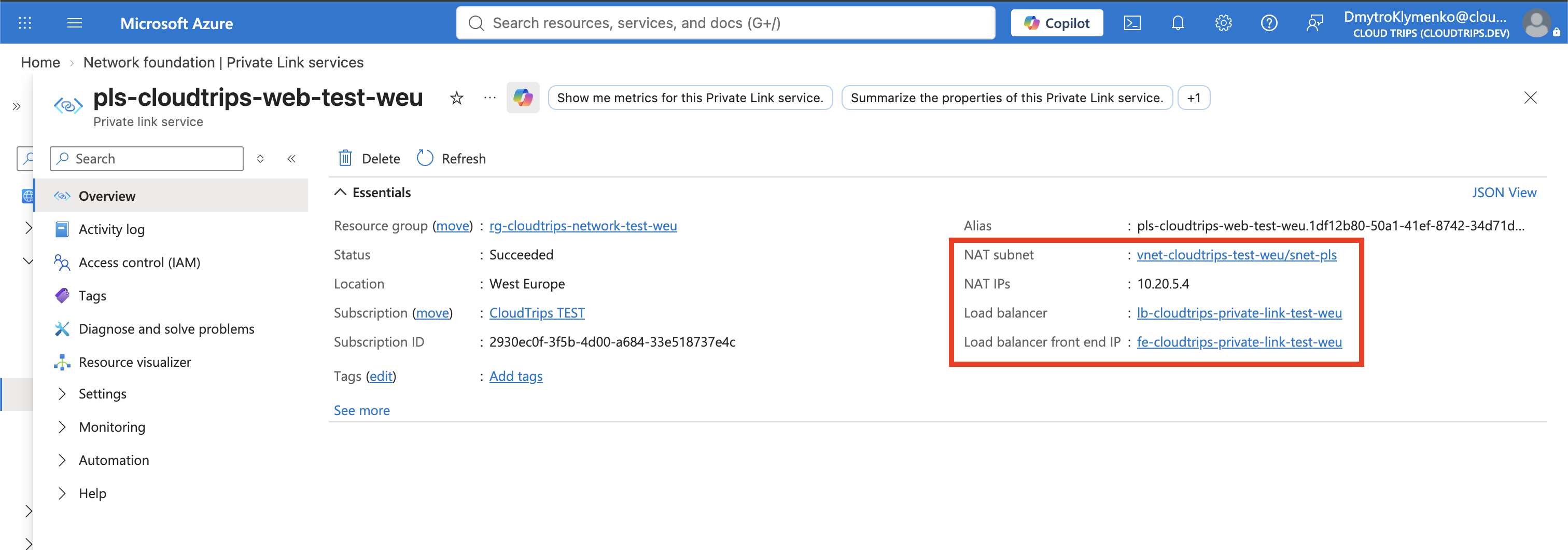
After deployment, open the service overview and copy its Alias. Consumers can use this alias without receiving access to the provider’s subscription or resource IDs.
Create a Consumer Private Endpoint
In a production design, the private endpoint normally belongs to a separate
consumer VNet—often in another subscription or tenant. This lab reuses the
existing CloudTrips VNet to avoid another VNet and test VM, so snet-data
simulates the consumer network while snet-app and snet-pls represent the
provider side:
vnet-cloudtrips-test-weu
├── snet-data → simulated consumer private endpoint
├── snet-app  → provider Load Balancer and web VMs
└── snet-pls  → provider Private Link Service NAT addresses
The roles remain separate even though the subnets share one VNet. A realistic
deployment would place the private endpoint in a consumer-owned VNet, such as
vnet-cloudtrips-consumer-test-weu, and connect it to this provider Private
Link Service without VNet peering. The consumer creates the private endpoint
because it needs a local private IP that represents the provider’s service
inside its own network.
Search for Private endpoints, select + Create, and configure:
Subscription: CloudTrips TEST
Resource group: rg-cloudtrips-network-test-weu
Name: pep-cloudtrips-custom-web-test-weu
Network interface name: nic-pep-cloudtrips-custom-web-test-weu
Region: West Europe
On Resource, select Connect to an Azure resource by resource ID or alias, paste the Private Link Service alias, and enter:
Request message: CloudTrips consumer labOn Virtual Network, configure:
Virtual network: vnet-cloudtrips-test-weu
Subnet: snet-data
Private IP configuration: Dynamically allocate IP address
No Azure-managed private DNS zone is offered for a custom service. Select Review + create > Create.
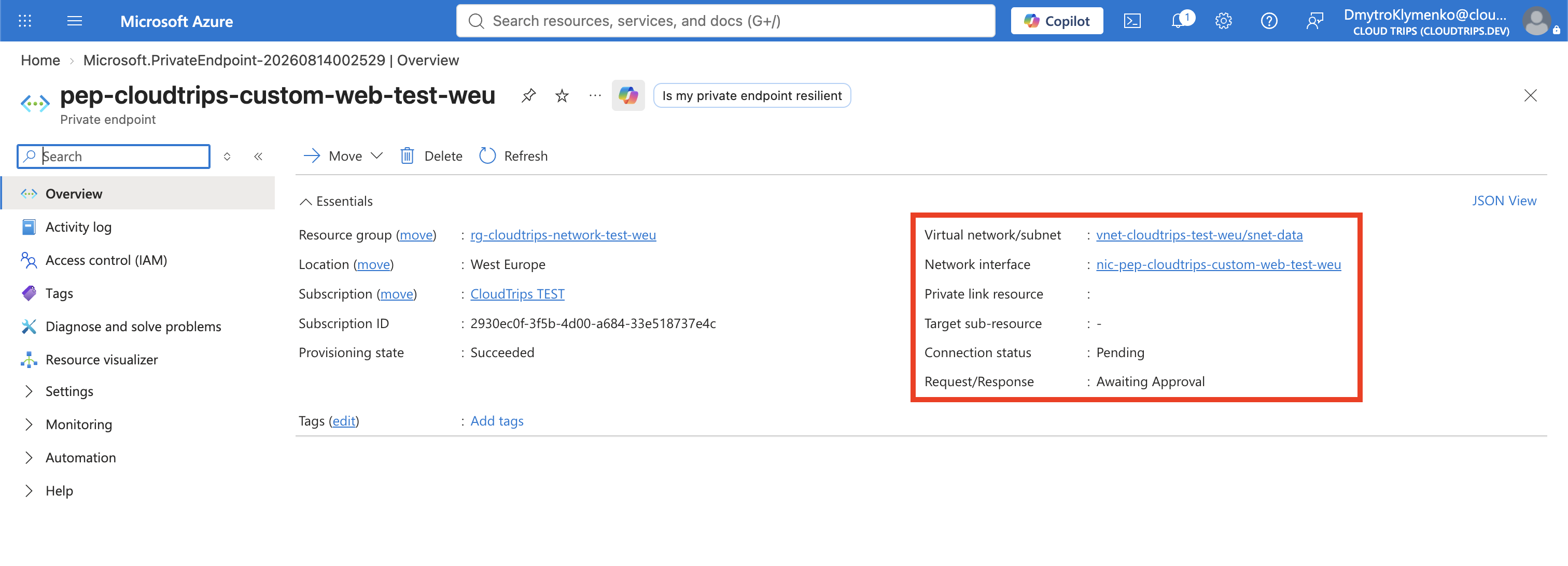
Approve the Consumer Connection
Open Private link services > pls-cloudtrips-web-test-weu > Private
endpoint connections. Select the pending connection, choose Approve, add
an optional description, and confirm.
The consumer endpoint should change to Approved. Approval is the provider’s consent boundary; creating a private endpoint does not automatically grant a consumer access when auto-approval is not configured.
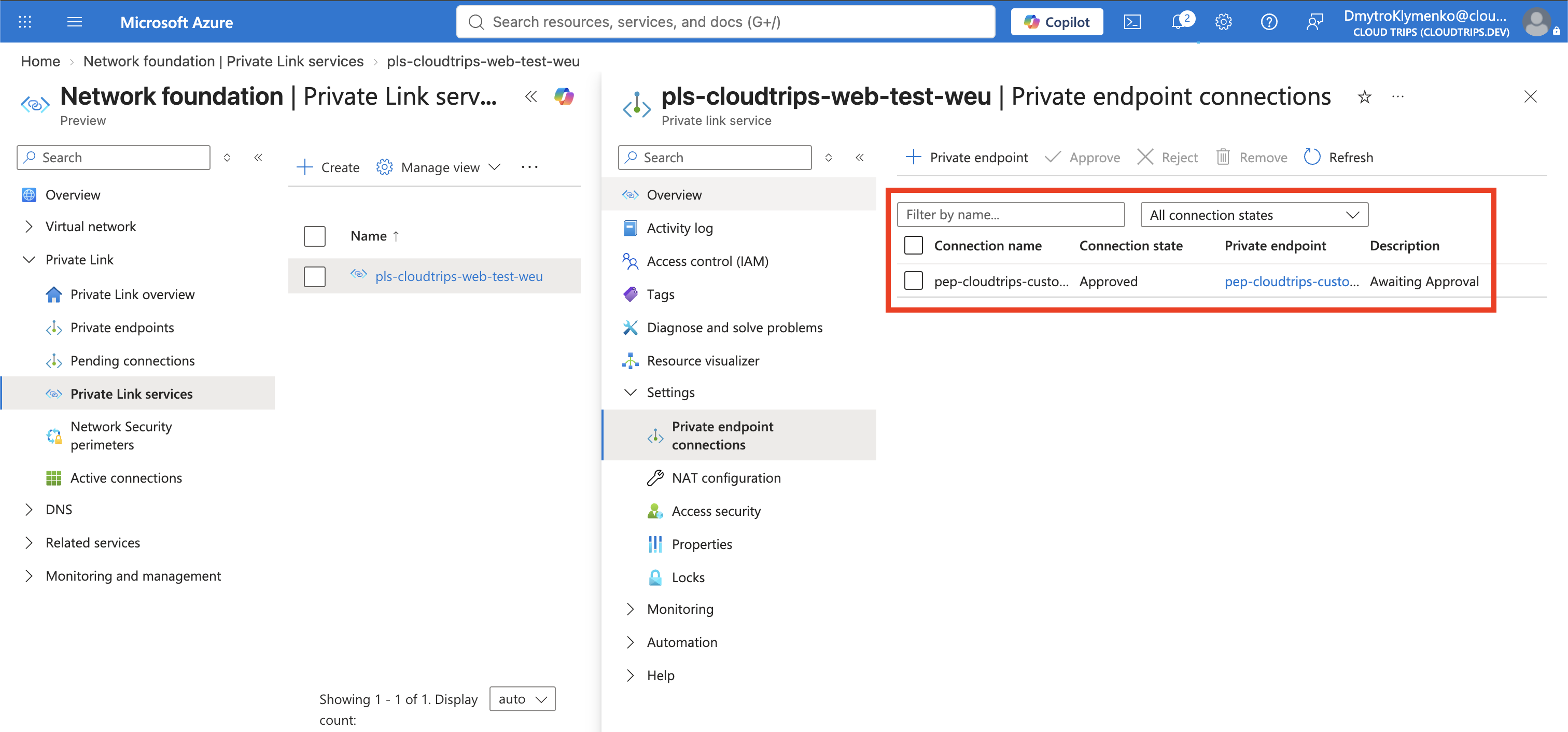
Verify the state with CLI:
az network private-link-service show \
  --resource-group rg-cloudtrips-network-test-weu \
  --name pls-cloudtrips-web-test-weu \
  --query '{State:provisioningState,Alias:alias,Connections:privateEndpointConnections[].privateLinkServiceConnectionState.status}' \
  --output yaml
Expect State: Succeeded and an Approved connection.
Test the Custom Service Privately
Read the private endpoint’s IP address:
CUSTOM_SERVICE_NIC=$(az network private-endpoint show \
  --resource-group rg-cloudtrips-network-test-weu \
  --name pep-cloudtrips-custom-web-test-weu \
  --query 'networkInterfaces[0].id' \
  --output tsv)

CUSTOM_SERVICE_IP=$(az network nic show \
  --ids "$CUSTOM_SERVICE_NIC" \
  --query 'ipConfigurations[0].privateIPAddress' \
  --output tsv)

printf 'Custom service private IP: %s\n' "$CUSTOM_SERVICE_IP"
Start WEB02 if necessary and call that address from inside the VNet:
az vm start \
  --resource-group rg-cloudtrips-network-test-weu \
  --name vm-cloudtrips-web02-test-weu

az vm run-command invoke \
  --resource-group rg-cloudtrips-network-test-weu \
  --name vm-cloudtrips-web02-test-weu \
  --command-id RunShellScript \
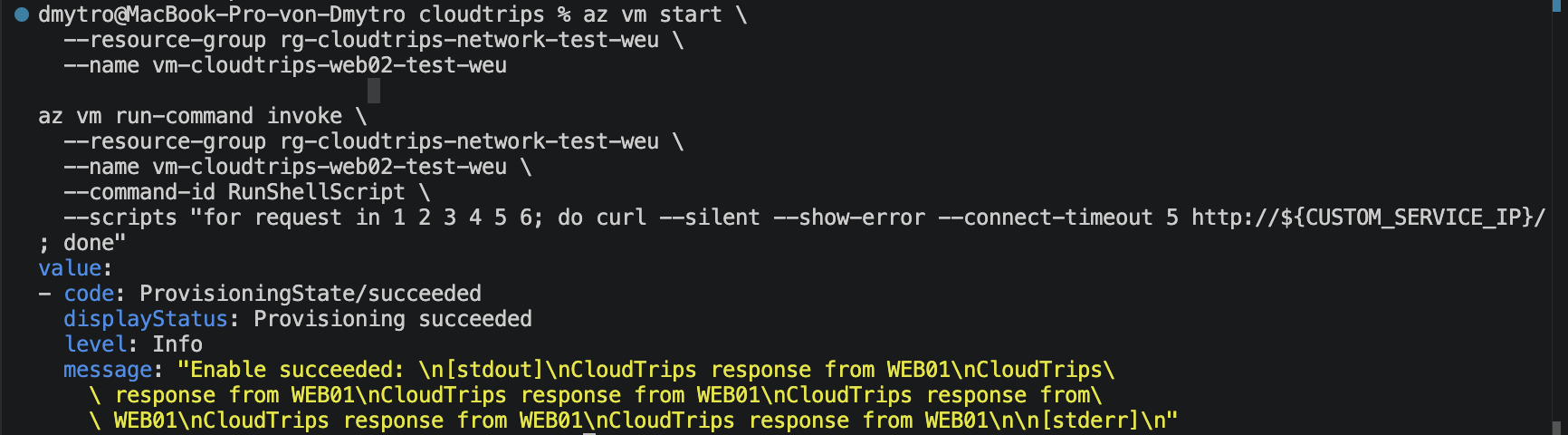
  --scripts "for request in 1 2 3 4 5 6; do curl --silent --show-error --connect-timeout 5 http://${CUSTOM_SERVICE_IP}/; done"
The output should contain responses from WEB01, WEB02, or both. The request entered through the consumer private endpoint, crossed Private Link, reached the internal Load Balancer frontend, and was distributed to a healthy backend.
Keep or Remove the Private Link Service Lab
Deallocate WEB02 after testing. If you remove this lab, delete resources in this order:
pep-cloudtrips-custom-web-test-weupls-cloudtrips-web-test-weulb-cloudtrips-private-link-test-weusnet-pls
Keep the existing public Load Balancer, VMs, VNet, and snet-data because
other networking trips use them.
Continue with A Network Issue Must Be Diagnosed? Use Network Watcher. Keep both web VMs, vnet-cloudtrips-test-weu, snet-app, and nsg-cloudtrips-app-test-weu for the diagnostic exercise.