App Needs Passwordless Secret Access? Use Managed Identity with Key Vault
Your secret is stored in Key Vault, but the application still needs to prove who it is to retrieve it. Giving the app another password creates another credential to protect and rotate. A managed identity gives the Azure resource an identity whose credentials Azure manages. It obtains an access token; Key Vault checks that identity’s permissions before returning the secret.
Reuse kv-ctappweu and demo-api-password from Create Key Vault and Store a Secret. This portal-only exercise uses an App Service Key Vault reference: Azure retrieves the secret and supplies its value as an application setting.
Create a Small App and Enable Its Identity
Open App Services → Create → Web App:
Resource group: rg-cloudtrips-security-test-weu
Name: app-ctsecretsweu
Publish: Code
Runtime stack: a supported Node.js LTS version
Operating system: Linux
Region: West Europe
App Service plan: asp-ctsecretsweu (new)
Pricing plan: Basic B1
Adjust the globally unique app name if taken. Review the plan cost and create the app. The platform’s reference-resolution check works with the default app; application deployment can follow later.
Open app-ctsecretsweu → Settings → Identity → System assigned, set Status: On, and save.
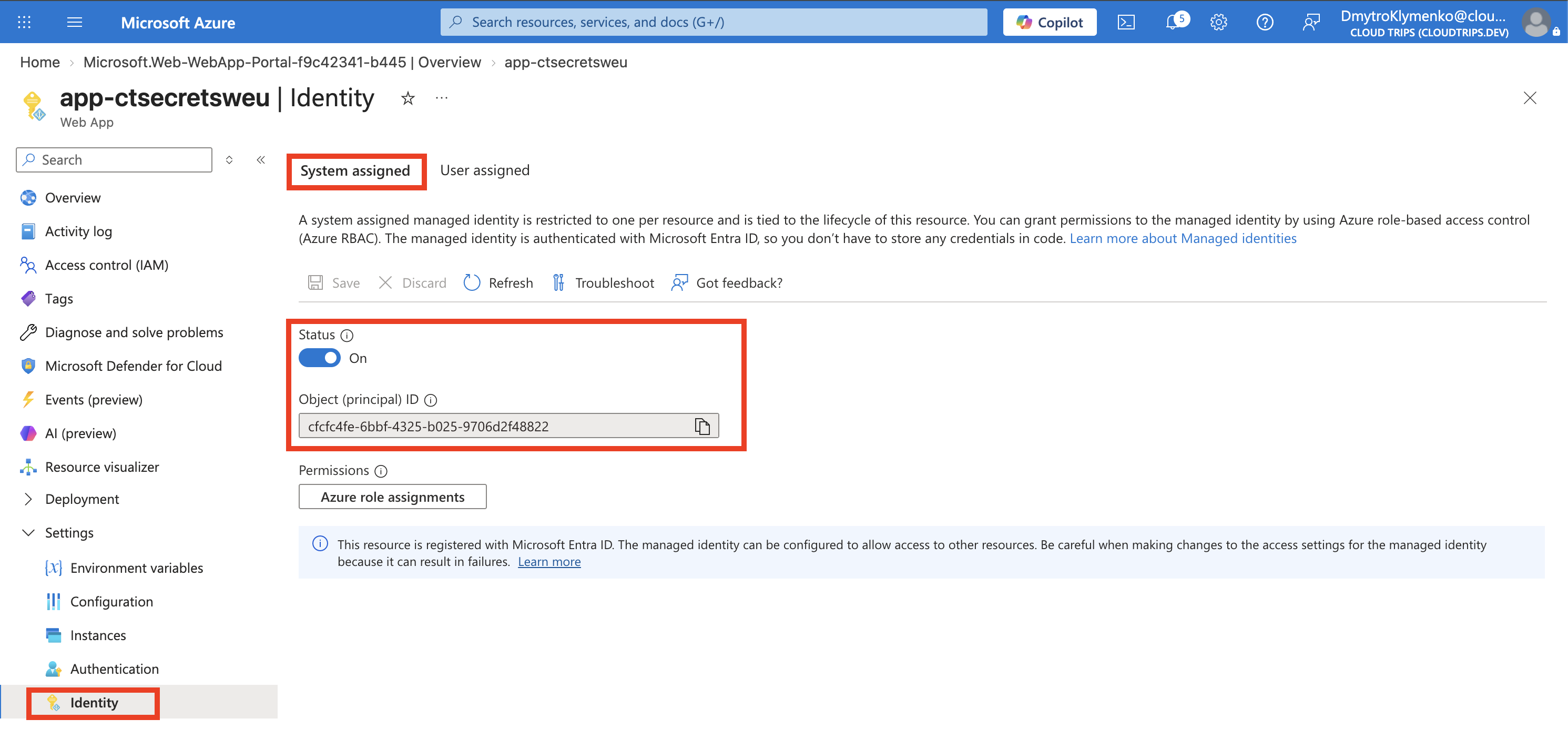
Check On and the Object (principal) ID. This identifies the app in Microsoft Entra ID. A system-assigned identity follows the app’s lifecycle.
Grant Read Access to the Secret
Open kv-ctappweu → Access control (IAM) → Add role assignment. Choose Key Vault Secrets User, then Managed identity → Select members → App Service → app-ctsecretsweu. Finish the assignment at vault scope.
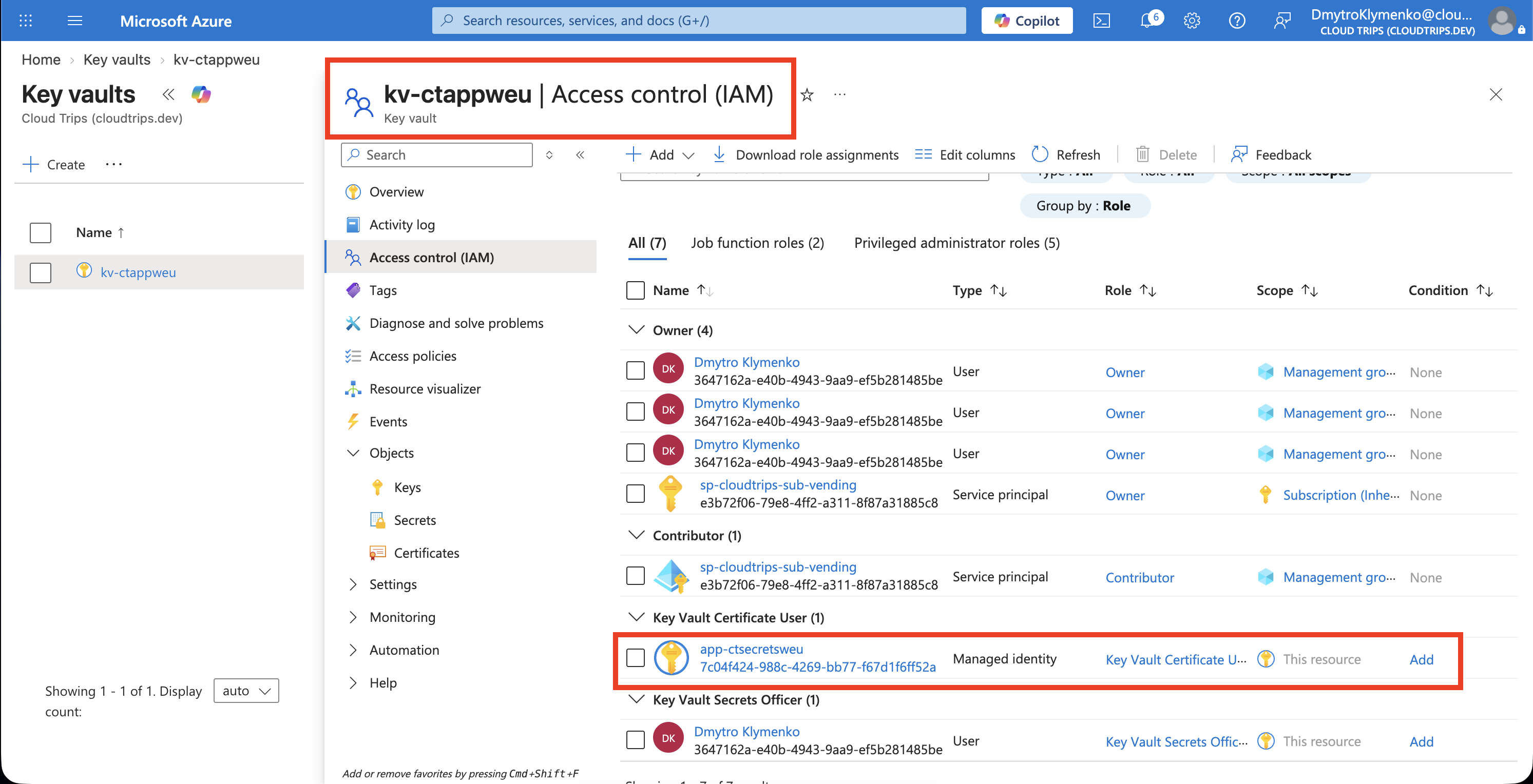
Check that the member is the app’s managed identity. This role allows reading secret values. Your own Secrets Officer role from the previous trip controls your access separately. Allow a few minutes for the app’s assignment to take effect.
Retrieve the Secret Through a Reference
Open the app’s Settings → Environment variables → App settings → Add:
Name: DEMO_API_PASSWORD
Value: @Microsoft.KeyVault(SecretUri=https://kv-ctappweu.vault.azure.net/secrets/demo-api-password)
Use your actual vault name. Select Apply/Save, confirm the configuration change, and reopen the setting to inspect its Key Vault reference status.
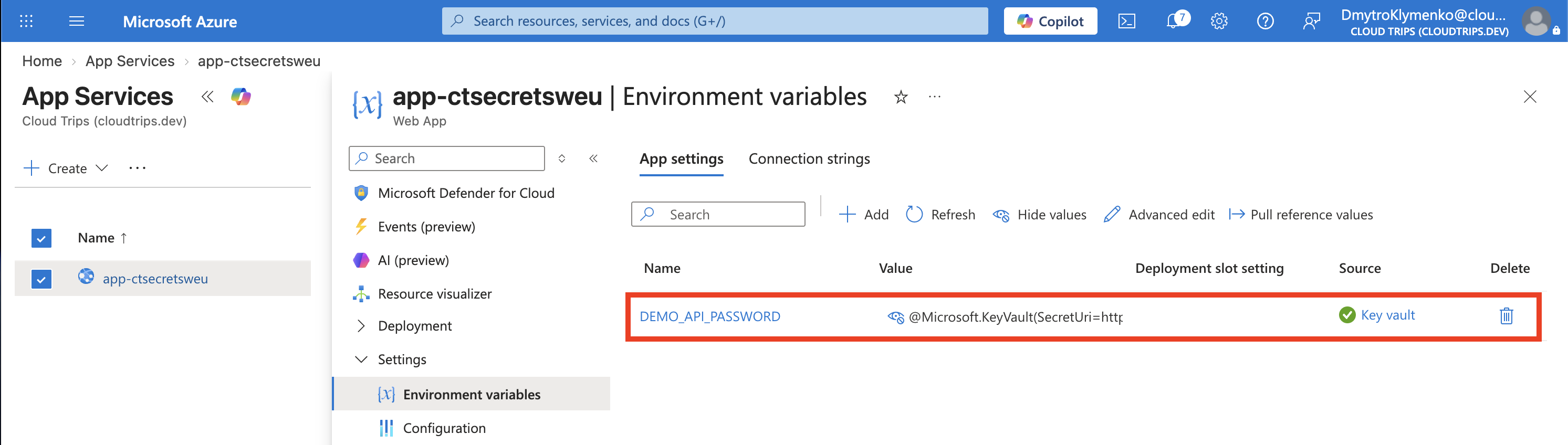
Check Resolved or the successful resolution indicator. This confirms App Service retrieved the secret using the app’s identity. Application code reads DEMO_API_PASSWORD as an environment variable; its value is the secret retrieved from Key Vault.
If resolution fails, check the reference spelling, enabled secret version, app identity, and role assignment. Keep the vault’s public network access from the previous lab so the app can reach it. For a fresh retry after permissions propagate, change an app setting and save; configuration changes trigger a refetch.
This versionless reference follows the latest secret version. App Service caches references and normally refreshes them within 24 hours; updating the vault value therefore reaches the app on a subsequent refresh.
Finish
Keep the vault for the next Security trip. When finished testing, delete app-ctsecretsweu and its dedicated plan asp-ctsecretsweu; stopping the app alone leaves plan charges running. Remove its vault role assignment if it remains after deleting the identity.