Traffic Flow Records Are Needed? View Flow Logs
A packet capture provides detailed evidence for a short investigation, but it is not a continuous record of network conversations. Operations and security teams also need connection metadata showing which addresses, ports, protocols, directions, and traffic decisions appeared over time.
Use Virtual Network flow logs for vnet-cloudtrips-test-weu. Generate one
known HTTP connection from WEB02 to WEB01, locate its JSON record in Azure
Storage, and interpret the flow tuple.
This trip builds on Packet-Level Evidence Is Needed? Capture Packets. Keep both web VMs and the working HTTP service on WEB01. Finish and remove the packet capture before enabling flow logs.
Why This Is Not a New NSG Flow Log
Azure NSG flow logs are a retiring legacy feature. New NSG flow logs cannot be created after June 30, 2025, and the feature retires on September 30, 2027. Existing NSG log files remain in their Storage accounts according to their retention settings, but new deployments must use Virtual Network flow logs.
VNet flow logs provide the required Layer 4 connection records at virtual network, subnet, or network-interface scope. They record metadata rather than packet payloads. Use packet capture when payload or TCP-flag evidence is required; use flow logs for longer-lived connection records.
Register the Insights Provider
Flow logging requires Microsoft.Insights. Check its registration:
az provider show \
  --namespace Microsoft.Insights \
  --query registrationState \
  --output tsv
If the result is not Registered, run:
az provider register --namespace Microsoft.InsightsWait until the state becomes Registered before creating the flow log.
Create Flow-Log Storage
Generate a globally unique Storage account name:
FLOW_STORAGE="stctflow$(az account show --query id --output tsv | tr -d '-' | cut -c1-10)"
printf 'Flow-log storage account: %s\n' "$FLOW_STORAGE"
Create a StorageV2, Standard LRS account with this name in
rg-cloudtrips-network-test-weu and West Europe. Keep secure transfer
required and minimum TLS 1.2. Flow logs and Storage operations can incur
charges, so this lab uses short retention and removes the resources afterward.
Enable a Virtual Network Flow Log
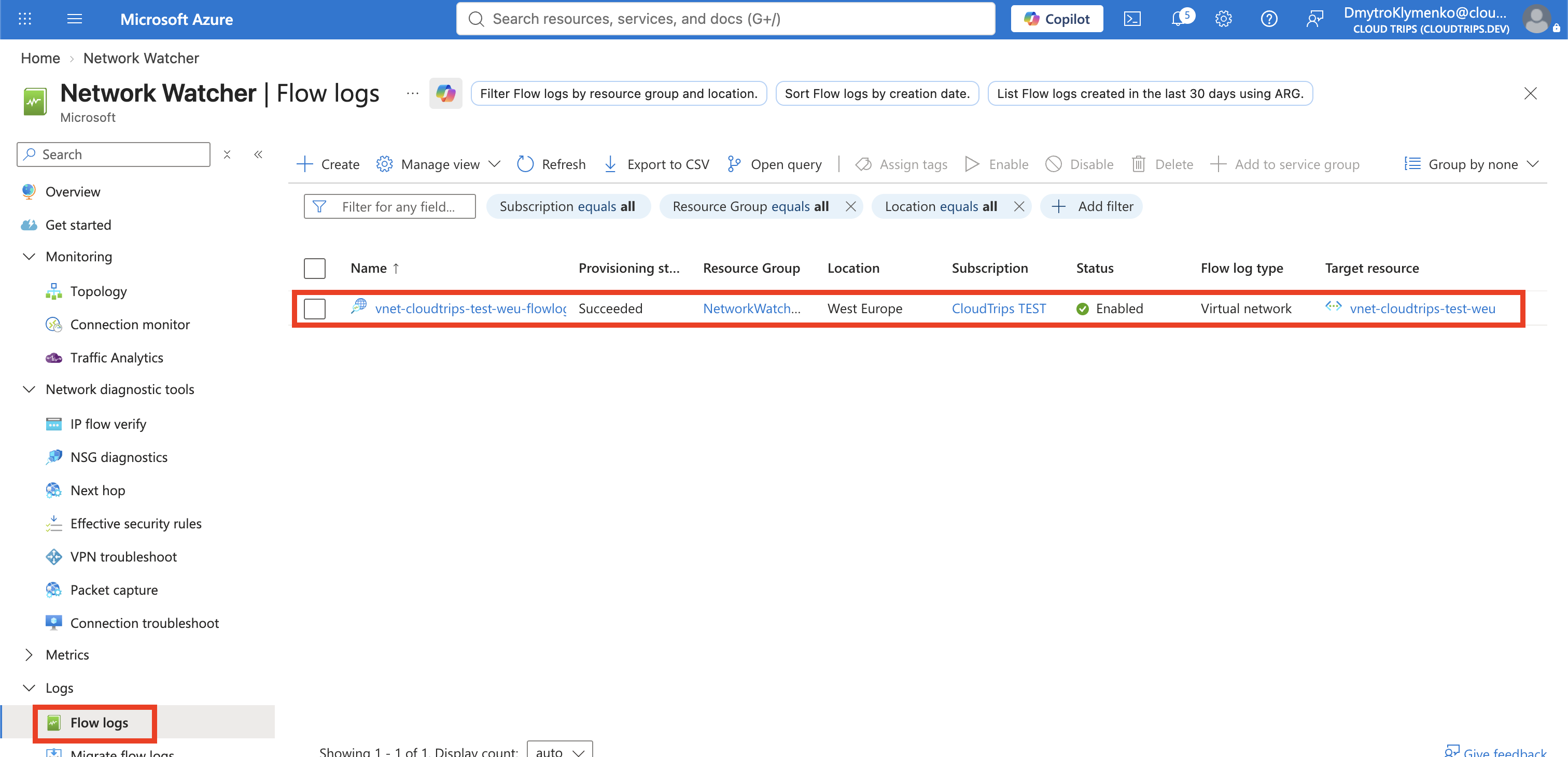
Search for Network Watcher, open the service, and select Logs > Flow logs > Create. Configure:
Subscription: CloudTrips TEST
Flow log type: Virtual network
Target resource: vnet-cloudtrips-test-weu
Flow log name: vnet-cloudtrips-test-weu-flowlog
Storage account subscription: CloudTrips TEST
Storage account: Use the FLOW_STORAGE value
Retention: 1 day
Traffic analytics: Disabled
Traffic Analytics is unnecessary for one known flow and would add Log
Analytics processing and cost. Select Review + create > Create. Azure
stores the flow-log resource in NetworkWatcherRG, even though the VNet and
Storage account are in the CloudTrips resource group.
Generate a Known HTTP Flow
Start both VMs if necessary and read their private addresses:
WEB01_IP=$(az vm list-ip-addresses \
  --resource-group rg-cloudtrips-network-test-weu \
  --name vm-cloudtrips-web01-test-weu \
  --query '[0].virtualMachine.network.privateIpAddresses[0]' \
  --output tsv)

WEB02_IP=$(az vm list-ip-addresses \
  --resource-group rg-cloudtrips-network-test-weu \
  --name vm-cloudtrips-web02-test-weu \
  --query '[0].virtualMachine.network.privateIpAddresses[0]' \
  --output tsv)

printf 'Expected flow: %s -> %s:80\n' "$WEB02_IP" "$WEB01_IP"
Send several requests so the flow is easy to identify:
az vm run-command invoke \
  --resource-group rg-cloudtrips-network-test-weu \
  --name vm-cloudtrips-web02-test-weu \
  --command-id RunShellScript \
  --scripts "for request in 1 2 3; do curl --silent --show-error --connect-timeout 5 http://${WEB01_IP}/; done"
Expect three WEB01 responses. Flow logs are collected in intervals rather than written immediately; allow approximately five to ten minutes for the first file to appear.
Download the JSON Flow Record
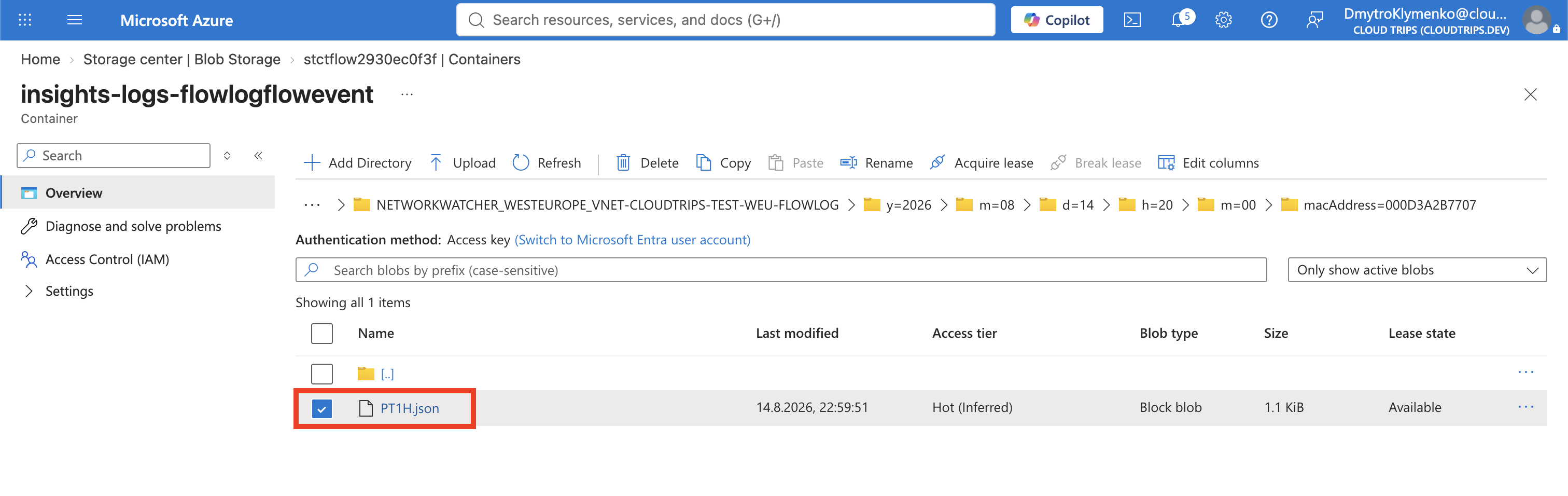
Open the $FLOW_STORAGE account and select Data storage > Containers >
insights-logs-flowlogflowevent. Navigate through the flow-log resource,
year, month, day, hour, minute, and MAC-address folders until you reach
PT1H.json. Select its ellipsis and Download.
Open PT1H.json in a text editor and search for both $WEB02_IP and
$WEB01_IP. A version-4 flowTuple resembles:
timestamp,sourceIp,destinationIp,sourcePort,destinationPort,protocol,direction,state,encryption,packetsSent,bytesSent,packetsReceived,bytesReceivedFor the known request, verify:
sourceIp: WEB02_IP
destinationIp: WEB01_IP
destinationPort: 80
protocol: 6 (TCP)
direction: O (outbound from the recorded interface)
The ephemeral source port varies for each connection. Packet and byte counters summarize the flow; they do not contain the HTTP payload. The record can also name the NSG or Virtual Network Manager rule that processed the flow.

Remove the Flow Log
Return to Network Watcher > Flow logs, select
vnet-cloudtrips-test-weu-flowlog, and select Delete. Then delete the
temporary $FLOW_STORAGE account after any required evidence is exported.
Deleting the flow-log resource stops new collection but does not delete data
already stored in Blob Storage.
Deallocate both VMs after testing. In production, choose retention, Storage network controls, access roles, and SIEM export based on the organization’s security and compliance requirements.
Continue with Many VNets Need Central Governance? Configure Network Manager. Keep the CloudTrips application, hub, services, and DR VNets for centralized governance.