Internet Egress Needs a Static IP? Create a NAT Gateway
CloudTrips resources need to connect to services on the internet. Some of those services accept requests only from approved public IP addresses, so CloudTrips needs one outbound IP that stays the same. Giving every VM its own public IP would create several addresses to secure and manage.
Create an Azure NAT Gateway for snet-app. NAT stands for Network
Address Translation: for an outbound connection, the gateway translates a
workload’s private source address into one static public source address. Every
resource in the associated subnet can therefore share the same predictable
egress IP without receiving its own public IP.
This trip uses the VNet and application subnet created in App Needs a Private Network? Create a VNet.
The intended path is:
Resource in snet-app -> NAT Gateway -> static public IP -> InternetNAT Gateway handles outbound connections and their response traffic. It does not accept unsolicited inbound internet connections, inspect application traffic, or replace NSG rules.
Plan the Outbound Path
Use:
Resource group: rg-cloudtrips-network-test-weu
NAT gateway: natgw-cloudtrips-app-test-weu
Public IP: pip-cloudtrips-nat-test-weu
Virtual network: vnet-cloudtrips-test-weu
Subnet: snet-app
The NAT Gateway and public IP must be in West Europe, the same region as
the subnet. Create a dedicated public IP; do not reuse
pip-cloudtrips-vm-test-weu, because that address was created for direct VM
connectivity.
Create the NAT Gateway
In the Azure portal, search for NAT gateways, open the service, and select Create.
On Basics, configure:
Subscription: CloudTrips TEST
Resource group: rg-cloudtrips-network-test-weu
NAT gateway name: natgw-cloudtrips-app-test-weu
Region: West Europe
SKU: Standard
Availability zone: No Zone
TCP idle timeout: 4 minutes
Standard with No Zone is a short-lived lab choice. Azure selects its zone,
and this configuration is not resilient to an availability-zone failure. For
a production deployment in a supported region, choose StandardV2 with a
StandardV2 public IP; that SKU is zone-redundant by default. Standard and
StandardV2 public IP resources cannot be mixed, and an existing Standard NAT
Gateway cannot be upgraded in place—it must be replaced.
The idle timeout controls how long an inactive TCP connection remains mapped. Keep the default for this exercise.
Select Next: Outbound IP. Under Public IP addresses, select Create a
new public IP address, enter pip-cloudtrips-nat-test-weu, and select OK.
Azure creates a static Standard IPv4 address for the gateway.
Select Next: Networking and configure:
Virtual network: vnet-cloudtrips-test-weu
Subnet: snet-app
Only selected subnets use the NAT Gateway. Associating it with snet-app does
not change outbound traffic from snet-data.
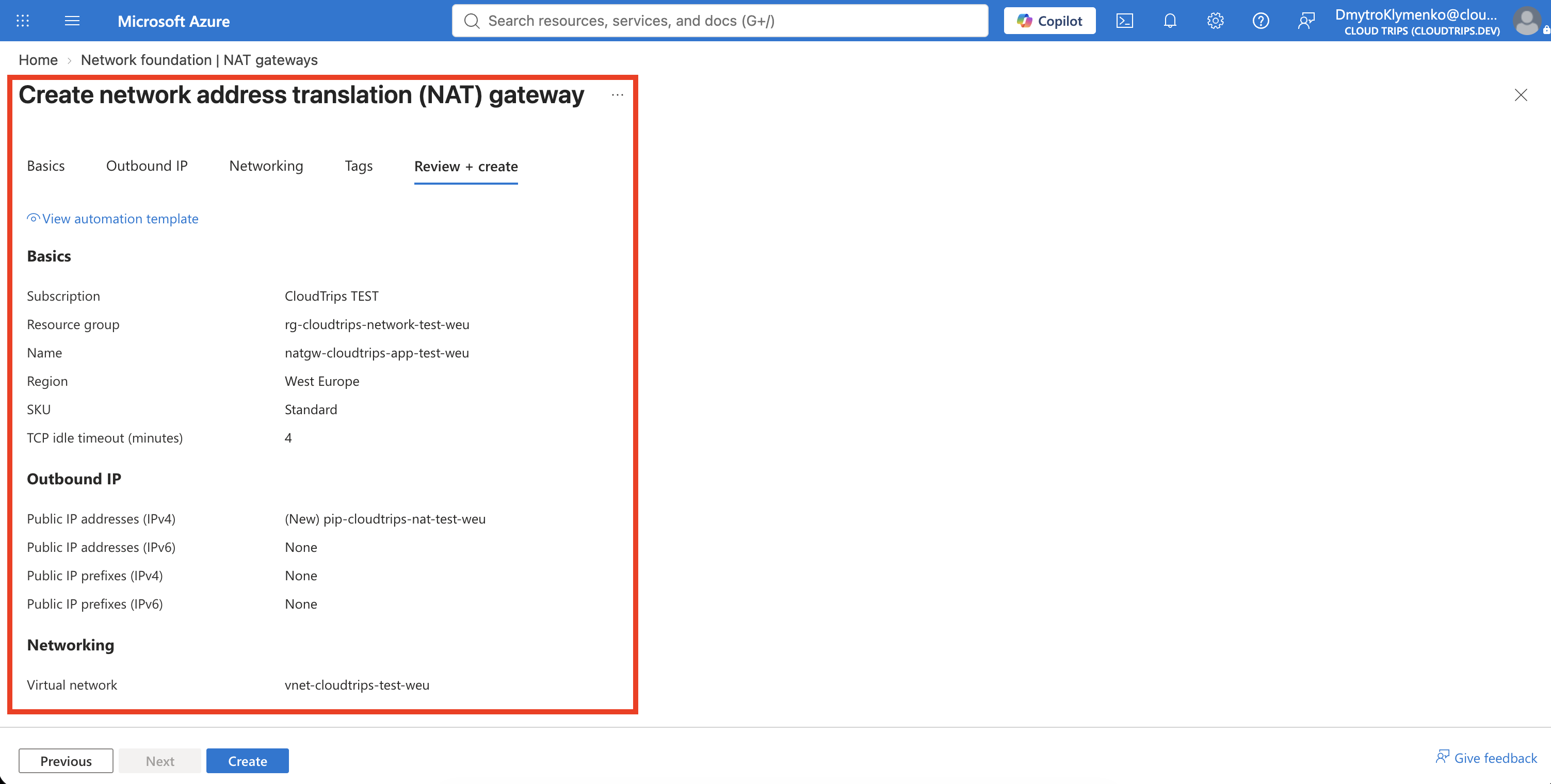
On Tags, add:
Application: CloudTrips
Environment: TEST
Purpose: OutboundConnectivity
Select Review + create, and then select Create.
Verify the Subnet Association
Open natgw-cloudtrips-app-test-weu. On Overview, confirm that its
provisioning state is Succeeded. Under Settings > Outbound IP,
confirm that pip-cloudtrips-nat-test-weu is attached.
Then open:
Virtual networks > vnet-cloudtrips-test-weu > Subnets > snet-appConfirm:
NAT gateway: natgw-cloudtrips-app-test-weu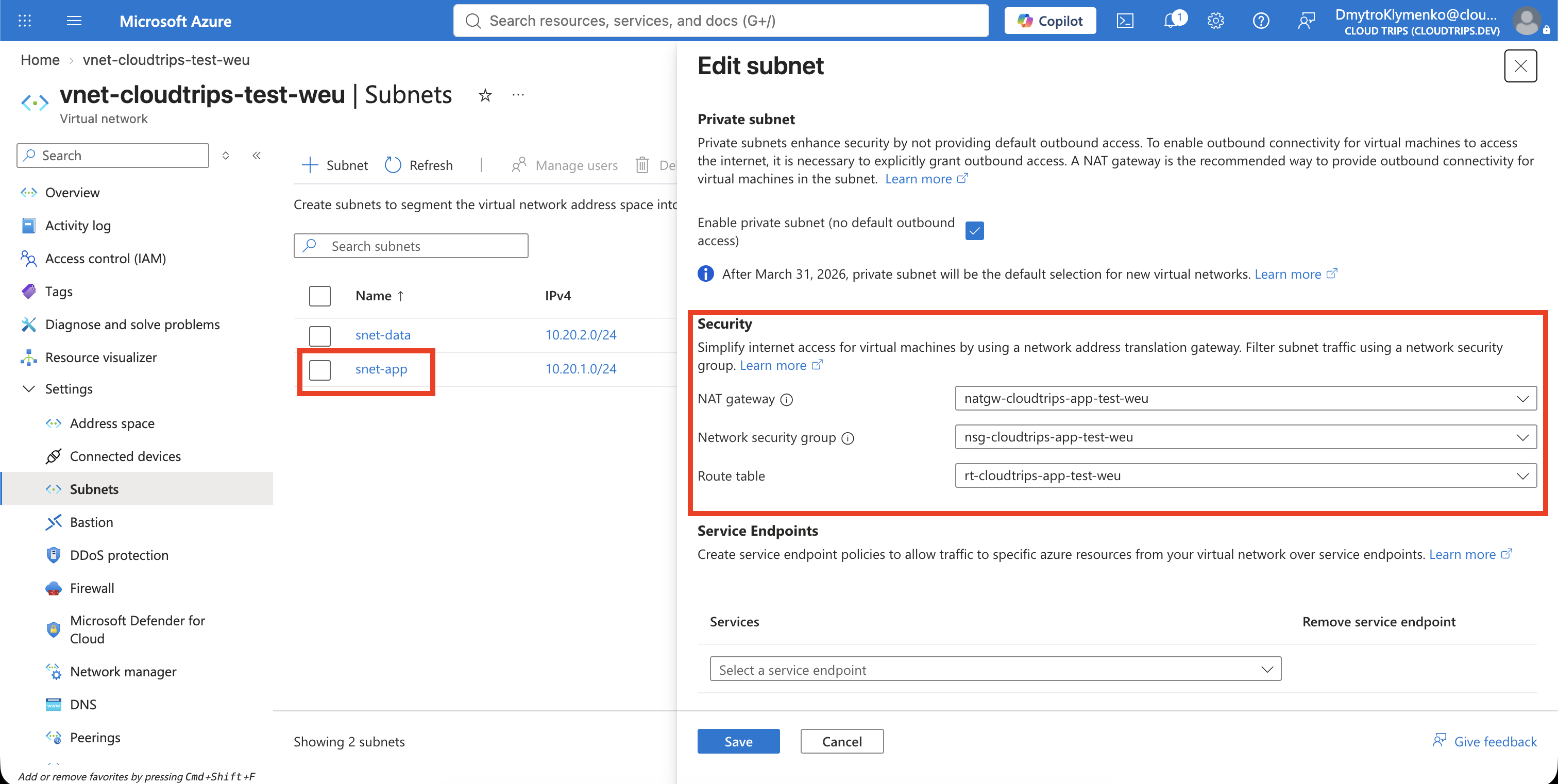
The subnet now has an explicit outbound method. When a resource in snet-app
starts an internet connection, the destination sees the static address of
pip-cloudtrips-nat-test-weu, not the resource’s private IP. Verifying the
actual observed address requires a running workload in the subnet; this trip
verifies the network configuration without creating a billable VM.
Remove the Billable Resources
NAT Gateway and its public IP can incur charges while provisioned. If you are
finished with the exercise, open snet-app, set NAT gateway to None,
and save. Delete natgw-cloudtrips-app-test-weu, then delete
pip-cloudtrips-nat-test-weu.
Do not delete vnet-cloudtrips-test-weu or snet-app; other Networking trips
use them.