Network Needs Firewall Inspection? Create Azure Firewall
The CloudTrips application subnet can connect to the internet through NAT Gateway, but NAT only translates addresses. It does not decide which destinations or protocols the workloads may use.
Deploy Azure Firewall as a central network security service. Then add a
user-defined route so internet-bound traffic from snet-app must pass through
the firewall. Azure Firewall is stateful: it evaluates a connection once and
automatically recognizes its response traffic.
This is a deliberately simplified single-VNet lab: the firewall is central to
the application subnet but is deployed inside vnet-cloudtrips-test-weu. In a
production hub-spoke design, place the shared firewall in the hub and route
spoke traffic through it. The retained screenshots show the simpler lab
topology and should not be read as a production placement recommendation.
This trip builds on An Admin Needs Secure VM Access? Create Azure Bastion. Keep or recreate its private VM and Bastion Developer connection for the final test.
The path becomes:
VM in snet-app -> route table -> Azure Firewall -> InternetAzure Firewall denies traffic that matches no allow rule. This trip uses that default-deny behavior to prove that the firewall is in the path. The next trip, Firewall Rules Need Central Management? Create a Firewall Policy, creates a centrally managed policy and allows an approved destination.
Azure Firewall Standard is billable from the moment it is deployed. Complete this trip and the following Firewall Policy trip in the same lab session, or perform the cleanup at the end of this trip.
Remove the Previous NAT Path
If natgw-cloudtrips-app-test-weu is still associated with snet-app, open:
Virtual networks > vnet-cloudtrips-test-weu > Subnets > snet-appSet NAT gateway to None and save. Delete
natgw-cloudtrips-app-test-weu and pip-cloudtrips-nat-test-weu if they are
no longer needed.
NAT Gateway and Azure Firewall are both valid outbound designs, but this exercise needs one unambiguous egress path. The firewall will provide its own public IP for outbound connections.
Create the Required Firewall Subnet
Azure Firewall must be deployed in a dedicated subnet named exactly
AzureFirewallSubnet. Azure recognizes this reserved name and uses the subnet
for the managed firewall instances. The subnet must be /26 or larger so
Azure has enough addresses for scaling and maintenance.
Open vnet-cloudtrips-test-weu, select Settings > Subnets, and select
+ Subnet. Configure:
Subnet purpose/template: Azure Firewall
Name: AzureFirewallSubnet
Starting address: 10.20.3.0
Subnet size: /26
Do not associate an NSG, route table, NAT Gateway, service endpoint, or subnet delegation. Select Add or Save.
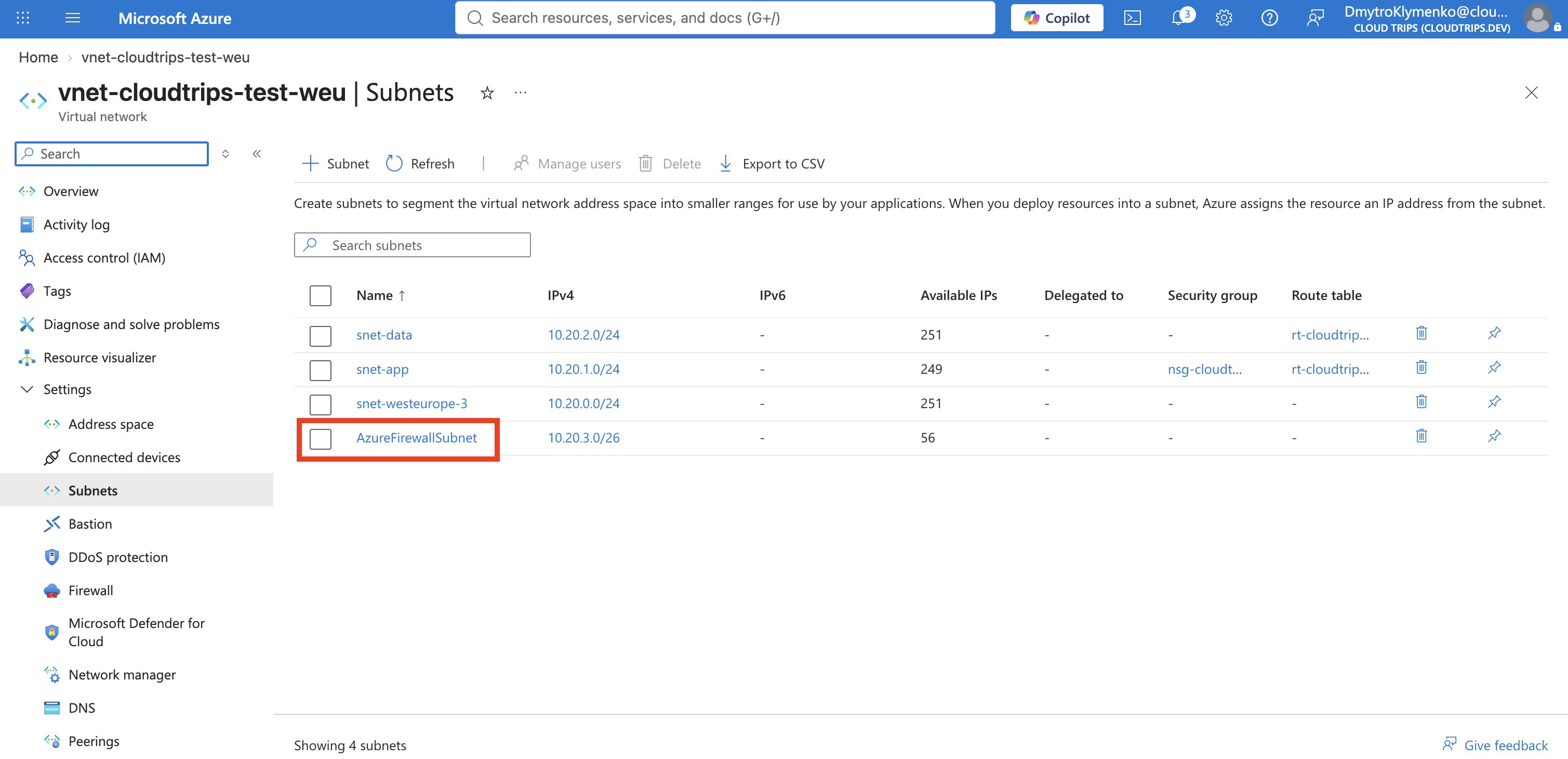
10.20.3.0/26 is inside the VNet’s 10.20.0.0/16 address space and does not
overlap snet-app or snet-data.
Deploy Azure Firewall
In the Azure portal, select Create a resource, search for Firewall, and select Create.
Configure:
Subscription: CloudTrips TEST
Resource group: rg-cloudtrips-network-test-weu
Name: afw-cloudtrips-test-weu
Region: West Europe
Availability options: No infrastructure redundancy required
Firewall SKU: Standard
Firewall management: Use classic firewall rules
Virtual network: Use existing
Virtual network name: vnet-cloudtrips-test-weu
Public IP address: Create new
Public IP name: pip-cloudtrips-afw-test-weu
Enable Firewall Management NIC: Disabled
If validation says that Force Tunneling requires
AzureFirewallManagementSubnet, return to the firewall configuration and
clear Enable Firewall Management NIC or set Force Tunneling to
Disabled. Do not create AzureFirewallManagementSubnet for this exercise.
The route added later sends workload traffic from snet-app to Azure Firewall
for inspection. Azure Firewall Force Tunneling is a different feature: it
sends Internet-bound customer traffic onward from Azure Firewall to an
upstream next hop, such as an on-premises firewall or another network virtual
appliance, instead of directly to the Internet. The separate management NIC
and subnet keep Azure Firewall’s platform and operational traffic on its
required management path. This lab does not use forced tunneling.
If the portal presents firewall management as a policy selection, choose None (use classic firewall rules). Do not create rules yet; the next trip will replace classic management with a central Firewall Policy.
On Tags, add:
Application: CloudTrips
Environment: TEST
Purpose: NetworkInspection
Select Review + create, and then select Create. Deployment can take several minutes.
Open afw-cloudtrips-test-weu and wait until its provisioning state is
Succeeded. Record its Private IP address for the next step. The public
IP is not needed for this test.
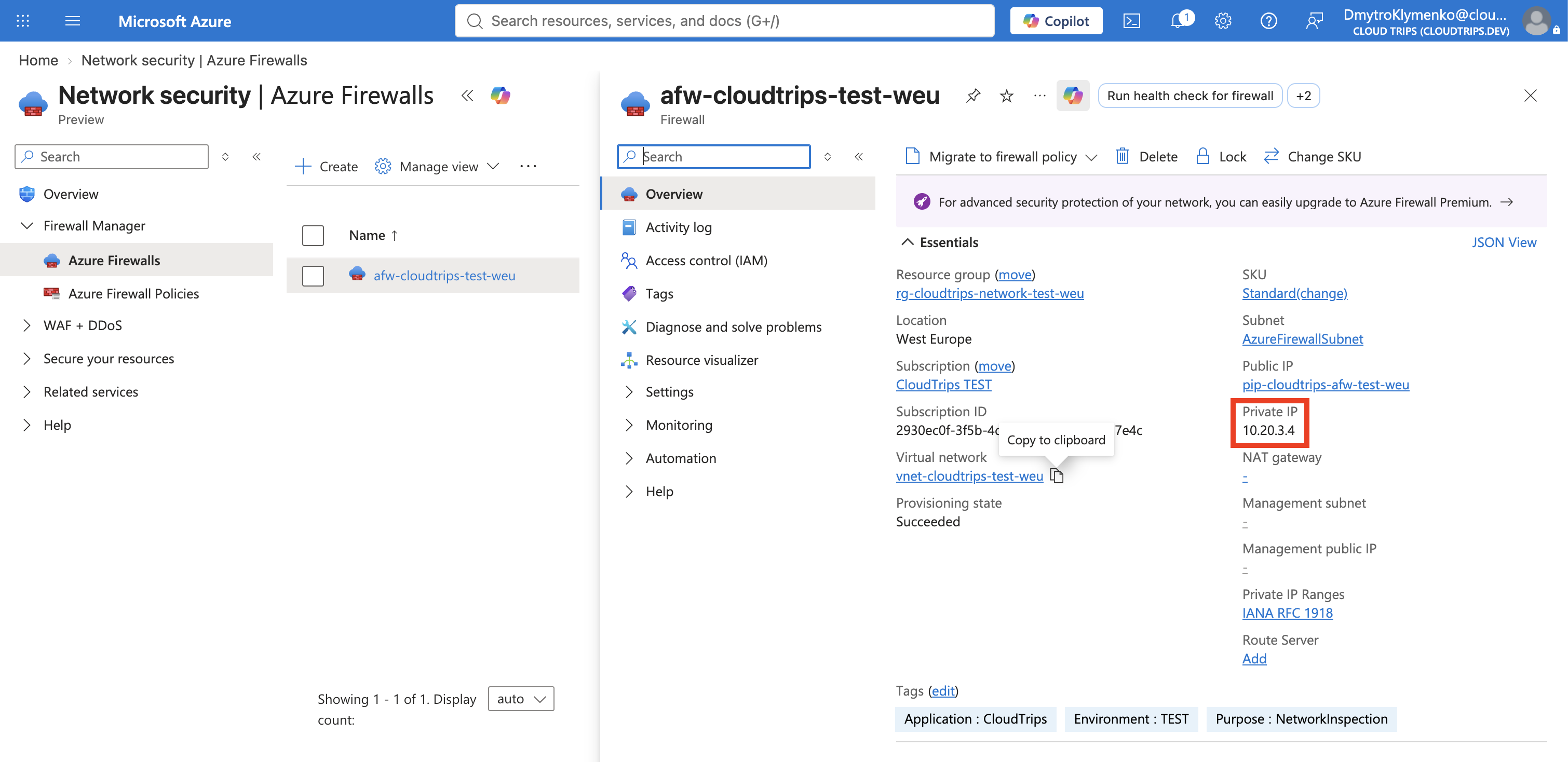
Creating the firewall does not automatically redirect workload traffic. The subnet route must explicitly select it as the next hop.
Route Application Egress Through the Firewall
Open rt-cloudtrips-app-test-weu, the route table already associated with
snet-app. Select Settings > Routes > Add and configure:
Route name: Default-To-Azure-Firewall
Destination type: IP Addresses
Destination IP addresses/CIDR ranges: 0.0.0.0/0
Next hop type: Virtual appliance
Next hop address: The private IP of afw-cloudtrips-test-weu
Select Add.
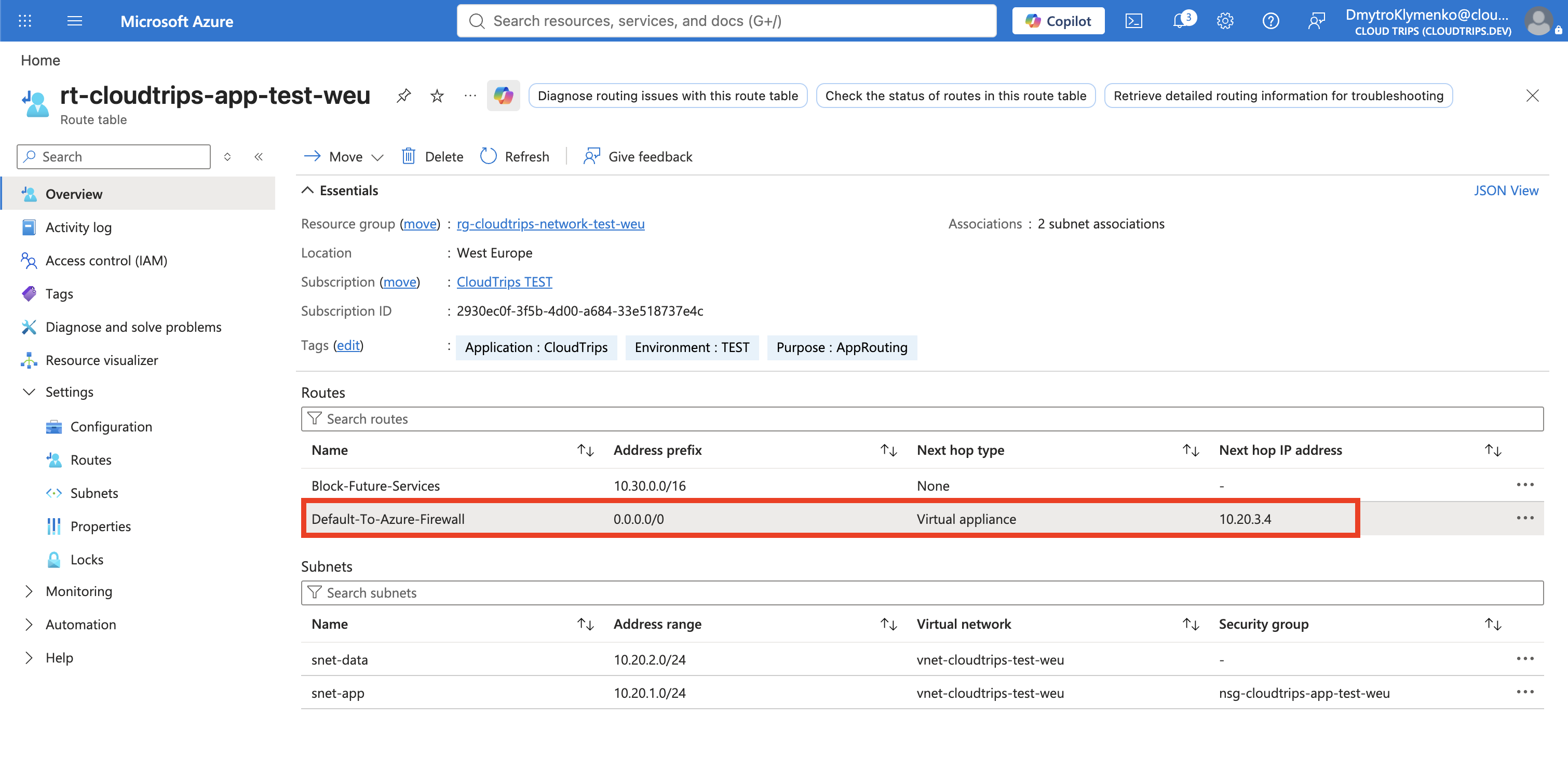
0.0.0.0/0 matches IPv4 destinations when no more-specific route exists.
In a route table, Virtual appliance means “send the traffic to this private
IP for processing or forwarding.” The next hop could be a firewall VM, router
VM, third-party network virtual appliance, or Azure Firewall. Azure Firewall
belongs to this route category, but it is a Microsoft-managed service: you
manage its policies and rules rather than its underlying VMs.
The existing Block-Future-Services route remains more specific than the
default route and continues to discard 10.30.0.0/16.
Verify the Default Deny
Recreate the VM If You Deleted It
Start vm-cloudtrips-bastion-test-weu if it is only deallocated. If you
deleted it after the Bastion trip, create a replacement in the Azure portal
with:
Resource group: rg-cloudtrips-network-test-weu
Name: vm-cloudtrips-bastion-test-weu
Region: West Europe
Availability option: Availability zone
Zone: 3
Security type: Standard
Image: Ubuntu Server 24.04 LTS - x64 Gen2
Size: Standard_D2s_v3
Authentication type: Password
Username: azureuser
Password: Create a temporary strong password
Public inbound ports: None
On Disks, use a Standard SSD and enable deletion of the OS disk with the VM. On Networking, configure:
Virtual network: vnet-cloudtrips-test-weu
Subnet: snet-app
Public IP: None
NIC network security group: None
Delete NIC when VM is deleted: Enabled
Add the tags Application: CloudTrips, Environment: TEST, and Purpose: FirewallTest. Select Review + create, select Create, and wait until the
VM is running. The preceding Bastion trip explains why this private VM can be
administered without a public IP.
Test Through Bastion
Connect through Connect > Bastion and run:
curl --connect-timeout 10 -I http://www.microsoft.comThe expected result is a firewall-generated block response such as:
HTTP/1.1 470 status code 470Status 470 is not a successful response from www.microsoft.com. Azure
Firewall returns it for this denied HTTP request because no allow rule matches.
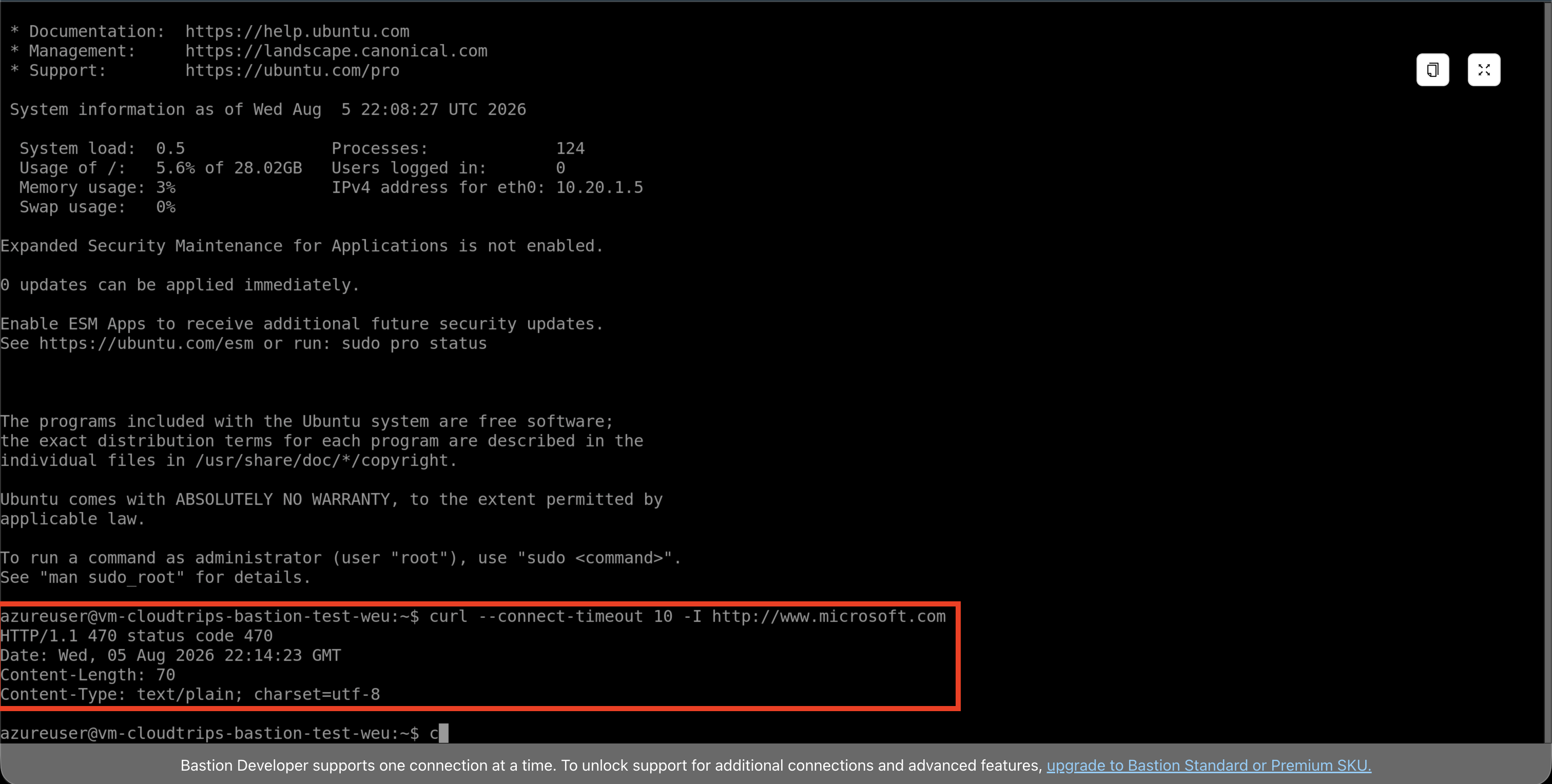
The response is expected evidence, not a broken deployment. The UDR sends the connection to Azure Firewall, and the firewall’s default-deny behavior blocks it because no rule permits the destination.
Continue or Clean Up
If you are continuing immediately with Firewall Rules Need Central
Management? Create a Firewall Policy,
deallocate the VM and keep the firewall, its public IP,
AzureFirewallSubnet, and Default-To-Azure-Firewall route.
Otherwise, first delete Default-To-Azure-Firewall from
rt-cloudtrips-app-test-weu so snet-app does not retain a route to a missing
next hop. Then delete in this order:
afw-cloudtrips-test-weu
pip-cloudtrips-afw-test-weu
AzureFirewallSubnet
vm-cloudtrips-bastion-test-weu and its disk/NIC
Keep the VNet, application subnet, NSG, and route table for later Networking trips.