Global Traffic Needs Regional Balancing? Configure a Cross-Region Load Balancer
The CloudTrips web tier now survives the failure of one VM, but both backend VMs and their regional Load Balancer are still in West Europe. A regional outage could make the complete public endpoint unavailable.
Add a small deployment in North Europe and place both regional public Load Balancers behind an Azure Global Load Balancer, also called a cross-region Load Balancer.
Global public IP
       |
Global Load Balancer
       |-----------------------------|
West Europe regional LB     North Europe regional LB
       |                              |
WEB01 and WEB02                    WEB01
The Global Load Balancer’s backend pool contains the frontend IP configurations of the regional Load Balancers, not their VMs. Each regional Load Balancer then selects a healthy VM in its own backend pool.
This trip builds on A Public App Needs DDoS Protection? Enable DDoS Protection. Keep its West Europe Load Balancer, protected public IP, rule, probe, and two web VMs. Start both VMs before continuing.
The earlier global-peering trip created
vnet-cloudtrips-dr-test-neu and snet-dr in North Europe. Reuse them here.
VNet peering is not required for Global Load Balancer traffic: the global tier
connects the public frontends of the two regional Load Balancers.
This lab adds another regional Load Balancer, public IP, NSG, VM, disk, and a Global Load Balancer. Complete the test promptly and use the cleanup section.
Prepare the North Europe Subnet
Create nsg-cloudtrips-web-test-neu in
rg-cloudtrips-network-test-weu, with Region set to North Europe.
Add this inbound rule:
Source: Service Tag
Source service tag: Internet
Destination: IP Addresses
Destination IP addresses/CIDR ranges: 10.50.1.0/24
Service: HTTP
Action: Allow
Priority: 100
Name: Allow-HTTP-LoadBalancer
Associate the NSG with
vnet-cloudtrips-dr-test-neu/snet-dr. Its default
AllowAzureLoadBalancerInBound rule permits Azure health probes.
Create the North Europe Regional Load Balancer
Search for Load balancers, and select Create > Standard Load Balancer. Configure:
Subscription: CloudTrips TEST
Resource group: rg-cloudtrips-network-test-weu
Name: lb-cloudtrips-web-test-neu
Region: North Europe
SKU: Standard
Type: Public
Tier: Regional
Add the frontend:
Name: fe-cloudtrips-web-test-neu
IP version: IPv4
Public IP: Create new
Public IP name: pip-cloudtrips-lb-test-neu
SKU: Standard
Availability zone: Zone-redundant
Routing preference: Microsoft network
Add an empty NIC-based backend pool:
Name: be-cloudtrips-web-test-neu
Virtual network: vnet-cloudtrips-dr-test-neu
Backend pool configuration: NIC
Add a load-balancing rule:
Name: rule-http-80
Frontend: fe-cloudtrips-web-test-neu
Backend pool: be-cloudtrips-web-test-neu
Protocol: TCP
Frontend port: 80
Backend port: 80
Health probe: Create new
Probe name: probe-tcp-80
Probe protocol: TCP
Probe port: 80
Session persistence: None
TCP reset: Enabled
Floating IP: Disabled
Select Review + create, and then select Create.
Add One North Europe Backend
Create a cost-conscious test VM:
Name: vm-cloudtrips-web01-test-neu
Resource group: rg-cloudtrips-network-test-weu
Region: North Europe
Availability options: No infrastructure redundancy required
Security type: Standard
Image: Ubuntu Server 24.04 LTS - x64 Gen2
Size: Standard_D2s_v3
Public inbound ports: None
Virtual network: vnet-cloudtrips-dr-test-neu
Subnet: snet-dr
Public IP: None
NIC network security group: None
Load balancing option: Azure load balancer
Load balancer: lb-cloudtrips-web-test-neu
Backend pool: be-cloudtrips-web-test-neu
Enable deletion of the NIC and OS disk with the VM. This lab uses one North Europe VM to limit cost; production would deploy at least two instances across failure domains.
After deployment, open Operations > Run command > RunShellScript and run:
sudo mkdir -p /opt/cloudtrips-web
printf '%s\n' 'CloudTrips response from NORTH EUROPE' | sudo tee /opt/cloudtrips-web/index.html >/dev/null
printf '%s\n' \
  '[Unit]' \
  'Description=CloudTrips test web server' \
  'After=network.target' \
  '' \
  '[Service]' \
  'ExecStart=/usr/bin/python3 -m http.server 80 --bind 0.0.0.0 --directory /opt/cloudtrips-web' \
  'Restart=always' \
  '' \
  '[Install]' \
  'WantedBy=multi-user.target' \
  | sudo tee /etc/systemd/system/cloudtrips-web.service >/dev/null
sudo systemctl daemon-reload
sudo systemctl enable --now cloudtrips-web
curl --silent http://127.0.0.1
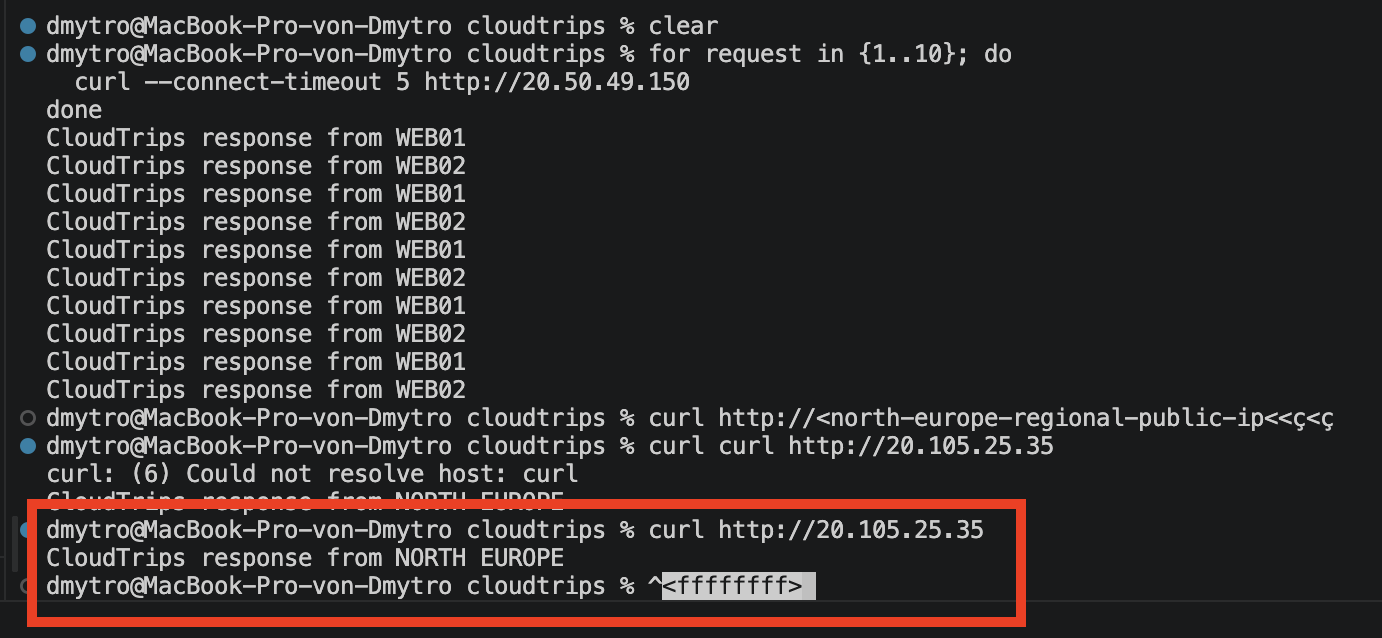
Open lb-cloudtrips-web-test-neu and confirm that its backend pool contains
the VM NIC. Test its regional public IP from your Mac:
curl http://<north-europe-regional-public-ip>It should return CloudTrips response from NORTH EUROPE.
Create the Global Load Balancer
Create another Standard Load Balancer:
Subscription: CloudTrips TEST
Resource group: rg-cloudtrips-network-test-weu
Name: lb-cloudtrips-web-global
Region: West Europe
SKU: Standard
Type: Public
Tier: Global
West Europe is the Global Load Balancer’s home region. It stores the Azure resource but does not force users through West Europe. The global frontend is a static anycast IP advertised from many Azure locations, allowing traffic to enter Microsoft’s network near the client.
Add the global frontend:
Name: fe-cloudtrips-web-global
IP version: IPv4
Public IP: Create new
Public IP name: pip-cloudtrips-lb-global
Public IP tier: Global
Add a backend pool named be-cloudtrips-regions-global. Under Load
balancers, add these two regional frontends:
lb-cloudtrips-web-test-weu / fe-cloudtrips-web-test-weu
lb-cloudtrips-web-test-neu / fe-cloudtrips-web-test-neu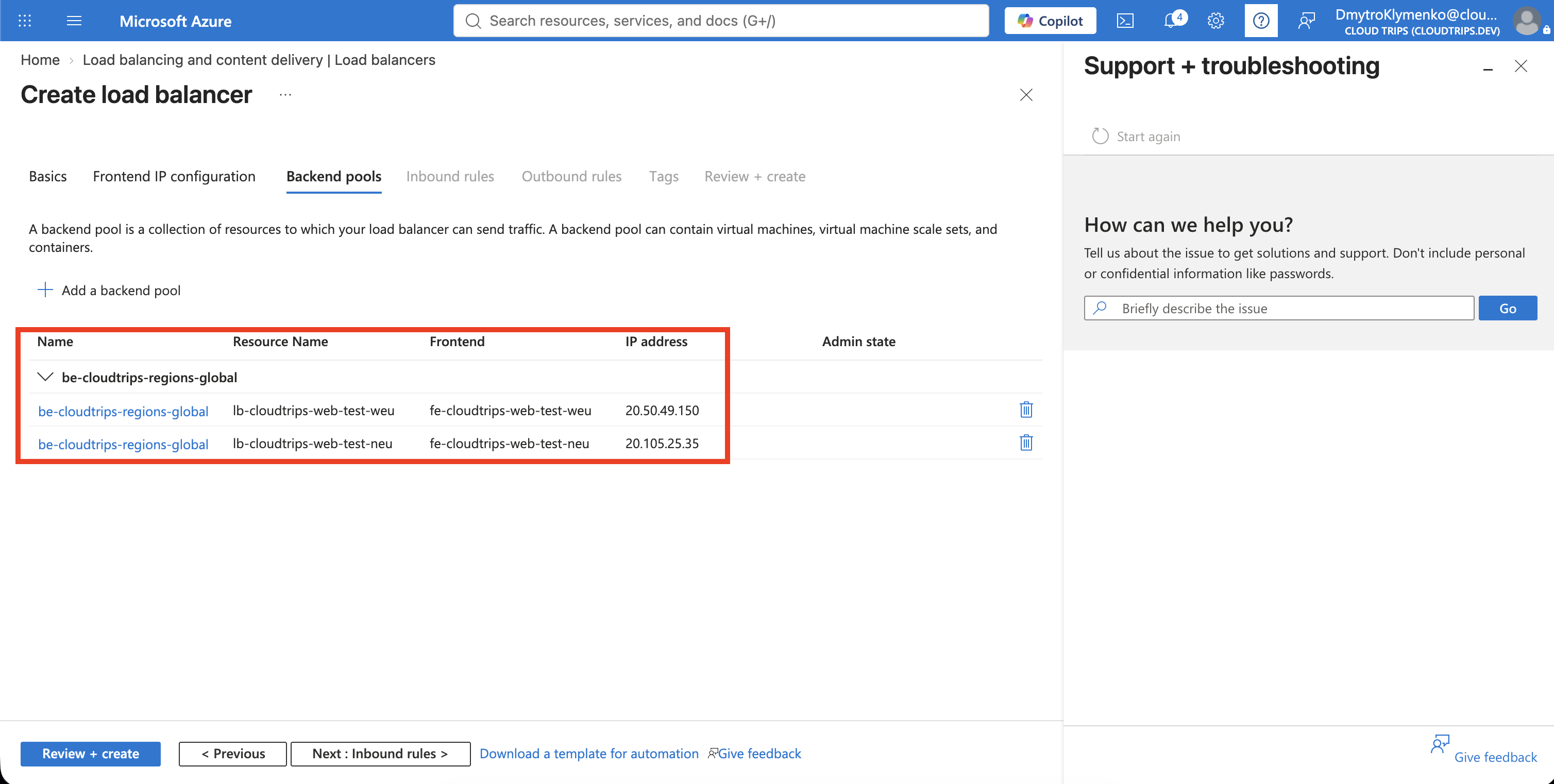
Add the global rule:
Name: rule-http-80-global
Frontend IP: fe-cloudtrips-web-global
Backend pool: be-cloudtrips-regions-global
Protocol: TCP
Frontend port: 80
Backend port: 80
Session persistence: None
Idle timeout: 15 minutes
TCP reset: Enabled
Floating IP: Disabled
The global backend port must match the frontend port used by both regional rules. No separate probe is selected here. The Global Load Balancer checks the availability reported by the regional Load Balancers automatically.
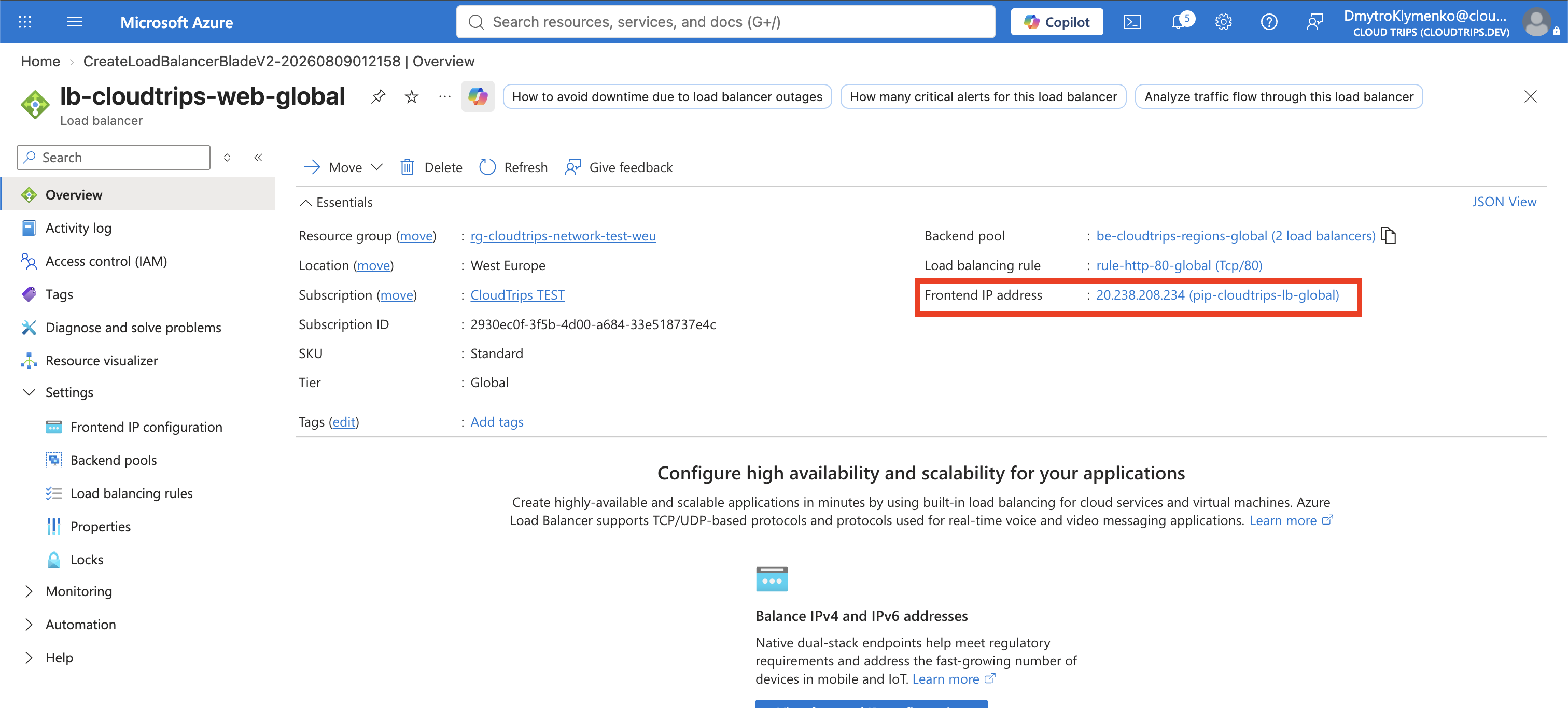
Select Review + create, and then select Create. Record the global public IP address.
Test Regional Routing and Failover
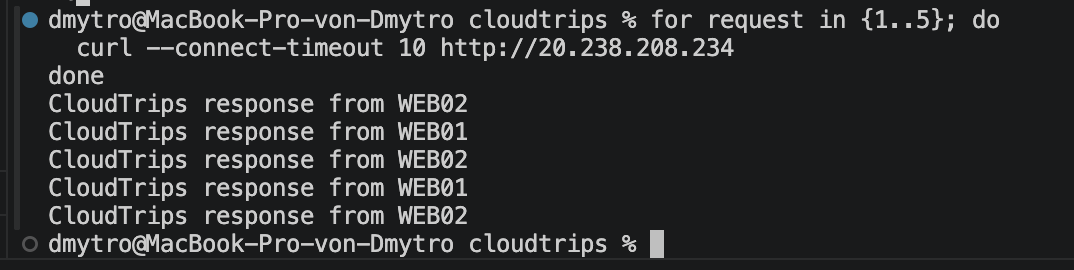
From your Mac, run several requests against the global IP:
for request in {1..5}; do
  curl --connect-timeout 10 http://<global-load-balancer-public-ip>
done
The Global Load Balancer uses geographic proximity, not strict alternation. From Austria, the normal result will probably come from West Europe. The exact region selected is not guaranteed.
Now deallocate both West Europe backends:
az vm deallocate --resource-group rg-cloudtrips-network-test-weu --name vm-cloudtrips-web01-test-weu
az vm deallocate --resource-group rg-cloudtrips-network-test-weu --name vm-cloudtrips-web02-test-weu
The regional probes eventually report zero healthy West Europe backends. The Global Load Balancer checks regional availability every five seconds and removes the unhealthy regional frontend from rotation. Retry the global IP for up to a minute:
for request in {1..12}; do
  curl --connect-timeout 10 http://<global-load-balancer-public-ip>
  sleep 5
done
The response should switch to:
CloudTrips response from NORTH EUROPE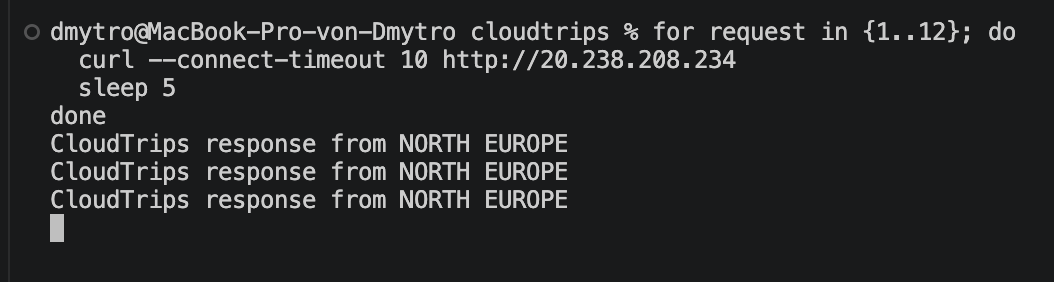
This proves regional failover at Layer 4. It does not replicate application data between regions; the application must handle that separately.
Clean Up the Cross-Region Extension
The West Europe public IP is still using the paid IP Protection setting from the preceding DDoS trip. The cross-region test is now complete, so disable that setting before retaining the original Load Balancer for later labs:
az network public-ip update \
  --resource-group rg-cloudtrips-network-test-weu \
  --name pip-cloudtrips-lb-test-weu \
  --protection-mode Disabled \
  --ddos-protection-plan null \
  --output none

az network public-ip show \
  --resource-group rg-cloudtrips-network-test-weu \
  --name pip-cloudtrips-lb-test-weu \
  --query '{Name:name,ProtectionMode:ddosSettings.protectionMode,ProtectionPlan:ddosSettings.ddosProtectionPlan.id}' \
  --output table
Do not continue until ProtectionMode shows Disabled and ProtectionPlan is
empty. This stops per-IP protection billing without deleting or detaching the
West Europe public IP.
The following Application Gateway trips need only the West Europe web VMs. Start them again:
az vm start --resource-group rg-cloudtrips-network-test-weu --name vm-cloudtrips-web01-test-weu
az vm start --resource-group rg-cloudtrips-network-test-weu --name vm-cloudtrips-web02-test-weu
Keep the original West Europe regional Load Balancer.
Delete the temporary cross-region resources:
lb-cloudtrips-web-global
pip-cloudtrips-lb-global
lb-cloudtrips-web-test-neu
pip-cloudtrips-lb-test-neu
vm-cloudtrips-web01-test-neu with its NIC and disk
nsg-cloudtrips-web-test-neu
Keep vnet-cloudtrips-dr-test-neu for later Network Manager and regional
networking exercises.