Hard-Coded Templates Cannot Be Reused? Use Parameters, Variables, and Outputs
The first CloudTrips template deployed a DEV storage account, but several decisions were still fixed in the code. Copying the complete template for TEST would create two files that can drift apart.
Refactor the template so the caller supplies environment-specific decisions, Bicep calculates consistent values, and the deployment returns the information needed by later commands.
In this trip, reuse one main.bicep file to deploy a CloudTrips TEST storage
account.
This trip builds on: Deploy a Storage Account with Bicep. Complete it first because this lab refactors the
main.bicepfile and DEV deployment created there.
Refactor the Template
Replace the current main.bicep content with:
targetScope = 'resourceGroup'

@description('CloudTrips deployment environment.')
@allowed([
  'dev'
  'test'
  'prod'
])
param environment string

@description('Azure region for the storage account.')
param location string = resourceGroup().location

@description('Storage redundancy option.')
@allowed([
  'Standard_LRS'
  'Standard_GRS'
  'Standard_ZRS'
])
param storageSku string = 'Standard_LRS'

@description('Team or person responsible for the resource.')
param owner string

@description('Application name used in resource tags.')
param applicationName string = 'CloudTrips'

var normalizedEnvironment = toLower(environment)
var storageAccountName = 'stct${normalizedEnvironment}${uniqueString(resourceGroup().id)}'
var commonTags = {
  Application: applicationName
  Environment: toUpper(normalizedEnvironment)
  ManagedBy: 'Bicep'
  Owner: owner
}

resource storageAccount 'Microsoft.Storage/storageAccounts@2025-06-01' = {
  name: storageAccountName
  location: location
  tags: commonTags
  sku: {
    name: storageSku
  }
  kind: 'StorageV2'
  properties: {
    allowBlobPublicAccess: false
    minimumTlsVersion: 'TLS1_2'
    supportsHttpsTrafficOnly: true
  }
}

output storageAccountName string = storageAccount.name
output storageAccountId string = storageAccount.id
output blobEndpoint string = storageAccount.properties.primaryEndpoints.blob
What does SKU actually mean?
SKU stands for Stock Keeping Unit. In Azure, it identifies a service tier or configuration that affects features, resilience, and cost. For storage,
Standardis the performance tier and the suffix specifies how Azure replicates the data:
LRS— Locally Redundant Storage; copies remain within one datacenter, making it suitable for this TEST exercise and other replaceable non-production dataZRS— Zone-Redundant Storage; copies are distributed across availability zones in one region so the service can withstand a zone failureGRS— Geo-Redundant Storage; copies are also sent to a secondary Azure region for regional disaster recovery, using asynchronous replication and requiring failoverZRS and GRS are not a simple better-or-worse sequence: ZRS protects regional availability across zones, while GRS provides a second-region copy.
The three constructs have different jobs:
paramreceives a deployment decision, such astestorStandard_LRSvarderives consistent names and tags inside the templateoutputreturns deployed values for people, scripts, or pipelines to use
The @allowed lists reject unsupported environment and SKU values during
validation.
Check the Bicep File
Run the Bicep linter:
az bicep lint \
  --file main.bicep
No output means the linter found no diagnostics.
Prepare CloudTrips TEST
Select the CloudTrips TEST subscription:
az account set \
  --subscription "<CloudTrips TEST subscription name or ID>"
Create the TEST resource group:
az group create \
  --name rg-cloudtrips-bicep-test-weu \
  --location westeurope \
  --tags Application=CloudTrips Environment=TEST ManagedBy=Bicep
The template itself is unchanged. TEST-specific choices are supplied as parameter values.
Preview the TEST Deployment
Run:
az deployment group what-if \
  --resource-group rg-cloudtrips-bicep-test-weu \
  --template-file main.bicep \
  --parameters \
    environment=test \
    storageSku=Standard_LRS \
    owner=DmytroKlymenko@cloudtrips.onmicrosoft.com
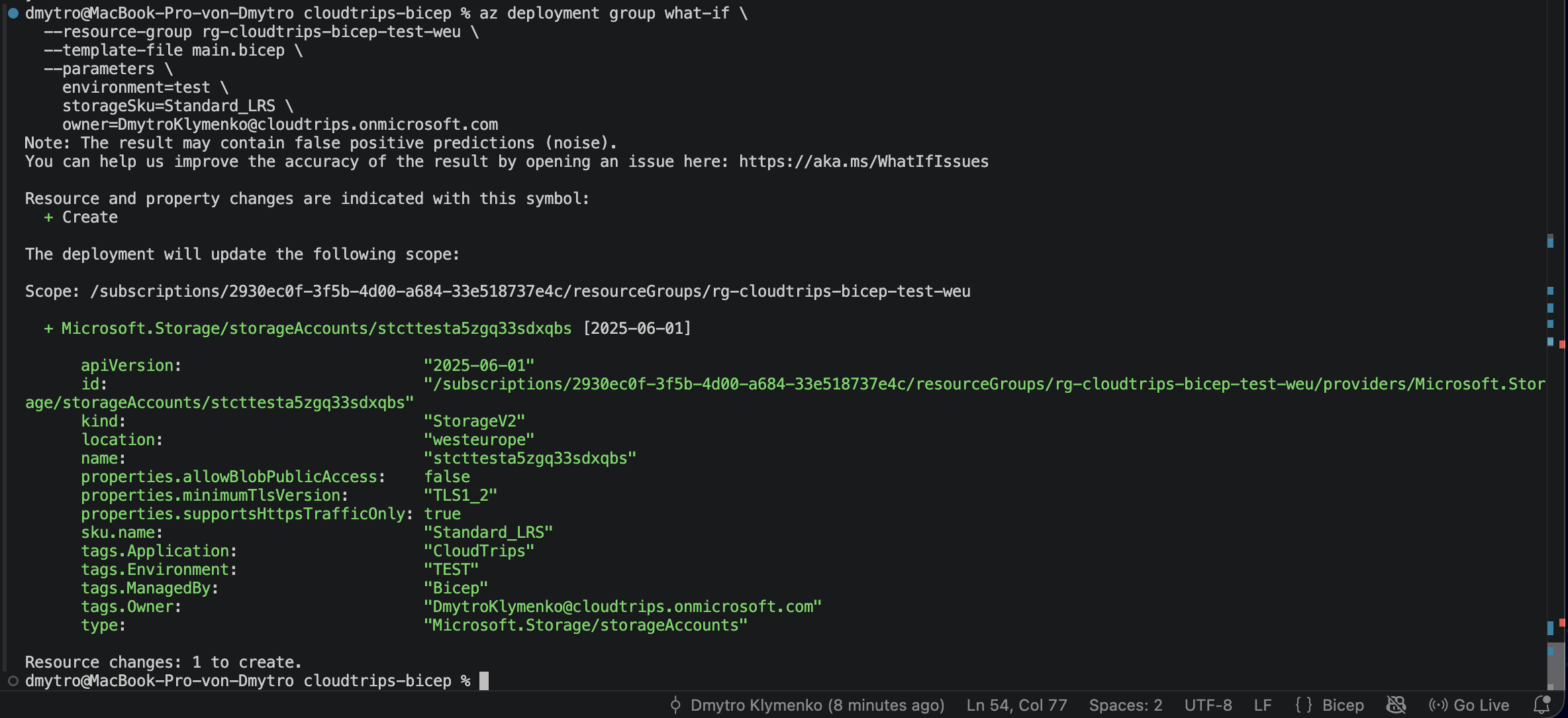
Confirm that the preview contains one storage account with the Create
change type. Its tags must include Environment: TEST and the supplied owner.
Deploy with TEST Values
Deploy the same template:
az deployment group create \
  --name deploy-cloudtrips-storage-test \
  --resource-group rg-cloudtrips-bicep-test-weu \
  --template-file main.bicep \
  --parameters \
    environment=test \
    storageSku=Standard_LRS \
    owner=DmytroKlymenko@cloudtrips.onmicrosoft.com \
  --query "properties.{state:provisioningState,outputs:outputs}" \
  --output yaml
The --query expression only shortens the command output. It shows the
deployment state and the values declared with output; it does not change the
deployment.
Confirm:
state: Succeeded
outputs.storageAccountName.value: stcttest...
outputs.storageAccountId.value: /subscriptions/.../storageAccounts/stcttest...
outputs.blobEndpoint.value: https://stcttest....blob.core.windows.net/
Verify the Reused Template
Copy the returned storage-account name and inspect the resource:
storage_account_name="<storageAccountName output>"

az storage account show \
  --resource-group rg-cloudtrips-bicep-test-weu \
  --name "$storage_account_name" \
  --query "{name:name,sku:sku.name,environment:tags.Environment,owner:tags.Owner,managedBy:tags.ManagedBy}" \
  --output table
Verify that the result contains:
SKU: Standard_LRS
Environment: TEST
Owner: <your email>
ManagedBy: Bicep
The team now has one template for multiple environments. Parameters expose the decisions that may change, variables apply the naming and tagging rules, and outputs make the deployment result available without duplicating the template.