Manual Deployments Are Inconsistent? Deploy a Storage Account with Bicep
Creating a storage account in the Azure portal works once. Repeating the same portal selections for DEV, TEST, and PROD can produce different security settings, tags, SKUs, or regions.
CloudTrips needs one reviewed definition that Azure can apply consistently. In this trip, use Bicep to:
- define a secure DEV storage account
- preview the Azure change before making it
- deploy the resource
- verify the result
- run the preview again to prove that the definition is repeatable
Prepare the Azure Scope
Open Azure Cloud Shell or a terminal with Azure CLI. Sign in and select the CloudTrips DEV subscription:
az login

az account set \
  --subscription "<CloudTrips DEV subscription name or ID>"
Confirm the selected subscription:
az account show \
  --query "{name:name,id:id}" \
  --output table
Create a resource group for the exercise:
az group create \
  --name rg-cloudtrips-bicep-dev-weu \
  --location westeurope \
  --tags Application=CloudTrips Environment=DEV ManagedBy=Bicep
The resource group is the deployment scope. Bicep will create the storage account inside it.
Define the Desired Resource
Create main.bicep with this content:
targetScope = 'resourceGroup'

@description('CloudTrips deployment environment.')
param environment string = 'dev'

@description('Azure region for the storage account.')
param location string = resourceGroup().location

var storageAccountName = 'stct${environment}${uniqueString(resourceGroup().id)}'

resource storageAccount 'Microsoft.Storage/storageAccounts@2025-06-01' = {
  name: storageAccountName
  location: location
  tags: {
    Application: 'CloudTrips'
    Environment: toUpper(environment)
    ManagedBy: 'Bicep'
  }
  sku: {
    name: 'Standard_LRS'
  }
  kind: 'StorageV2'
  properties: {
    allowBlobPublicAccess: false
    minimumTlsVersion: 'TLS1_2'
    supportsHttpsTrafficOnly: true
  }
}

output storageAccountName string = storageAccount.name
output storageAccountId string = storageAccount.id
This is the desired Azure state. The resource block says what must exist.
uniqueString() produces the same suffix for the same resource group, so
repeated deployments target the same globally unique storage-account name.
Preview the Deployment
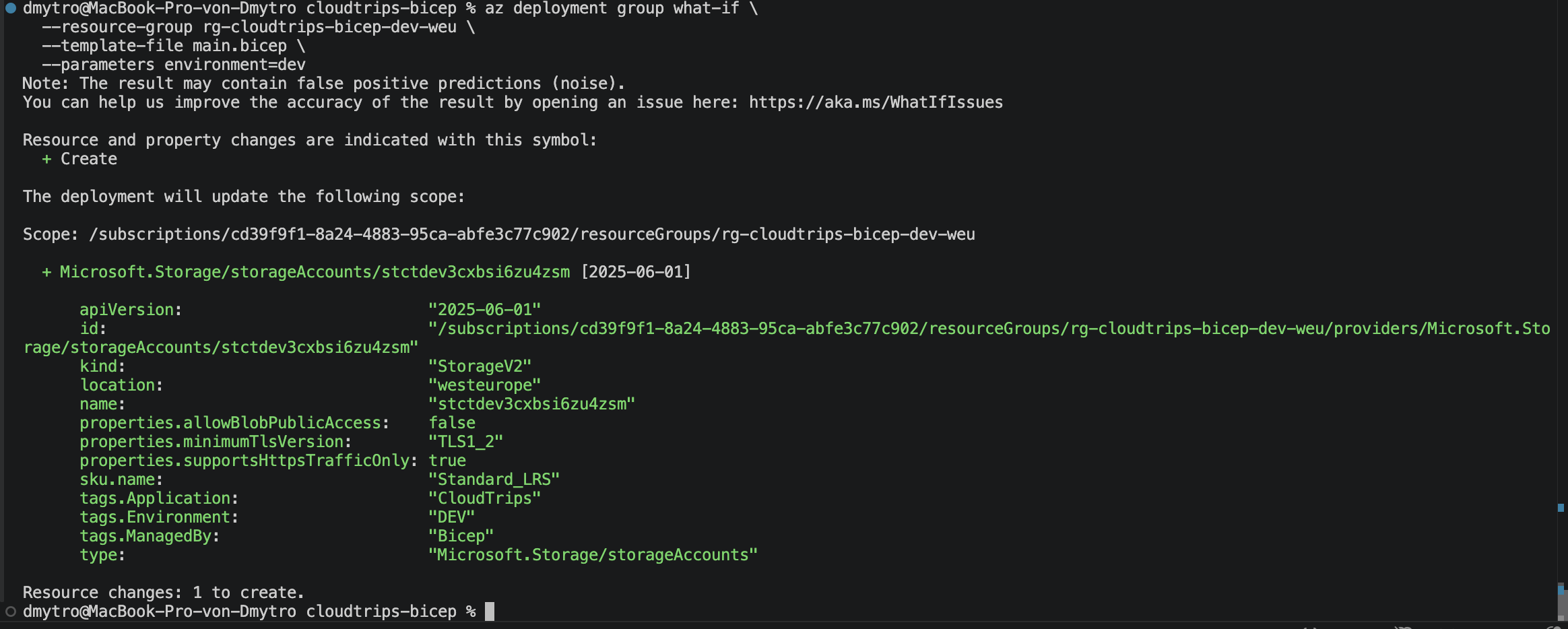
Run a what-if operation:
az deployment group what-if \
  --resource-group rg-cloudtrips-bicep-dev-weu \
  --template-file main.bicep \
  --parameters environment=dev
Do not continue until the output shows one storage account with the Create change type. What-if asks Azure Resource Manager to evaluate the Bicep file without creating the resource.
Deploy the Storage Account
Deploy the same file:
az deployment group create \
  --name deploy-cloudtrips-storage-dev \
  --resource-group rg-cloudtrips-bicep-dev-weu \
  --template-file main.bicep \
  --parameters environment=dev \
  --query "properties.{state:provisioningState,outputs:outputs}" \
  --output yaml
Confirm that the provisioning state is Succeeded. Copy the
storageAccountName output; Bicep calculated that name and returned it from
the deployment.
Verify the Result
Set the output value and inspect the deployed configuration:
storage_account_name="<storageAccountName output>"

az storage account show \
  --resource-group rg-cloudtrips-bicep-dev-weu \
  --name "$storage_account_name" \
  --query "{name:name,location:primaryLocation,httpsOnly:enableHttpsTrafficOnly,minimumTlsVersion:minimumTlsVersion,allowBlobPublicAccess:allowBlobPublicAccess,tags:tags}" \
  --output yaml
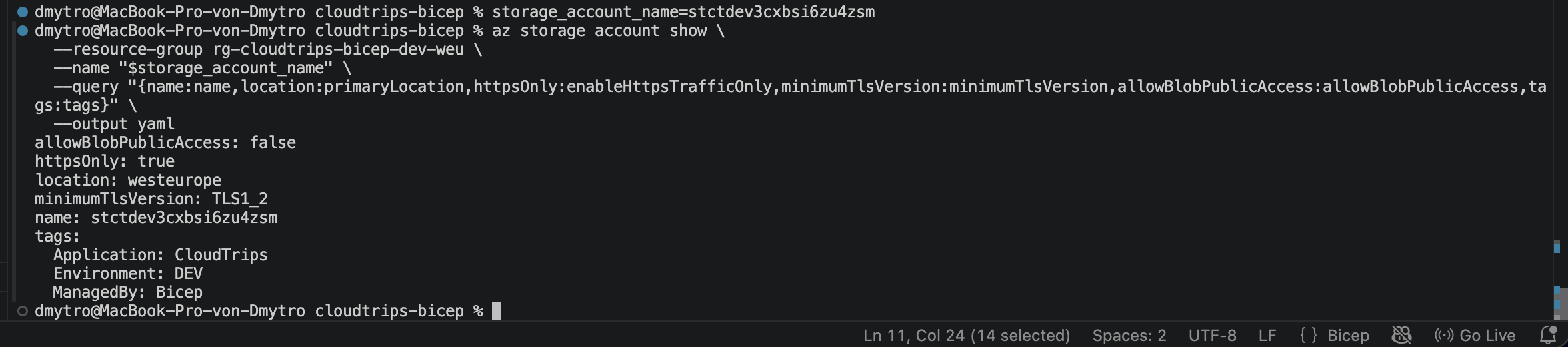
Verify:
httpsOnly: true
minimumTlsVersion: TLS1_2
allowBlobPublicAccess: false
tags.Application: CloudTrips
tags.Environment: DEV
tags.ManagedBy: Bicep
These settings were not selected manually. They came from the reviewed Bicep definition.
Prove the Deployment Is Repeatable
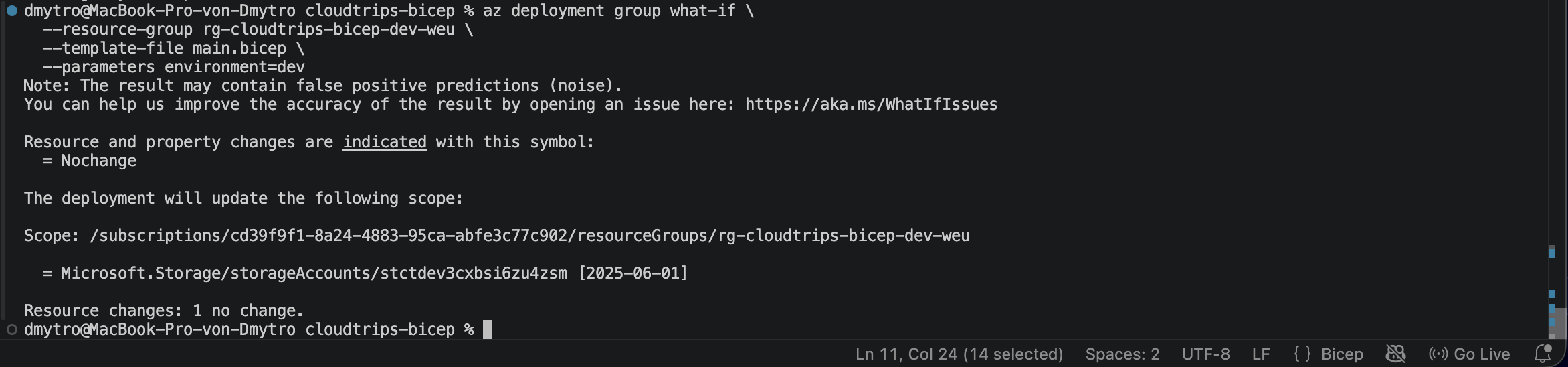
Run the same preview again:
az deployment group what-if \
  --resource-group rg-cloudtrips-bicep-dev-weu \
  --template-file main.bicep \
  --parameters environment=dev
Azure should report no intended resource changes. The template still resolves to the same storage-account name and the deployed properties already match the declaration.
This is the practical value of Bicep: the file records the required result, Azure Resource Manager applies it, and the same definition can be reviewed and repeated instead of rebuilding the resource from memory.