Some Resources Exist Above the Resource Group? Use Deployment Scopes
The CloudTrips storage template starts at resource-group scope, so the target
resource group must already exist. Creating it separately with az group create means Bicep still cannot provision the complete environment from
scratch.
A resource group belongs to a subscription. Create a subscription-scoped entry point for that higher-level resource, then use a module to deploy the existing workload into the resource group.
This trip builds on: Create Modules. Complete it first because the subscription-scoped entry point deploys the existing storage module into a new resource group.
Understand the Scope Boundary
targetScope tells Azure Resource Manager where a Bicep deployment starts and
which resource types the file can declare directly.
targetScope |
Typical responsibility | Azure CLI command |
|---|---|---|
resourceGroup |
Storage accounts, key vaults, and application resources | az deployment group |
subscription |
Resource groups and subscription-wide governance | az deployment sub |
managementGroup |
Governance shared by multiple subscriptions | az deployment mg |
tenant |
Tenant-wide resources such as management groups | az deployment tenant |
One Bicep file has one target scope. A module can target another scope through
its scope property.
Create the Subscription Entry Point
Create subscription.bicep beside main.bicep:
targetScope = 'subscription'

@allowed([
  'dev'
  'test'
  'prod'
])
param environment string

param location string = deployment().location
param resourceGroupName string
param storageSku string = 'Standard_LRS'
param owner string
param costCenter string
param containerNames array = [
  'uploads'
]
param deployAuditContainer bool = false
param applicationName string = 'CloudTrips'

var commonTags = {
  Application: applicationName
  CostCenter: costCenter
  Environment: toUpper(environment)
  ManagedBy: 'Bicep'
  Owner: owner
}

resource workloadResourceGroup 'Microsoft.Resources/resourceGroups@2025-04-01' = {
  name: resourceGroupName
  location: location
  tags: commonTags
}

module workload './main.bicep' = {
  name: '${deployment().name}-workload'
  scope: workloadResourceGroup
  params: {
    applicationName: applicationName
    containerNames: containerNames
    costCenter: costCenter
    deployAuditContainer: deployAuditContainer
    environment: environment
    location: location
    owner: owner
    storageSku: storageSku
  }
}

output resourceGroupId string = workloadResourceGroup.id
output storageAccountName string = workload.outputs.storageAccountName
output storageAccountId string = workload.outputs.storageAccountId
output blobEndpoint string = workload.outputs.blobEndpoint
output containerIds array = workload.outputs.containerIds
output auditContainerId string? = workload.outputs.?auditContainerId
The resource group is declared directly because it belongs to the
subscription scope. main.bicep remains resource-group scoped. Setting
scope: workloadResourceGroup tells Azure to run that module inside the
resource group and also creates an implicit dependency on it.
Add the TEST Scope Parameters
Create environments/test.subscription.bicepparam:
using '../subscription.bicep'

param environment = 'test'
param location = 'westeurope'
param resourceGroupName = 'rg-cloudtrips-bicep-test-weu'
param storageSku = 'Standard_LRS'
param owner = '<your email>'
param costCenter = 'CC-TEST-100'
param containerNames = [
  'uploads'
  'exports'
]
param deployAuditContainer = true
This points to the new subscription entry point while preserving the TEST workload values used in the earlier trips.
Validate and Preview Both Scopes
From cloudtrips-bicep, run:
az bicep lint \
  --file subscription.bicep

az bicep build-params \
  --file environments/test.subscription.bicepparam \
  --stdout > /dev/null

az account set \
  --subscription "<CloudTrips TEST subscription name or ID>"

az deployment sub what-if \
  --name deploy-cloudtrips-test-scope \
  --location westeurope \
  --parameters environments/test.subscription.bicepparam
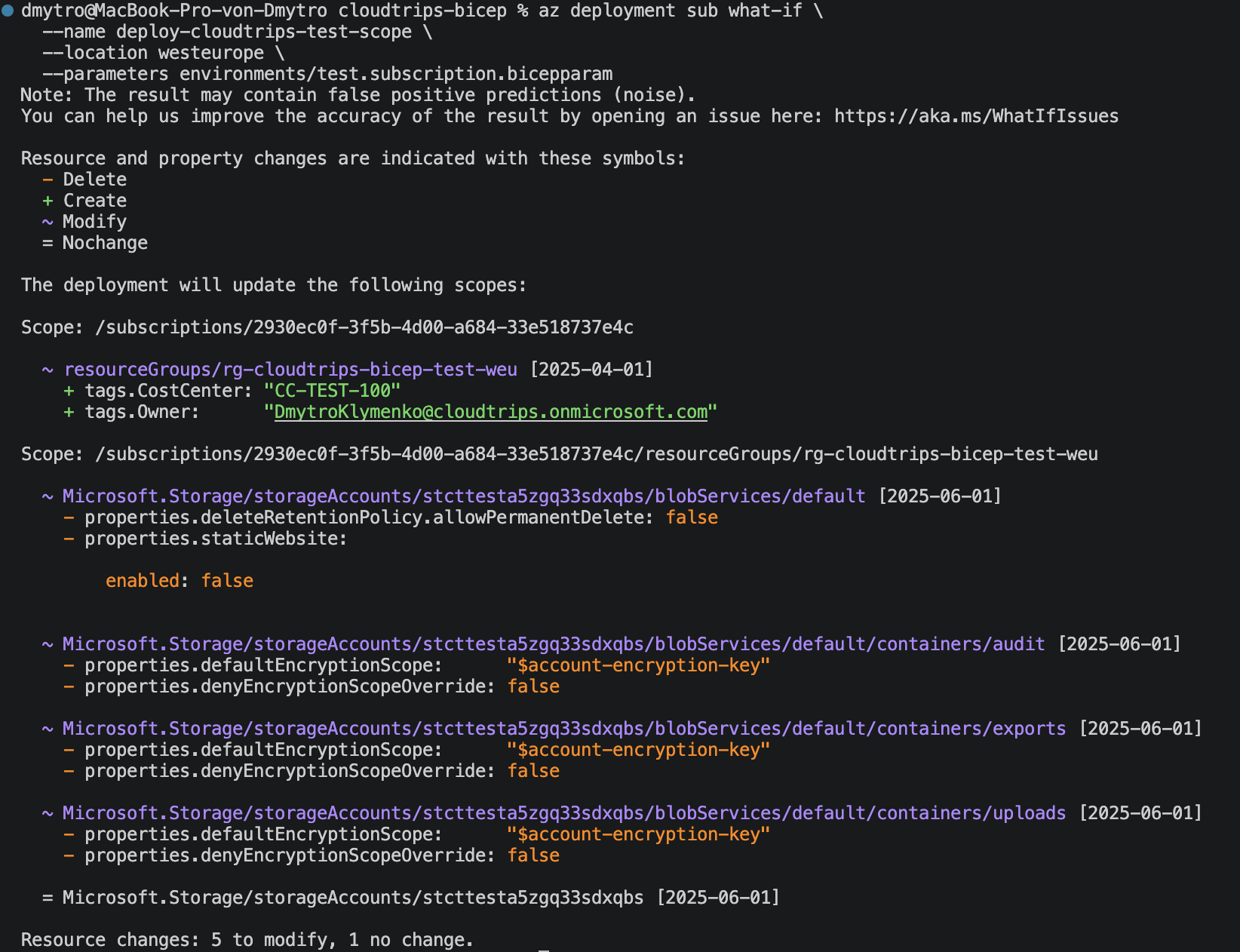
Because the TEST resource group already exists, the preview should update it only if its tags differ. It must not delete or recreate the resource group, storage account, Blob service, or containers. The storage provider defaults identified in the previous trip can still appear as what-if noise.
Deploy from the Subscription
Run the subscription deployment:
az deployment sub create \
  --name deploy-cloudtrips-test-scope \
  --location westeurope \
  --parameters environments/test.subscription.bicepparam \
  --query "properties.{state:provisioningState,outputs:outputs}" \
  --output yaml
--location is required because Azure stores subscription-deployment metadata
in a region. It does not change the scope. Reusing the same deployment name
later also requires the same metadata location.
Confirm that the state is Succeeded and that the outputs contain the resource
group and storage values.
Verify the Deployment Chain
One command now creates three deployment records:
deploy-cloudtrips-test-scopeat subscription scopedeploy-cloudtrips-test-scope-workloadin the resource groupdeploy-cloudtrips-test-scope-workload-storagefor the storage module
The suffixes come from the module name expressions. The records show the
scope transitions; they do not deploy three copies of the resources.
Check the parent:
az deployment sub show \
  --name deploy-cloudtrips-test-scope \
  --query "properties.provisioningState" \
  --output tsv
Then list the resource-group deployments:
az deployment group list \
  --resource-group rg-cloudtrips-bicep-test-weu \
  --query "[?starts_with(name, 'deploy-cloudtrips-test-scope')].{name:name,state:properties.provisioningState}" \
  --output table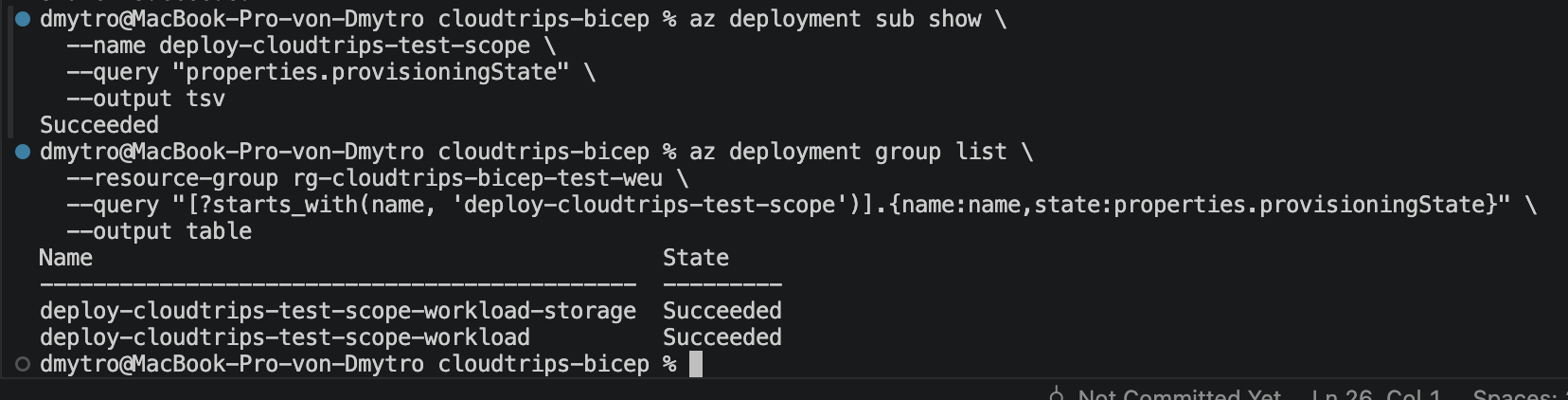
CloudTrips can now provision the resource-group boundary and its workload from one Bicep entry point. Higher-scope resources stay at subscription scope, while the existing application resources remain correctly isolated inside their resource group.