One Bicep File Has Become Too Large? Create Modules
main.bicep now contains inputs, naming logic, a storage account, Blob
settings, a resource loop, a conditional resource, and outputs. Adding
networking, monitoring, or another service to the same file would make reviews
and maintenance increasingly difficult.
Keep main.bicep as the deployment entry point and move the complete storage
implementation into a focused module. The refactor must not recreate or
reconfigure the existing TEST resources.
This trip builds on: Use Conditions and Loops. Complete it first because this lab moves that storage account, loop, condition, and outputs into a module.
Create the Storage Module
Create modules/storage.bicep:
param applicationName string
param containerNames array
param costCenter string
param deployAuditContainer bool
param environment string
param location string
param owner string
param storageSku string

var normalizedEnvironment = toLower(environment)
var storageAccountName = 'stct${normalizedEnvironment}${uniqueString(resourceGroup().id)}'
var commonTags = {
  Application: applicationName
  CostCenter: costCenter
  Environment: toUpper(normalizedEnvironment)
  ManagedBy: 'Bicep'
  Owner: owner
}

resource storageAccount 'Microsoft.Storage/storageAccounts@2025-06-01' = {
  name: storageAccountName
  location: location
  tags: commonTags
  sku: {
    name: storageSku
  }
  kind: 'StorageV2'
  properties: {
    allowBlobPublicAccess: false
    minimumTlsVersion: 'TLS1_2'
    supportsHttpsTrafficOnly: true
  }
}

resource blobService 'Microsoft.Storage/storageAccounts/blobServices@2025-06-01' = {
  parent: storageAccount
  name: 'default'
  properties: {
    containerDeleteRetentionPolicy: {
      enabled: true
      days: 7
    }
    deleteRetentionPolicy: {
      enabled: true
      days: 7
    }
  }
}

resource appContainers 'Microsoft.Storage/storageAccounts/blobServices/containers@2025-06-01' = [
  for containerName in containerNames: {
    parent: blobService
    name: containerName
    properties: {
      publicAccess: 'None'
    }
  }
]

resource auditContainer 'Microsoft.Storage/storageAccounts/blobServices/containers@2025-06-01' = if (deployAuditContainer) {
  parent: blobService
  name: 'audit'
  properties: {
    publicAccess: 'None'
  }
}

output storageAccountName string = storageAccount.name
output storageAccountId string = storageAccount.id
output blobEndpoint string = storageAccount.properties.primaryEndpoints.blob
output containerIds array = [
  for i in range(0, length(containerNames)): appContainers[i].id
]
output auditContainerId string? = deployAuditContainer ? auditContainer.id : null
The module has a clear contract:
- parameters are the values it needs from the calling file
- resources are the storage implementation it owns
- outputs are the values it returns to the calling file
Turn main.bicep into the Orchestrator
Keep the existing parameter declarations in main.bicep. Remove the storage
variables, resources, and direct resource outputs, then add:
module storage './modules/storage.bicep' = {
  name: '${deployment().name}-storage'
  params: {
    applicationName: applicationName
    containerNames: containerNames
    costCenter: costCenter
    deployAuditContainer: deployAuditContainer
    environment: environment
    location: location
    owner: owner
    storageSku: storageSku
  }
}

output storageAccountName string = storage.outputs.storageAccountName
output storageAccountId string = storage.outputs.storageAccountId
output blobEndpoint string = storage.outputs.blobEndpoint
output containerIds array = storage.outputs.containerIds
output auditContainerId string? = storage.outputs.?auditContainerId
main.bicep passes its parameter values through params. It reads returned
values through storage.outputs.
The module deployment name combines the parent deployment name with -storage.
This avoids one fixed nested-deployment name when different parent deployments
run at the same scope.
The DEV, TEST, and PROD .bicepparam files remain unchanged. They still link
to main.bicep, whose input contract has not changed.
Validate the Refactor
Lint both files:
az bicep lint \
  --file modules/storage.bicep

az bicep lint \
  --file main.bicep
Then compile the TEST parameter file with the refactored entry point:
az bicep build-params \
  --file environments/test.bicepparam \
  --stdout > /dev/null
Continue only when all commands complete without diagnostics.
Prove That the Resources Will Not Be Recreated
Select the CloudTrips TEST subscription and run what-if:
az account set \
  --subscription "<CloudTrips TEST subscription name or ID>"

az deployment group what-if \
  --resource-group rg-cloudtrips-bicep-test-weu \
  --parameters environments/test.bicepparam
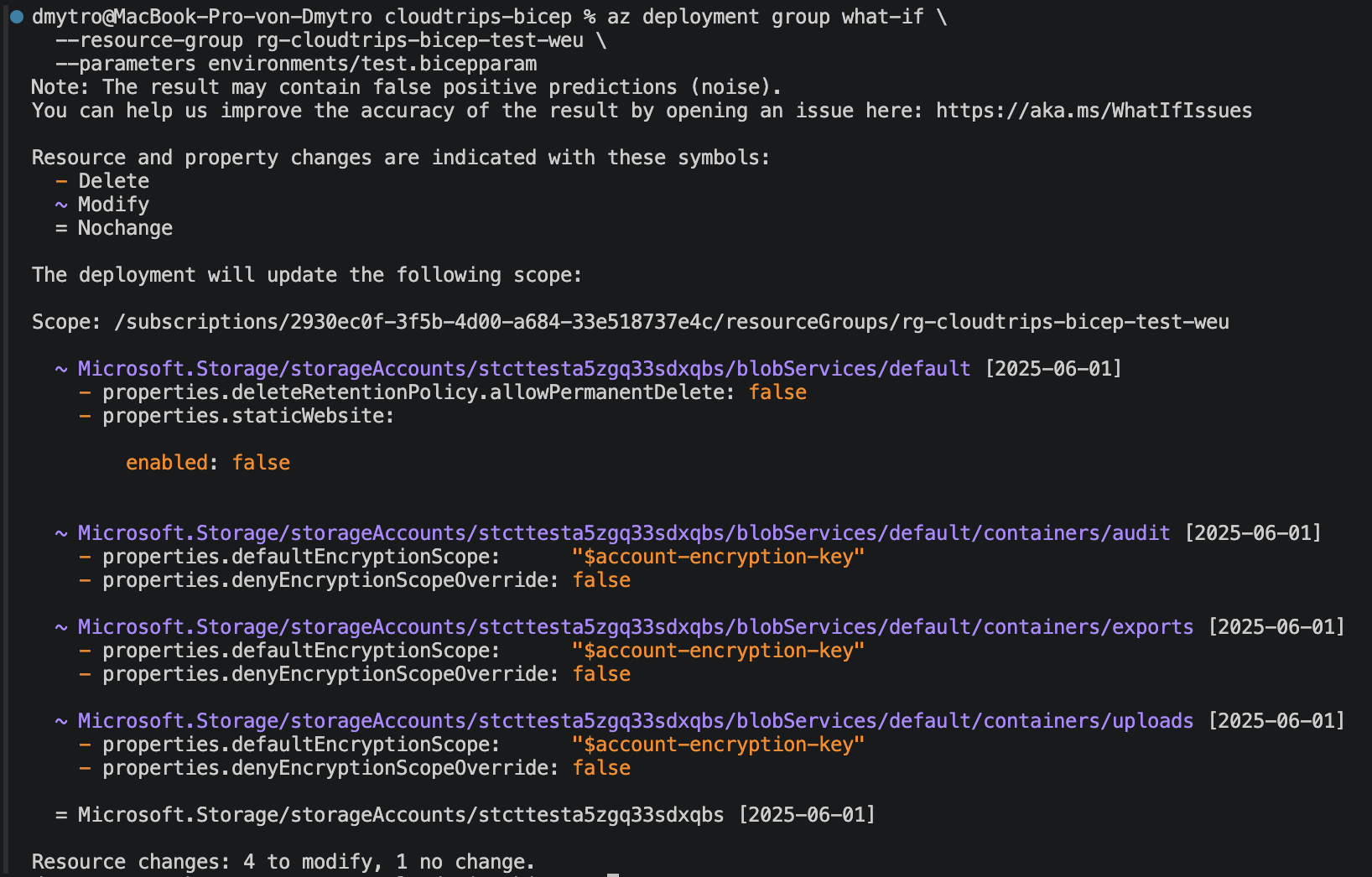
The preview can show a nested Microsoft.Resources/deployments resource for
the storage module. It can also report Modify for the Blob service and its
containers because Azure adds default properties that the Bicep file does not
declare. In this deployment, the expected lines are:
allowPermanentDelete: falseandstaticWebsite.enabled: falseon the Blob servicedefaultEncryptionScope: "$account-encryption-key"anddenyEncryptionScopeOverride: falseon each container
The minus sign means that a value exists in Azure’s current resource representation but is absent from the proposed template. Azure restores these provider defaults after deployment, so Microsoft classifies such entries as what-if noise.
Confirm that the storage account reports NoChange and that the preview
contains no Create, Delete, or replacement of the storage account, Blob
service, or containers. Their names and resource IDs must remain the same; only
the Bicep code organization changed.
Deploy the Module Refactor
Deploy the same TEST configuration:
az deployment group create \
  --name deploy-cloudtrips-storage-test-modules \
  --resource-group rg-cloudtrips-bicep-test-weu \
  --parameters environments/test.bicepparam \
  --query "properties.{state:provisioningState,outputs:outputs}" \
  --output yaml
This creates two deployment records: --name sets the parent name, and the
module expression appends -storage for the nested deployment. The storage
resources are deployed only once, through that module.
Confirm that the state is Succeeded and that the entry-point outputs still
contain the storage account and container values.
Verify the Nested Module Deployment
A local Bicep module is compiled into a nested ARM deployment. Verify the module deployment:
az deployment group show \
  --resource-group rg-cloudtrips-bicep-test-weu \
  --name deploy-cloudtrips-storage-test-modules-storage \
  --query "properties.{state:provisioningState,outputs:outputs}" \
  --output yaml
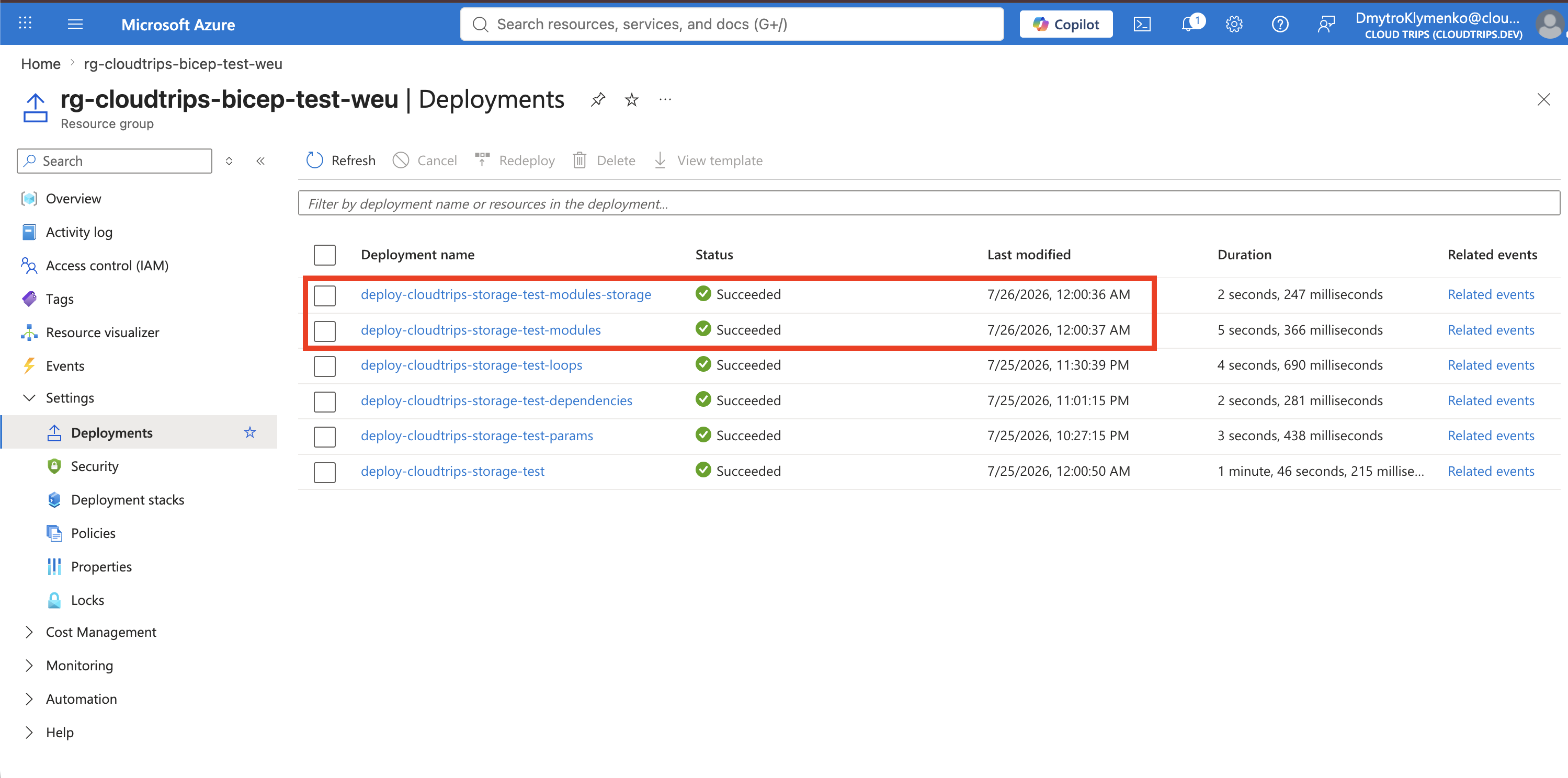
Confirm that the nested state is Succeeded. In the Azure portal, the
resource group’s Deployments page should show both the parent deployment
and its storage-module deployment.
CloudTrips now has a small entry point and a storage module with a defined
input/output contract. Future services can be added as their own modules
without returning all implementation details to main.bicep.