Fast Temporary OS Disk Needed? Configure an Ephemeral OS Disk
CloudTrips needs a quickly recreated, stateless worker. An Azure ephemeral OS disk stores operating-system writes on local storage attached to the VM host instead of persisting them in Azure Storage. This provides low latency, fast reimage, and no separate OS-disk storage charge.
Local OS state can disappear during reimage, redeploy, resizing, service healing, or host movement. Ephemeral OS VMs do not support stop/deallocate, snapshots, Azure Backup, Site Recovery, OS-disk swap, or image capture. Keep application state on an external service or a managed data disk.
Compare OS Disk Types
| Capability | Persistent managed OS disk | Ephemeral OS disk |
|---|---|---|
| Storage location | Azure Storage | Local storage on the VM host |
| Simple restart | Data remains | Data normally remains |
| Stop/deallocate and start later | Supported; OS state remains | Not supported |
| Reimage or redeploy | OS state can be retained depending on the operation | OS state is rebuilt and local changes are lost |
| Resize VM | OS data remains | Reprovisions the OS and deletes local OS state |
| Snapshot, Backup, Site Recovery | Supported according to disk and VM configuration | Not supported |
| Separate OS-disk storage charge | Yes | No |
| Best suited for | Stateful or long-lived servers | Stateless workers and replaceable instances |
Both types have normal RAM, and RAM is temporary for both. Ephemeral refers to the OS disk, not the VM’s memory. An ephemeral VM can still use a persistent managed data disk or external storage for important data.
Ephemeral OS disks have three possible local placement types:
| Placement | Local storage used | Typical VM families |
|---|---|---|
| Cache disk | VM host cache | Older cached families such as Dsv3 |
| Temp disk / Resource disk | Local temporary disk | Families such as Dadsv5 and Ddsv5 |
| NVMe disk | Local NVMe device | Newer supported v6 families |
Azure offers only the placements supported by the selected VM size. The OS image must fit within that local storage capacity.
Create the Resource Group
Create:
Subscription: CloudTrips TEST
Resource group: rg-cloudtrips-ephemeral-test-weu
Region: West Europe
Configure the VM
Create an Azure virtual machine. On Basics, configure:
Resource group: rg-cloudtrips-ephemeral-test-weu
Virtual machine name: vm-cloudtrips-ephemeral01-test-weu
Region: West Europe
Availability options: No infrastructure redundancy required
Security type: Trusted launch virtual machines
Image: Ubuntu Server 24.04 LTS - x64 Gen2
Size: Standard_D2s_v3
Authentication type: SSH public key
Username: azureuser
SSH public key source: Generate new key pair
Key pair name: sshkey-cloudtrips-ephemeral-test-weu-01
Public inbound ports: None
Ephemeral support depends on both the VM size and image size. Standard_D2s_v3
uses cache-disk placement and normally has enough local cache for the small
Ubuntu image. If the ephemeral option remains unavailable, select another size
that the portal marks as supporting an ephemeral OS disk.
Configure the Ephemeral OS Disk
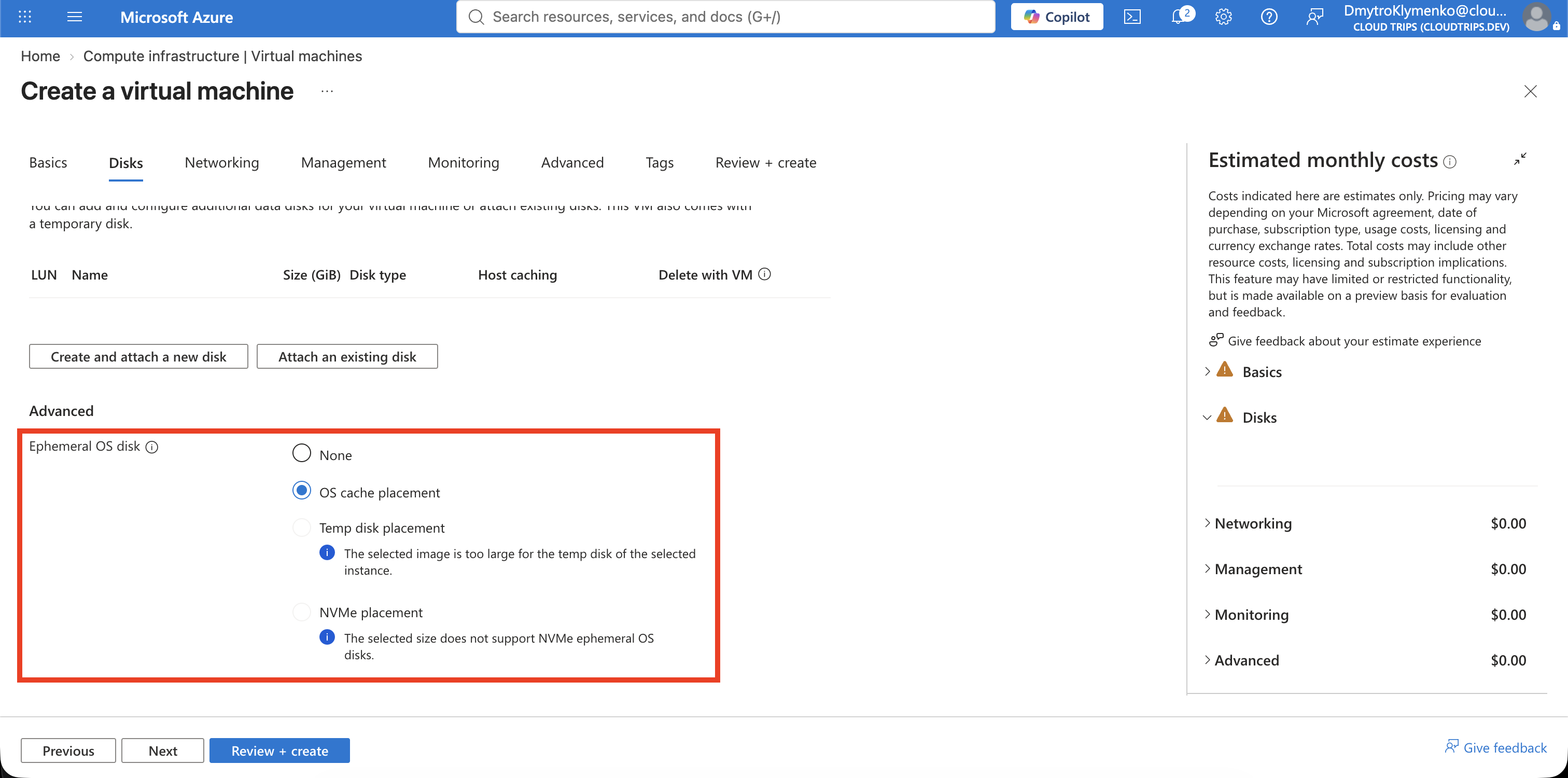
On Disks, configure:
OS disk type: Standard SSD LRS
Use ephemeral OS disk: Enabled
Ephemeral OS disk placement: Cache disk
The field labels can vary slightly. Azure can automatically select the supported placement. Cache placement is used by older cached VM families such as Dsv3; newer families can offer Temp disk or NVMe disk placement. The image OS-disk size must fit in the selected VM’s local cache, temporary disk, or NVMe capacity.
On Networking, create:
Virtual network: vnet-cloudtrips-ephemeral-test-weu
Address range: 10.87.0.0/16
Subnet: snet-workers
Subnet range: 10.87.1.0/24
Public IP: None
NIC network security group: None
Select Review + create > Create.
Verify the Disk Type
In Cloud Shell, run:
az vm show \
  --resource-group rg-cloudtrips-ephemeral-test-weu \
  --name vm-cloudtrips-ephemeral01-test-weu \
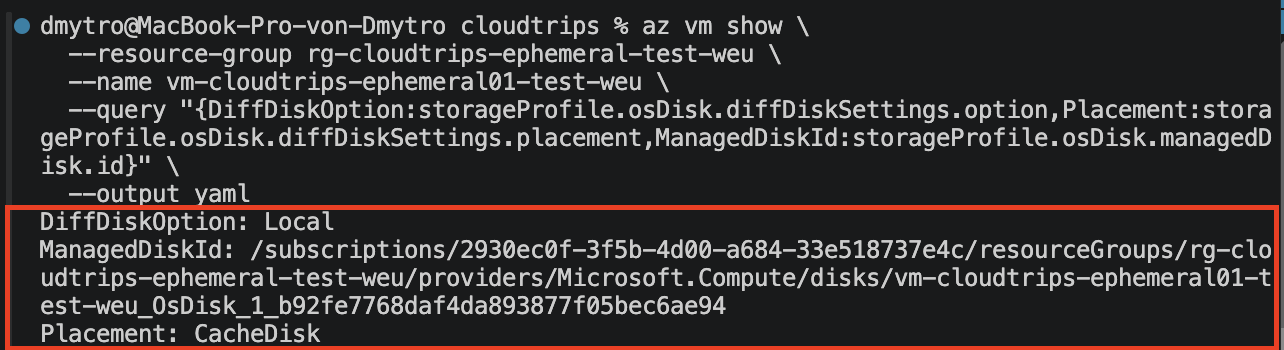
  --query "{DiffDiskOption:storageProfile.osDisk.diffDiskSettings.option,Placement:storageProfile.osDisk.diffDiskSettings.placement}" \
  --output yaml
Expected values:
DiffDiskOption: Local
Placement: CacheDisk
DiffDiskOption: Local is the decisive proof that OS writes use ephemeral
local storage. Azure can still populate storageProfile.osDisk.managedDisk.id
with an OS-disk resource reference; that ID does not make the OS disk
persistent.
Write Disposable State
Open the VM > Run command > RunShellScript and run:
printf 'CloudTrips ephemeral marker\nHost: %s\n' "$(hostname)" |
  tee /var/lib/cloudtrips-ephemeral-marker.txt

cat /var/lib/cloudtrips-ephemeral-marker.txt
Run Command executes this Linux script as root, so sudo is not required.
The marker exists only on the local ephemeral OS disk. It represents state that
a real stateless worker must store externally.
Reimage the VM
Reimage rebuilds the VM’s operating system disk from its original Ubuntu image. It is similar to reinstalling the operating system: applications, configuration, logs, and files written to the OS disk are removed. The Azure VM resource, VM size, network interface, virtual network, and attached persistent data disks remain.
For an ephemeral OS disk, reimage is a normal fast-reset operation. It intentionally deletes the marker and proves why important state must be stored outside the OS disk. Run from Cloud Shell:
az vm reimage \
  --resource-group rg-cloudtrips-ephemeral-test-weu \
  --name vm-cloudtrips-ephemeral01-test-weu
Wait until the VM returns to Running and the VM Agent is Ready. Then open RunShellScript again and run:
if test -e /var/lib/cloudtrips-ephemeral-marker.txt; then
  echo 'Unexpected: marker still exists'
  exit 1
else
  echo 'Expected: marker was removed by reimage'
fi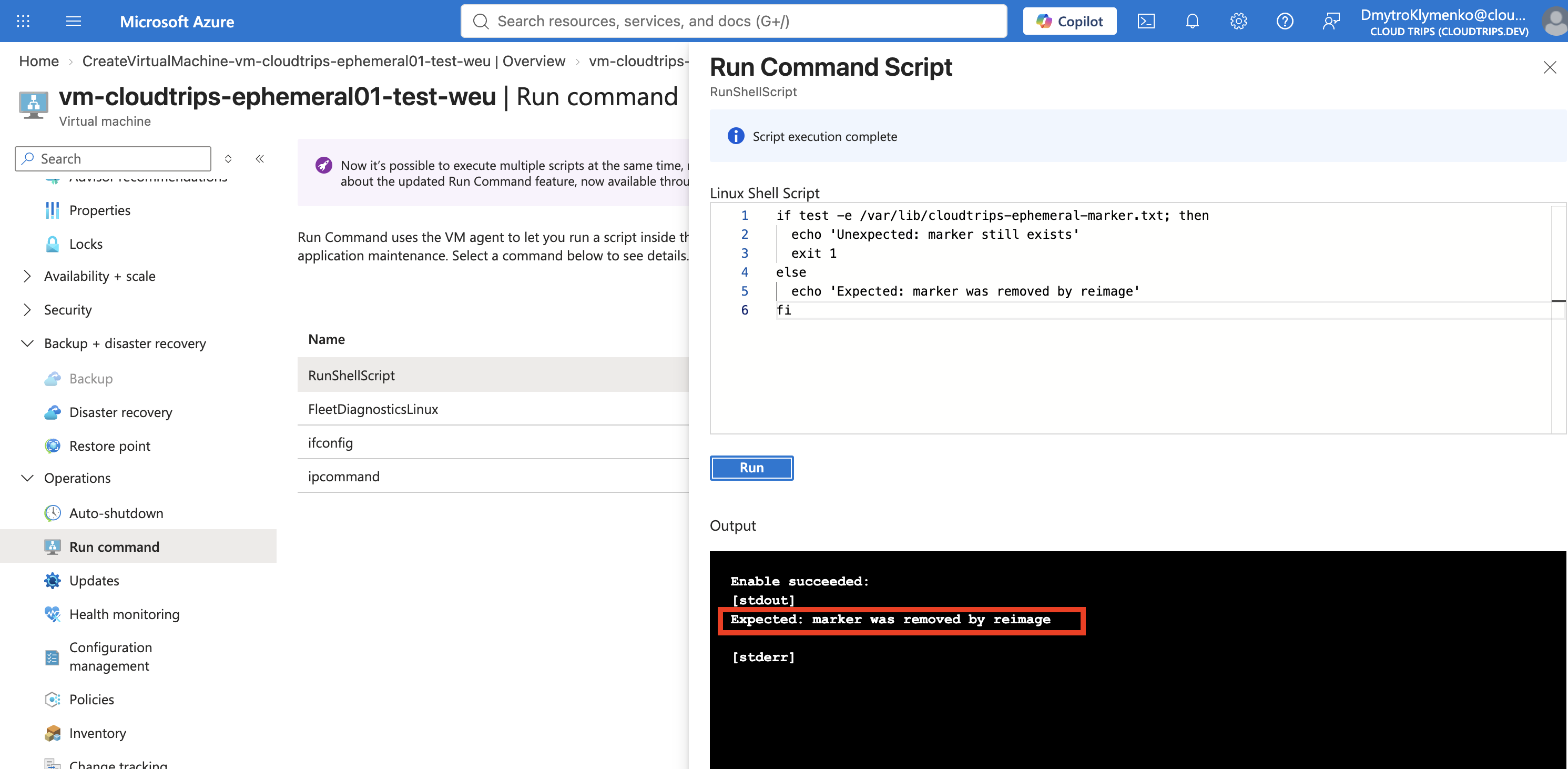
This proves that the OS is disposable. It does not benchmark disk performance; use workload-specific I/O tests when performance is the actual requirement.
Clean Up
Do not try to retain this VM with Stop (deallocate). Delete its dedicated resource group:
az group delete --name rg-cloudtrips-ephemeral-test-weu --yesConfirm that az group exists --name rg-cloudtrips-ephemeral-test-weu returns
false.