File Share Needs High Performance? Configure Premium Azure Files
CloudTrips has an I/O-intensive workload that needs lower latency and more predictable file-share performance than an HDD share. Azure Files SSD—also called Premium Azure Files—stores the share on solid-state media and provides single-digit millisecond latency for most operations.
The previous Azure Files trip used HDD with pay-as-you-go billing: inexpensive capacity with separate transaction charges. This trip uses SSD with Provisioned v2 billing: CloudTrips pays for configured storage, IOPS, and throughput even when the share is empty.
- Capacity (GiB) is the amount of file data reserved.
- IOPS is the number of read/write operations available per second.
- Throughput (MiB/s) is the amount of data transferable per second.
Provisioned v2 allows these three values to be configured independently. Provisioned v1 couples performance to capacity, often requiring extra storage to obtain more IOPS or throughput. Provisioned v2 is the recommended model for new Azure Files deployments where it is available.
Create the Premium Storage Account
Search for Storage accounts, select Create, and enter:
Subscription: CloudTrips TEST
Resource group: Create new → rg-cloudtrips-premiumfiles-test-itn
Storage account name: stctpremiumfilesdmytro
Region: Italy North
Primary service: Azure Files
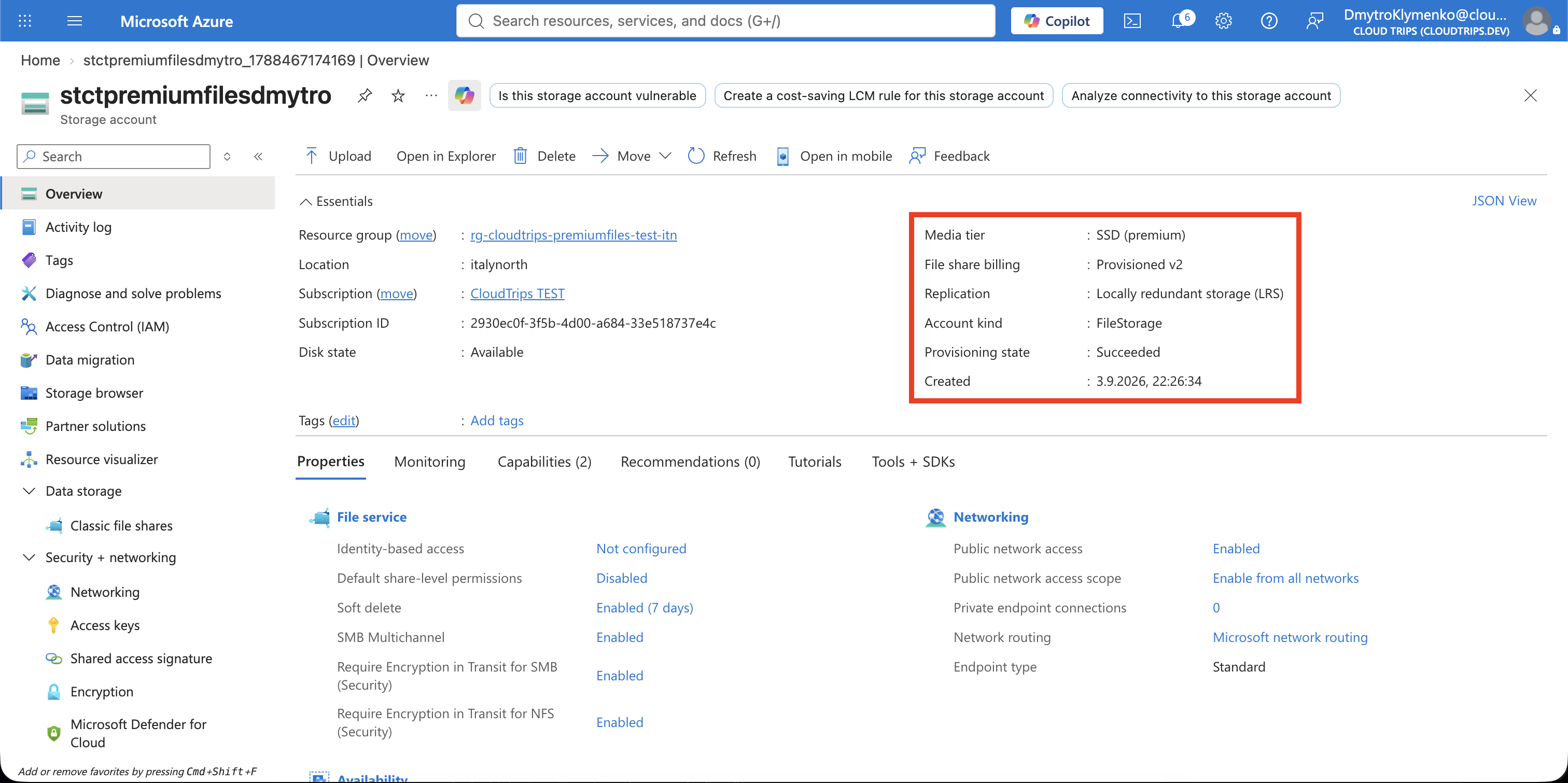
Media tier: SSD
File share billing: Provisioned v2
Redundancy: Locally-redundant storage (LRS)
LRS keeps three synchronous copies in one physical location and has the lowest cost for this temporary performance lab. ZRS provides zone resilience but costs more. SSD Azure Files supports LRS and ZRS, not geo-redundant choices.
Keep Enable storage account key access: Enabled so the portal can generate a simple SMB mount command if required. Select Review + create and Create.
Create the Provisioned v2 Share
Open the account and select Data storage > Classic file shares > + File share. Configure:
Name: premium-app-share
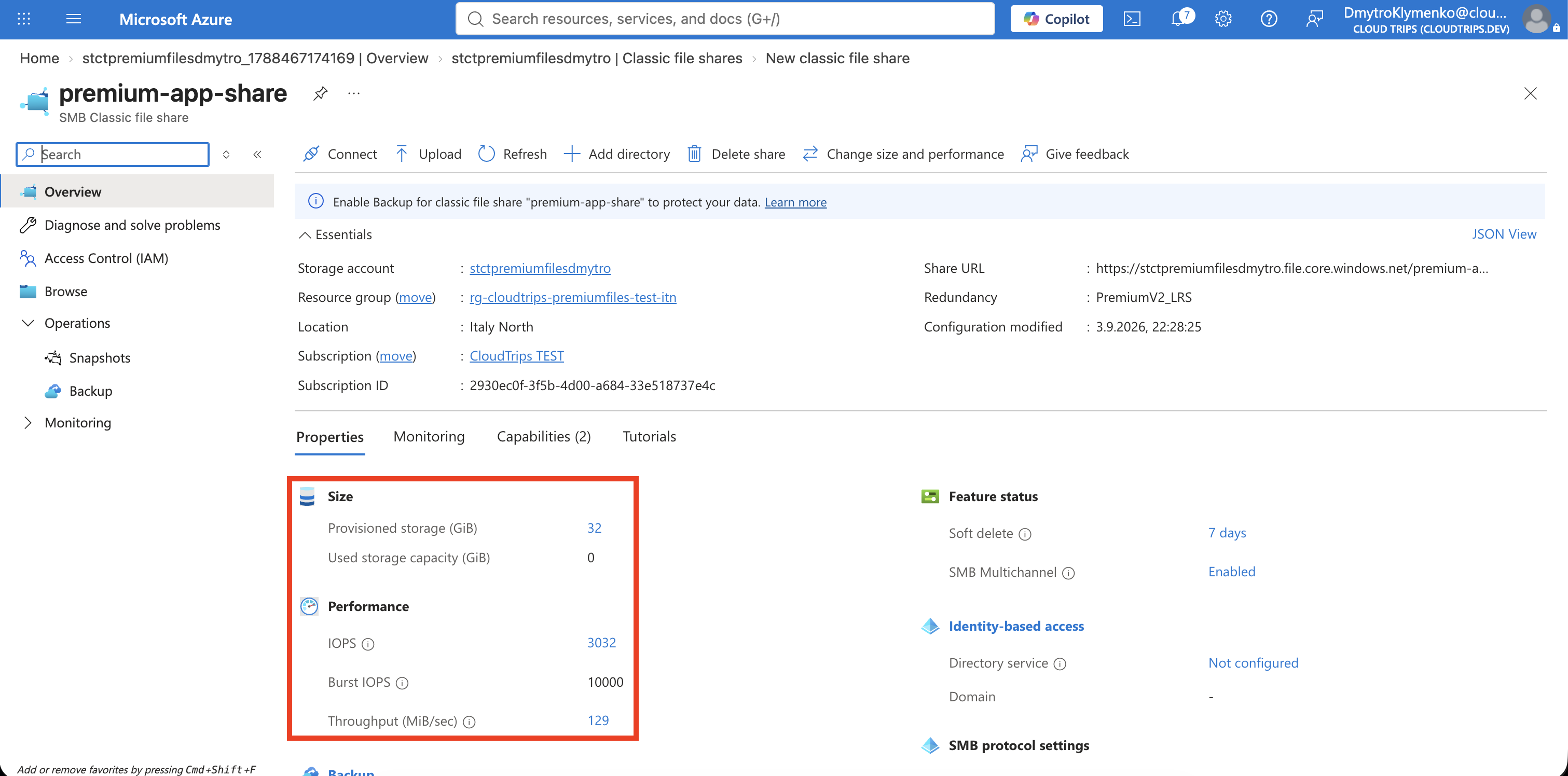
Provisioned storage: 32 GiB
Provisioned IOPS and throughput: Recommended provisioning
Protocol: SMB
Backup: Disabled
32 GiB is the minimum Provisioned v2 share size. Recommended provisioning
lets Azure calculate suitable IOPS and throughput from that capacity. Record the
values shown by the portal before selecting Review + create and Create;
the generated values can vary as the service evolves.
The provisioned values—not the amount of data uploaded—determine the recurring share charge. Leave backup disabled because backup is outside this performance lab and would create additional resources.
Inspect the Performance Configuration
Open premium-app-share and review its Overview or Size and performance
page. Confirm that it shows:
Media tier: SSD
Billing model: Provisioned v2
Protocol: SMB
Provisioned storage: 32 GiB
Provisioned IOPS: portal-calculated value
Provisioned throughput: portal-calculated value
Provisioned v2 can later increase or decrease capacity, IOPS, and throughput within the service limits. Increasing a value raises its billed provision; a mostly empty share can therefore still cost significantly more than the HDD pay-as-you-go share from the previous trip. Do not raise the values merely for this demonstration.
Premium provisioning guarantees an available performance envelope; it does not make every operation reach the maximum. Actual performance also depends on file sizes, concurrency, application behavior, client limits, network bandwidth, and mount options.
Clean Up Immediately
This share incurs provisioned charges while it exists. After taking the screenshots, delete the standalone resource group:
az group delete \
  --name rg-cloudtrips-premiumfiles-test-itn \
  --yes
Confirm that it is gone:
az group exists --name rg-cloudtrips-premiumfiles-test-itnExpected result: false.