Private Azure Access Needs a VPN Endpoint? Create a VPN Gateway
CloudTrips needs a central endpoint for encrypted connections to private Azure resources. Without it, an individual remote worker cannot establish a private network path from a laptop into the CloudTrips VNets.
An Azure VPN Gateway is the Azure-side endpoint for encrypted VPN tunnels. It runs in the hub VNet so that multiple spoke VNets can share one gateway. The gateway has a public IP address for establishing encrypted tunnels, but this does not give the resources in the spokes public IP addresses.
This trip creates the gateway and shares it with the application and services spokes. The next trip configures point-to-site access so that a remote worker can connect directly from a laptop.
This trip builds on: Spoke Networks Need a Central Hub? Configure a Hub-Spoke Network.
Plan the Azure VPN Endpoint
Use:
Hub VNet: vnet-cloudtrips-hub-test-weu
Gateway subnet: GatewaySubnet
Gateway subnet range: 10.60.255.0/27
VPN gateway: vng-cloudtrips-hub-test-weu
Gateway type: VPN
VPN type: Route-based
SKU: VpnGw1AZ
Public IP: pip-cloudtrips-vng-test-weu
Active-active mode: Disabled
BGP: Disabled
VpnGw1AZ is used as the smallest AZ-capable gateway SKU for this TEST
environment. A production choice must be based on availability, connection
count, throughput, and the required VPN features.
VPN Gateway is billed hourly after deployment, even before it carries VPN traffic. Create it when you are ready to complete this trip and the following point-to-site VPN trip. Provisioning commonly takes 45 minutes or more.
Create GatewaySubnet
A VPN gateway must be deployed into a subnet named exactly GatewaySubnet.
This is not just a naming convention: Azure uses the reserved name to find the
subnet where it can deploy and manage the gateway instances. A normally named
subnet such as snet-gateway is not recognized, and gateway creation fails if
GatewaySubnet does not exist. Do not place VMs or other resources in this
dedicated subnet.
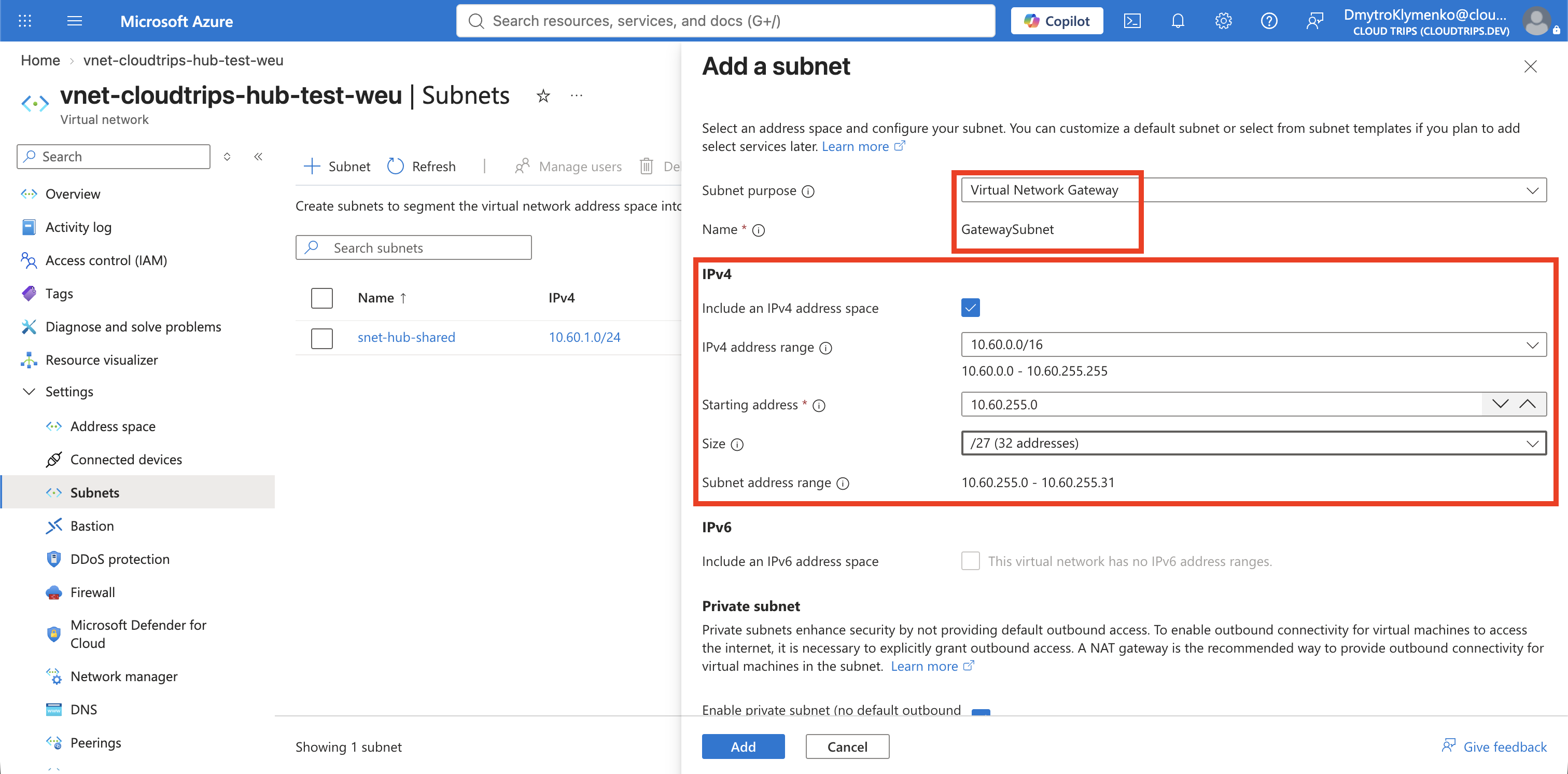
Open vnet-cloudtrips-hub-test-weu and select Settings > Subnets >
+ Subnet.
Configure:
Subnet purpose: Virtual Network Gateway
Name: GatewaySubnet
Starting address: 10.60.255.0
Size: /27
The purpose selection should set the required name automatically. A /27
provides 32 addresses and leaves room for gateway instances and future gateway
configuration changes.
Do not associate an NSG, route table, or NAT gateway with GatewaySubnet.
Select Add.
Create the Virtual Network Gateway
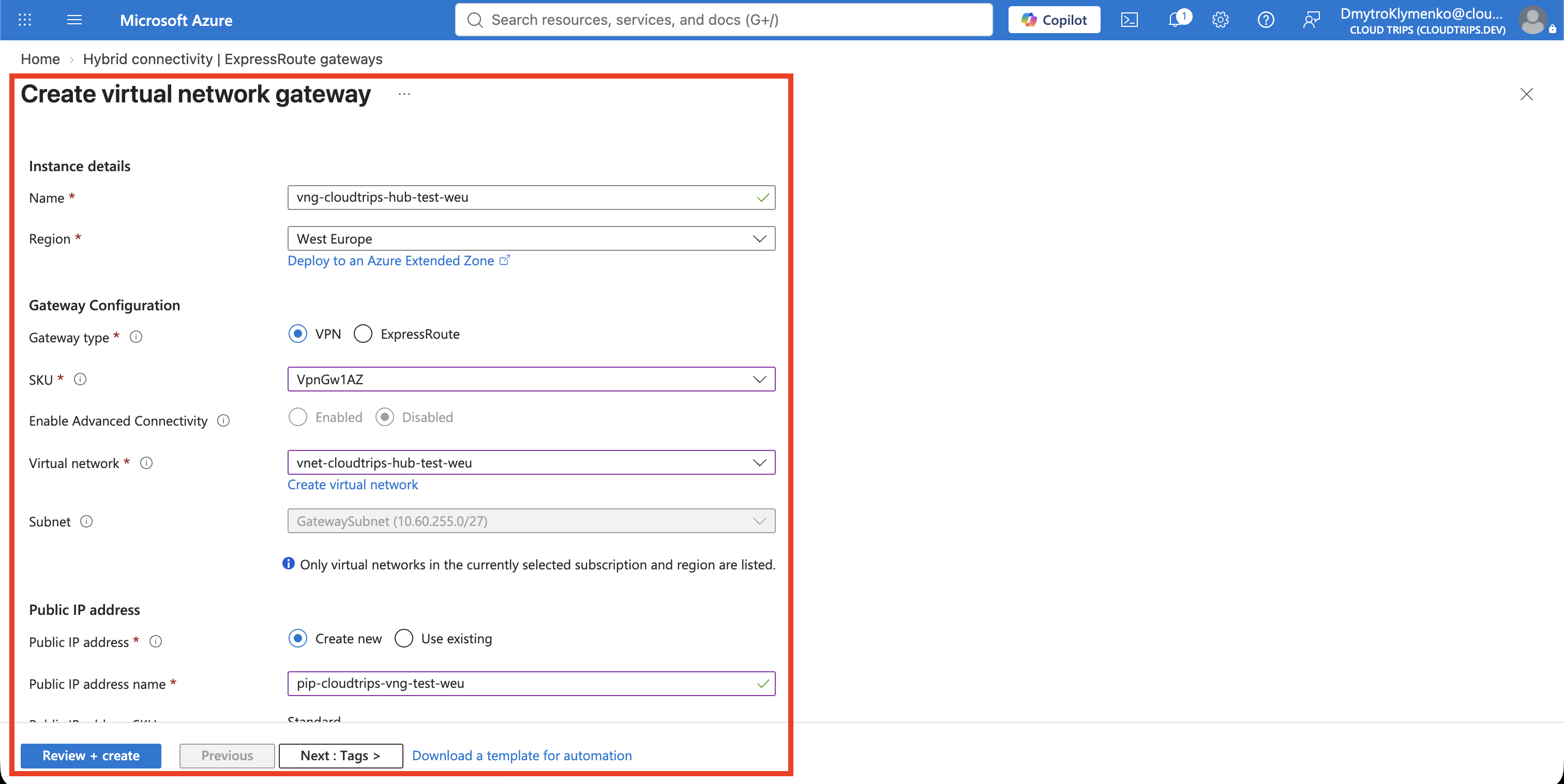
Search the Azure portal for Virtual network gateways, open the service, and select Create.
On Basics, configure:
Subscription: CloudTrips TEST
Resource group: rg-cloudtrips-network-test-weu
Name: vng-cloudtrips-hub-test-weu
Region: West Europe
Gateway type: VPN
SKU: VpnGw1AZ
Virtual network: vnet-cloudtrips-hub-test-weu
The portal should detect GatewaySubnet automatically. If the hub VNet is not
available, confirm that the gateway region is West Europe and that the
required subnet exists.
Configure the public IP section:
Public IP address: Create new
Public IP address name: pip-cloudtrips-vng-test-weu
Enable active-active mode: Disabled
Configure BGP: Disabled
Enable Key Vault access: Disabled
The current portal might not display an Availability zone field. For a new
gateway that uses the AZ-capable VpnGw1AZ SKU, Azure handles the
zone-redundant deployment automatically, so no zone value must be entered.
The Standard, static public IP identifies the Azure end of a future VPN tunnel. It does not expose the private addresses in the hub or spokes.
Select Review + create, and then select Create. Leave the deployment running until Azure reports that it has completed.
Verify the Gateway
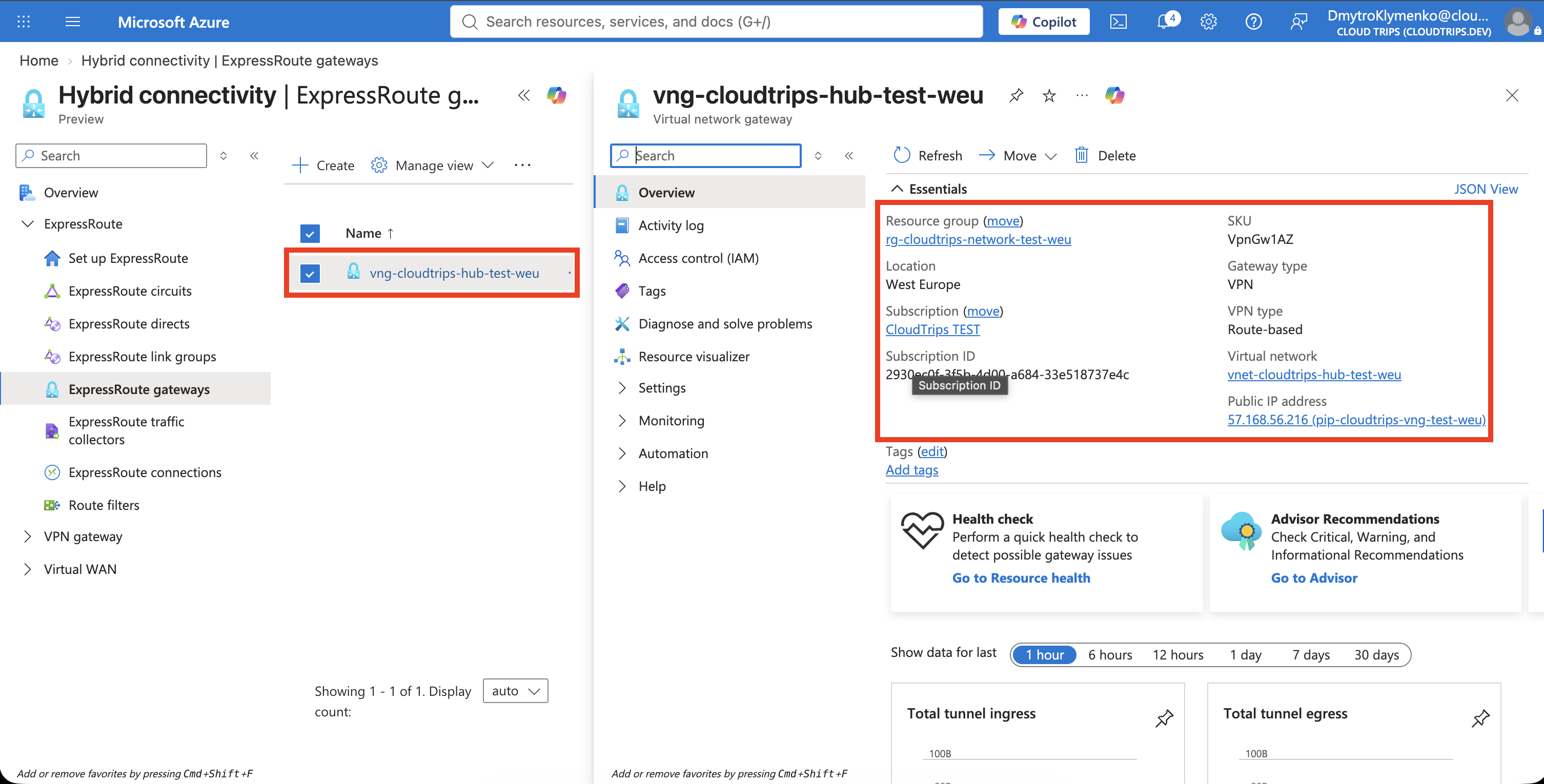
Open vng-cloudtrips-hub-test-weu and confirm:
Provisioning state: Succeeded
Gateway type: VPN
VPN type: Route-based
SKU: VpnGw1AZ
Virtual network: vnet-cloudtrips-hub-test-weu
Record the public IP address shown on the gateway overview. The client profile generated in the next trip uses this Azure tunnel endpoint automatically.
You can also verify the gateway in Cloud Shell:
az network vnet-gateway show \
  --resource-group rg-cloudtrips-network-test-weu \
  --name vng-cloudtrips-hub-test-weu \
  --query "{State:provisioningState,VpnType:vpnType,Sku:sku.name}" \
  --output table

az network public-ip show \
  --resource-group rg-cloudtrips-network-test-weu \
  --name pip-cloudtrips-vng-test-weu \
  --query "{Address:ipAddress,Allocation:publicIPAllocationMethod,Sku:sku.name}" \
  --output table
Share the Hub Gateway with the Spokes
Gateway transit allows the spokes to use the gateway in the hub instead of deploying a separate gateway in every VNet.
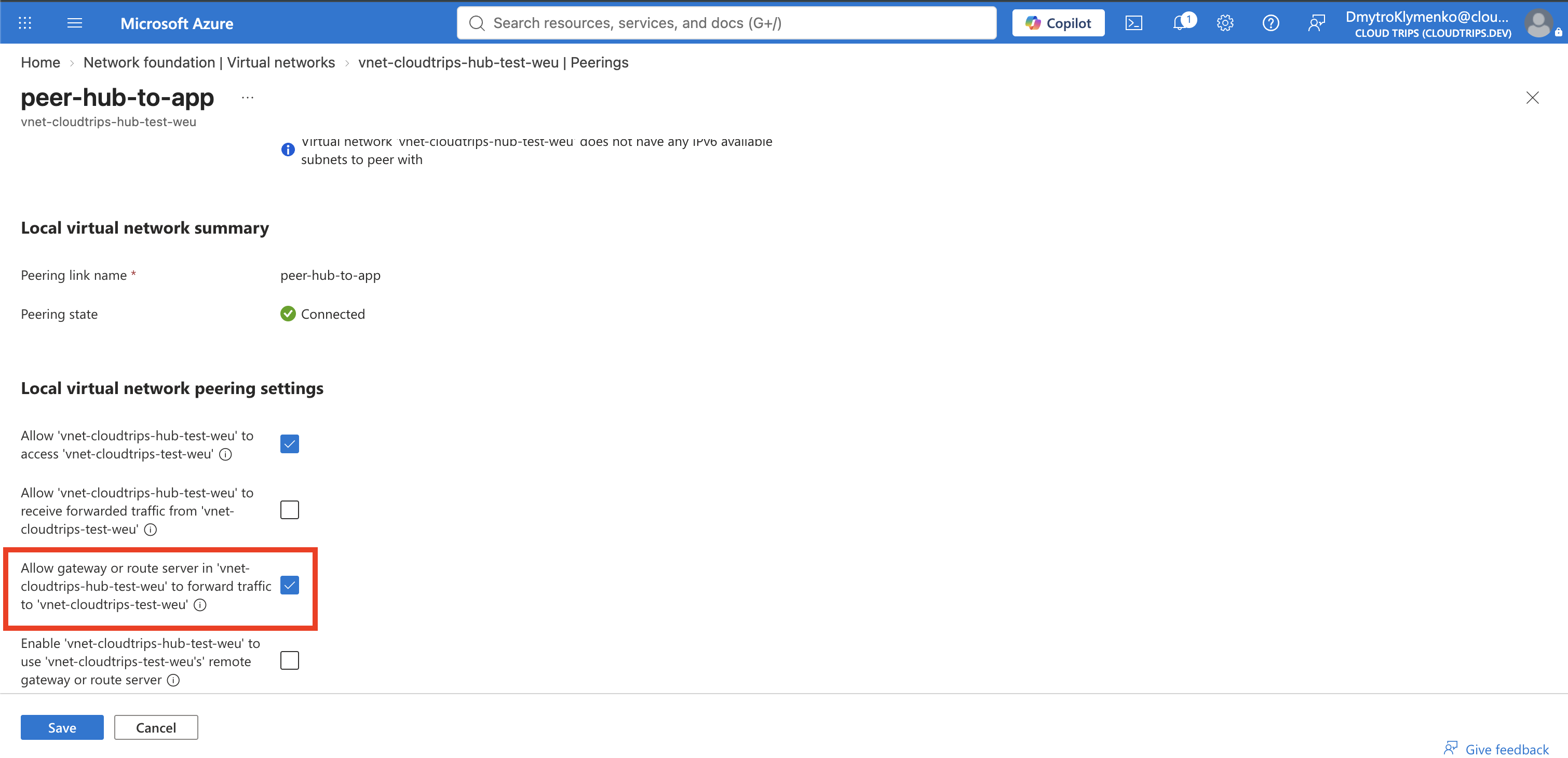
Open vnet-cloudtrips-hub-test-weu > Settings > Peerings. Open
peer-hub-to-app. Under the hub’s local peering settings, enable Allow
gateway or route server in vnet-cloudtrips-hub-test-weu to forward traffic to
vnet-cloudtrips-test-weu, and save the peering. Repeat this for
peer-hub-to-services, allowing the hub gateway to forward traffic to
vnet-cloudtrips-services-test-weu.
Open vnet-cloudtrips-test-weu > Settings > Peerings. Open
peer-app-to-hub, enable Enable vnet-cloudtrips-test-weu to use
vnet-cloudtrips-hub-test-weu’s remote gateway or route server, and save the
peering. Do not enable Allow gateway or route server in
vnet-cloudtrips-test-weu to forward traffic. That option requires a gateway
inside the application VNet, but the gateway is intentionally located in the
hub.
Open vnet-cloudtrips-services-test-weu > Settings > Peerings. Open
peer-services-to-hub, enable Enable vnet-cloudtrips-services-test-weu to
use vnet-cloudtrips-hub-test-weu’s remote gateway or route server, and save
the peering. Leave the option that would require a gateway inside the services
VNet disabled.
A VNet can use a remote gateway from only one peering. Neither spoke contains its own virtual network gateway, so both can use the hub gateway.
The Azure VPN endpoint is now ready and shared with both spokes, but no laptop can connect yet. The next trip adds a client address pool, Microsoft Entra ID authentication, and an Azure VPN Client profile for point-to-site access.