Global DNS Failover Needed? Configure Traffic Manager
CloudTrips has one regional Load Balancer in West Europe. Azure Traffic Manager provides global DNS-based routing and returns a healthy endpoint according to the profile’s routing method. This lab temporarily separates the existing web VMs across two small public Load Balancers and uses Priority routing to switch DNS between them.
1. Client asks DNS for the Traffic Manager name
                         |
                         v
              Azure Traffic Manager
                 Priority routing
                  /            \
       1: Original LB       2: Second LB
             |                   |
           WEB01               WEB02

2. DNS returns the selected Load Balancer name
3. Client connects directly to that public endpoint
Traffic Manager is not a proxy and does not provide a global frontend IP. It answers DNS queries; application traffic then flows directly to the selected public endpoint.
This trip requires only
lb-cloudtrips-web-test-weu, its existing public frontend, HTTP rule, health probe, and healthy WEB01/WEB02 backend pool. No additional VM is required.
This topology demonstrates Traffic Manager priority, monitoring, DNS TTL, and endpoint switching. It is not regional high availability: both public endpoints remain in the same VNet and West Europe region. Production regional failover requires independent endpoints in separate regions.
Traffic Manager, the second Standard Load Balancer, and its public IP can incur charges. Complete the cleanup after verification.
Separate WEB02 from the Original Backend Pool
A VM NIC should not participate in two public Load Balancers simultaneously.
Open lb-cloudtrips-web-test-weu > Backend pools, open the existing web
pool, remove only the NIC/IP configuration of
vm-cloudtrips-web02-test-weu, and select Save. Keep WEB01 in the original
pool and wait until it shows healthy.
The original public IP should now always return WEB01:
PRIMARY_IP=$(az network public-ip show \
  --resource-group rg-cloudtrips-network-test-weu \
  --name pip-cloudtrips-lb-test-weu \
  --query ipAddress \
  --output tsv)

curl --silent --show-error --connect-timeout 10 "http://${PRIMARY_IP}/"
Create the Second Load Balancer
Create another Standard Load Balancer:
Subscription: CloudTrips TEST
Resource group: rg-cloudtrips-network-test-weu
Name: lb-cloudtrips-web-tm-test-weu
Region: West Europe
SKU: Standard
Type: Public
Tier: Regional
Add its frontend:
Name: fe-cloudtrips-web-tm-test-weu
IP version: IPv4
Public IP: Create new
Public IP name: pip-cloudtrips-lb-tm-test-weu
SKU: Standard
Availability zone: Zone-redundant
Add a NIC-based backend pool:
Name: be-cloudtrips-web-tm-test-weu
Virtual network: vnet-cloudtrips-test-weu
Backend pool configuration: NIC
Backend: The NIC/IP configuration of vm-cloudtrips-web02-test-weu only
Add a TCP health probe:
Name: probe-tcp-80
Protocol: TCP
Port: 80
Add a load-balancing rule:
Name: rule-http-80
IP version: IPv4
Frontend IP address: fe-cloudtrips-web-tm-test-weu
Backend pool: be-cloudtrips-web-tm-test-weu
Protocol: TCP
Frontend port: 80
Backend port: 80
Health probe: probe-tcp-80
Session persistence: None
TCP reset: Enabled
Floating IP: Disabled
Create the Load Balancer, wait until WEB02 is healthy, and test its endpoint:
BACKUP_IP=$(az network public-ip show \
  --resource-group rg-cloudtrips-network-test-weu \
  --name pip-cloudtrips-lb-tm-test-weu \
  --query ipAddress \
  --output tsv)

curl --silent --show-error --connect-timeout 10 "http://${BACKUP_IP}/"
It should return CloudTrips response from WEB02. The topology is:
Traffic Manager
├── Priority 1 -> lb-cloudtrips-web-test-weu    -> WEB01
└── Priority 2 -> lb-cloudtrips-web-tm-test-weu -> WEB02
Compare the Two Global Designs
| Capability | Traffic Manager | Cross-region Load Balancer |
|---|---|---|
| Decision layer | DNS | Layer 4 network flow |
| Client connects to | Selected regional endpoint | One global anycast IP |
| Endpoint types | Azure, external, or nested public endpoints | Regional Azure Load Balancer frontends |
| Failover visibility | Affected by DNS TTL and client caching | Existing flows use the global frontend |
| Best fit | DNS-based application failover across heterogeneous endpoints | Static global IP and Azure Layer 4 regional balancing |
Priority routing sends normal DNS answers to endpoint priority 1. Priority
2 is returned only when the first endpoint is disabled or Traffic Manager’s
probe marks it degraded.
Assign DNS Names to Both Public IPs
An Azure Public IP resource must have a DNS name before it can be selected as an Azure endpoint in Traffic Manager. Generate unique labels in Cloud Shell:
RG_NAME="rg-cloudtrips-network-test-weu"
SUFFIX=$(az account show --query id --output tsv | tr -d '-' | cut -c1-8)

az network public-ip update \
  --resource-group "$RG_NAME" \
  --name pip-cloudtrips-lb-test-weu \
  --dns-name "cloudtrips-web-weu-${SUFFIX}"

az network public-ip update \
  --resource-group "$RG_NAME" \
  --name pip-cloudtrips-lb-tm-test-weu \
  --dns-name "cloudtrips-web-tm-backup-${SUFFIX}"

az network public-ip list \
  --resource-group "$RG_NAME" \
  --query "[?name=='pip-cloudtrips-lb-test-weu' || name=='pip-cloudtrips-lb-tm-test-weu'].{Name:name,FQDN:dnsSettings.fqdn,IP:ipAddress}" \
  --output table
The output should show two different *.westeurope.cloudapp.azure.com names.
Test both before adding another routing layer:
curl --silent --show-error --connect-timeout 10 \
  "http://cloudtrips-web-weu-${SUFFIX}.westeurope.cloudapp.azure.com/"

curl --silent --show-error --connect-timeout 10 \
  "http://cloudtrips-web-tm-backup-${SUFFIX}.westeurope.cloudapp.azure.com/"
The original FQDN should return WEB01. The backup FQDN should return WEB02. Fix the corresponding Load Balancer rule, health probe, backend membership, or VM listener if either request fails.
Create a Priority Traffic Manager Profile
Traffic Manager profile DNS names must be globally unique in the
trafficmanager.net zone. Print the profile name from Cloud Shell:
TM_NAME="tm-cloudtrips-${SUFFIX}"
printf 'Traffic Manager profile: %s\n' "$TM_NAME"
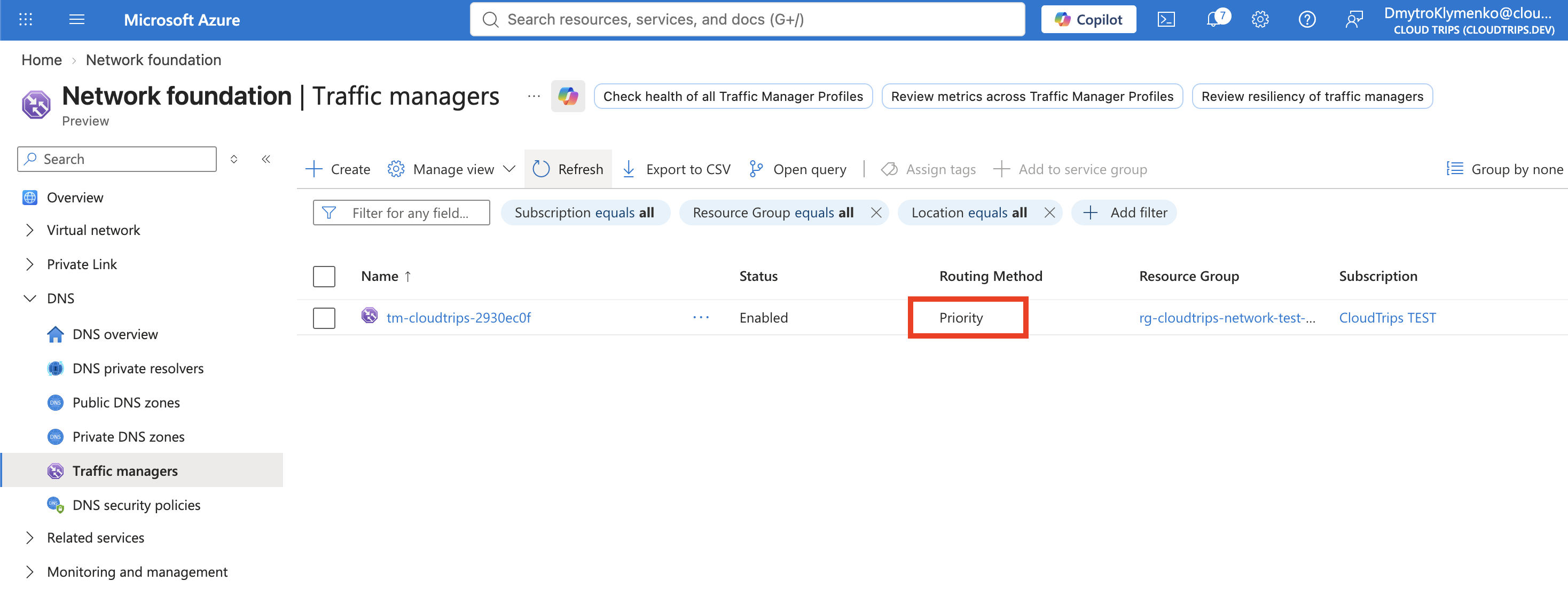
In the Azure portal, search for Traffic Manager profiles and select Create:
Name: <printed Traffic Manager profile name>
Routing method: Priority
DNS record type: CNAME
Subscription: CloudTrips TEST
Resource group: rg-cloudtrips-network-test-weu
The resource group has a region, but the Traffic Manager profile is a global service. Select Create.
Configure DNS and Endpoint Monitoring
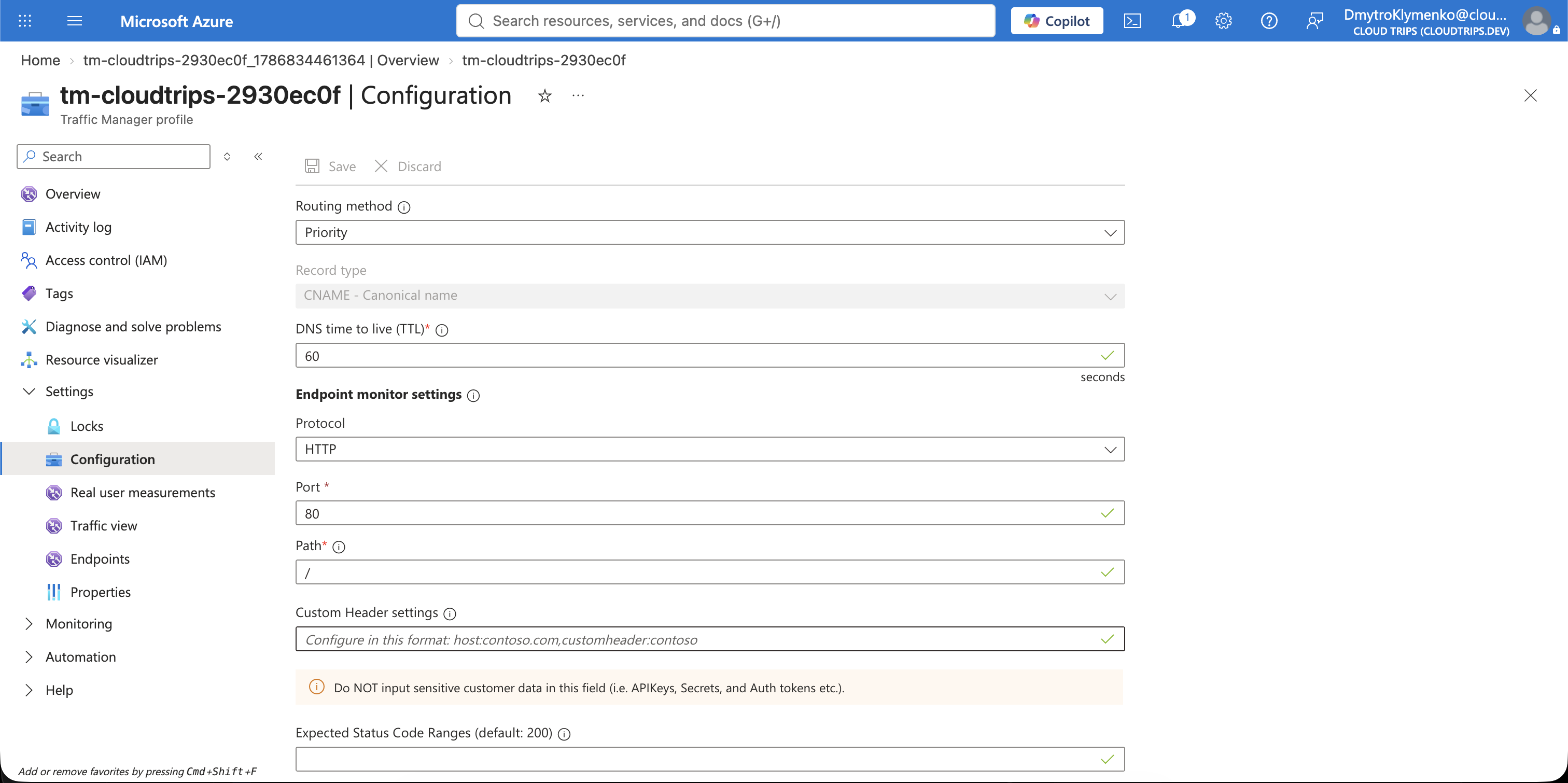
Open the profile and select Settings > Configuration. Configure:
Routing method: Priority
DNS record type: CNAME
DNS time to live (TTL): 30 seconds
Endpoint monitor protocol: HTTP
Port: 80
Path: /
Probing interval: 30 seconds
Tolerated number of failures: 3
Probe timeout: 10 seconds
Expected status code ranges: 200-299
Select CNAME, not A. The two Azure Public IP resources have DNS labels, so
Traffic Manager represents their endpoint targets as DomainName. An A
profile accepts only IPv4Address targets and fails when saving an Azure
endpoint with this message:
Endpoint target type, 'DomainName', is not allowed for this profile.
Valid values are: IPv4Address.
The endpoint record type cannot be changed after this profile is created. If
you already created it with A, cancel the failed endpoint change, delete only
the Traffic Manager profile, and recreate it with DNS record type: CNAME.
You can normally reuse the same profile name immediately within the same
Microsoft Entra tenant. Do not delete either Load Balancer or public IP.
Select Save. The probe requests / on each public-IP DNS name. A
successful response proves that the Load Balancer rule, health probe,
NSG, backend listener, and response path are working.
Do not use the default AllowAzureLoadBalancerInBound NSG rule as proof that
Traffic Manager probes are admitted. That rule is for the
AzureLoadBalancer service tag. The CloudTrips HTTP rule already
permits the public web endpoint on TCP 80, including Traffic Manager’s
external health probes.
Add Primary and Standby Endpoints
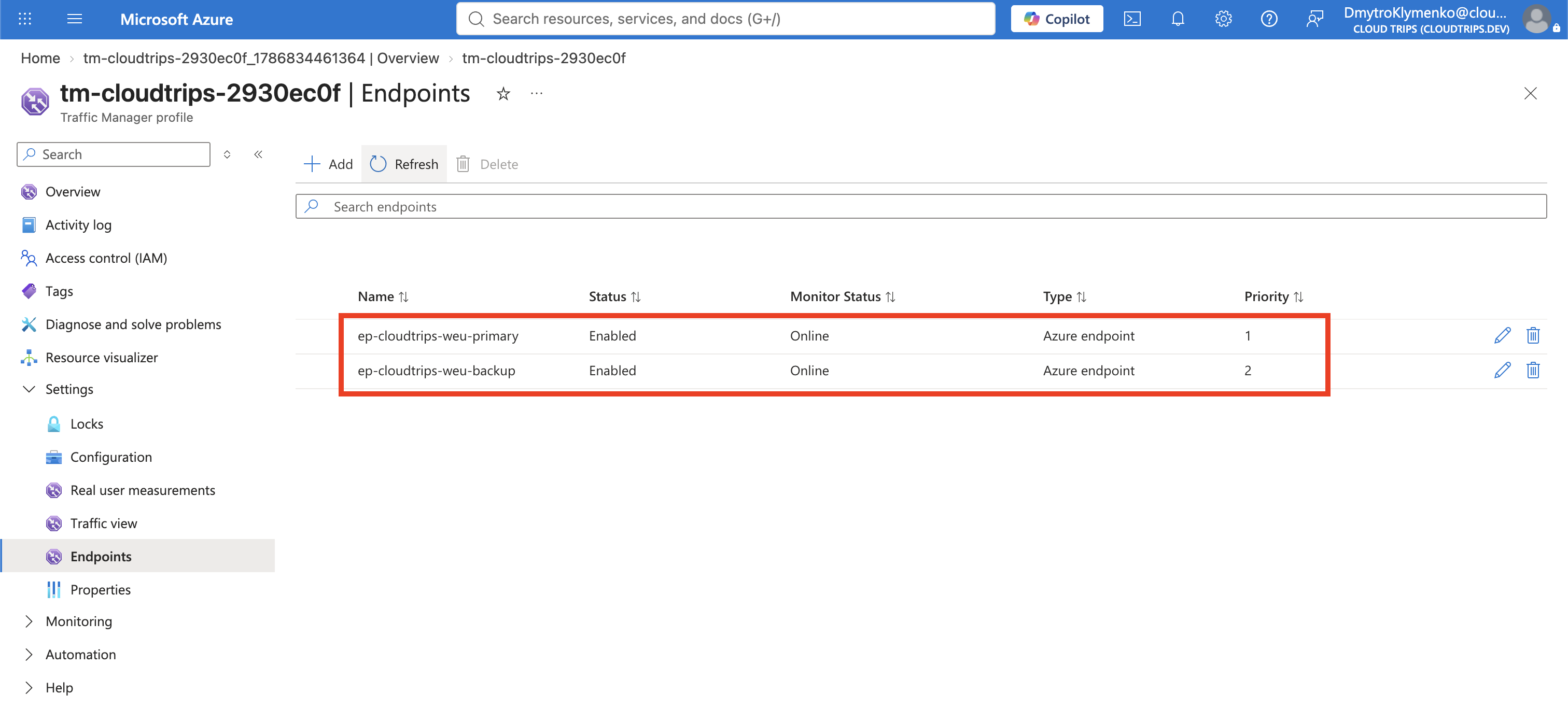
Select Settings > Endpoints > Add and create the primary:
Type: Azure endpoint
Name: ep-cloudtrips-weu-primary
Target resource type: Public IP address
Target resource: pip-cloudtrips-lb-test-weu
Priority: 1
Status: Enabled
Add the standby endpoint:
Type: Azure endpoint
Name: ep-cloudtrips-weu-backup
Target resource type: Public IP address
Target resource: pip-cloudtrips-lb-tm-test-weu
Priority: 2
Status: Enabled
Wait until both monitoring states show Online. If an endpoint remains
Checking endpoint or becomes Degraded, test its endpoint FQDN directly
and confirm that HTTP / returns a status in 200-299.
Verify Primary DNS Routing
The profile Overview shows a DNS name such as:
tm-cloudtrips-<suffix>.trafficmanager.netFrom your laptop, set the actual name and inspect its DNS chain:
TM_FQDN="<traffic-manager-profile-name>.trafficmanager.net"

dig +short "$TM_FQDN"
curl --silent --show-error --connect-timeout 10 "http://${TM_FQDN}/"
DNS should select ep-cloudtrips-weu-primary while it is Online, and curl
should return CloudTrips response from WEB01. WEB02 is no longer in that Load
Balancer’s backend pool. The result demonstrates priority, not geographic
proximity: priority 1 wins regardless of the client’s location.
Perform a Controlled DNS Switch
Administratively disable only the Traffic Manager endpoint; do not stop or
delete production resources for this test. Under Endpoints, select
ep-cloudtrips-weu-primary and choose Disable. This controlled switch tests
priority selection and DNS cache behavior. It is not a probe-detected failure
and does not by itself prove automatic health failover.
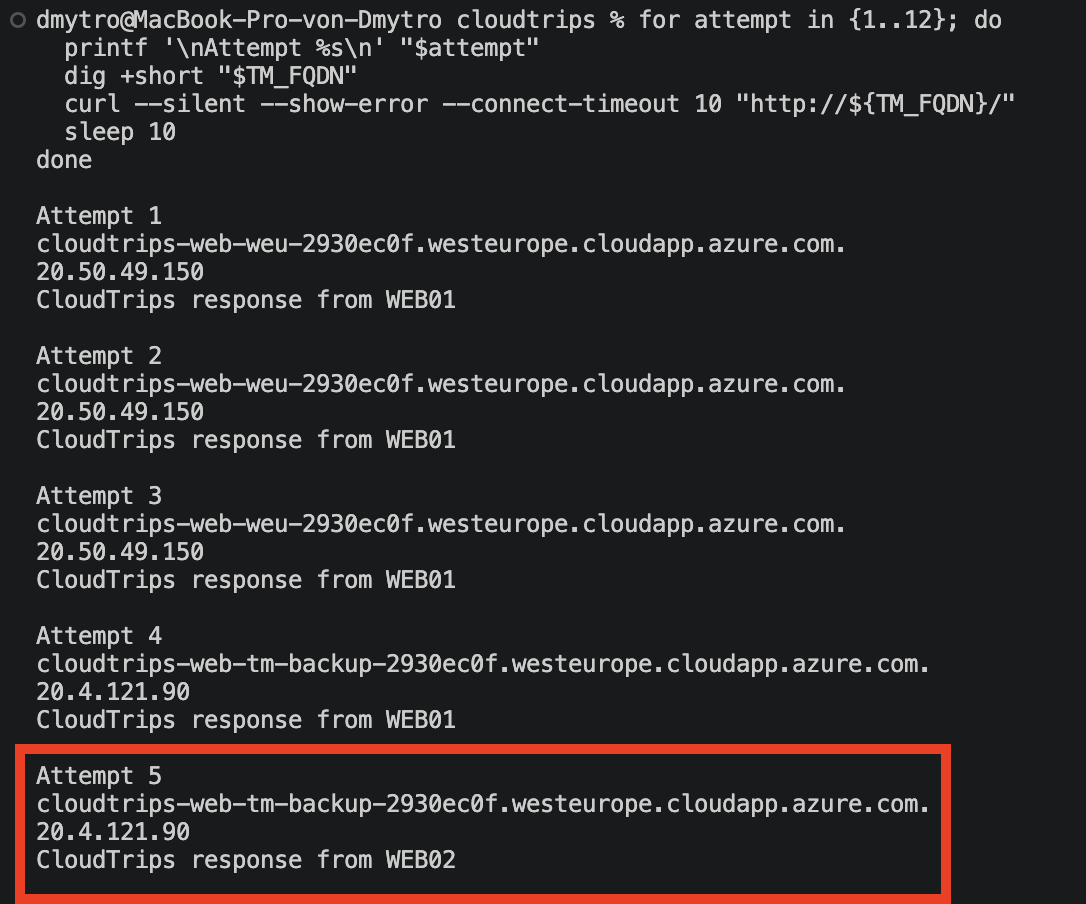
Wait at least the 30-second DNS TTL, then repeat from your laptop:
for attempt in {1..12}; do
  printf '\nAttempt %s\n' "$attempt"
  dig +short "$TM_FQDN"
  curl --silent --show-error --connect-timeout 10 "http://${TM_FQDN}/"
  sleep 10
done
dig should change to the second public IP, and the application should return
WEB02. Compare the two recorded public IPs and response bodies to prove that
the DNS endpoint changed after the administrative status change. In a real
probe-detected failure, Traffic Manager makes the same routing selection only
after its monitor marks the primary endpoint Degraded according to the
configured interval and failure threshold.
Local operating-system, browser, and recursive-resolver caches can retain the old answer until its TTL expires. Traffic Manager controls new DNS answers; it cannot recall an answer that a client already cached.
Re-enable ep-cloudtrips-weu-primary, wait until it is Online, and allow
the DNS TTL to expire. The same profile name should then select the primary
public IP and return WEB01 again.
Understand the Production DNS Name
Users would normally access a company name such as www.cloudtrips.example,
not the trafficmanager.net hostname. At the authoritative public DNS
provider, create a CNAME from the application name to the profile:
www.cloudtrips.example CNAME tm-cloudtrips-<suffix>.trafficmanager.netDo not create that example record in a real zone. The DNS provider and domain
owner must approve the actual name. For a zone apex such as
cloudtrips.example, use an Azure DNS alias record or a provider feature that
supports apex aliases; a normal CNAME cannot coexist at a zone apex.
Traffic Manager provides endpoint failover, not application-state replication. Sessions, databases, secrets, and uploaded files still need a regional data replication and recovery design.
Remove the Traffic Manager Lab
Delete tm-cloudtrips-<suffix> from Traffic Manager profiles. This removes
the profile and its endpoint definitions; it does not delete either Load
Balancer, public IP, or VM.
Optionally remove the temporary Azure-managed DNS labels while keeping the public IP resources:
az network public-ip update \
  --resource-group "$RG_NAME" \
  --name pip-cloudtrips-lb-test-weu \
  --remove dnsSettings

az network public-ip update \
  --resource-group "$RG_NAME" \
  --name pip-cloudtrips-lb-tm-test-weu \
  --remove dnsSettings
Delete the temporary Load Balancer, then its public IP:
lb-cloudtrips-web-tm-test-weu
pip-cloudtrips-lb-tm-test-weu
Finally open the original lb-cloudtrips-web-test-weu backend pool and add
WEB02’s NIC/IP configuration again. Wait until both WEB01 and WEB02 show
healthy. Keep the original Load Balancer, its public IP, VMs, NSG, and HTTP
service.
Continue to the conceptual overview: What Should You Use? ExpressRoute, Route Server, IPv6, and SNAT.