VNets in Different Regions Need Connection? Configure Global Peering
CloudTrips needs a network in a second Azure region for future disaster-recovery resources. A VNet belongs to one region, so the new North Europe network cannot be part of the existing West Europe VNet.
Connect the two networks with global VNet peering. Global peering is the same VNet peering feature used in the previous trip; Azure calls it global when the two VNets are in different regions. There is no separate Global switch in the portal.
This trip builds on: Two VNets Need Private Communication? Create VNet Peering.
Plan the Cross-Region Connection
Use:
Application VNet: vnet-cloudtrips-test-weu
Application region: West Europe
Application address space: 10.20.0.0/16

DR VNet: vnet-cloudtrips-dr-test-neu
DR region: North Europe
DR address space: 10.50.0.0/16
DR subnet: snet-dr
DR subnet range: 10.50.1.0/24

Peering shown on application VNet: peer-app-to-dr
Peering shown on DR VNet: peer-dr-to-app
10.50.0.0/16 does not overlap the application, services, or reserved network
ranges created earlier.
VNet peering is not transitive. The existing application-to-services peering does not automatically connect the services VNet to the DR VNet. This trip creates a direct application-to-DR connection.
Create the North Europe VNet
In the Azure portal, search for Virtual networks, open the service, and select Create.
On Basics, configure:
Subscription: CloudTrips TEST
Resource group: rg-cloudtrips-network-test-weu
Name: vnet-cloudtrips-dr-test-neu
Region: North Europe
The resource group is located in West Europe, but it can contain resources from other regions. The VNet itself is created in North Europe as selected above.
On Security, do not add Azure Bastion, Azure Firewall, a DDoS protection plan, or virtual network encryption for this exercise.
On IP Addresses, configure:
IPv4 address space: 10.50.0.0/16
Subnet purpose/template: Default
Subnet name: snet-dr
Starting address: 10.50.1.0
Subnet size: /24
Default outbound access: Disabled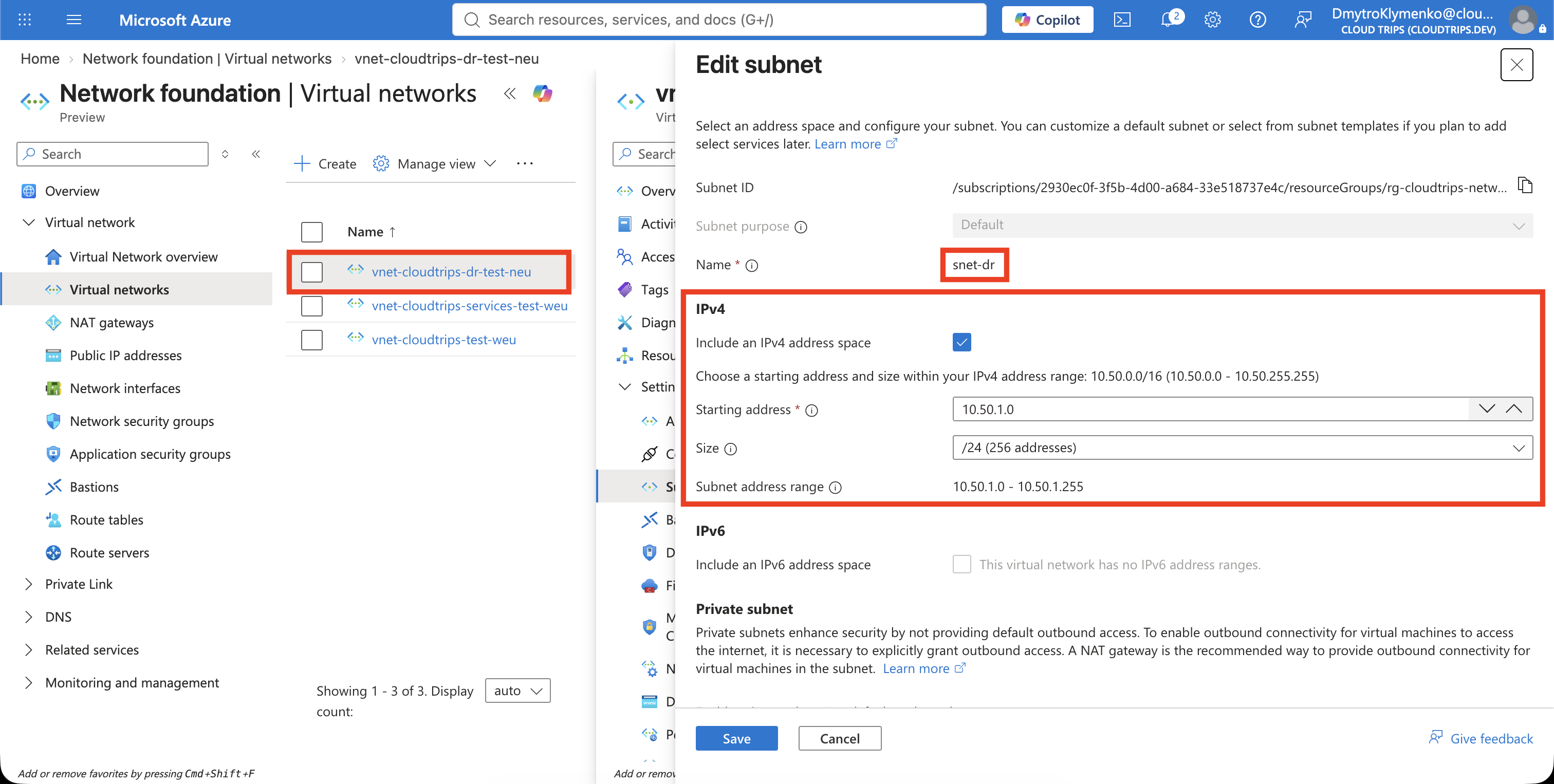
On Tags, add:
Application: CloudTrips
Environment: TEST
Purpose: DisasterRecovery
Select Review + create, and then select Create.
Configure Global Peering
Open vnet-cloudtrips-test-weu, select Settings > Peerings, and select
Add.
In this form, Local virtual network means the currently open application
VNet, while Remote virtual network means the DR VNet selected below. The
Local peering name is therefore peer-app-to-dr; the Remote peering name is
peer-dr-to-app.
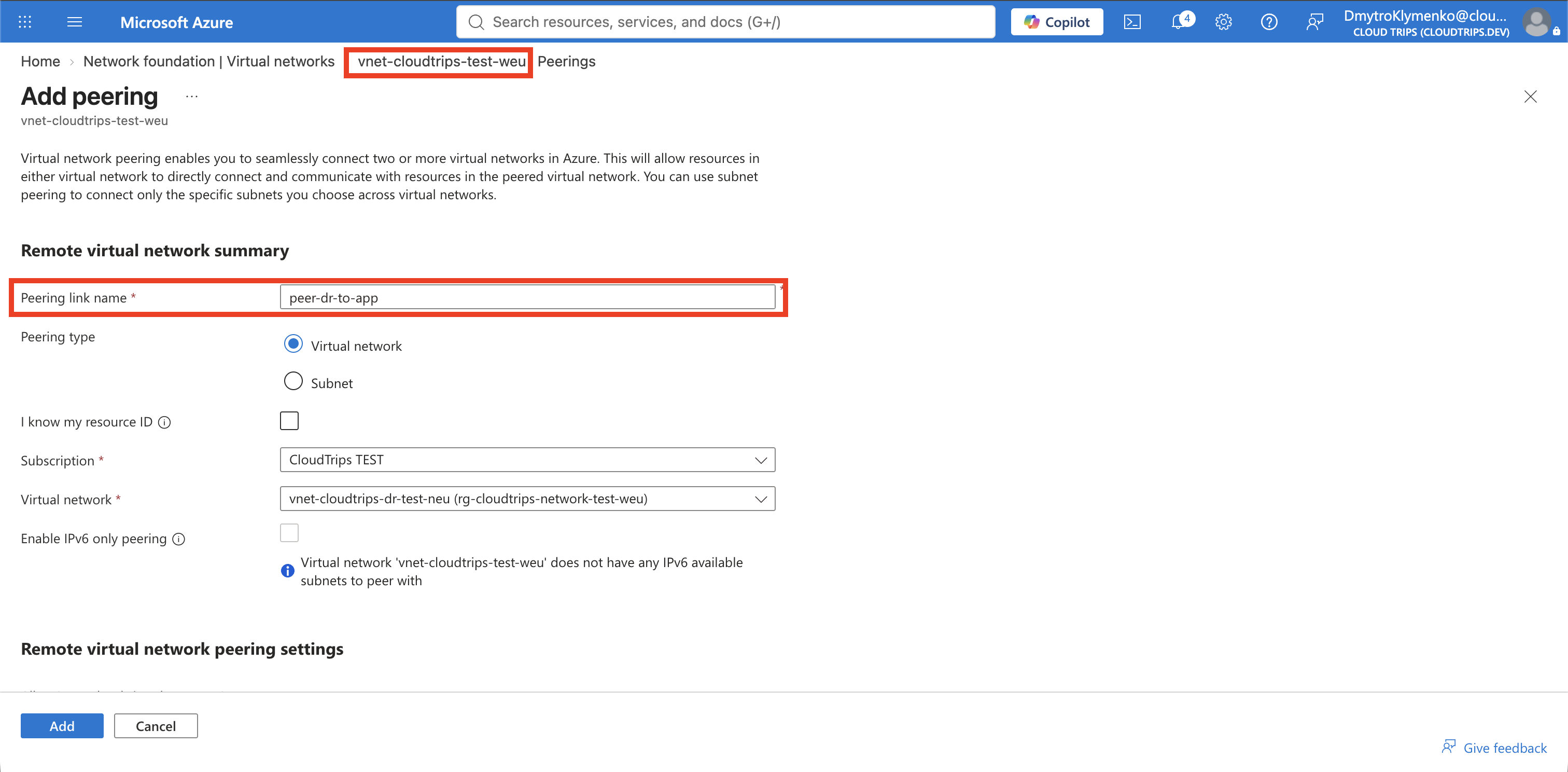
Under Remote virtual network summary, configure:
Peering link name: peer-dr-to-app
Subscription: CloudTrips TEST
Virtual network: vnet-cloudtrips-dr-test-neu
Allow the DR VNet to access vnet-cloudtrips-test-weu. Leave forwarded
traffic and gateway/route-server options disabled.
Under Local virtual network summary, configure:
Peering link name: peer-app-to-drAllow vnet-cloudtrips-test-weu to access the DR VNet. Leave the remaining
forwarding and gateway options disabled.
The portal does not ask whether this should be global peering. It detects that West Europe and North Europe are different regions and creates global peering automatically.
Select Add.
Verify the Cross-Region Peering
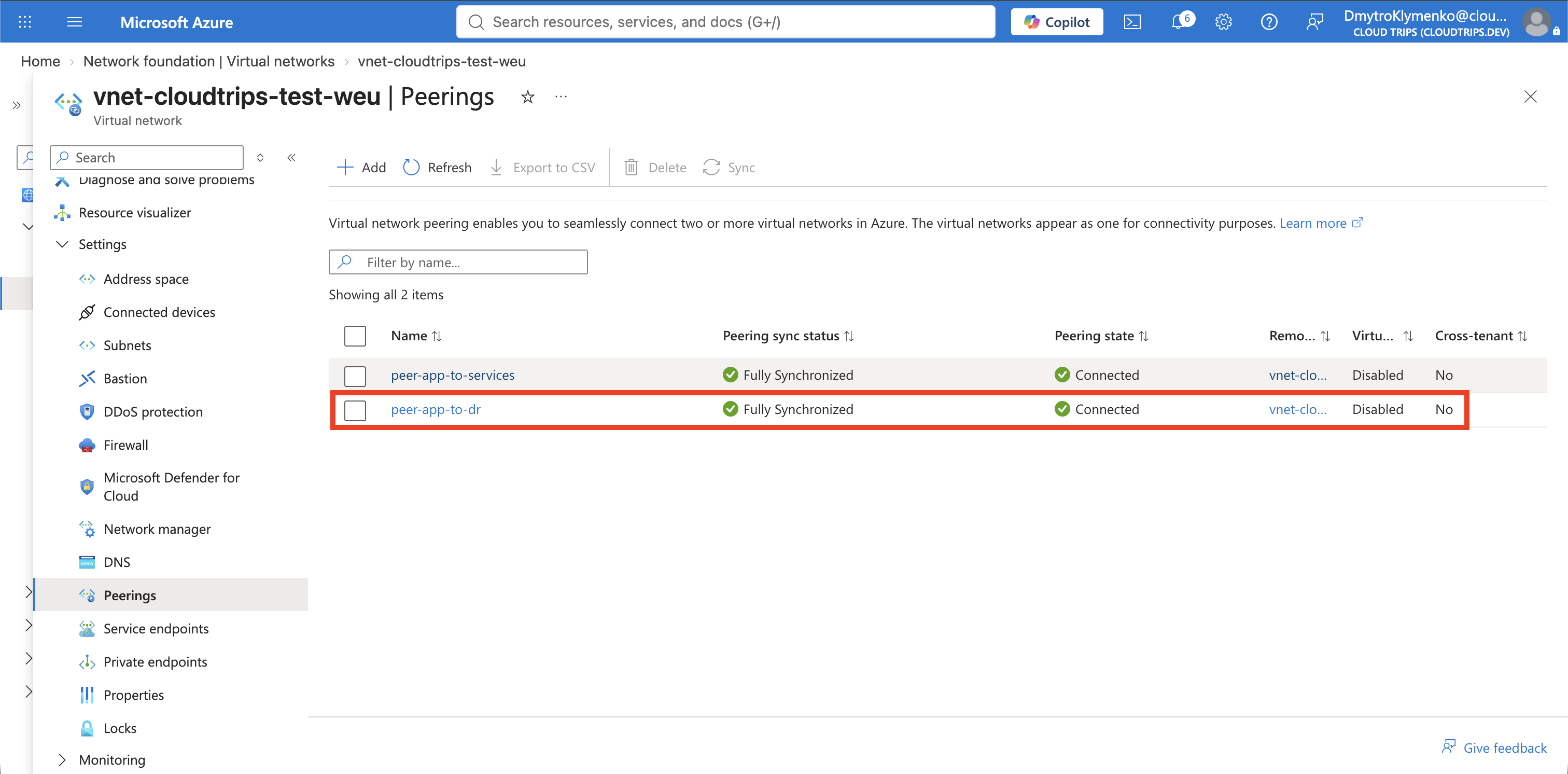
Return to Peerings and select Refresh until peer-app-to-dr shows
Connected. Open the DR VNet and confirm that peer-dr-to-app also shows
Connected.
Use Cloud Shell to confirm that the VNets are in different regions:
az network vnet show \
  --resource-group rg-cloudtrips-network-test-weu \
  --name vnet-cloudtrips-test-weu \
  --query "{Name:name,Region:location,AddressSpace:addressSpace.addressPrefixes[0]}" \
  --output table

az network vnet show \
  --resource-group rg-cloudtrips-network-test-weu \
  --name vnet-cloudtrips-dr-test-neu \
  --query "{Name:name,Region:location,AddressSpace:addressSpace.addressPrefixes[0]}" \
  --output table
Then verify the peering:
az network vnet peering show \
  --resource-group rg-cloudtrips-network-test-weu \
  --vnet-name vnet-cloudtrips-test-weu \
  --name peer-app-to-dr \
  --query "{State:peeringState,Access:allowVirtualNetworkAccess}" \
  --output yaml
The state should be Connected and access should be true.
Global peering provides private cross-region connectivity; it does not copy resources, replicate application data, or perform disaster-recovery failover. Those capabilities must be designed separately.