App Needs High-Volume Event Streaming? Create an Event Hub, Send, and Read Events
Use Event Hubs for a continuous stream of events, such as sensor readings, application telemetry, or click activity. Service Bus is suited to reliable work processing; Event Grid routes notifications; Event Hubs retains a stream that independent readers can consume and replay.
This lab sends ten sensor readings to keep the exercise small. It demonstrates the streaming workflow, not a high-volume performance test. You create resources in the portal and run a prepared file in Cloud Shell. No VM or local installation is needed, and the earlier Service Bus and Event Grid resources are not required.
Create the Namespace and Event Hub
In the Azure portal, search for Event Hubs → Create:
Subscription: CloudTrips TEST
Resource group: rg-cloudtrips-eventhubs-test-weu
Namespace name: evhns-ctstreamweu
Region: West Europe
Pricing tier: Standard
Throughput units: 1
Auto-inflate: Disabled
Use a globally unique namespace name; add a suffix if needed. Keep public network access enabled for this lab. Choose Standard so the next trip can use Capture. Review the cost estimate: provisioned throughput capacity is billed even when you are not sending events.
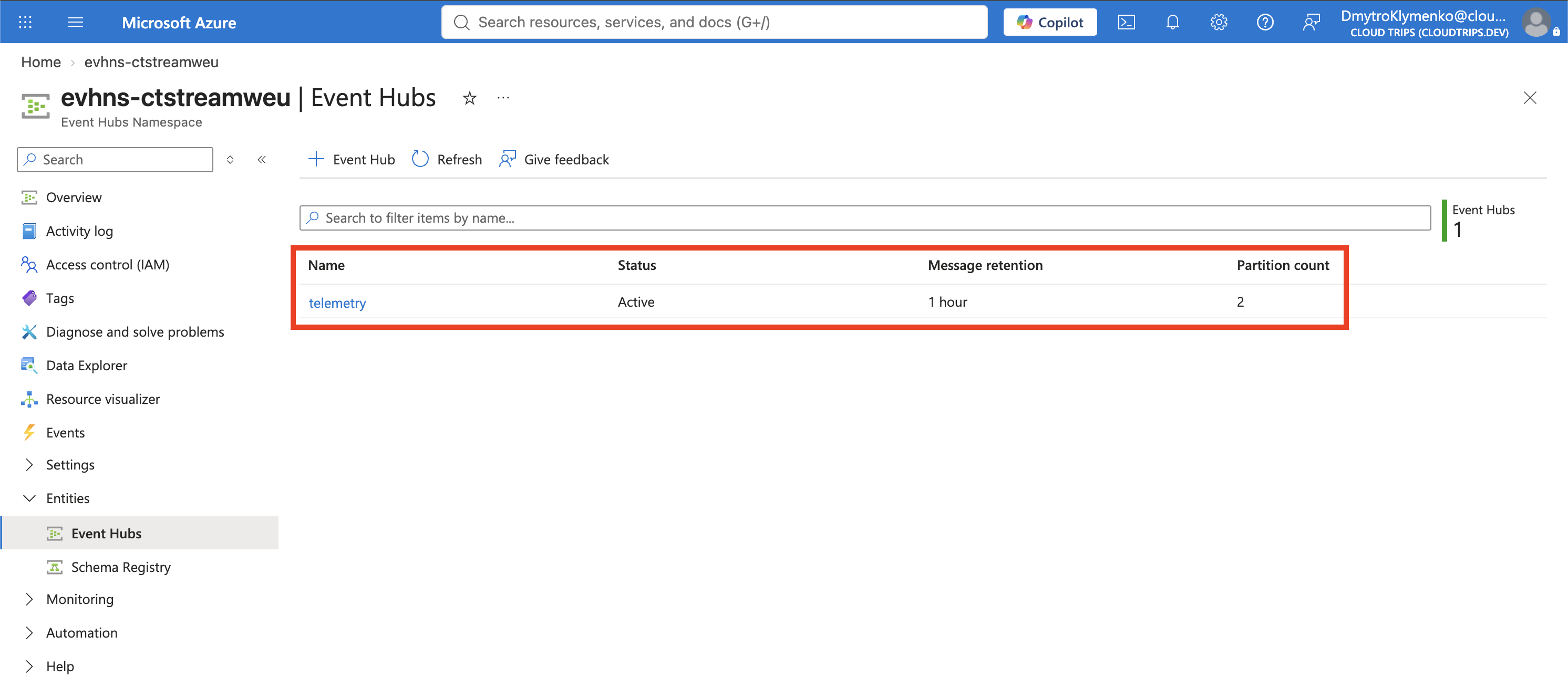
After deployment, open the namespace → Entities → Event Hubs → + Event Hub:
Name: telemetry
Partition count: 2
Cleanup policy: Delete
Retention time: 1 day
Capture: Off
Create it, then open telemetry → Consumer groups and confirm the built-in $Default group is present. We use this group for the lab; no custom consumer group is needed.
| Concept | Meaning in this lab |
|---|---|
| Namespace | Holds event hubs and the shared throughput capacity. |
| Event hub | The telemetry stream. |
| Partition | One ordered section of that stream. Partitions allow readers to share processing work. |
| Consumer group | An independent reading view for an application, such as a dashboard or an archiver. |
| Retention | How long events remain available for reading and replay. Reading does not delete them. |
A consumer group does not by itself persist a reader’s progress. A checkpoint records the last processed position, usually in a separate store. We omit checkpoints in this short demo so replay is easy. There is no global ordering guarantee across partitions.
Give Yourself Data Access
On the namespace → Access control (IAM) → Add role assignment, assign Azure Event Hubs Data Owner to the user you will use in Cloud Shell. Your subscription Owner role permits resource management but does not replace this data-access role. Allow a few minutes for a new assignment to propagate.
This role allows the lab user to send and receive. Production applications can use the narrower Azure Event Hubs Data Sender or Azure Event Hubs Data Receiver roles.
Send and Read Ten Events
Download the Event Hubs example. Open Cloud Shell → Bash in the Azure portal. A session without a storage account is sufficient. Upload event-hubs-demo.py using Upload/Download files → Upload.
Run the following block, replacing evhns-ctstreamweu if your namespace name differs. If the account check says to log in, run az login --use-device-code, complete the sign-in with the user assigned above, and rerun the block.
cd "$HOME"
az account show --output table
az account set --subscription 'CloudTrips TEST'

python3 -m venv /tmp/ct-eventhubs
source /tmp/ct-eventhubs/bin/activate
python -m pip install 'azure-eventhub>=5.12,<6' 'azure-identity>=1.17,<2' 'aiohttp>=3.9,<4'

python event-hubs-demo.py --namespace evhns-ctstreamweu --consumer-group '$Default'
The example uses your Azure CLI login and an encrypted WebSocket connection. The async SDK uses aiohttp, included in the installation command. No connection string is needed.
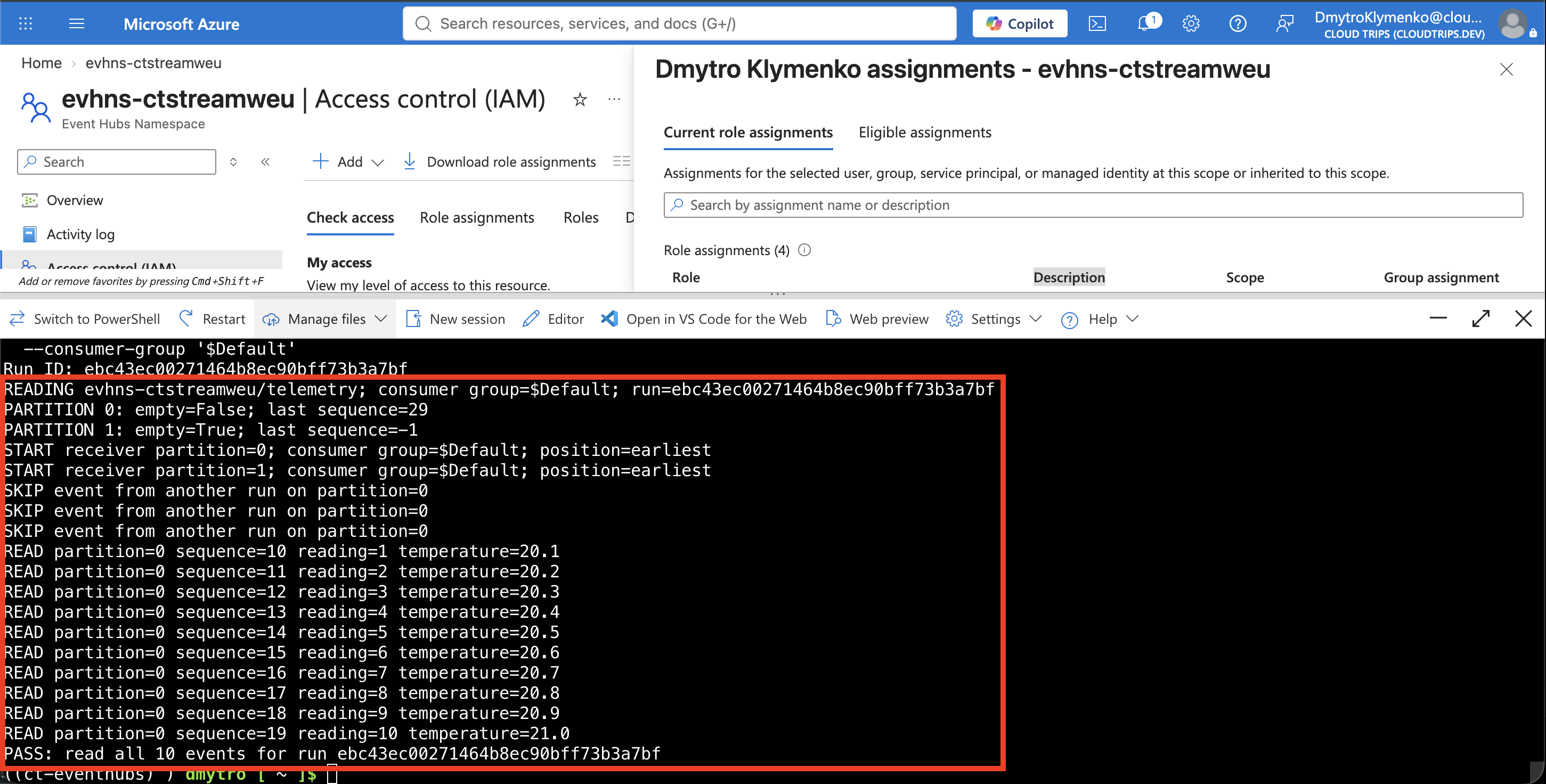
The script prints a Run ID, sends ten JSON readings for sensor-01, then reads events and checks that all ten readings from this run arrived. Expect:
Run ID: <your-run-id>
SENT 10 events; run ID: <your-run-id>
READ partition=... sequence=... reading=1 temperature=20.1
...
READ partition=... sequence=... reading=10 temperature=21.0
PASS: read all 10 events for run <your-run-id>
Each event includes runId, deviceId, reading, and temperature. The partition key sensor-01 keeps this device’s events in one partition, so this small run need not populate both partitions. The printed sequence number is assigned by Event Hubs within the partition; it is not the reading number.
Replay Without Sending Again
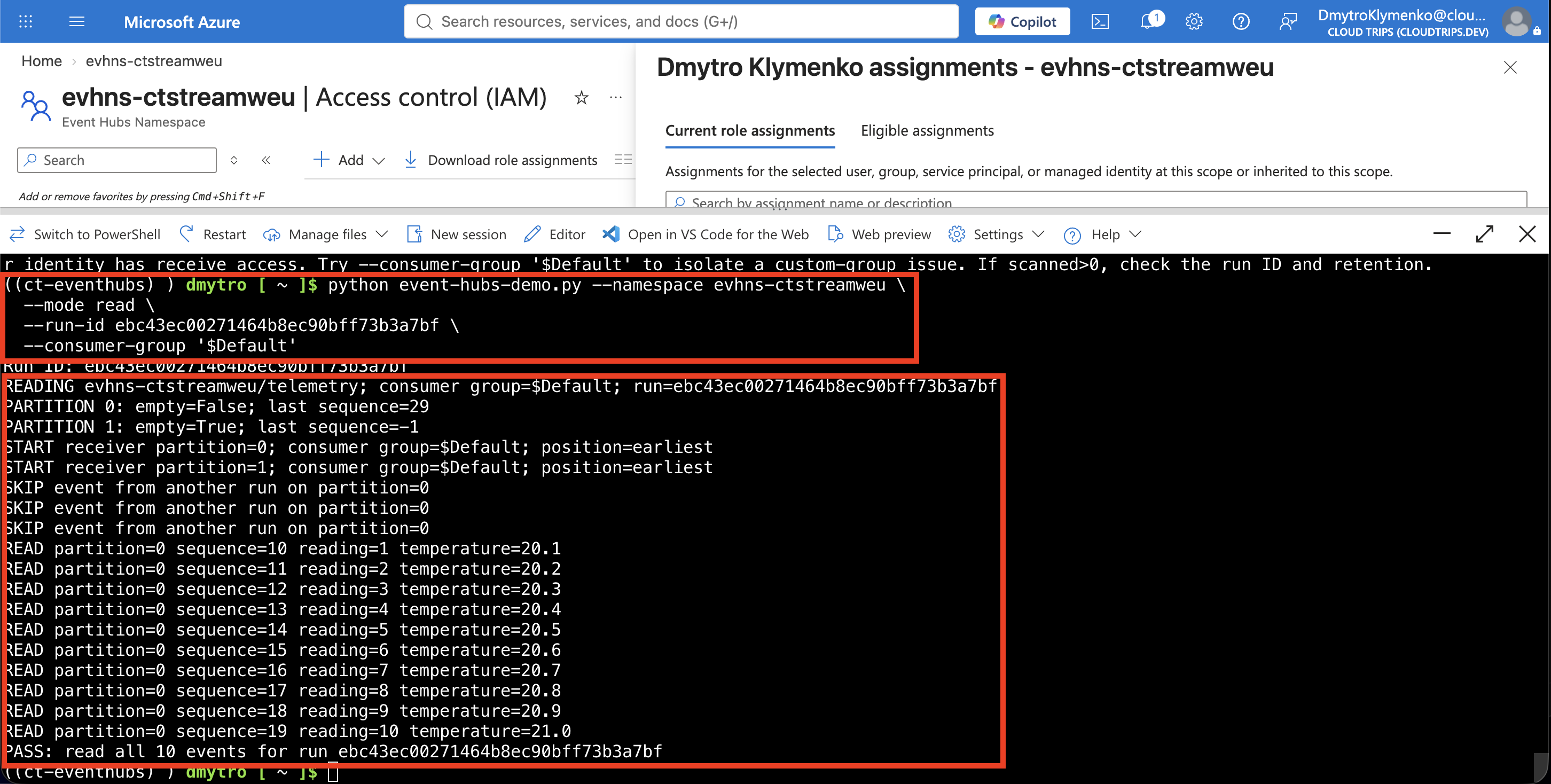
Copy the Run ID from the successful run. Run this command after replacing PASTE_RUN_ID and, if necessary, the namespace:
python event-hubs-demo.py --namespace evhns-ctstreamweu \
  --mode read --run-id PASTE_RUN_ID --consumer-group '$Default'
This time the script only reads. It starts at the earliest retained event (starting_position="-1"), ignores other run IDs, and verifies the same ten readings again. It does not complete or delete events as a Service Bus worker would. Run only one demo receiver at a time.
A real application normally resumes from persisted checkpoints instead of rescanning the retained stream on every start. Independent applications use separate consumer groups and their own checkpoint state. This example holds its verification progress only in memory and stops after all ten readings or a receive timeout.
If access is denied, check the signed-in account and its data role. If the run reports missing events, verify telemetry, $Default, the namespace name, and the copied Run ID. Events older than retention cannot be replayed. The full script’s –mode send option sends a fresh batch without starting a receiver; we will reuse it for Capture.
If the demo reports Read 0/10, sending may still have succeeded. Download and upload the current example again for partition diagnostics. PARTITION lines show whether the hub contains events; START identifies each reader; WAIT shows scanned and matching counts. These lines do not themselves prove successful delivery to the reader.
Retry with –mode read and the same Run ID using the replay command above. Keep the single quotes around $Default so Bash does not treat it as a variable. Use the partition diagnostics and full error to investigate if reading still fails; a timeout alone does not establish the cause. Do not resend just to troubleshoot reading.
Finish
Keep the namespace and event hub for the next Capture trip. Close Cloud Shell after the test. If you are not continuing, delete rg-cloudtrips-eventhubs-test-weu to stop the namespace capacity charges; simply stopping the script does not stop those charges.