Events Must Trigger Another Service? Create an Event Grid Topic and Subscription
When to use which: Use Service Bus for “do this work reliably,” such as processing an order with retries. Use Event Grid for “this happened—notify interested services,” such as triggering a Function after a file upload.
An order has been created, and another service needs to react. Event Grid routes a notification about what happened to a configured destination. The sender publishes once to a topic; an event subscription defines where matching events go.
In this lab, the destination is Azure Queue Storage. Seeing the event appear in that queue proves delivery to another service. No order-processing application runs: a worker or Function could later consume the queue. You need no Service Bus resources, VM, or local installation.
Create the Topic and Destination
Use CloudTrips TEST and create rg-cloudtrips-eventgrid-test-weu in West Europe. In the Azure portal, search for Event Grid Topics → Create:
Name: egt-ctordersweu
Region: West Europe
Event schema / Input schema: Event Grid Schema
Create a custom topic under Event Grid Topics, not a topic inside an Event Grid Namespace. Keep public network access and local/key authentication enabled for this small lab. Add a suffix if the name is unavailable and use your actual name in the publishing command below.
In the same resource group, create a Storage account named stcteventsweu with Standard, LRS, and the general-purpose v2 account type. Storage names are globally unique; change yours if needed. Keep public network access enabled and anonymous blob access disabled.
To create and inspect queue messages using your signed-in identity, assign your user Storage Queue Data Contributor on this Storage account through Access control (IAM). Allow a few minutes for a new role assignment to take effect. You need permission to assign roles for this lab. Event Grid operations and Storage usage can incur charges.
Under Data storage → Queues, create order-events.
Allow Event Grid to Deliver Events
Open egt-ctordersweu → Identity → System assigned, set Status: On, and save.
On the Storage account → Access control (IAM) → Add role assignment, assign Storage Queue Data Message Sender to the topic’s managed identity. Choose Managed identity, then locate egt-ctordersweu under Event Grid topics. This gives Event Grid permission to place messages in the destination; it is separate from your own queue-access role.
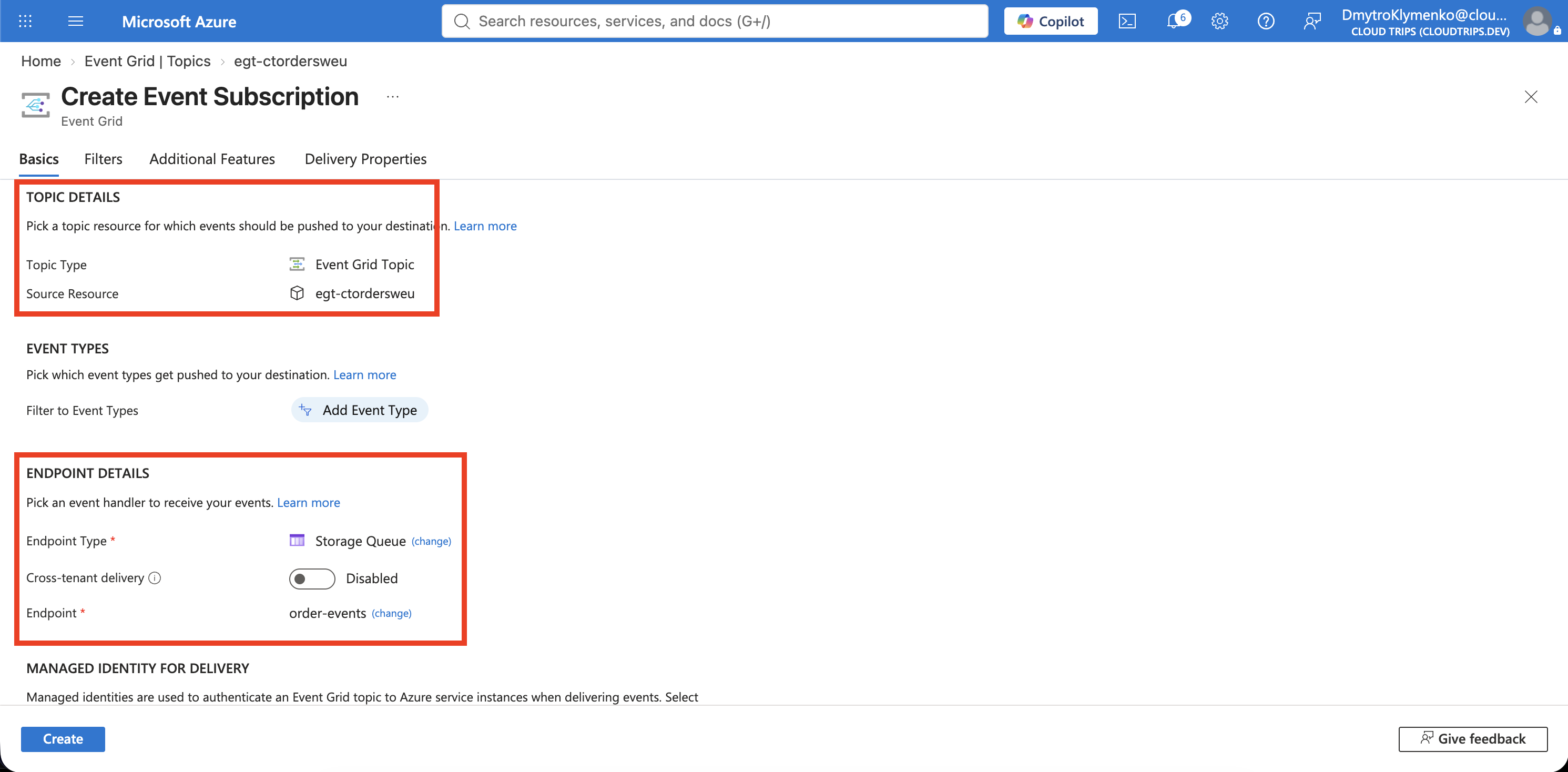
Return to the topic → Overview → + Event Subscription:
Name: es-ctorders-to-queue
Event Schema: Event Grid Schema
Endpoint Type: Storage Queues
Endpoint: stcteventsweu / order-events
Managed Identity Type: System Assigned
Use Select an endpoint to choose your actual Storage account and queue. Enable the system-assigned identity for delivery in the endpoint settings. Leave event filters at their defaults for this first test, then create the event subscription. Wait until provisioning succeeds before publishing.
Screenshot 1: The event subscription showing the Event Grid topic and Storage queue destination.
Publish One Order Event
Open Azure Cloud Shell → Bash. A session without a storage account is sufficient. Run the block below; change topic_name if you used another topic name. If the account check reports that login is required, run az login --use-device-code, complete the displayed sign-in steps, and rerun the block.
The Python code uses built-in libraries, so no pip packages are required. It obtains the topic key through your Azure CLI login without printing it. Your lab Owner account can retrieve this key. Key authentication is used for publishing; the managed identity configured above is used for delivery to Storage.
az account show --output table
az account set --subscription 'CloudTrips TEST'

python3 - <<'PYTHON'
import json
import subprocess
import uuid
from datetime import datetime, timezone
from urllib.request import Request, urlopen

resource_group = "rg-cloudtrips-eventgrid-test-weu"
topic_name = "egt-ctordersweu"

def az_value(*args):
    return subprocess.check_output(
        ["az", *args, "--output", "tsv"], text=True
    ).strip()

endpoint = az_value(
    "eventgrid", "topic", "show", "--resource-group", resource_group,
    "--name", topic_name, "--query", "endpoint"
)
key = az_value(
    "eventgrid", "topic", "key", "list", "--resource-group", resource_group,
    "--name", topic_name, "--query", "key1"
)
event = {
    "id": str(uuid.uuid4()),
    "eventType": "CloudTrips.OrderCreated",
    "subject": "orders/CT-5001",
    "eventTime": datetime.now(timezone.utc).isoformat(),
    "dataVersion": "1.0",
    "data": {"orderId": "CT-5001", "product": "Notebook", "quantity": 1}
}
request = Request(
    endpoint, data=json.dumps([event]).encode("utf-8"),
    headers={"Content-Type": "application/json", "aeg-sas-key": key},
    method="POST"
)
with urlopen(request, timeout=30) as response:
    print(f"Accepted: HTTP {response.status}; event ID: {event['id']}")
PYTHON
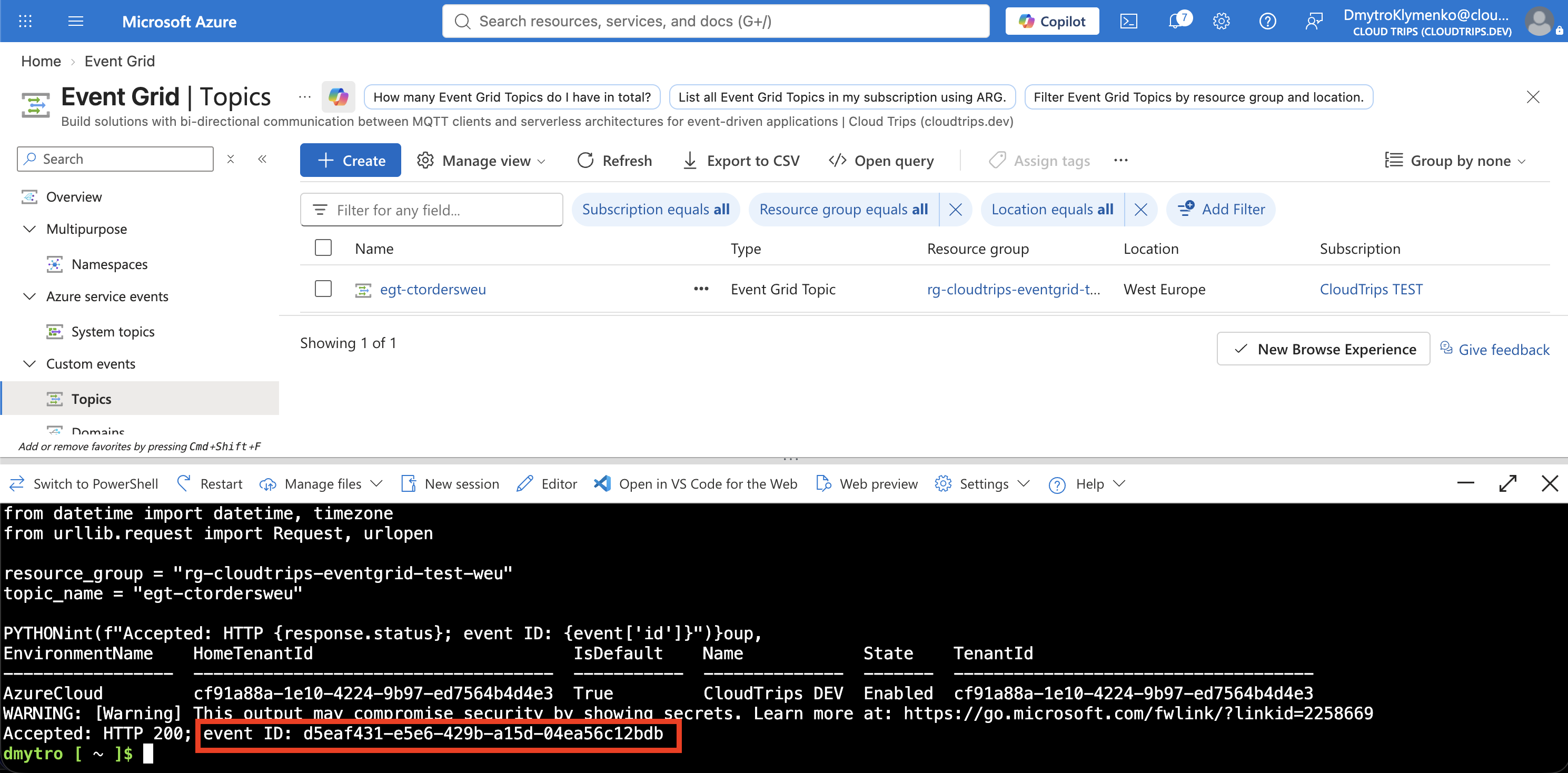
Expect Accepted: HTTP 200 and an event ID. This confirms Event Grid accepted the publication; the next step verifies delivery.
Screenshot 2: Cloud Shell showing the accepted event and its event ID.
Verify Delivery to the Queue
Open your Storage account → Data storage → Queues → order-events and refresh. Use Microsoft Entra authentication if the portal offers an authentication selector. Inspect the received message’s text. Find CloudTrips.OrderCreated, orders/CT-5001, and the same event ID printed in Cloud Shell. If the viewer offers Base64 decoding, enable it only if the text is encoded.
Screenshot 3: The Storage queue message showing the delivered order event.
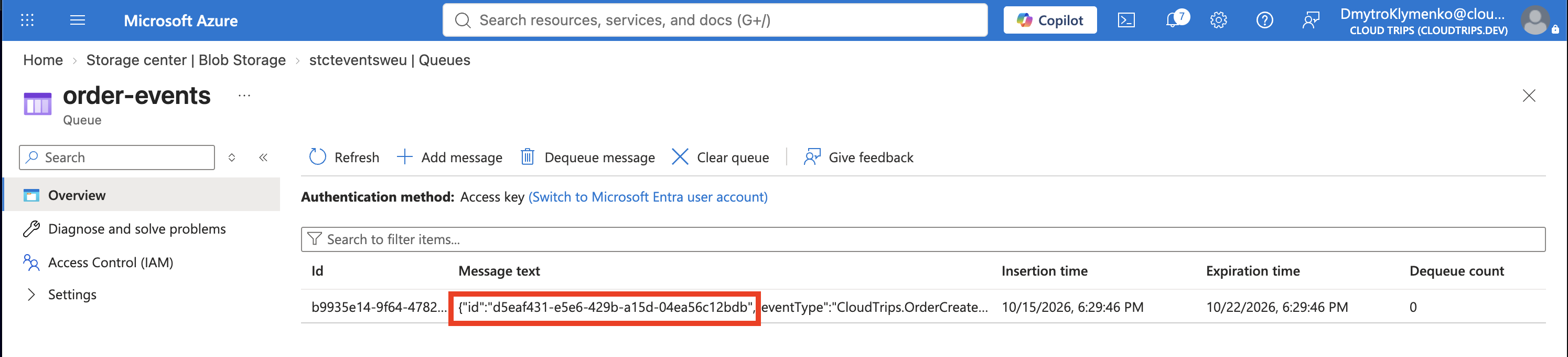
The topic received the notification, the event subscription selected the destination, and Event Grid delivered it to Storage. An event subscription here is a routing configuration, not your Azure billing subscription.
If the queue is empty after a short wait, open the topic’s Metrics and inspect Matched Events, Delivery Succeeded Events, and Delivery Failed Events over the last hour. Check the destination, the delivery identity, and its Storage Queue Data Message Sender role. Role propagation and retries can delay delivery. A successful publish does not prove the destination accepted the event.
Event Grid can deliver an event more than once and does not guarantee delivery order. A receiving application should recognize duplicate event IDs. It also retries failed deliveries only within configured limits; this lab does not configure a dead-letter destination.
Finish
Keep this resource group for the Event Grid domain trip. Otherwise, delete rg-cloudtrips-eventgrid-test-weu when finished. Deleting only the event subscription stops that route but leaves the topic and Storage resources in place.