API Changes Need Separate Versions? Create and Test an API Version
API versions let clients move to a changed API when they are ready. Suppose an order API changes total from a number to an object containing amount and currency. Existing clients might break if that change suddenly appears at their current endpoint. Keeping v1 available while introducing v2 gives those clients time to migrate.
Reuse apim-ctgateway-weu on Consumption and CloudTrips Petstore. We will create v1 and v2, identify each with a response header, and keep the original URL working. Both versions use the same existing Petstore backend; we do not deploy a new application or change the JSON body in this lab.
| Feature | When to use it |
|---|---|
| Version | Offer a separately selectable API contract, commonly for breaking changes |
| Revision | Prepare and test changes within a version, commonly for compatible updates |
Versioning does not make an incompatible change safe by itself. Clients still need to choose the new version and adapt to its contract.
Prepare the Existing API
Open API Management → apim-ctgateway-weu → APIs → APIs → CloudTrips Petstore.
If you completed the policy trip, first perform its cleanup. Under Design → GET /pet/findByStatus → policy code editor, the operation policy should be:
<policies>
  <inbound><base /></inbound>
  <backend><base /></backend>
  <outbound><base /></outbound>
  <on-error><base /></on-error>
</policies>
Save if you changed it. Keep the All operations policy that removes subscription keys before forwarding, and keep Subscription required enabled. This prevents the previous lab’s required header, query override, and three-call limit from being copied into your new versions.
Create v1
In the API list, open … beside CloudTrips Petstore → Add version:
Version identifier: v1
Versioning scheme: Path
Full API version name: ct-petstore-v1
Products: leave empty
Select Create. The portal groups the API into a version set. Expand it to see Original and v1.
Original preserves the existing endpoint without a version segment. It is not automatically renamed to v1. The new v1 is a separate API resource created from the source API.
We use Path because the selected version is visible in the URL. APIM also supports selecting a version through a header or query parameter, but all versions in a version set share the chosen scheme.
Select v1 → Settings and verify:
Web service URL: https://petstore3.swagger.io/api/v3
API URL suffix: petstore
Subscription required: On
APIM adds the version segment for you. Do not manually change the suffix to petstore/v1, or change the backend URL to /v1. Petstore’s own /api/v3 address and your gateway’s version identifiers are independent.
Mark the v1 Response
Within v1, open Design → All operations → policy code editor. Replace this lab API’s policy with:
<policies>
  <inbound>
    <base />
    <set-header name="Ocp-Apim-Subscription-Key" exists-action="delete" />
    <set-query-parameter name="subscription-key" exists-action="delete" />
  </inbound>
  <backend>
    <base />
  </backend>
  <outbound>
    <base />
    <set-header name="X-CloudTrips-API-Version" exists-action="override">
      <value>v1</value>
    </set-header>
  </outbound>
  <on-error>
    <base />
  </on-error>
</policies>
Save. This retains the key-removal rules and adds X-CloudTrips-API-Version: v1 to backend responses. It gives us a visible way to check which version handled the request.
Create v2 from v1
Open … beside the v1 API entry → Add version:
Version identifier: v2
Versioning scheme: Path (inherited from the version set)
Full API version name: ct-petstore-v2
Products: leave empty
Select Create. You should now see Original, v1, and v2 in the same group.
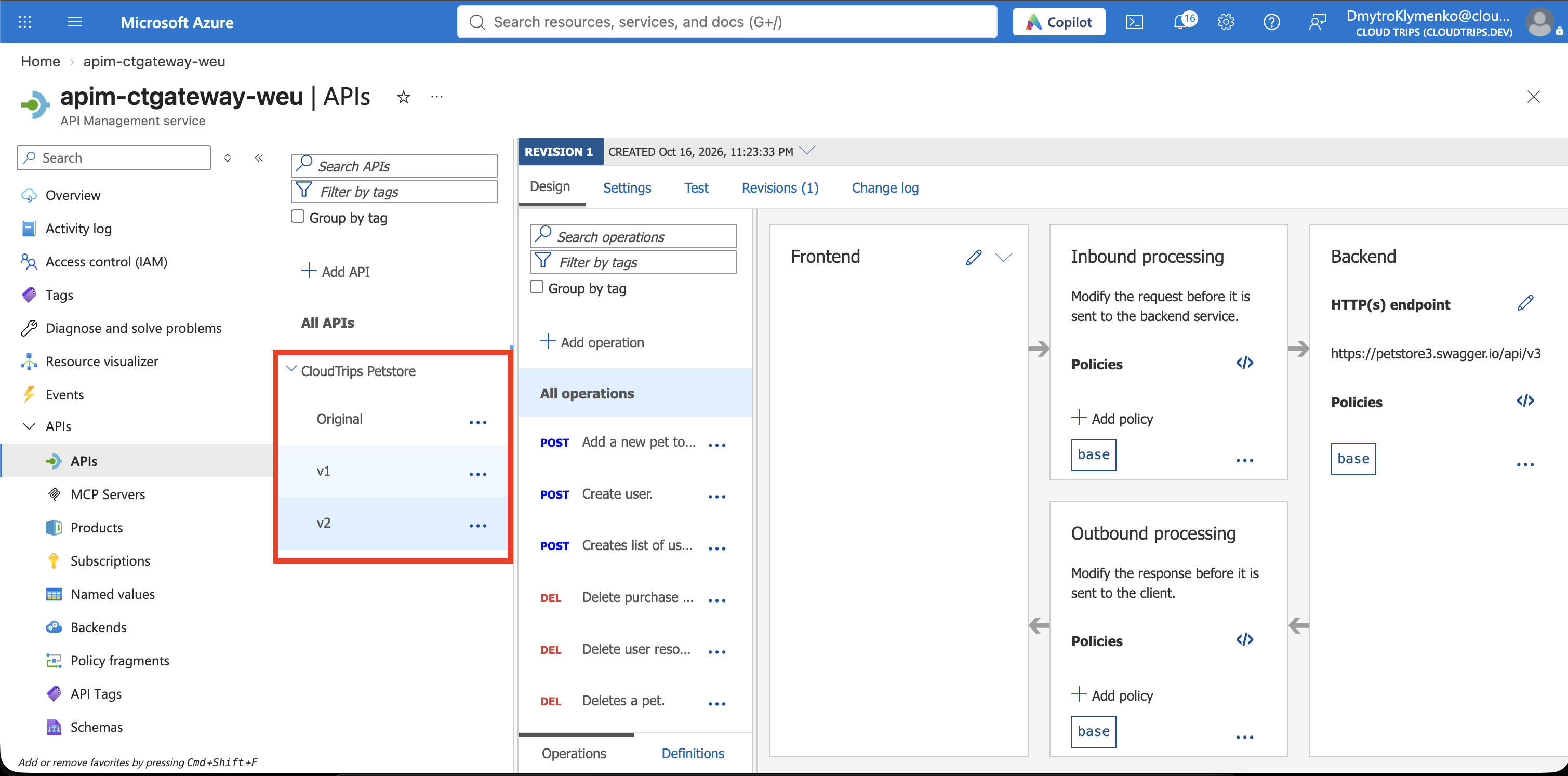
Select v2 → Design → All operations → policy code editor. In the copied response-header policy, change only:
<value>v1</value>to:
<value>v2</value>Save. Verify v2 still uses the same backend URL and has Subscription required enabled. Changes to v2’s own policies do not update v1’s policies. A version can later use different operations, response formats, or a different backend; here the response marker is the only intentional difference.
Test Both Versions
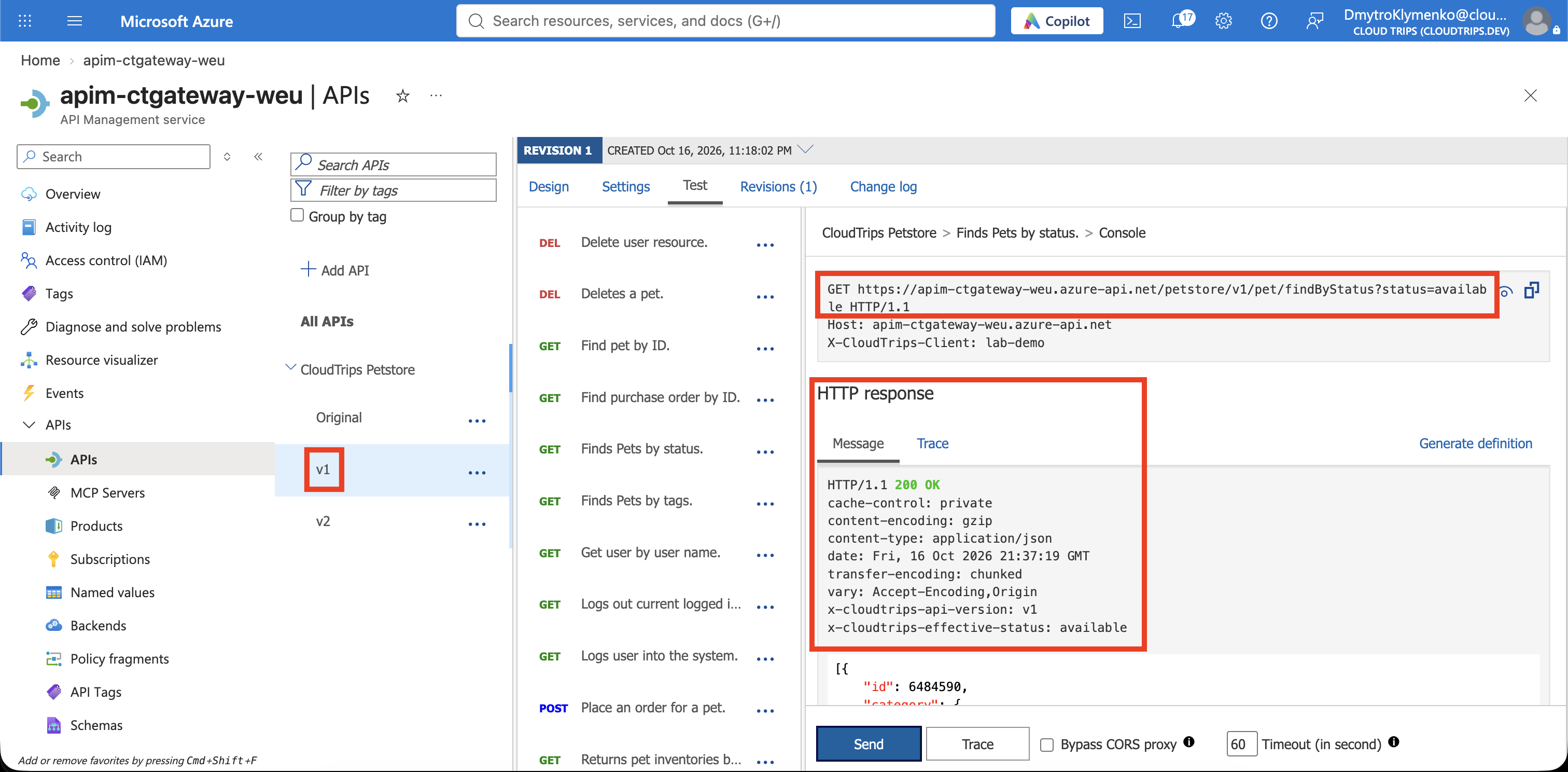
Select v1 → Test → GET /pet/findByStatus:
Query parameter:
  status: available
Request header:
  Accept: application/json
Use the portal’s built-in all-access subscription for this administrator test and keep its key masked. No product is needed for this test, and Consumption has no developer portal. A key scoped only to the original API does not automatically grant access to the new APIs.
Select Send. Check all three:
- Request URL contains
/petstore/v1/pet/findByStatus. - Response status is 200 OK.
- Response headers contain X-CloudTrips-API-Version: v1.
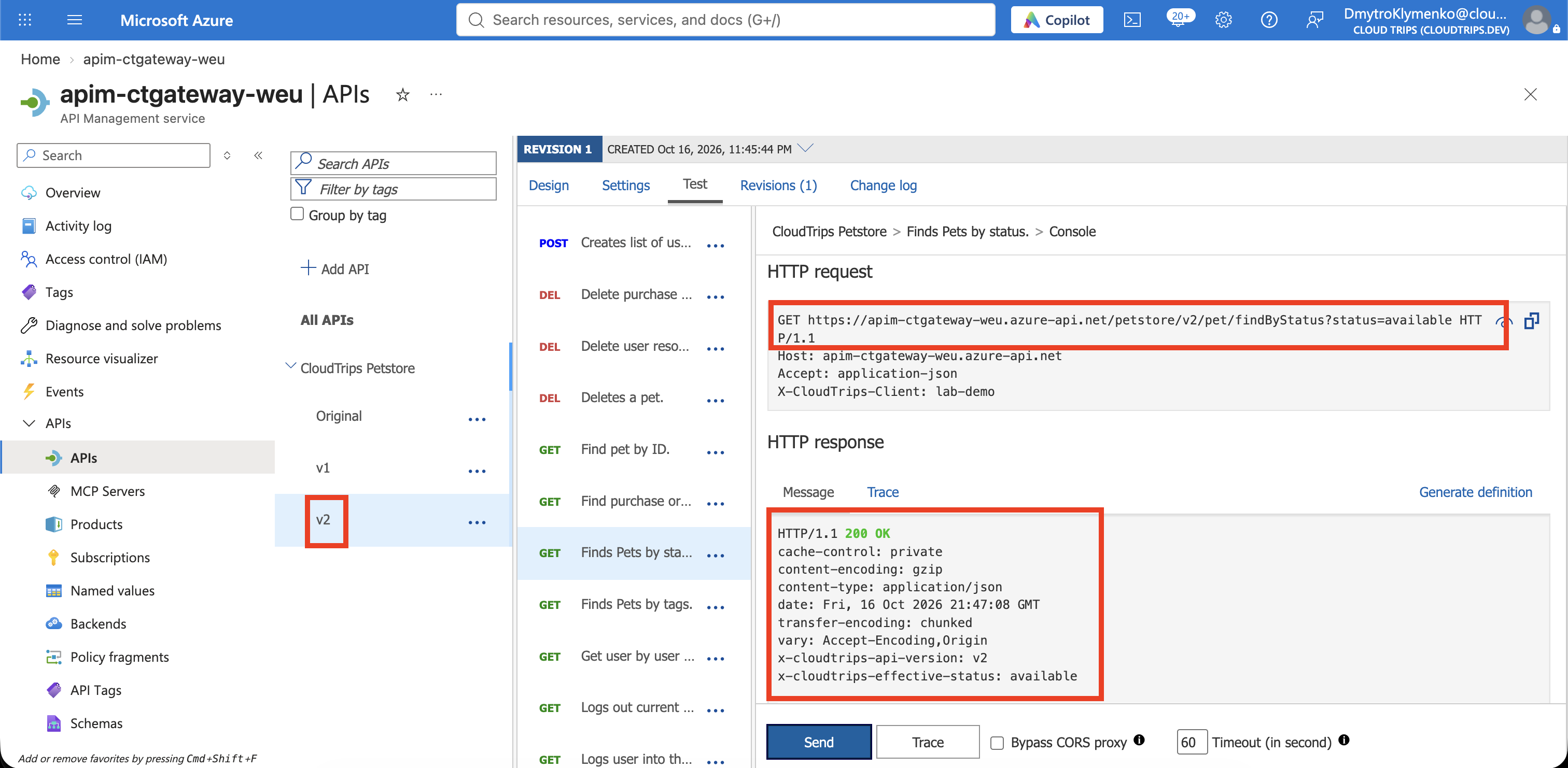
Now select v2 → Test → GET /pet/findByStatus, use the same query parameter and request header, and send again. Expect 200 OK, a URL containing /petstore/v2/pet/findByStatus, and X-CloudTrips-API-Version: v2.
Finally select Original → Test and call the same operation. It should still return 200 at the URL without a version segment. It should not have the custom version header added to v1 and v2.
| API | Gateway path, followed by ?status=available |
|---|---|
| Original | /petstore/pet/findByStatus |
| v1 | /petstore/v1/pet/findByStatus |
| v2 | /petstore/v2/pet/findByStatus |
All three use your gateway host, such as https://apim-ctgateway-weu.azure-api.net. They currently forward to the same backend operation. The labels v1 and v2 do not automatically redirect old clients or create new backend deployments.
If the Results Differ
- 400 or 429 from the previous lab: its operation policy was copied. Reset that operation’s policy in each affected version using the preparation block above.
- v2 returns the v1 header: edit v2’s copied outbound policy and save; also check that the test URL actually contains v2.
- 404: keep the suffix
petstore, the version identifiersv1andv2, and the backend URL ending in/api/v3. Do not insert the version into the operation path. - 401: use a subscription that includes the API version being tested. The portal’s all-access subscription covers the lab versions.
Finish
Keep the instance and versions for further API work. If removing only this lab’s versions, delete v1 and v2 individually, preserving Original. Deleting the whole version set can remove the API versions grouped inside it.
If finished with API Management, delete rg-cloudtrips-apim-test-weu. In a real API rollout, retire an old version only after its clients have migrated.