APIs Need a Central Gateway? Create API Management and Import an API
Azure API Management (APIM) gives clients a central entry point to your APIs. Imagine an app calling separate order, payment, and stock services. APIM can expose them through one gateway, where you manage access rules, request limits, and transformations instead of implementing every rule separately in each service.
Client → API Management gateway → Existing backend API
Client ← API Management gateway ← Backend response
APIM does not run the backend’s application code. Importing an API adds its routes and description to the gateway; the original backend still handles the request.
For this lab, use the publicly hosted Swagger Petstore sample API. No App Service, Logic App, Integration Account, or local application is needed. We will only read sample data.
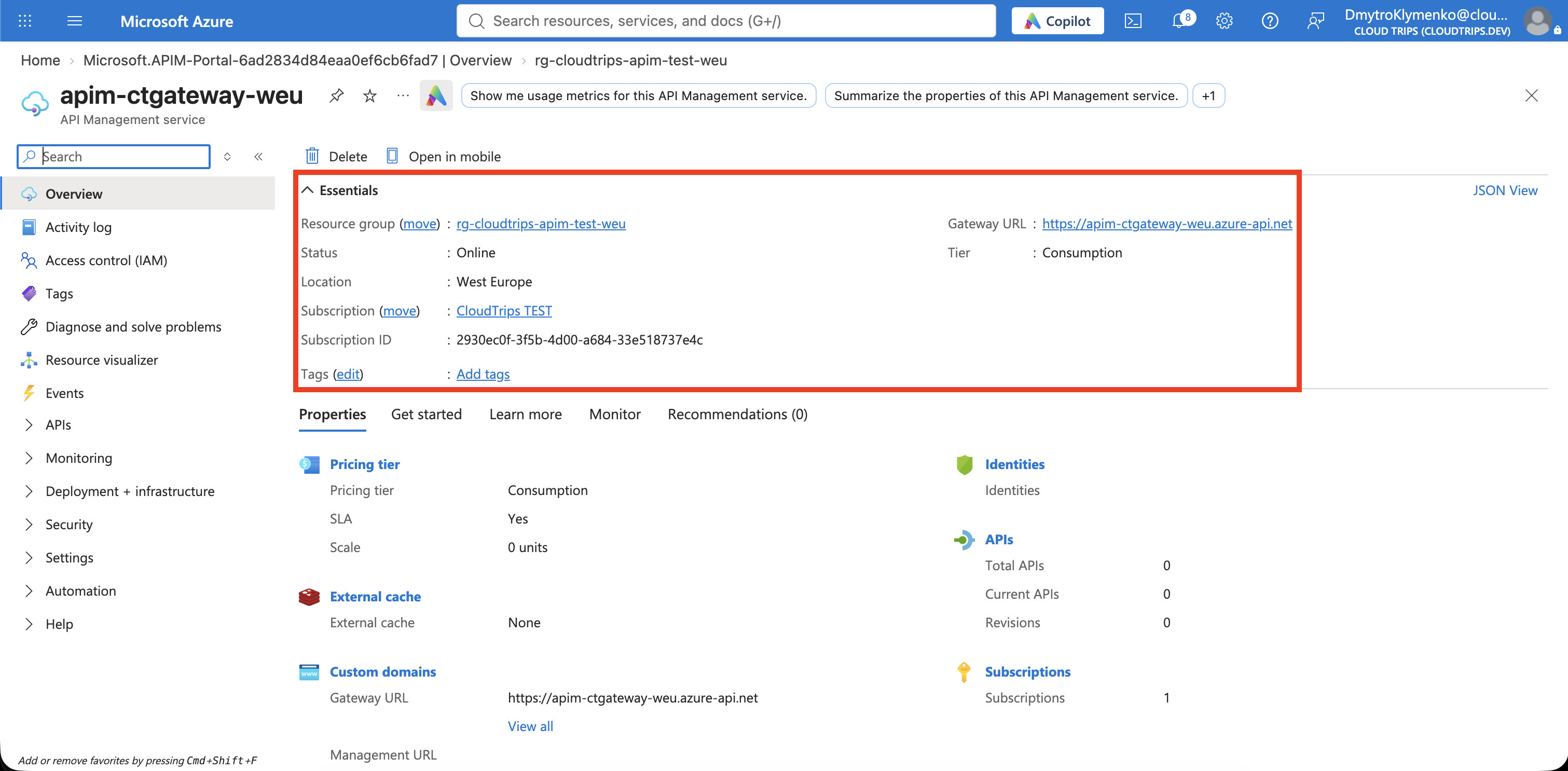
Create API Management
In the Azure portal, search for API Management services → Create:
Subscription: CloudTrips TEST
Resource group: rg-cloudtrips-apim-test-weu
Region: West Europe
Resource name: apim-ctgateway-weu
Organization name: CloudTrips
Administrator email: your email address
Pricing tier: Consumption
Use a unique suffix if the resource name is taken. The name becomes part of your gateway address, such as https://apim-ctgateway-weu.azure-api.net.
Consumption bills by API usage and is sufficient for this public HTTP API lab. It does not include a developer portal or private networking. You need an Azure subscription, not a separate per-user license. Review the estimate and leave optional monitoring/security add-ons unselected. Use public network access; no VNet or managed identity is needed here.
Select Review + create → Create. Provisioning time varies; wait for deployment to finish and the instance to become available before importing.
Import the Existing API
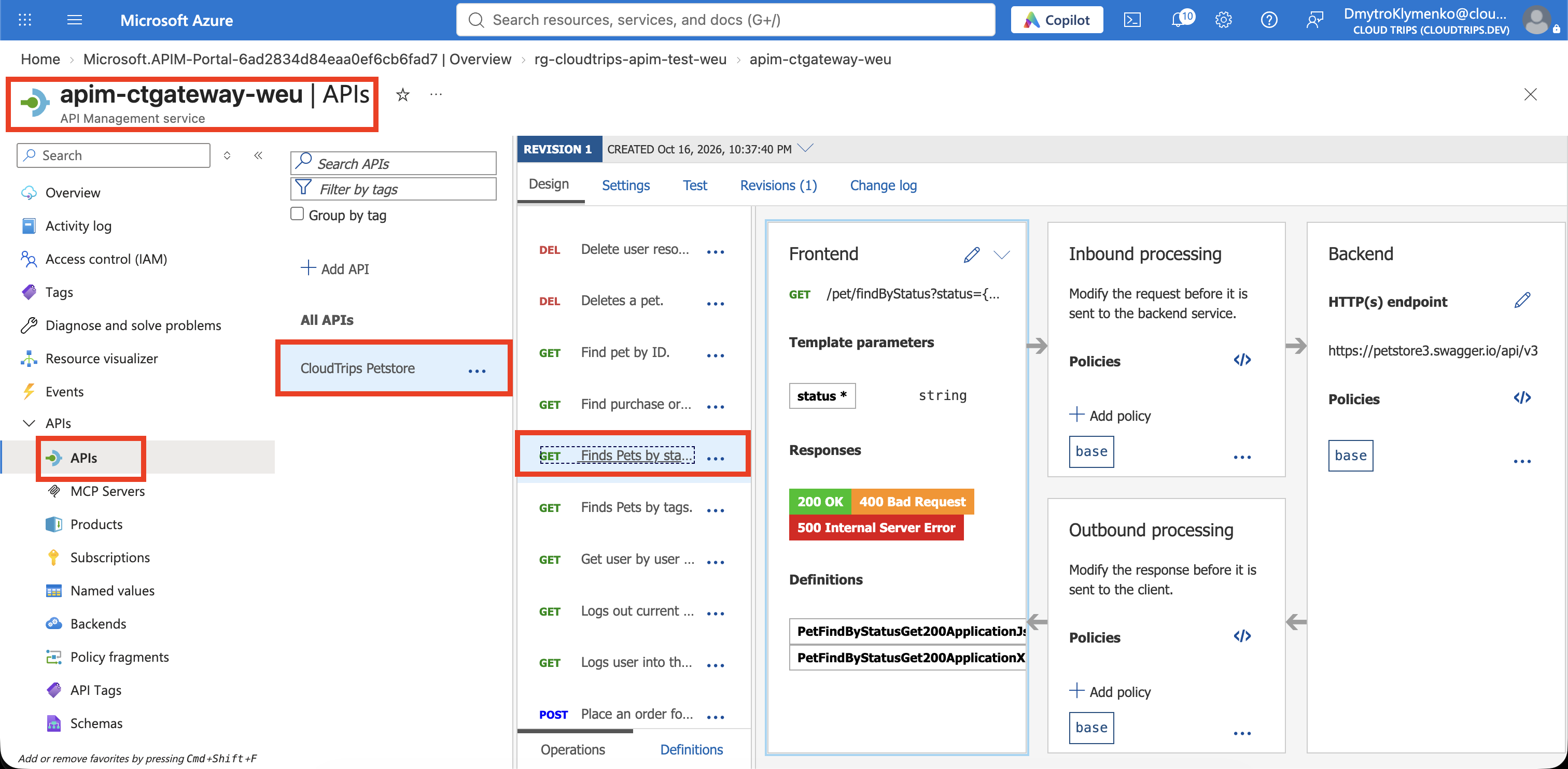
Open the instance → APIs → APIs → Add API → OpenAPI. If the OpenAPI tile is already visible, select it directly. Choose Full if the form offers Basic and Full views.
An OpenAPI document is a machine-readable description of an API: its paths, methods, parameters, and response formats. APIM uses it to create the operations you can call through the gateway.
Enter:
OpenAPI specification: https://petstore3.swagger.io/api/v3/openapi.json
Display name: CloudTrips Petstore
Name: ct-petstore
URL scheme: HTTPS
API URL suffix: petstore
Products: leave empty
Version this API: No
Wait for the definition to load, then adjust the generated display name and name to the values above. Leave other import options at their defaults and select Create.
Select CloudTrips Petstore → Settings. Verify these values and save if you change them:
Web service URL: https://petstore3.swagger.io/api/v3
API URL suffix: petstore
Subscription required: On
The Web service URL is the backend address. The API URL suffix identifies this API on your gateway. Under Design, confirm that GET /pet/findByStatus appears among the imported operations.
Products bundle APIs for consumers. We can leave Products empty because the portal can test this API using the instance’s built-in test subscription.
Keep the Gateway Key at the Gateway
An APIM subscription grants access to APIs using a key. It is different from your Azure billing subscription. With Subscription required enabled, callers need a valid key for this API.
APIM can forward the key to the backend by default. Our backend is a public sample service, so remove that key before forwarding the request. APIM still checks it at the gateway.
Under CloudTrips Petstore → Design → All operations, find Inbound processing and select its policy code editor (</>). For this newly imported lab API, replace the policy document with:
<policies>
  <inbound>
    <base />
    <set-header name="Ocp-Apim-Subscription-Key" exists-action="delete" />
    <set-query-parameter name="subscription-key" exists-action="delete" />
  </inbound>
  <backend>
    <base />
  </backend>
  <outbound>
    <base />
  </outbound>
  <on-error>
    <base />
  </on-error>
</policies>
Select Save. The two delete rules remove the subscription key from the forwarded header or query string. The <base /> elements preserve inherited policy behavior. Apply this at All operations, not only one operation.
Test Through the Gateway
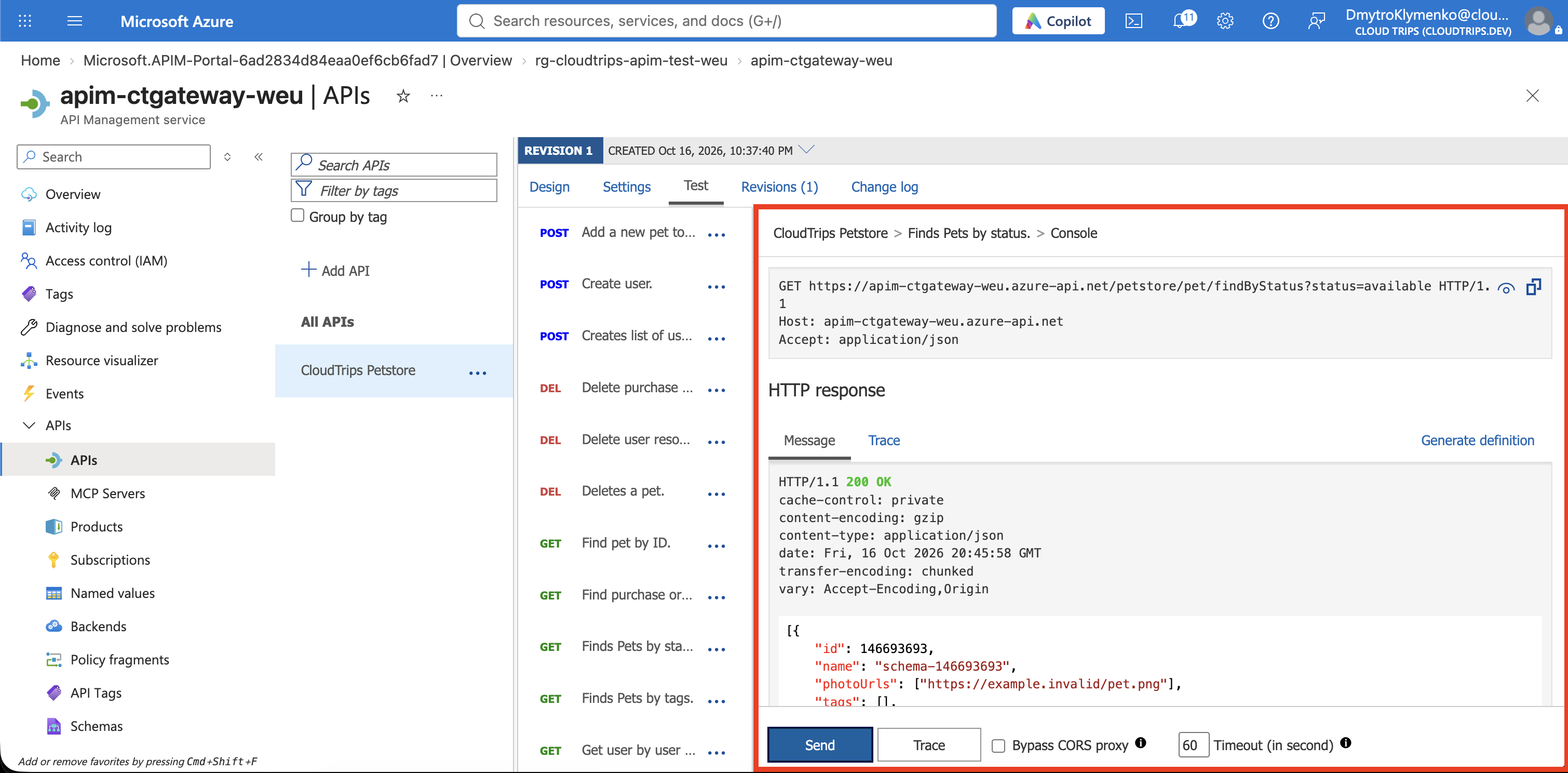
Open CloudTrips Petstore → Test. Select Finds Pets by status, or locate the operation by GET /pet/findByStatus.
Set:
Query parameter:
  status: available
Request header:
  Accept: application/json
The portal test console normally fills Ocp-Apim-Subscription-Key using the built-in all-access subscription. If a Subscription selector appears, choose that subscription for this administrator test. Keep the key masked; do not copy it into screenshots or client applications.
Select Send. Expect 200 OK and a JSON array of pets. This is a shared demo, so its records can change; an empty array with HTTP 200 is also a valid response.
Check that the Request URL uses your azure-api.net gateway hostname. For the example name, the request is:
https://apim-ctgateway-weu.azure-api.net/petstore/pet/findByStatus?status=availableAPIM forwards it to:
https://petstore3.swagger.io/api/v3/pet/findByStatus?status=availableNotice that petstore is your gateway suffix; it is not added to the backend URL.
To verify the access check, open your gateway request URL in a new browser tab without a subscription key. Expect 401 with a missing-key message. This is intentional: the portal test included a key, while the browser request did not.
The Petstore backend remains publicly reachable at its own address. Protecting the gateway does not automatically block direct backend access. In a real deployment, you would also restrict or authenticate access to your backend.
If the Test Fails
- 401 in the test console: check that the APIM subscription key is populated and the selected subscription is active. Do not disable Subscription required to fix a missing key.
- 404: check the backend URL, gateway suffix, and selected operation. Do not put
/pet/findByStatusinto the Web service URL; it is already the operation path. - Import fails or the backend returns 5xx: the public demo service may be temporarily unavailable. Retry later; recreating APIM will not repair that backend.
Finish
You now have a gateway exposing an existing API, with a successful request routed through APIM and a missing-key request rejected at the gateway.
Keep rg-cloudtrips-apim-test-weu if continuing with API policies or versioning. Otherwise delete the resource group. Deleting the imported API alone leaves the API Management instance in place.