API Needs User Permissions? Expose a Delegated Scope
APIs should not accept access tokens only because the token is valid.
They should also check what the signed-in user is allowed to do.
For user-based API access, the Microsoft Entra pattern is:
Expose a delegated scope.
This pattern is used when:
- a user is present
- an app calls an API on behalf of that user
- the API needs user permission checks
- authentication is handled by Microsoft Entra ID
- authorization is based on the
scpclaim in the access token
In this example:
- CloudTrips API is the protected resource
- CloudTrips Client is any user-facing client app
- Employee is the signed-in user
The client can be a web app, SPA, CLI, mobile app, or desktop app.
The important part is the same:
Client requests scope -> Entra issues access token -> API validates aud and scpDelegated Scope vs App Role
A delegated scope represents what a client app may do on behalf of a signed-in user.
In tokens, delegated permissions appear in:
scpExample:
{
  "scp": "Trips.Read"
}
An app role represents role-based authorization for an application, user, or group.
In tokens, app roles appear in:
rolesUse delegated scopes when the API decision is about the permission the client requested for the user.
Use app roles when the app decision is about the role assigned to the user or group.
The same signed-in user token can contain both:
{
  "scp": "Trips.Read",
  "roles": ["Trip.Approver"]
}
In that case, the two claims answer different questions:
scp
Question it answers:
Is this client allowed to call this API operation for the signed-in user?Example use:
Allow an API read endpoint when scp contains Trips.Read.roles
Question it answers:
What role does this user or group have inside the app?Example use:
Show approval features when roles contains Trip.Approver.For APIs, a common pattern is:
Check aud -> token is for this API
Check scp -> client has delegated permission
Check roles -> user has required business role, if the endpoint needs one
This trip focuses mainly on delegated scopes and the scp claim.
Create CloudTrips API App
First, create the resource application.
Go to:
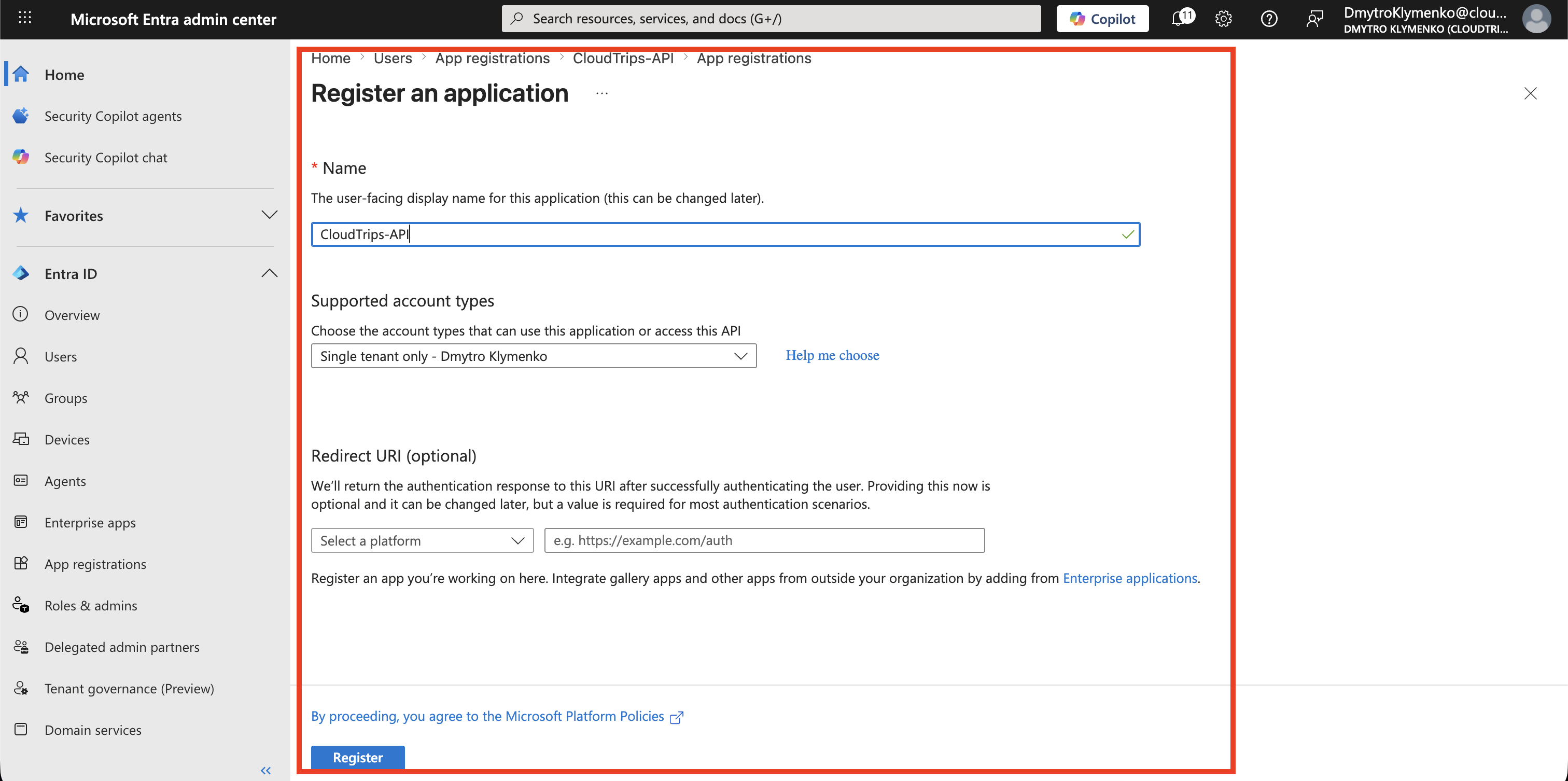
Entra ID > App registrations > New registrationCreate an application:
Name: CloudTrips-API
Supported account types: Single tenant
This app registration represents the API that will receive and validate access tokens.
Set Application ID URI
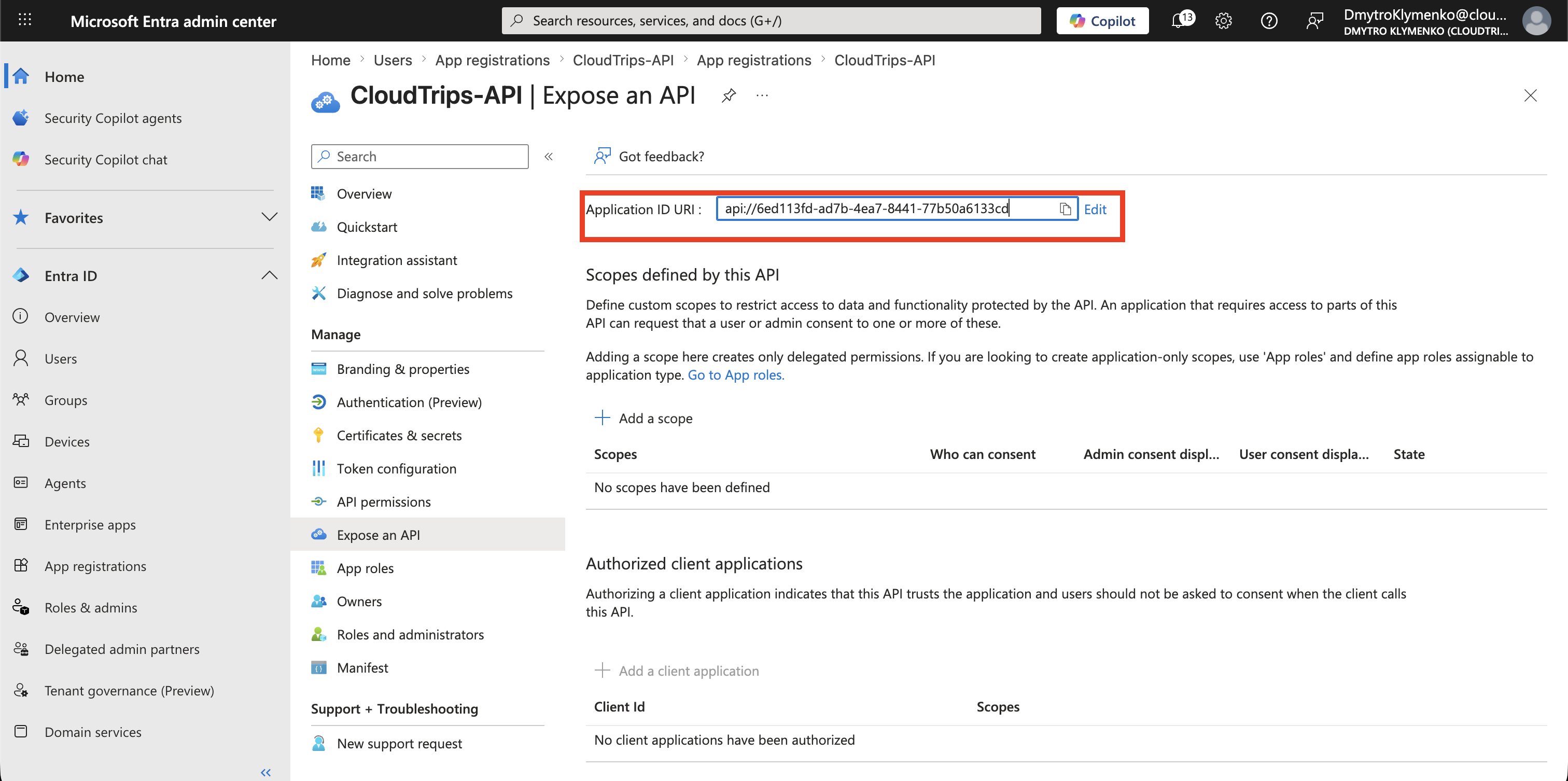
Inside CloudTrips-API, open:
Expose an APISet the Application ID URI:
api://<cloudtrips-api-application-id>This value becomes the API audience.
The access token should later contain this value in the aud claim.
Add Delegated Scope
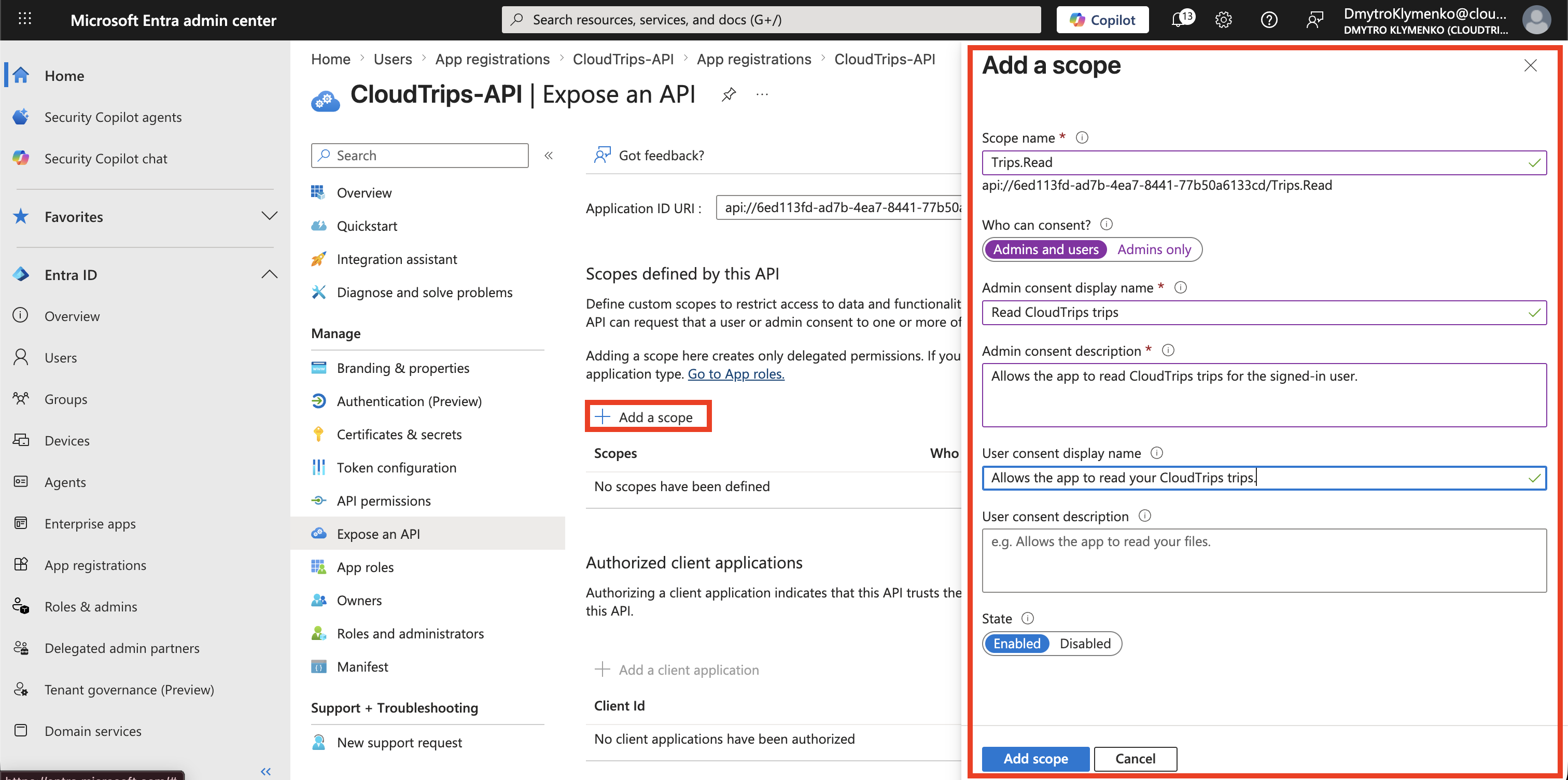
Inside CloudTrips-API, select:
Add a scopeCreate a delegated scope:
Scope name: Trips.Read
Who can consent: Admins and users
Admin consent display name: Read CloudTrips trips
Admin consent description: Allows the app to read CloudTrips trips for the signed-in user.
User consent display name: Read your CloudTrips trips
User consent description: Allows the app to read your CloudTrips trips.
State: Enabled
This defines a user permission that client apps can request.
After saving, the scope appears under:
Scopes defined by this APIThe full permission value is:
api://<cloudtrips-api-application-id>/Trips.Read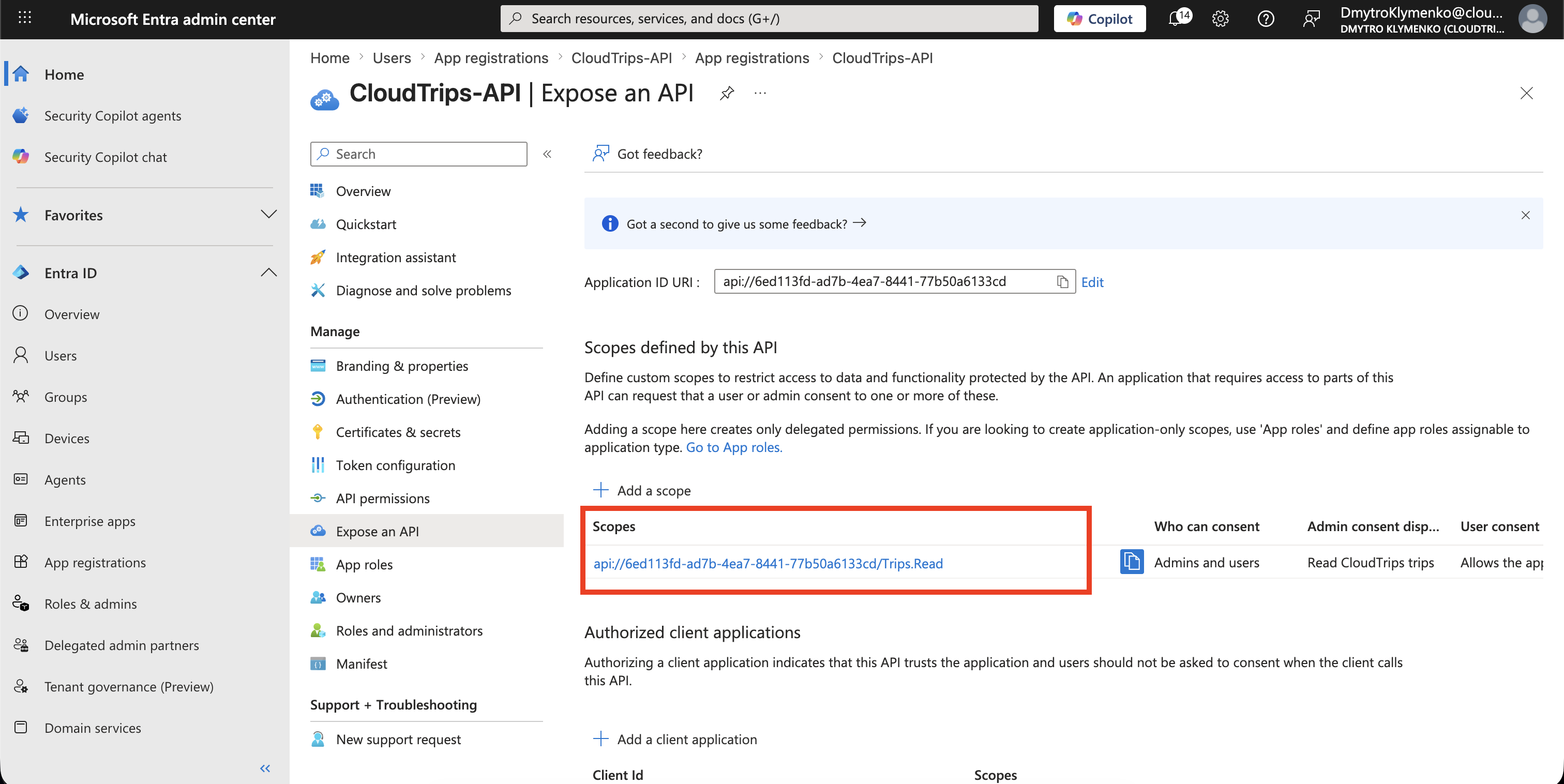
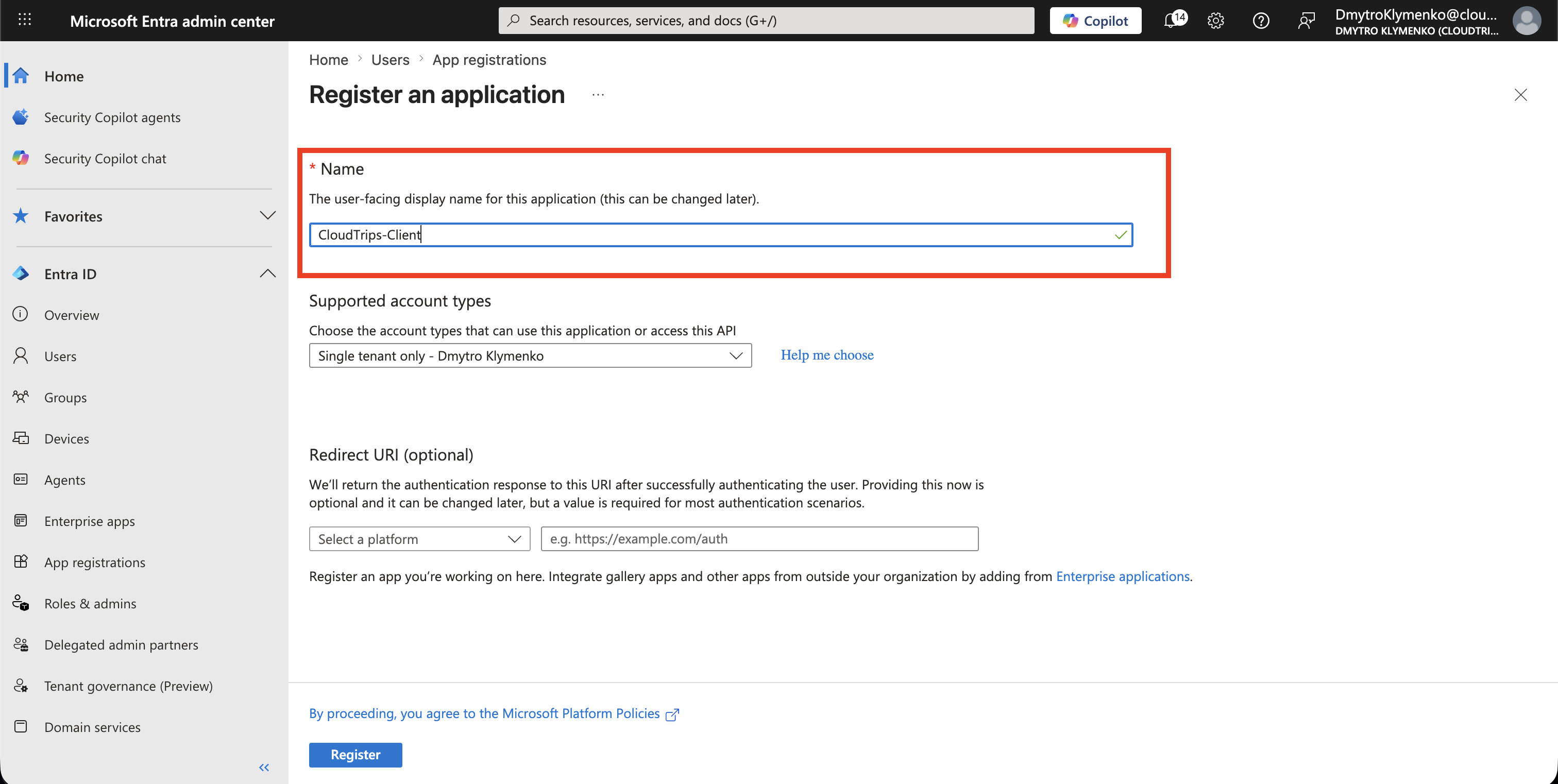
Create Client App
Now create a client app that will request the scope.
Go to:
Entra ID > App registrations > New registrationCreate an application:
Name: CloudTrips-Client
Supported account types: Single tenant
The exact platform depends on your app type.
For this trip, the client only needs to demonstrate that a user-facing app can request the delegated scope.
Add API Permission
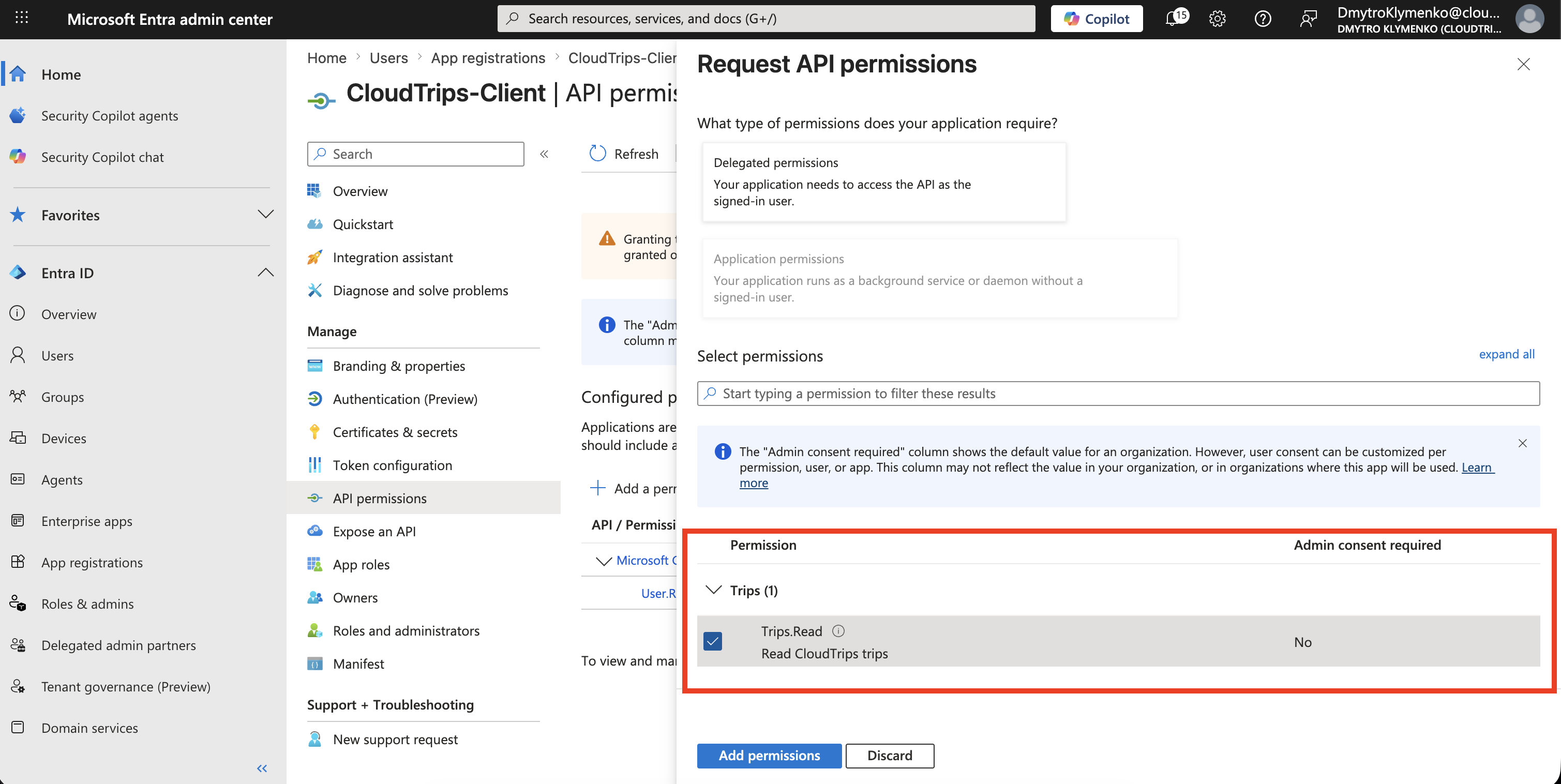
Inside CloudTrips-Client, open:
API permissions > Add a permissionChoose:
My APIs > CloudTrips-API > Delegated permissions > Trips.ReadThis allows the client app to request Trips.Read on behalf of the signed-in user.
Grant Consent
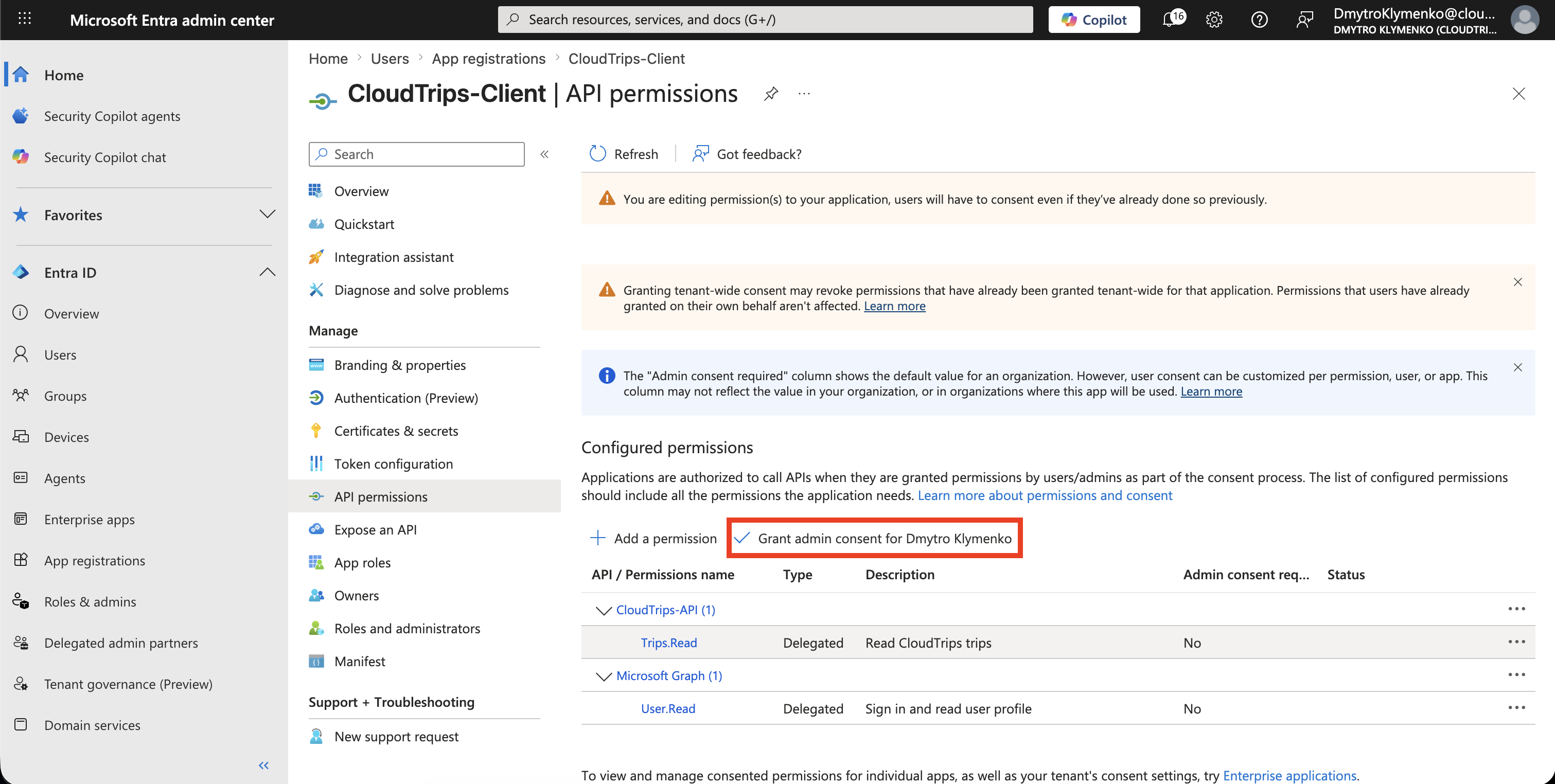
If your tenant requires administrator approval, click:
Grant admin consentAfter consent, the permission status should show that consent was granted for the tenant.
Request an Access Token
The client requests an access token using the full scope value:
api://<cloudtrips-api-application-id>/Trips.ReadThe exact OAuth flow depends on the client type:
| Client type | Common flow |
|---|---|
| Server-side web app | Authorization Code Flow |
| SPA | Authorization Code Flow with PKCE |
| CLI or device | Device Code Flow |
| Mobile or desktop app | Authorization Code Flow with PKCE |
The important request value is the scope:
scope=openid profile api://<cloudtrips-api-application-id>/Trips.ReadInspect Access Token
Decode the access token.
For delegated API access, check these claims:
| Claim | Meaning |
|---|---|
aud |
API that should accept the token |
scp |
Delegated permissions granted to the client |
sub |
Stable user identifier for this app |
tid |
Tenant ID |
iss |
Token issuer |
For this trip, the important proof is:
{
  "aud": "api://<cloudtrips-api-application-id>",
  "scp": "Trips.Read"
}
Validate Token in the API
The API should validate more than the token signature.
At minimum, validate:
- signature
- issuer
- audience
- expiration
- required delegated scope
Example logic:
const audiences = Array.isArray(claims.aud) ? claims.aud : [claims.aud];

if (!audiences.includes('api://<cloudtrips-api-application-id>')) {
  throw new Error('Invalid audience');
}

const scopes = String(claims.scp ?? '').split(' ');

if (!scopes.includes('Trips.Read')) {
  throw new Error('Missing required scope');
}
If the token is valid and contains scp=Trips.Read, the API returns the protected data.
Compare Scopes and Roles in User Tokens
Scopes and roles are often confused because both can appear in user access tokens.
They are not the same.
scp comes from delegated API permissions.
It says what permission the client app received for this API call.
roles comes from app role assignment.
It says what role the signed-in user or group has in the application.
Use scp for API permission boundaries:
Can this client call GET /trips for this user?
Required claim: scp contains Trips.Read
Use roles for app or business authorization:
Can this user approve a trip?
Required claim: roles contains Trip.Approver
For a simple read API, scp=Trips.Read may be enough.
For a sensitive workflow, check both:
scp contains Trips.Write
roles contains Trip.Manager
The API should still reject tokens that are valid JWTs but not valid for this API.
Reject the request when:
audis for another APIscpdoes not containTrips.Read- the token is expired
- the token came from the wrong tenant
- the token signature cannot be verified
Examples:
403 Invalid audience
403 Missing required scope: Trips.Read
401 Access token is expired
Enterprise Note
Delegated scopes are part of the API contract.
Name them carefully.
Good scope names describe the API permission:
Trips.Read
Trips.Write
Trips.Approve
Avoid using broad scopes when a narrower permission is possible.
For production, document:
- which clients may request each scope
- whether user consent is allowed
- when admin consent is required
- which API endpoints require which scopes
- how missing scopes are logged and investigated
This makes authorization easier to audit and safer to change.