SPA Needs Secure Login? Use Authorization Code Flow with PKCE
Single-page applications run in the browser.
That means they cannot safely store a client secret.
For a browser-based app, the secure pattern is:
Authorization Code Flow with PKCE.
PKCE stands for Proof Key for Code Exchange.
How This Differs from the Web App Flow
The previous trip used Authorization Code Flow for a server-side web app.
That app could keep a client_secret on the server and use it when exchanging the authorization code for tokens.
A SPA is different.
Its code runs in the user’s browser. Anything placed in the SPA can be inspected, copied, or modified by the user.
That is why a SPA must not use a client secret.
Instead, the SPA uses PKCE:
- the SPA creates a random
code_verifier - it sends only a hashed
code_challengeduring sign-in - later it proves possession of the original
code_verifier - Microsoft Entra ID issues tokens only if the verifier matches the challenge
So the purpose is similar:
Sign in user -> get authorization code -> exchange code for tokens -> call APIBut the protection mechanism is different:
Server-side web app: client secret protects the code exchange
SPA: PKCE protects the code exchange
This pattern is used when:
- a user is present
- the app runs in the browser
- no client secret can be protected
- authentication is handled by Microsoft Entra ID
- the app needs delegated access to an API
In this example:
- CloudTrips SPA is the browser application
- CloudTrips API is the protected resource
- Employee is the signed-in user
Authentication is done with OAuth 2.0 Authorization Code Flow with PKCE. Authorization is controlled with delegated permissions.
Architecture
Employee -> CloudTrips SPA -> Microsoft Entra ID -> CloudTrips APIThe SPA redirects the browser to Microsoft Entra ID.
The SPA receives an authorization code.
The SPA exchanges the code for tokens using a PKCE code verifier.
No client secret is used.
PKCE Verifier and Challenge
PKCE works by splitting one secret into two moments.
First, the SPA creates a long random string:
code_verifier=RANDOM_SECRET_CREATED_IN_THE_BROWSERThe SPA keeps this value locally for the current sign-in attempt.
Then the SPA hashes it with SHA-256 and base64url-encodes the result:
code_challenge=BASE64URL(SHA256(code_verifier))
code_challenge_method=S256
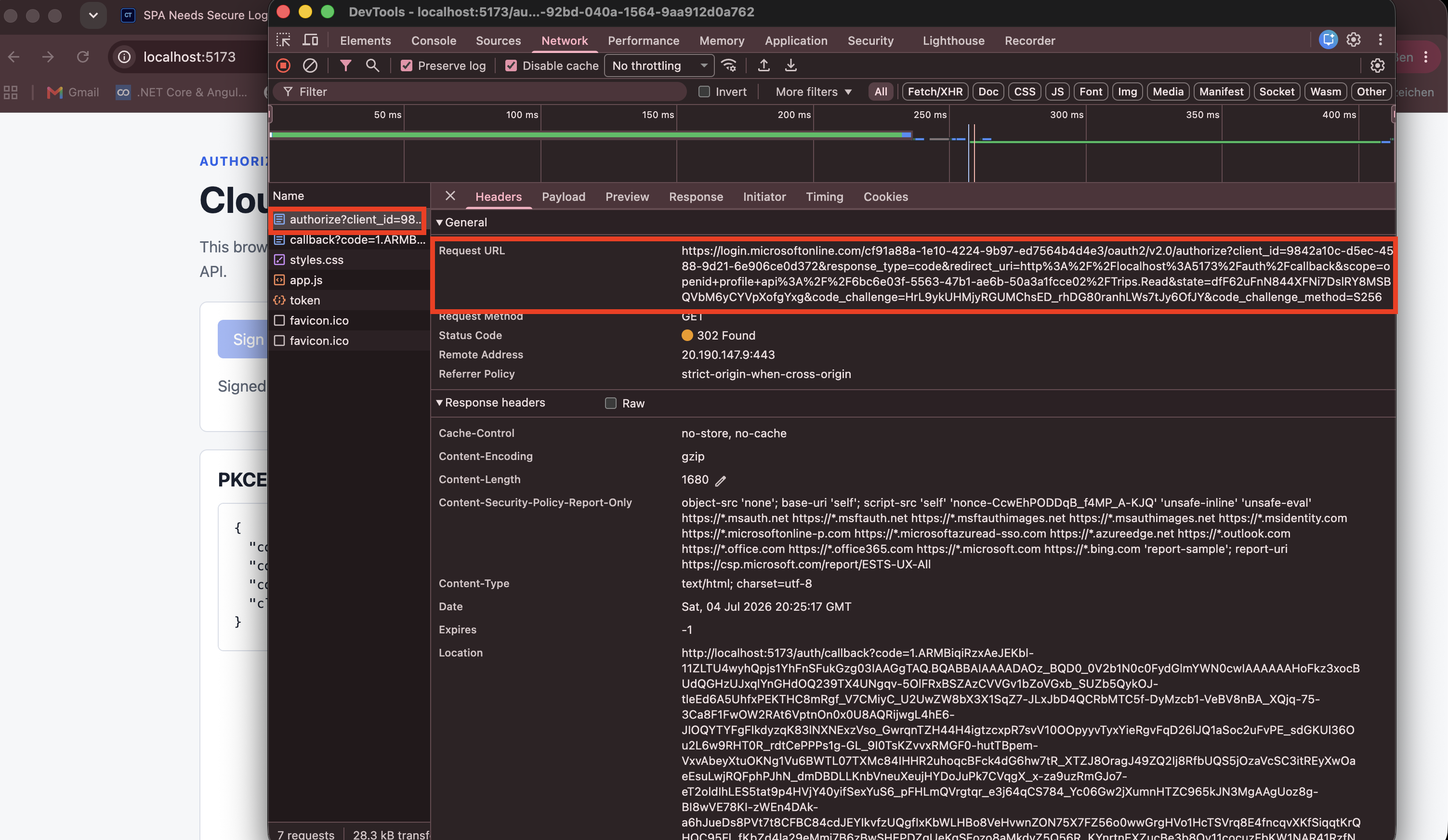
The browser sends the code_challenge to Microsoft Entra ID in the authorize request.
The browser does not send the code_verifier yet.
Later, when the SPA receives the authorization code, it sends the original code_verifier to the token endpoint.
Microsoft Entra ID hashes that verifier again and checks whether it matches the earlier code_challenge.
This is the core PKCE proof:
Authorize request: send code_challenge
Token request: send code_verifier
Entra check: SHA256(code_verifier) must match code_challenge
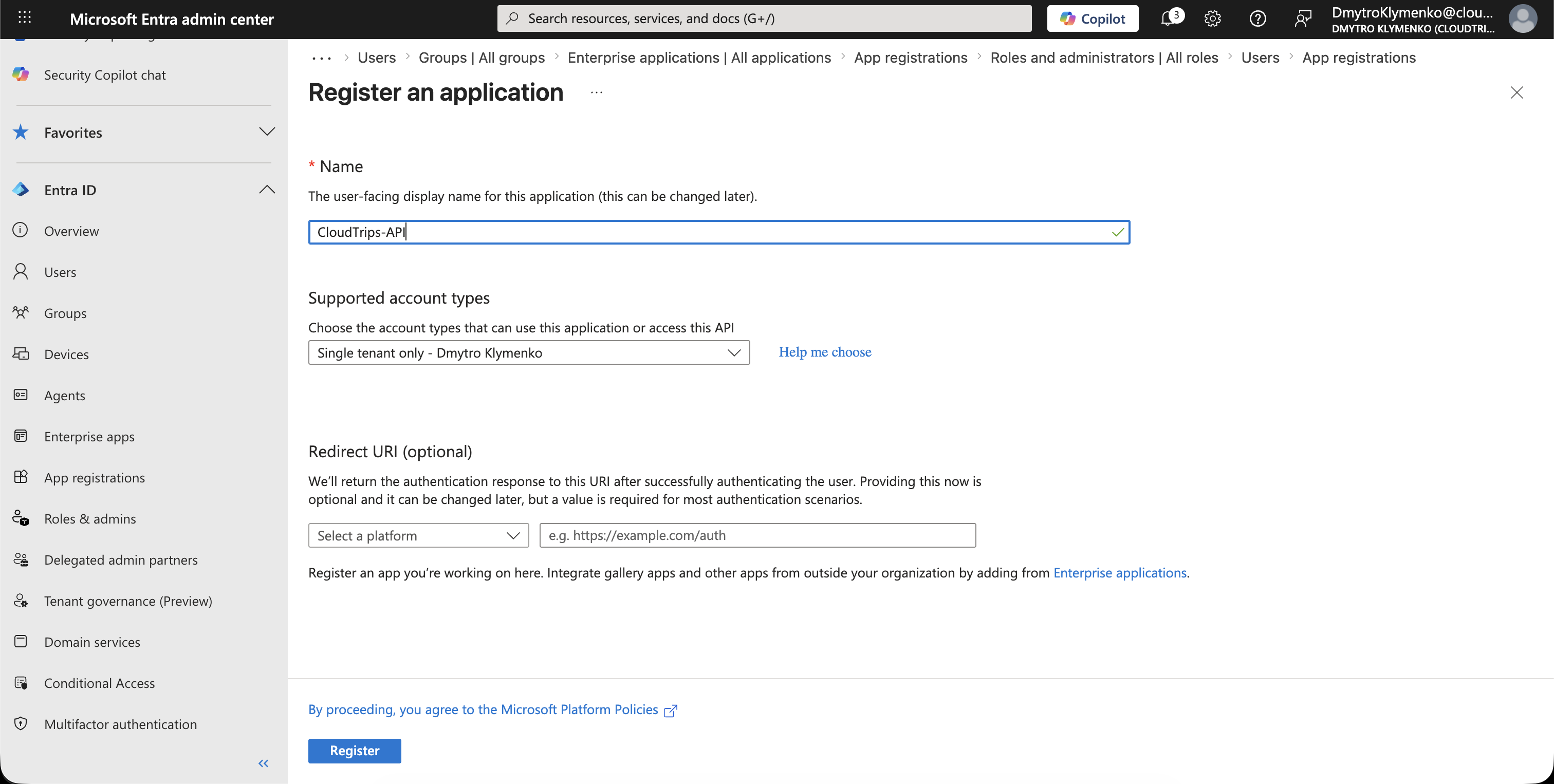
Create CloudTrips API App
First, create the resource application.
Go to:
Entra ID > App registrations > New registrationCreate an application:
Name: CloudTrips-APIThis app registration represents the API that will receive and validate access tokens.
Expose API
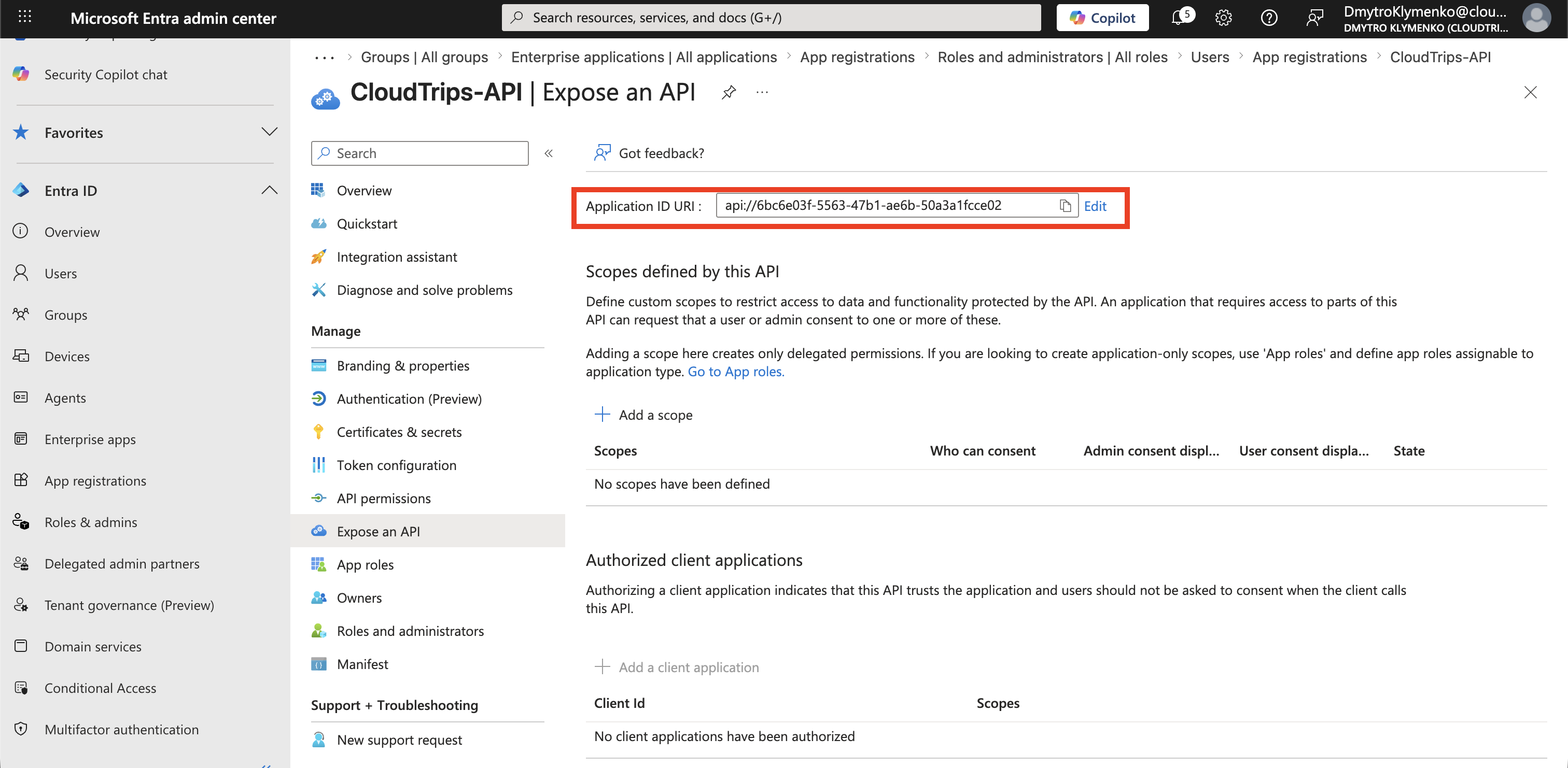
Inside CloudTrips-API, open:
Expose an APISet the Application ID URI:
api://<cloudtrips-api-application-id>This identifier becomes the audience for access tokens issued to the CloudTrips API.
Create Delegated Scope
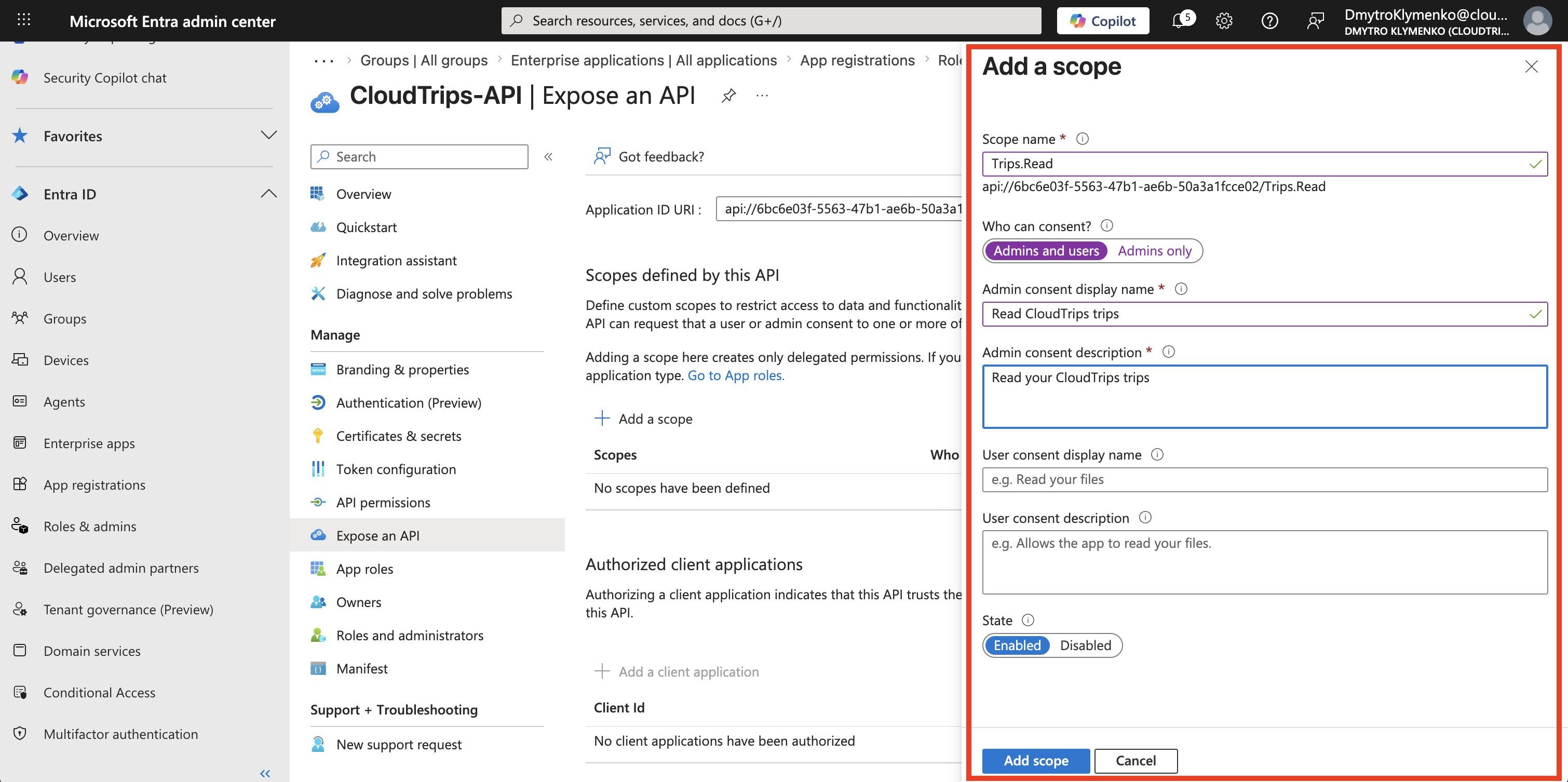
Inside CloudTrips-API, add a delegated scope:
Expose an API > Add a scopeExample:
Scope name: Trips.Read
Who can consent: Admins and users
Admin consent display name: Read CloudTrips trips
User consent display name: Read your CloudTrips trips
State: Enabled
The CloudTrips API can later check whether the incoming token contains this scope.
Create CloudTrips SPA
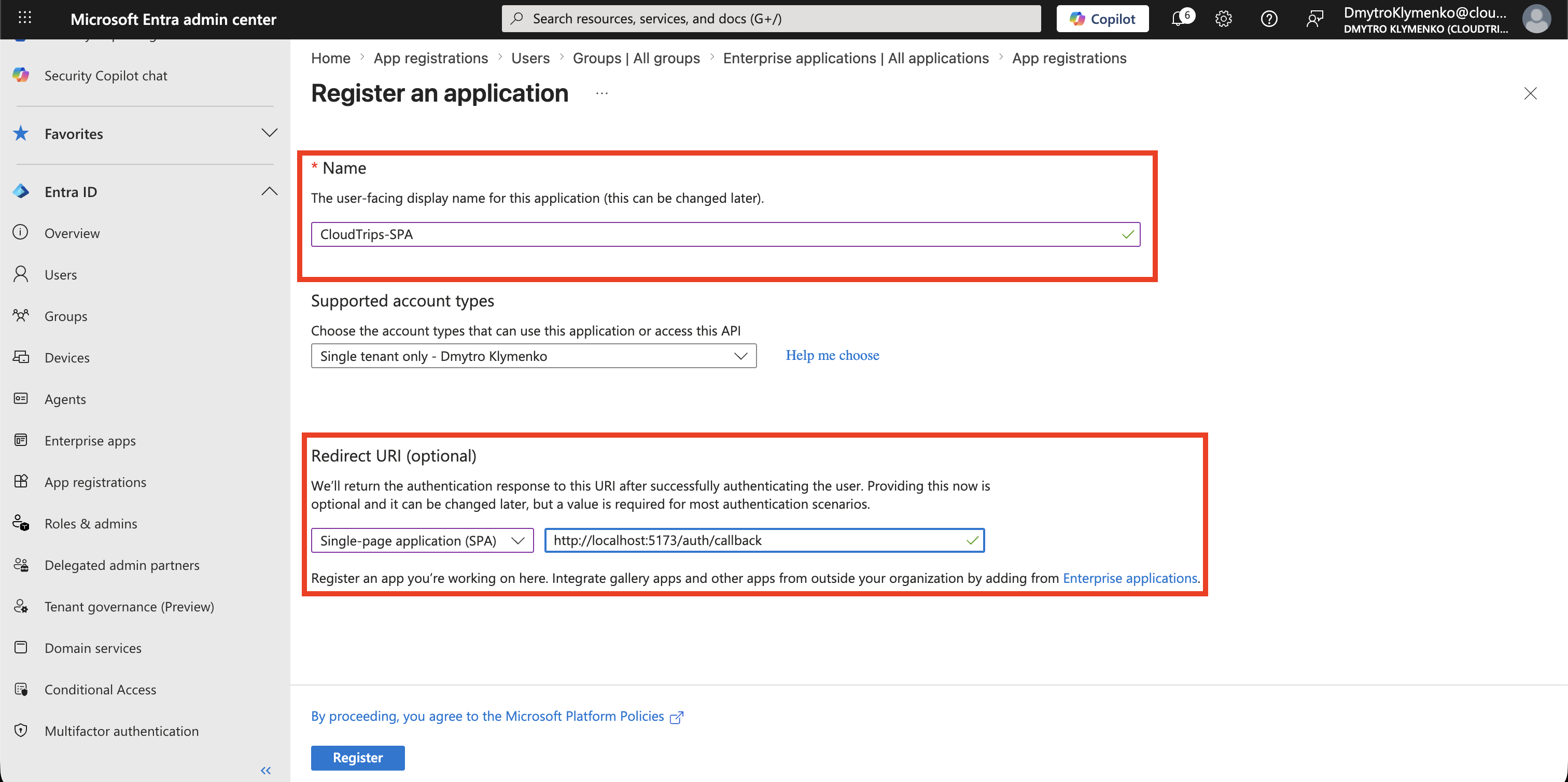
Now create the browser client application.
Go to:
Entra ID > App registrations > New registrationCreate an application:
Name: CloudTrips-SPA
Supported account types: Single tenant
Redirect URI platform: Single-page application
Redirect URI: http://localhost:5173/auth/callback
The redirect URI is where Microsoft Entra ID sends the browser after the user signs in.
For production, use the real SPA URL.
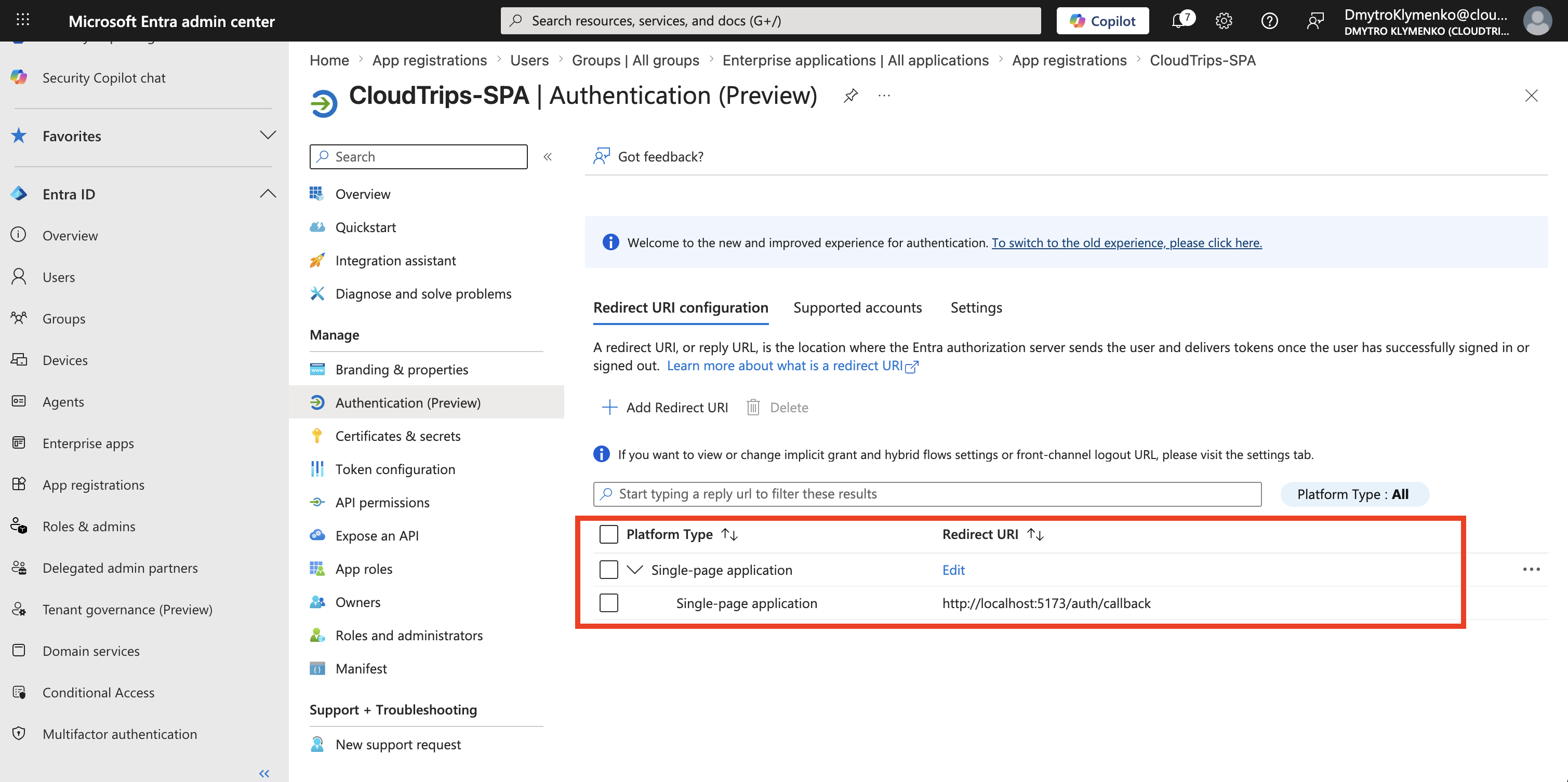
Check SPA Authentication Settings
Inside CloudTrips-SPA, open:
AuthenticationConfirm that the platform is:
Single-page applicationAnd that the redirect URI is:
http://localhost:5173/auth/callbackDo not create a client secret for the SPA.
A SPA is a public client. Any secret placed in browser code can be read by users.
Add API Permission
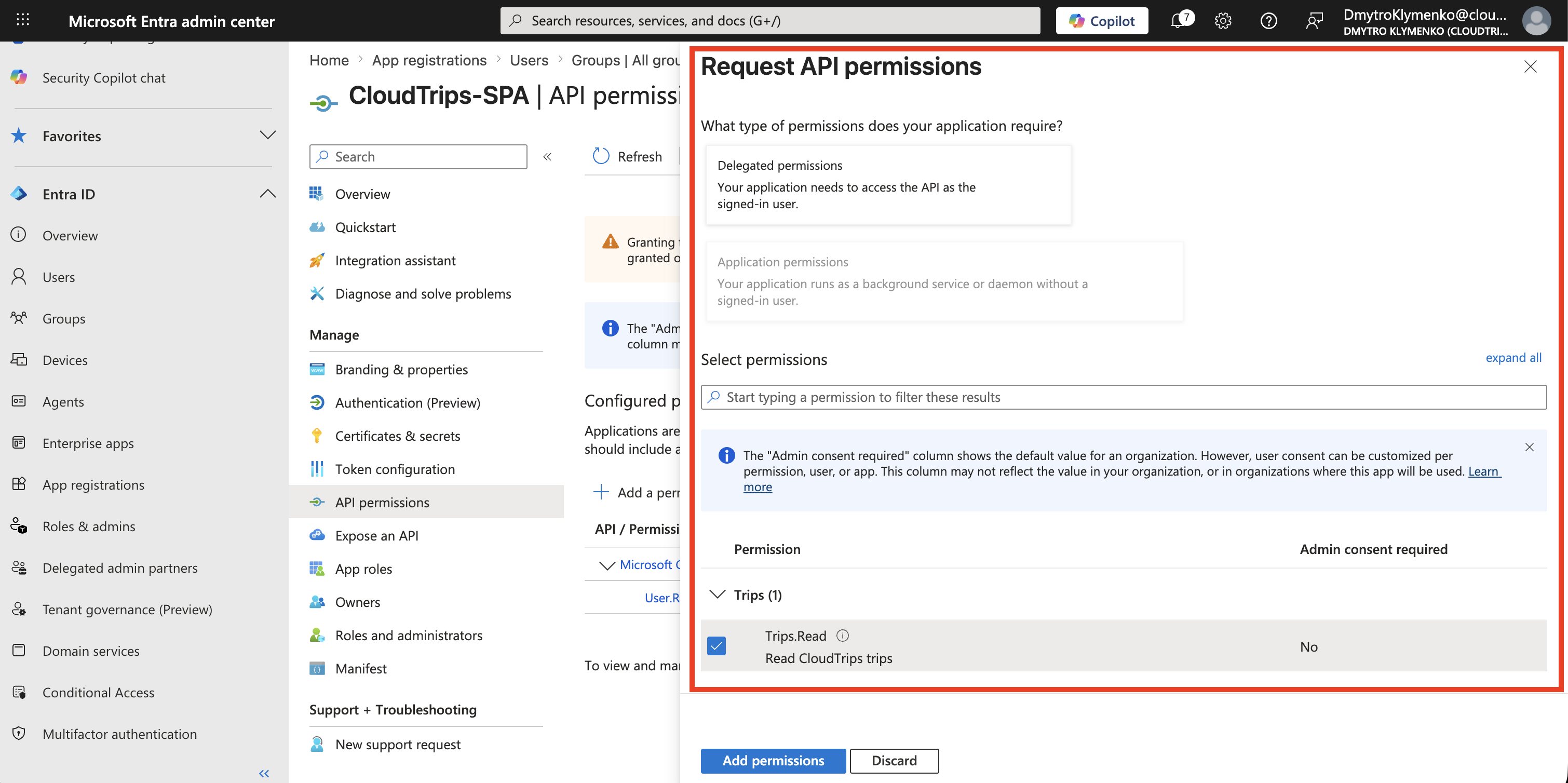
Go to:
App registrations > CloudTrips-SPA > API permissionsThen select:
Add a permissionChoose:
My APIs > CloudTrips-API > Delegated permissions > Trips.ReadThis allows the SPA to request an access token for the CloudTrips API on behalf of the signed-in user.
If your tenant requires administrator approval, click:
Grant admin consent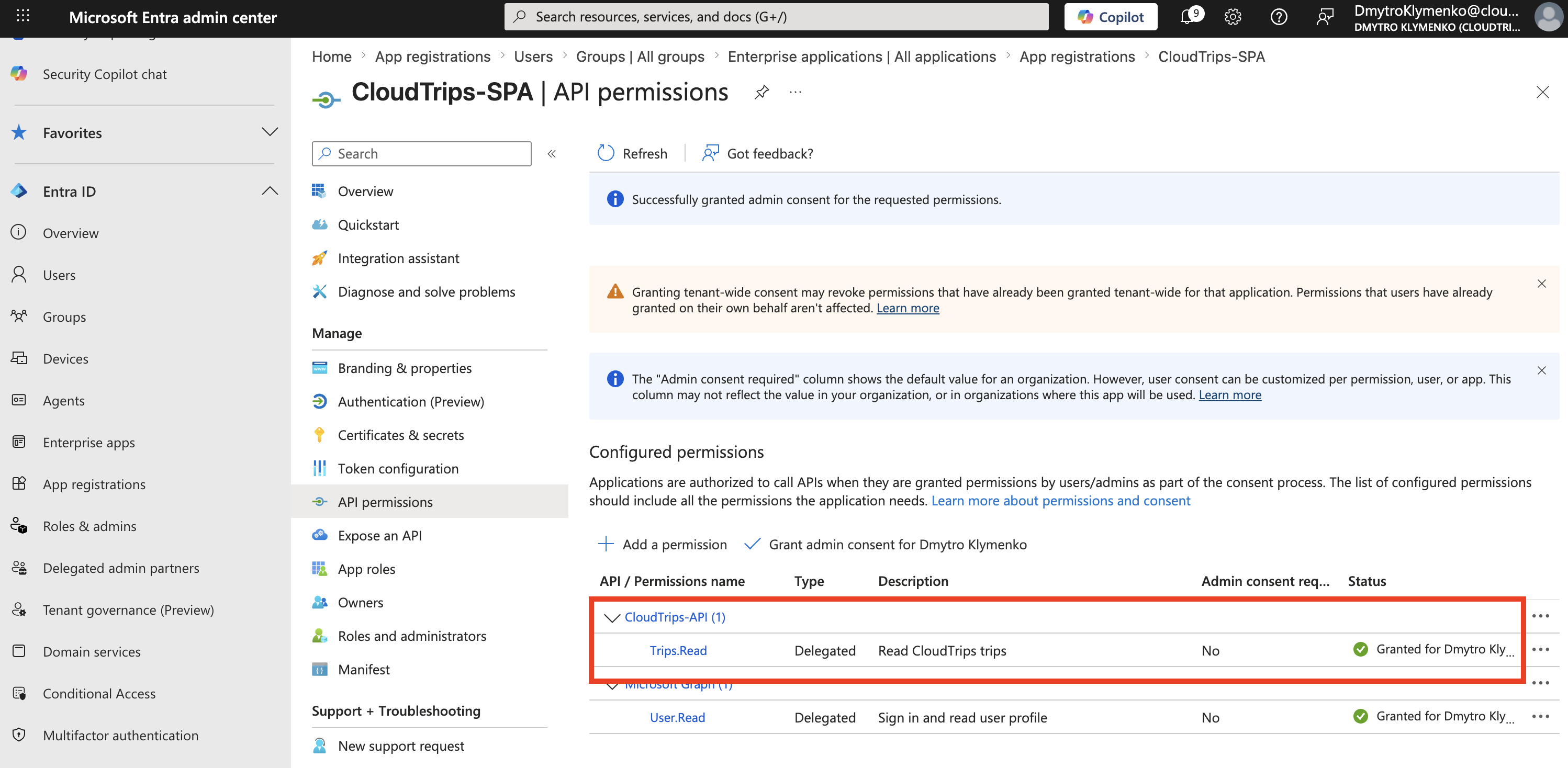
Authorization Request with PKCE
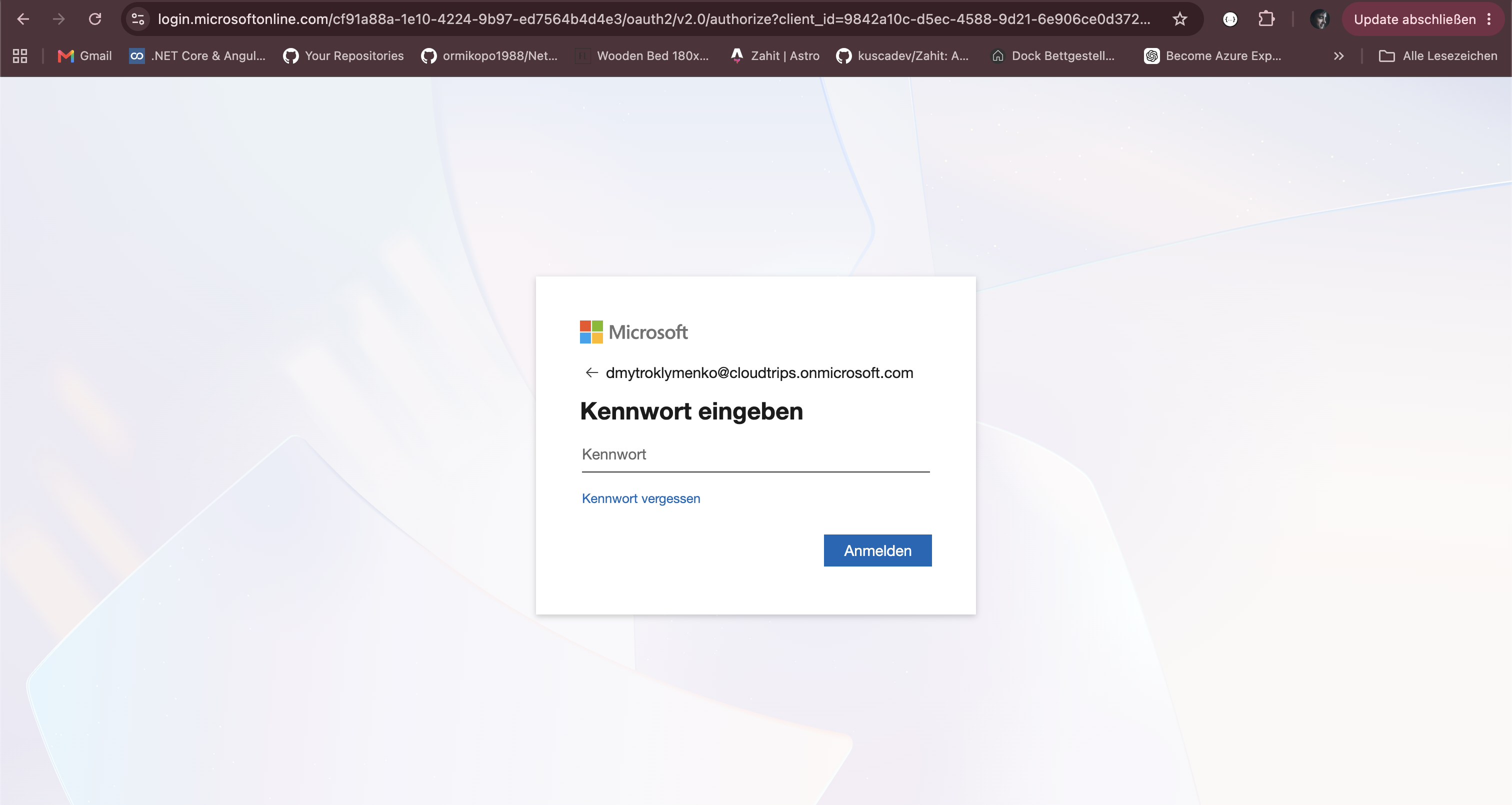
At runtime, the browser is redirected to:
GET https://login.microsoftonline.com/<tenant-id>/oauth2/v2.0/authorizeRequest parameters include:
client_id=CLOUDTRIPS_SPA_CLIENT_ID
response_type=code
redirect_uri=http://localhost:5173/auth/callback
scope=openid profile api://<cloudtrips-api-application-id>/Trips.Read
state=<random-state-value>
code_challenge=<hashed-code-verifier>
code_challenge_method=S256
The important PKCE values are:
| Value | Meaning |
|---|---|
code_verifier |
secret random value created by the SPA and kept locally until the token request |
code_challenge |
hashed value derived from the verifier and sent in the authorize request |
code_challenge_method |
S256, meaning SHA-256 was used to create the challenge |
Microsoft Entra ID stores the challenge with the authorization code.
At this point Microsoft Entra ID has seen the challenge, but it has not seen the verifier.
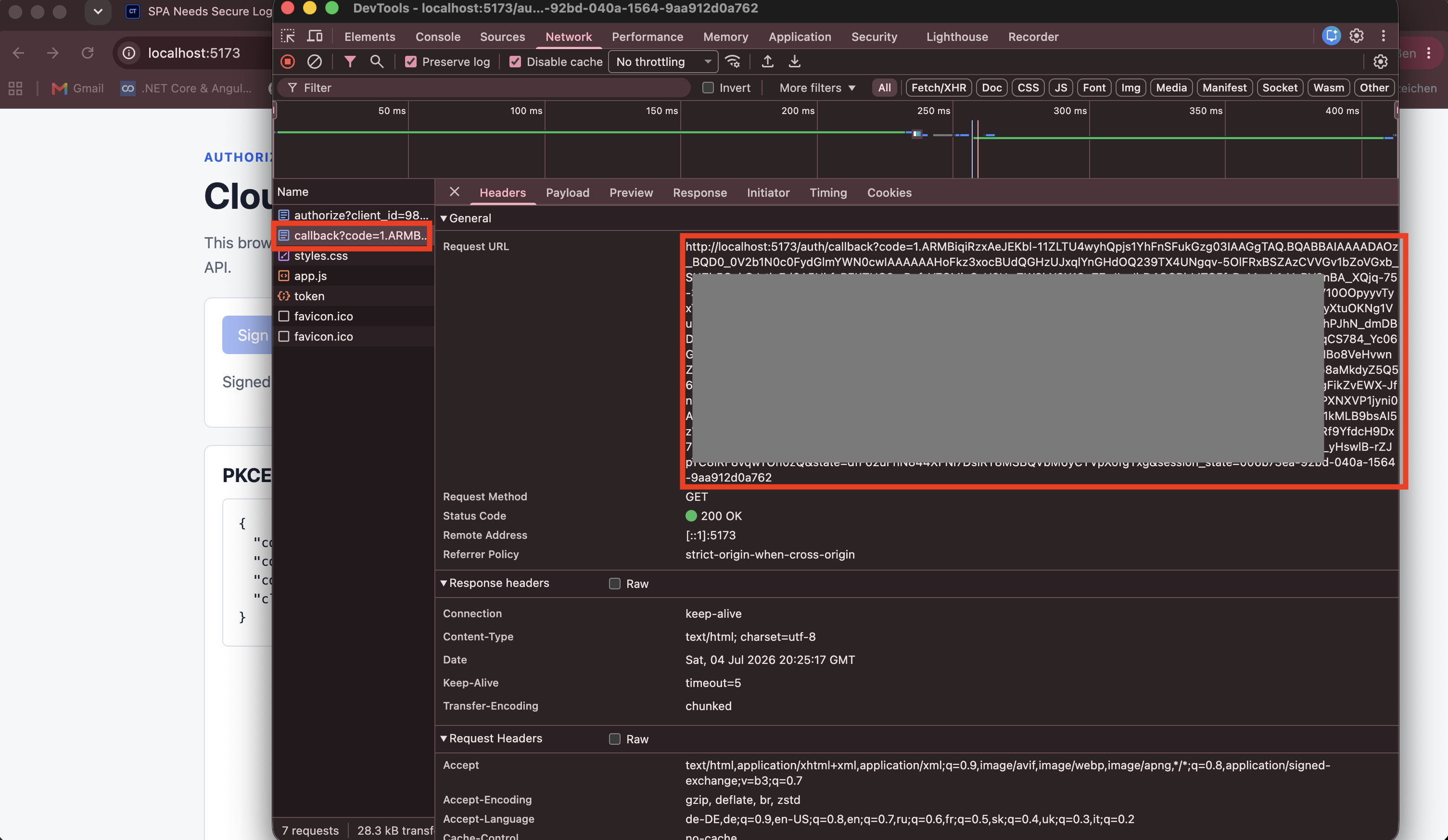
Callback with Authorization Code
After the user signs in, Microsoft Entra ID redirects the browser back to:
http://localhost:5173/auth/callbackThe callback contains an authorization code.
The SPA checks the state value and then prepares the token request.
The authorization code by itself is not enough.
The SPA must redeem it together with the same code_verifier that was created before the redirect.
Exchange Code with Code Verifier
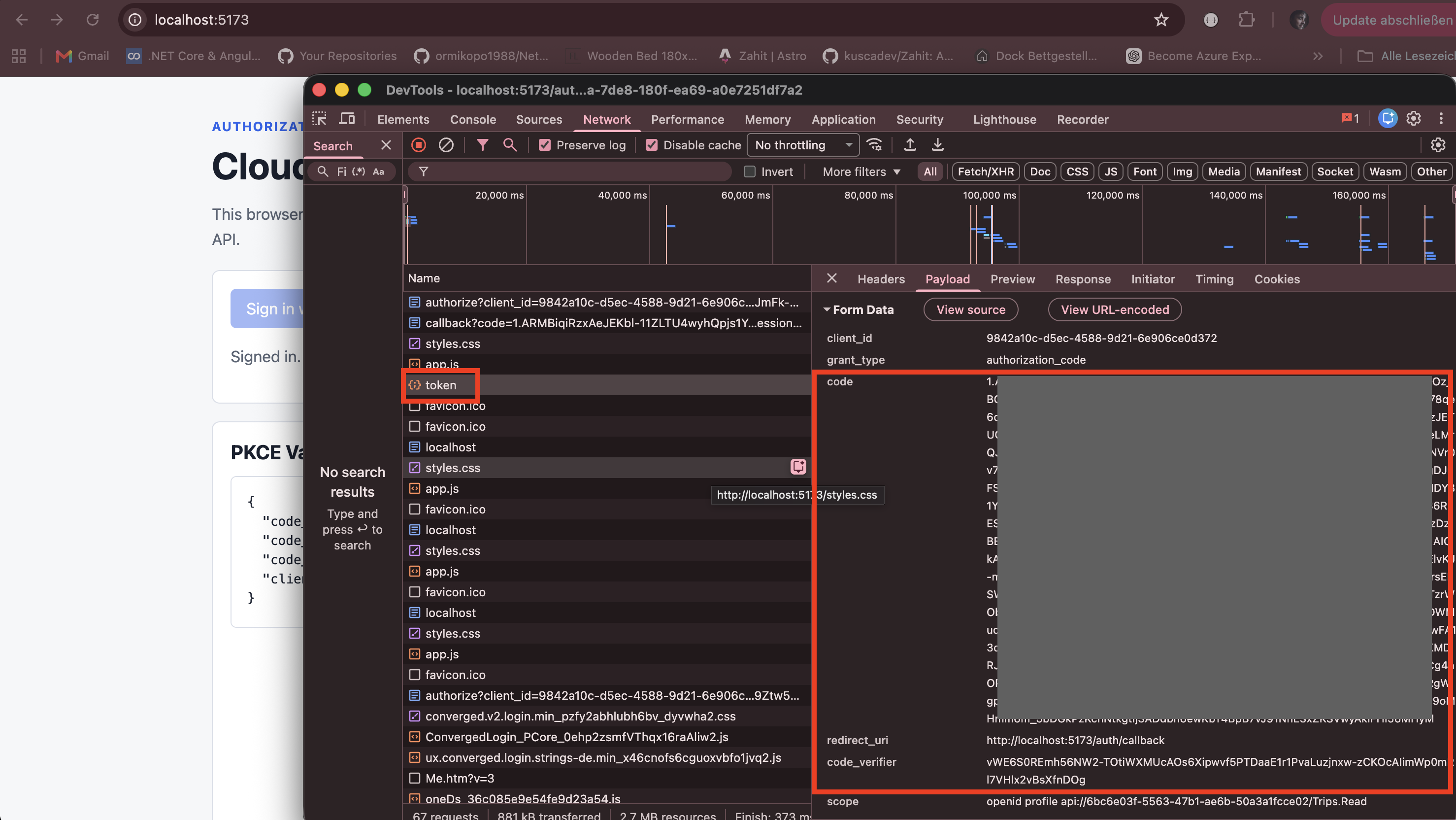
The SPA sends the authorization code to Microsoft Entra ID:
POST https://login.microsoftonline.com/<tenant-id>/oauth2/v2.0/tokenRequest body:
client_id=CLOUDTRIPS_SPA_CLIENT_ID
grant_type=authorization_code
code=AUTHORIZATION_CODE
redirect_uri=http://localhost:5173/auth/callback
code_verifier=ORIGINAL_RANDOM_CODE_VERIFIER
scope=openid profile api://<cloudtrips-api-application-id>/Trips.Read
There is no client_secret.
Microsoft Entra ID hashes the submitted code_verifier and compares it with the code_challenge from the authorization request.
If they match, Entra issues tokens.
If the verifier is missing, changed, or from another browser session, the token request fails.
Access Token Claims
The SPA receives an access token for the CloudTrips API.
Decode the access token.
Important claims:
| Claim | Meaning |
|---|---|
aud |
API that should accept the token |
scp |
Delegated permissions granted to the SPA |
sub |
Stable user identifier for this app |
tid |
Tenant ID |
iss |
Token issuer |
For this trip, the important proof is:
{
  "aud": "api://<cloudtrips-api-application-id>",
  "scp": "Trips.Read"
}
Why PKCE Matters
Without PKCE, anyone who steals the authorization code could try to redeem it.
With PKCE, the authorization code is bound to the original code_verifier.
That means the token endpoint requires proof that the same browser flow that started the sign-in is also redeeming the code.
Key Difference from Server-Side Web App Flow
| Topic | Server-side web app | SPA with PKCE |
|---|---|---|
| Client type | Confidential | Public |
| Client secret | Yes | No |
| Token exchange | Server side | Browser/public client |
| Protection | Client secret | PKCE code verifier |
| Common redirect URI | /signin-oidc |
/auth/callback |
Enterprise Note
Real enterprise environments usually have multiple stages:
- DEV
- TEST or STAGE
- PROD
Use separate app registrations per environment when redirect URIs, API audiences, or consent boundaries differ.
Example:
CloudTrips-SPA-DEV
CloudTrips-SPA-TEST
CloudTrips-SPA-PROD

CloudTrips-API-DEV
CloudTrips-API-TEST
CloudTrips-API-PROD
This provides:
- isolated redirect URIs
- clearer token audiences
- safer production consent boundaries
- cleaner auditing and troubleshooting