SQL Needs Tamper Evidence? Configure SQL Ledger
A payment was recorded as 100, but now shows 120. You need to see the change and prove that someone with privileged access has not secretly rewritten the stored history. SQL Ledger preserves row versions and links them with cryptographic hashes. A digest, a compact cryptographic checkpoint saved outside the database, lets you later check the history’s integrity.
Create a Ledger Table
Use your existing lab database on sql-ctappweu, such as stctauditweu or sqldb-cloudtrips. Connect as ctadmin through VS Code or Query editor (preview). If needed, recreate a database using Create Azure SQL Database.
Run once to create an updatable ledger table and a payment:
CREATE TABLE dbo.LedgerPayments (
    PaymentId int PRIMARY KEY,
    Amount decimal(10,2) NOT NULL
)
WITH (
    SYSTEM_VERSIONING = ON (HISTORY_TABLE = dbo.LedgerPaymentsHistory),
    LEDGER = ON (LEDGER_VIEW = dbo.LedgerPaymentsView)
);
INSERT INTO dbo.LedgerPayments VALUES (1, 100.00);
LEDGER = ON enables ledger for this new table. Azure also creates its history table and ledger view. This choice is permanent for the table; use the lab table here.
Inspect a Recorded Change
Run:
UPDATE dbo.LedgerPayments SET Amount = 120.00 WHERE PaymentId = 1;

SELECT PaymentId, Amount, ledger_operation_type_desc AS Operation
FROM dbo.LedgerPaymentsView
ORDER BY ledger_transaction_id, ledger_sequence_number;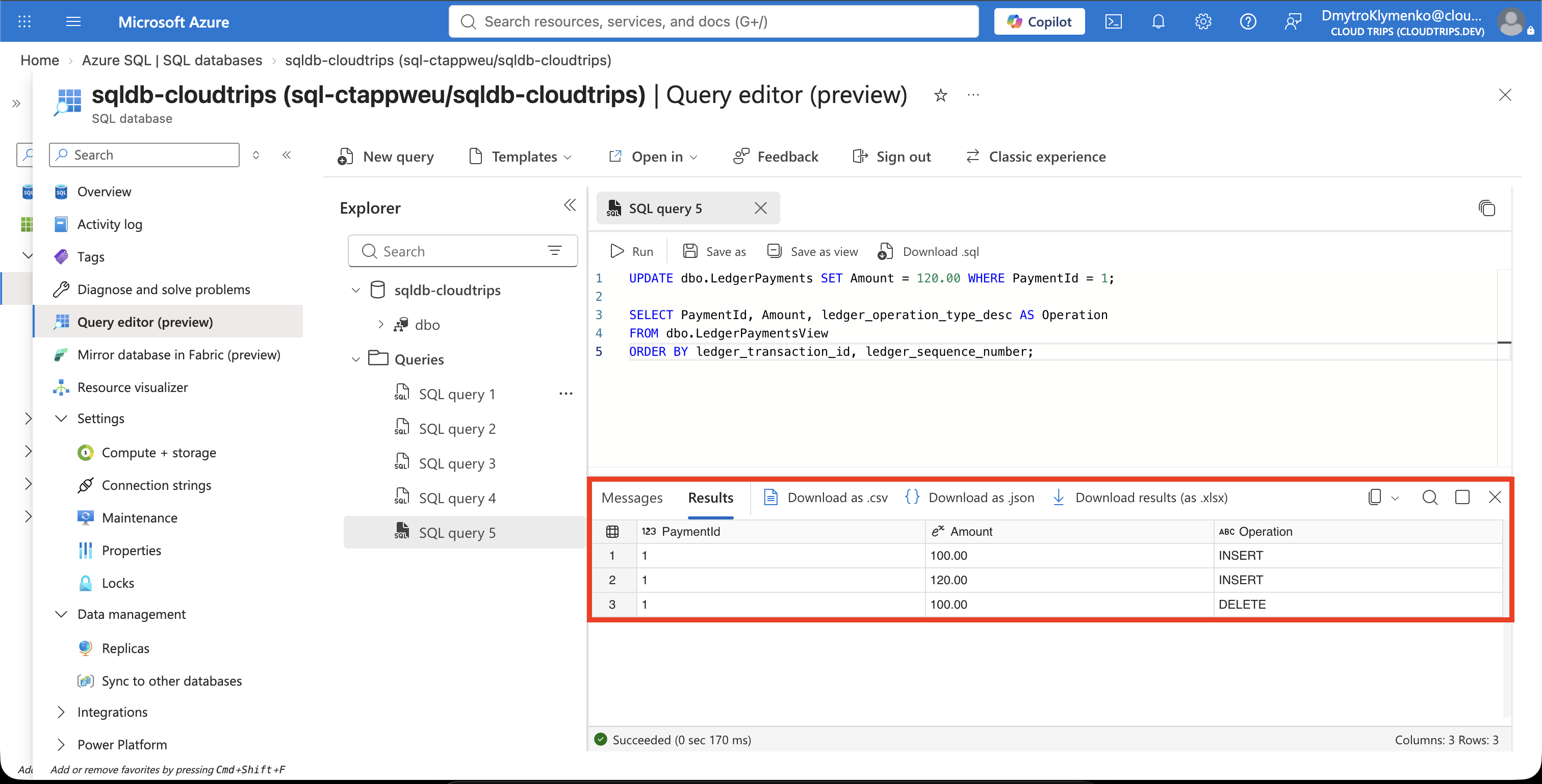
Expect the original INSERT 100.00, then DELETE 100.00 and INSERT 120.00 for the update. The current amount is 120, and the earlier value remains in the recorded history. An ordinary SQL update is a tracked change; verification checks whether that history remains intact.
Save an Independent Checkpoint
Run:
EXEC sys.sp_generate_database_ledger_digest;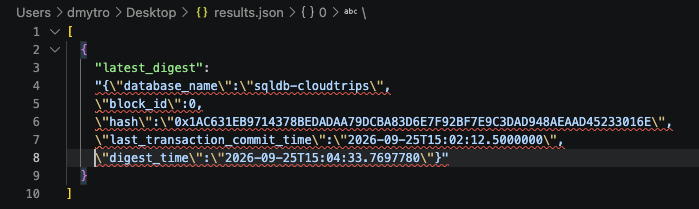
Copy the JSON object inside the result’s latest_digest cell into ledger-digest.json. If you export the result grid, extract this object’s contents from the latest_digest wrapper and remove the string-escaping backslashes before using it below.
A block groups committed transactions; block IDs start at 0. SQL hashes row versions, combines those hashes into transaction hashes, and links blocks using the preceding block’s hash. This links the stored history cryptographically.
Your JSON saves the database_name, block_id, that block’s hash, and timestamps. The hash acts as a fingerprint of the linked history at that checkpoint. Keep this original JSON outside the database for later comparison; its values vary between runs.
This lab saves the digest manually. Production digests need independently protected storage, such as immutable Blob Storage or Azure Confidential Ledger, so someone changing the database cannot also replace the checkpoint. Azure SQL can upload digests automatically through database → Security → Ledger.
Verify Against the Saved Digest
Verification reads the stored rows and history, recalculates their hashes, and checks the transaction and block links against your saved digest. Secretly rewriting an earlier value changes the calculated hashes, so verification reports a mismatch. Later normal updates preserve earlier versions and add recorded changes, keeping the history verifiable.
On the same database, run this separately to enable the isolation mode required for verification:
ALTER DATABASE CURRENT SET ALLOW_SNAPSHOT_ISOLATION ON;Successful completion normally returns no rows. Then replace the placeholder below with the saved JSON object, keeping the surrounding square brackets, and run:
DECLARE @digests nvarchar(max) = N'[PASTE_SAVED_JSON_OBJECT_HERE]';
EXEC sys.sp_verify_database_ledger @digests;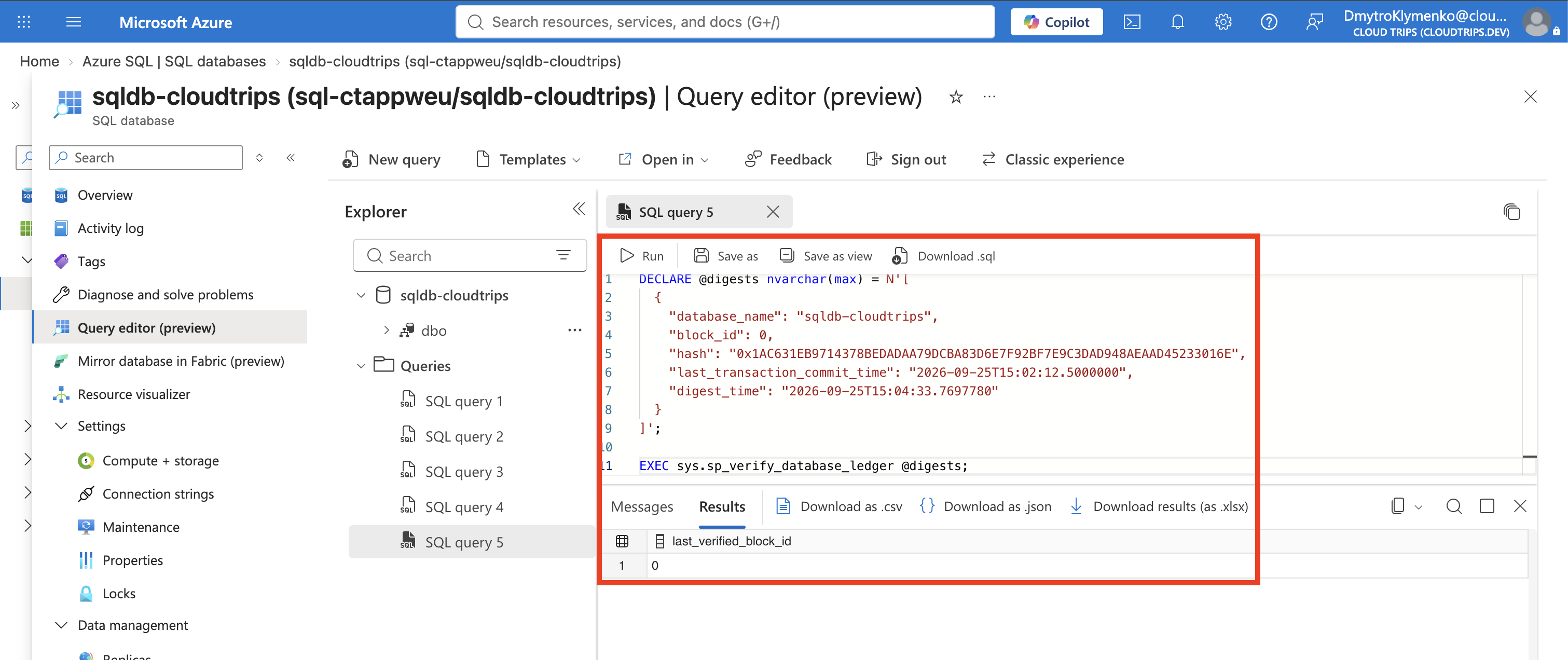
Check Messages for errors and the result’s last_verified_block_id. For your saved digest with block_id: 0, successful verification returning 0 means SQL verified through the first block. Keep older digests when generating new ones: each is an independently saved checkpoint for later checks.
If verification detects rewritten history, Messages can report an error such as: “The hash of block xxxx in the database ledger doesn’t match the hash provided in the digest for this block.” Here, xxxx represents the affected block ID.
A normal SQL UPDATE, such as changing 100 to 120, is recorded in the history and can pass verification—even if the change was malicious. Ledger detects altered history; business rules and access controls determine which changes are allowed.
Clean Up
Keep the lab database for later trips, or delete it when finished. Ledger retains historical data, including after a ledger table is dropped; deleting the disposable database removes the whole lab. Delete the local digest file once you no longer need it.