HTTP Requests Need Routing? Route Requests to Application Services
Your website and orders application need one public entry point, with requests sent to the right application according to their URL path. A Kubernetes Service connects clients to Pods, but it does not choose an application based on an HTTP path. A gateway can make that decision.
In this lab, http://
| Resource | Purpose |
|---|---|
| GatewayClass | Identifies the controller implementation that manages gateways; here, approuting-istio |
| Gateway | Defines the entry point and HTTP listener on port 80 |
| HTTPRoute | Matches request paths and selects the destination Service |
| Service | Selects the ready application Pods |
The request flows through public gateway → HTTPRoute rule → Service backend → application Pod. This Kubernetes gateway is part of AKS application routing; you do not create a separate Azure API Management service.
Reuse aks-ctlab-weu in UK West, namespace ct-apps, the ready ct-web Deployment, and ct-web-internal from the preceding trips. Start the cluster if stopped. You need permission to update the AKS resource and your Kubernetes administration access.
This lab uses Gateway API. Managed NGINX ingress support ends in November 2026, so this new exercise uses its supported successor. Your NGINX application containers are web servers and are separate from that ingress-controller retirement.
Enable Gateway API Routing
Use Azure Cloud Shell → Bash for this add-on setting: the documented enablement uses Azure CLI. We apply the application and route manifests through the portal afterward. The update modifies your existing cluster; it does not recreate it.
Azure CLI must be 2.86.0 or newer. Check the version with the command below before continuing with az aks update. If it is older, use an updated Azure CLI environment; do not replace this step with the older NGINX application-routing option.
az account set --subscription "CloudTrips TEST"
az version --query '"azure-cli"' -o tsv

az aks update \
  --resource-group rg-cloudtrips-aks-test-weu \
  --name aks-ctlab-weu \
  --enable-gateway-api \
  --enable-app-routing-istio

az aks get-credentials \
  --resource-group rg-cloudtrips-aks-test-weu \
  --name aks-ctlab-weu \
  --overwrite-existing
kubelogin convert-kubeconfig -l azurecli
kubectl get gatewayclass approuting-istio
Wait for the update to finish. The final command should list approuting-istio with ACCEPTED: True. If you open a new Cloud Shell session later, repeat the az account set, az aks get-credentials, and kubelogin commands before using kubectl.
This sequence assumes the lab cluster does not have the separate Istio service mesh add-on enabled. The two implementations cannot be enabled together. Do not remove an existing mesh from a shared cluster for this exercise.
The routing components use node capacity, and the gateway will provision public load-balancer networking that can incur charges. The sample endpoint uses HTTP without authentication; keep it limited to the demonstration pages.

Add a Second Application and Service
In the portal, open aks-ctlab-weu → Kubernetes resources → Services and ingresses → Create → Apply a YAML. Paste the complete manifest below and choose Add or Apply:
apiVersion: v1
kind: ConfigMap
metadata:
  name: ct-orders-page
  namespace: ct-apps
data:
  index.html: |
    <html><body><h1>CloudTrips Orders</h1><p>Response from the orders application.</p></body></html>
---
apiVersion: apps/v1
kind: Deployment
metadata:
  name: ct-orders
  namespace: ct-apps
spec:
  replicas: 2
  selector:
    matchLabels:
      app: ct-orders
  template:
    metadata:
      labels:
        app: ct-orders
    spec:
      nodeSelector:
        kubernetes.io/os: linux
      containers:
        - name: nginx
          image: nginx:stable-alpine
          ports:
            - containerPort: 80
          resources:
            requests:
              cpu: 100m
              memory: 64Mi
            limits:
              cpu: 250m
              memory: 128Mi
          readinessProbe:
            httpGet:
              path: /
              port: 80
            initialDelaySeconds: 2
            periodSeconds: 5
          volumeMounts:
            - name: page
              mountPath: /usr/share/nginx/html
              readOnly: true
      volumes:
        - name: page
          configMap:
            name: ct-orders-page
---
apiVersion: v1
kind: Service
metadata:
  name: ct-orders
  namespace: ct-apps
spec:
  type: ClusterIP
  selector:
    app: ct-orders
  ports:
    - name: http
      port: 80
      targetPort: 80
A ConfigMap is a Kubernetes object that stores non-secret configuration or text separately from your application image. Pods can use its content as environment variables or files. Here, ct-orders-page stores index.html, and the Deployment mounts it as /usr/share/nginx/html/index.html inside each NGINX container. This supplies our own page without building a new NGINX image. The ConfigMap only stores the content; NGINX runs the web server and serves it.
Both orders Pods therefore display CloudTrips Orders, rather than the original application’s default NGINX page. This is sample content, not an order-processing backend.
Under Workloads → Deployments, filter to ct-apps and wait for ct-orders to have two ready replicas. Under Services and ingresses, confirm both ct-orders and ct-web-internal exist as ClusterIP Services on port 80.
Create the Gateway and Route
Open Create → Apply a YAML again and apply:
apiVersion: gateway.networking.k8s.io/v1
kind: Gateway
metadata:
  name: ct-http
  namespace: ct-apps
spec:
  gatewayClassName: approuting-istio
  listeners:
    - name: http
      protocol: HTTP
      port: 80
      allowedRoutes:
        namespaces:
          from: Same
---
apiVersion: gateway.networking.k8s.io/v1
kind: HTTPRoute
metadata:
  name: ct-app-routes
  namespace: ct-apps
spec:
  parentRefs:
    - name: ct-http
      sectionName: http
  rules:
    - matches:
        - path:
            type: Exact
            value: /orders
      filters:
        - type: URLRewrite
          urlRewrite:
            path:
              type: ReplaceFullPath
              replaceFullPath: /
      backendRefs:
        - name: ct-orders
          port: 80
    - matches:
        - path:
            type: PathPrefix
            value: /
      backendRefs:
        - name: ct-web-internal
          port: 80
The Gateway accepts HTTP on port 80 and allows routes from its own namespace. The HTTPRoute attaches to its http listener. No hostname restriction is configured, so you can test with the public IP without buying a domain or configuring DNS.
The exact path /orders selects ct-orders. The gateway rewrites that path to / before forwarding it because our sample orders server serves its page at /. The browser’s address remains /orders—this is an internal rewrite, not a redirect.
The / prefix rule sends other paths to ct-web-internal. The exact /orders match takes precedence over the broader prefix match. Use /orders without a trailing slash for this exact-match example; /orders/ does not match it.
Check the Routing Status
In the portal, look under Kubernetes resources → Custom resources for the Gateway and HTTPRoute resources in ct-apps and inspect their status/YAML. Gateway resources may not appear in the older Ingresses list.
For an explicit status check, return to your connected Cloud Shell → Bash session and run:
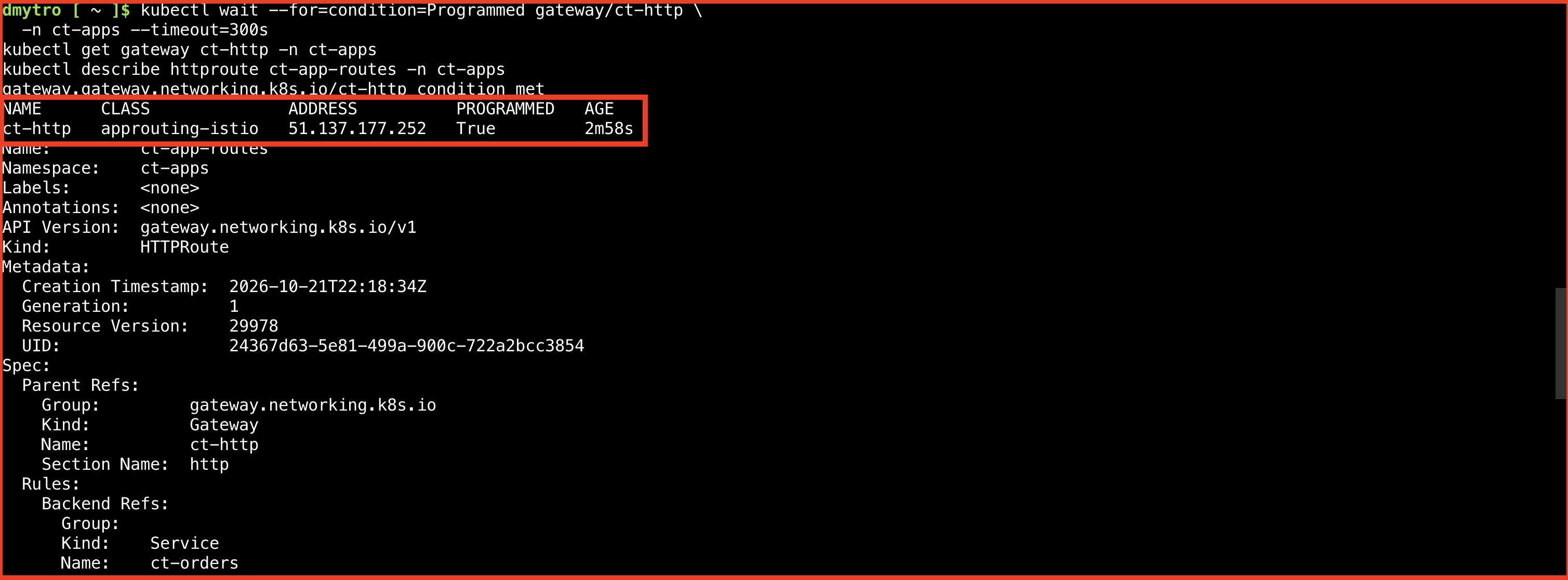
kubectl wait --for=condition=Programmed gateway/ct-http \
  -n ct-apps --timeout=300s
kubectl get gateway ct-http -n ct-apps
kubectl describe httproute ct-app-routes -n ct-apps
Expect Programmed=True on the Gateway and Accepted=True plus ResolvedRefs=True in the route’s parent status. ResolvedRefs confirms that referenced resources such as Services can be resolved; it does not prove that their application Pods are healthy.
The Gateway receives its own public address. In Services and ingresses, the generated LoadBalancer Service is normally named ct-http-approuting-istio. Wait if its external IP is still pending. Use the Gateway’s address for this trip, not the previous ct-web-public address, which bypasses these routing rules.
Test Both Paths
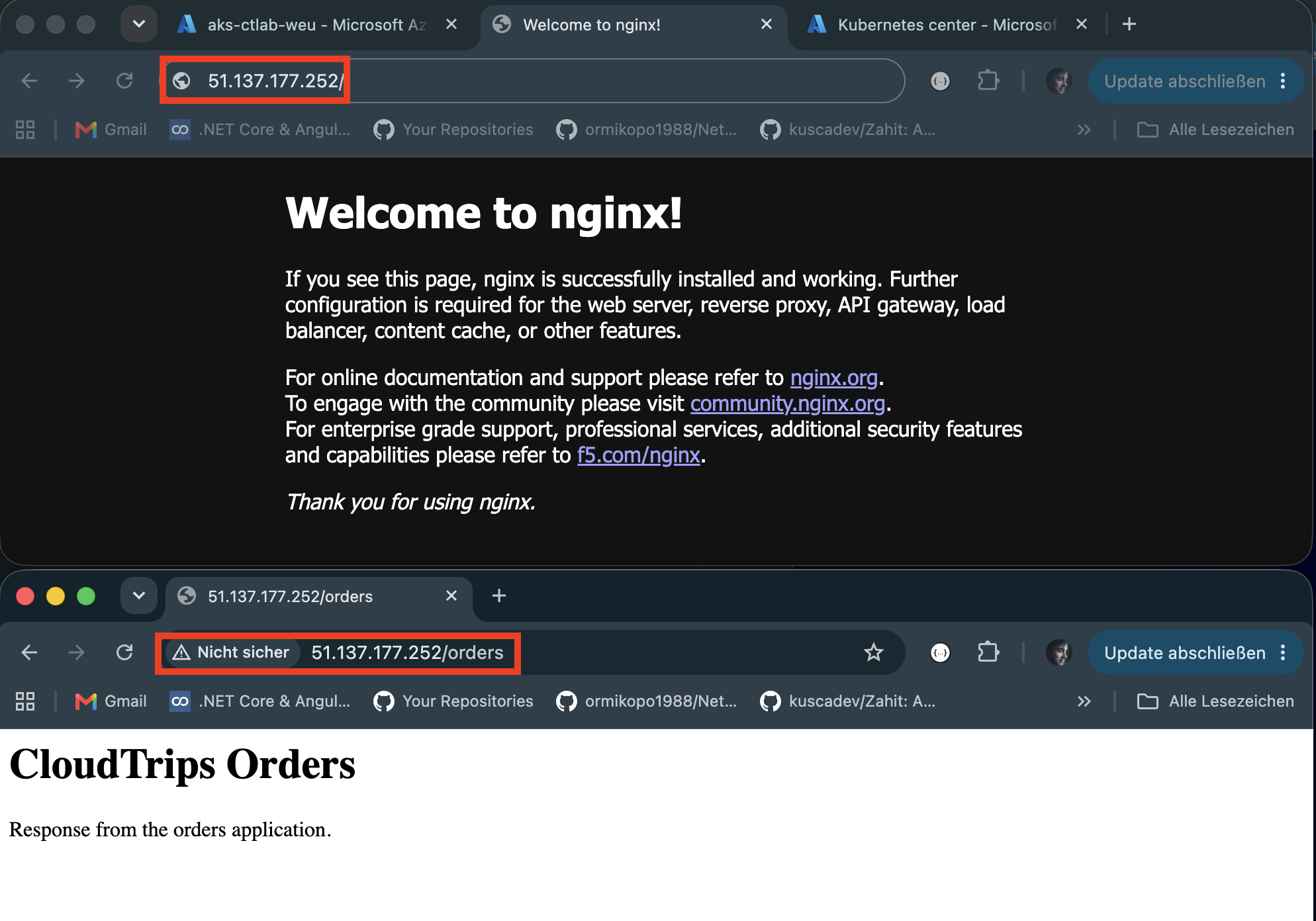
Copy the address from the Gateway status or its generated Service. Open these two URLs in your browser, substituting the actual IP:
http://<gateway-ip>/
http://<gateway-ip>/orders| Request | Expected response |
|---|---|
/ |
Welcome to nginx! from the existing web application |
/orders |
CloudTrips Orders from the second application |
Use HTTP, not HTTPS; this listener has no TLS configuration. You can also test from Cloud Shell:
GATEWAY_IP=$(kubectl get gateway ct-http -n ct-apps \
  -o jsonpath='{.status.addresses[0].value}')
curl -i --max-time 30 "http://$GATEWAY_IP/"
curl -i --max-time 30 "http://$GATEWAY_IP/orders"
Both responses should have HTTP status 200, with different page content. That proves a single entry point routes requests to two application Services according to their paths.
If the gateway is ready but you receive an error, check the route conditions and confirm both Deployments have ready Pods. A request to /orders/ instead of /orders follows the fallback web route and can return an NGINX 404 because that file path does not exist.
Keep or Remove the Routing Lab
If ct-web-public still exists from the Services trip, delete that Service through the portal when you no longer need direct access. Keep ct-web-internal: the HTTPRoute uses it.
To remove this routing lab, use Custom resources to delete ct-app-routes and then ct-http in ct-apps. Deleting the Gateway triggers cleanup of its generated proxy and Service resources. Verify they disappear before disabling the add-on; do not manually remove the cluster’s shared Azure load balancer.
Delete the ct-orders Deployment under Workloads, its ct-orders Service under Services and ingresses, and ct-orders-page under Configuration → Config maps. Keep the original web Deployment and internal Service for later exercises.
If no other Gateway uses this add-on, disable its routing implementation in Cloud Shell:
az aks update \
  --resource-group rg-cloudtrips-aks-test-weu \
  --name aks-ctlab-weu \
  --disable-app-routing-istio
The managed Gateway API resource definitions can remain installed. The AKS cluster still exists and incurs costs. Stop it between sessions or delete its lab resource group when you are finished with AKS.