VMs Need Zone Resilience? Deploy Across Availability Zones
CloudTrips needs two VMs that can remain available if one datacenter has a power, cooling, or network failure. Azure availability zones are physically separate locations within a region, with independent infrastructure.
This trip deploys one Ubuntu VM in Zone 1 and another in Zone 2 in West Europe. The VMs use private IP addresses only.
Compare Sets and Zones
| Availability set | Availability zones |
|---|---|
| Separates VMs across fault and update domains within a datacenter | Separates VMs across datacenters within a region |
| Protects against localized hardware and maintenance events | Also protects against a complete zone-level datacenter failure |
| Lower VM-to-VM latency | Greater physical isolation |
| Azure chooses the fault domain | You select or let Azure select the zone |
For two or more VMs distributed across two or more zones, Azure provides a higher VM connectivity SLA than for availability sets. The application must still run redundantly on both VMs and use load balancing or failover.
Create the Resource Group and Network
Create:
Subscription: CloudTrips TEST
Resource group: rg-cloudtrips-zones-test-weu
Region: West Europe
Open Virtual networks > Create:
Name: vnet-cloudtrips-zones-test-weu
IPv4 address space: 10.84.0.0/16
Subnet: snet-servers
Subnet range: 10.84.1.0/24
Select Review + create > Create. A VNet and subnet are regional resources, so VMs in different zones can use the same subnet.
Create the Zone 1 VM
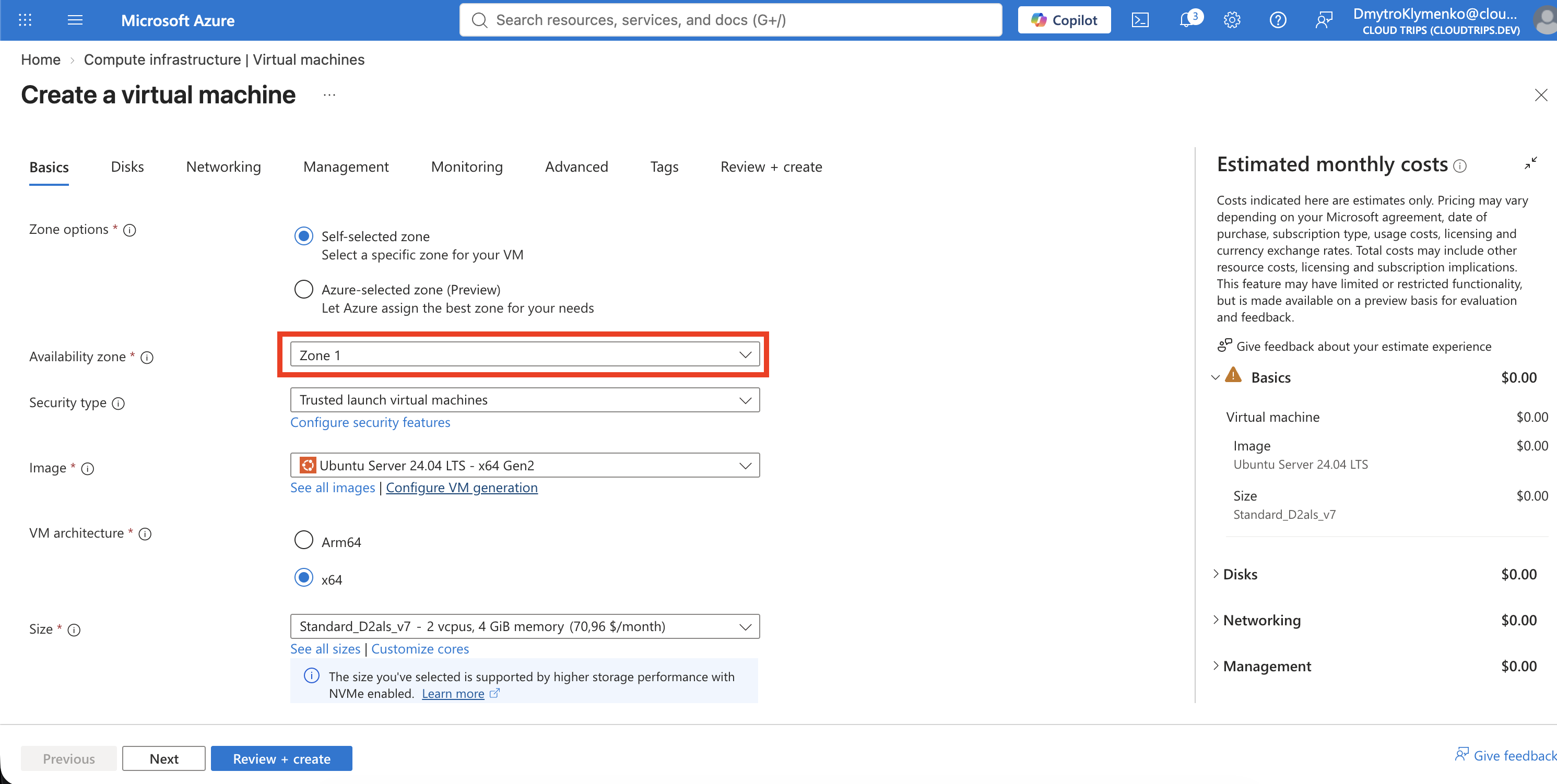
Open Virtual machines > Create > Azure virtual machine. Configure:
Resource group: rg-cloudtrips-zones-test-weu
Virtual machine name: vm-cloudtrips-zone01-test-weu
Region: West Europe
Availability options: Availability zone
Zone options: Self-selected zone
Availability zone: Zone 1
Security type: Trusted launch virtual machines
Image: Ubuntu Server 24.04 LTS - x64 Gen2
Size: Standard_D2als_v7
Authentication type: SSH public key
Username: azureuser
SSH public key source: Generate new key pair
Key pair name: sshkey-cloudtrips-zones-test-weu-01
Public inbound ports: None
The SSH key resource name must be unique. If that name already exists from an earlier attempt, select Use existing key stored in Azure or append a unique suffix such as your initials. Do not overwrite or expose an existing private key.
Use a Standard SSD LRS OS disk. On Networking, select
vnet-cloudtrips-zones-test-weu and snet-servers, and set Public IP to
None. Add the usual CloudTrips TEST tags and create the VM.
Create the Zone 2 VM
Repeat VM creation with:
Virtual machine name: vm-cloudtrips-zone02-test-weu
Availability options: Availability zone
Zone options: Self-selected zone
Availability zone: Zone 2
Size: Standard_D2alds_v6
SSH public key source: Use existing key stored in Azure
Stored key: sshkey-cloudtrips-zones-test-weu-01
Keep region, security type, image, disk, VNet, subnet, and tags the same. Do not create a public IP or inbound rule.
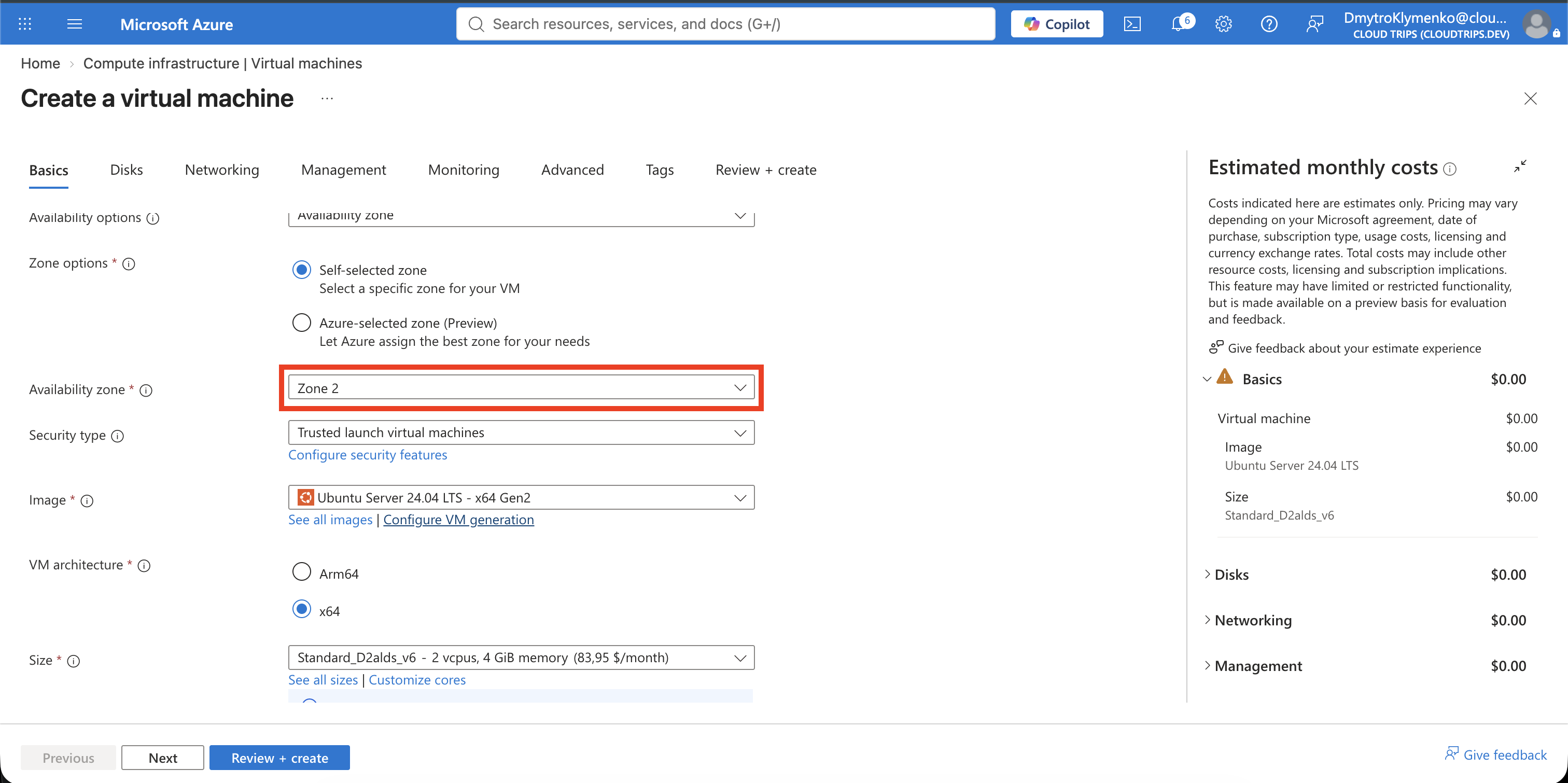
Zone 1 uses Standard_D2als_v7, while Zone 2 uses the available
Standard_D2alds_v6. Different sizes are acceptable for this placement test,
but they can provide different CPU, memory, disk, and network performance. A
production redundant tier should normally use the same or closely equivalent
capacity in every zone.
Verify Zone Placement
Open Virtual machines and add or inspect the Availability zone column. Confirm:
vm-cloudtrips-zone01-test-weu: Zone 1
vm-cloudtrips-zone02-test-weu: Zone 2
Provisioning state: Succeeded for both
Status: Running for both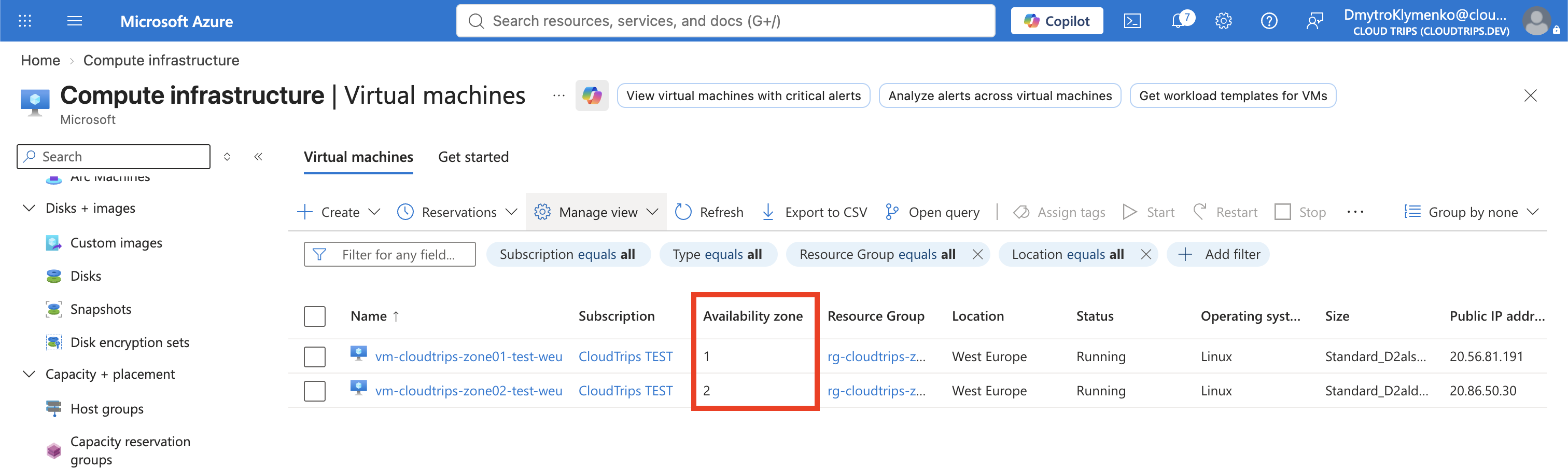
Open each VM > Overview > Properties and verify its zone again. A VM’s zone cannot be changed after creation; moving it requires creating a VM in the target zone.
Understand the Remaining Design
Zone placement protects infrastructure, not the application by itself. A production design also needs:
- The same healthy application on both VMs
- A zone-redundant Standard Load Balancer or Application Gateway
- Replicated or zone-resilient application data
- Monitoring, health probes, and tested failover
Managed OS disks using LRS remain aligned with their VM’s zone. For data that must survive a zone failure independently, choose an appropriate zone-redundant data service or supported ZRS disk design.
Clean Up
Delete the dedicated resource group:
az group delete \
  --name rg-cloudtrips-zones-test-weu \
  --yes
Verify that az group exists --name rg-cloudtrips-zones-test-weu returns
false.