Cheap Interruptible VM Needed? Create a Spot VM
CloudTrips needs inexpensive compute for a disposable batch or test workload. An Azure Spot VM uses unused Azure capacity at a discount, but Azure can evict it with approximately 30 seconds’ notice when the capacity is needed elsewhere.
Spot VMs have no availability SLA. Use them only for interruptible workloads that can retry, restart, or continue from a checkpoint. Do not use one as the only server for a production application, database, or other critical service.
Understand Price and Eviction
| Setting | Meaning |
|---|---|
| Max price | Highest hourly price you accept |
Max price -1 |
Pay the current Spot price up to the regular VM price; no price-based eviction |
| Capacity eviction | Azure reclaims the VM because it needs the capacity |
| Deallocate policy | Stops and deallocates the VM but retains its resource and disks |
| Delete policy | Deletes the VM and, according to its deletion settings, associated disks |
This trip uses -1 and Deallocate. The VM can still be evicted for
capacity. Starting it again is not guaranteed because Spot capacity might be
unavailable.
Create the Resource Group
Create:
Subscription: CloudTrips TEST
Resource group: rg-cloudtrips-spot-test-weu
Region: West Europe
Configure the Spot VM
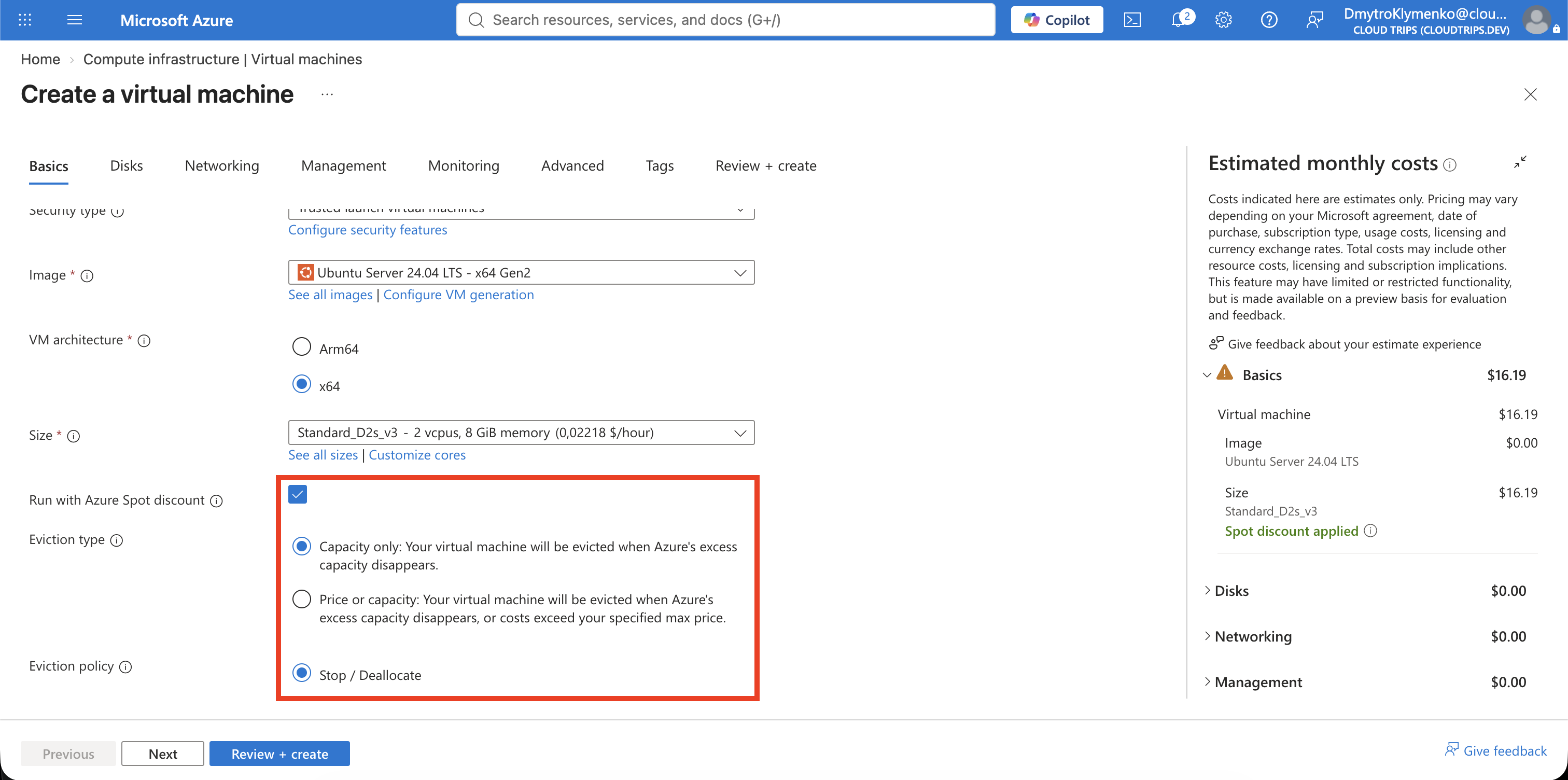
Open Virtual machines > Create > Azure virtual machine. On Basics, configure:
Resource group: rg-cloudtrips-spot-test-weu
Virtual machine name: vm-cloudtrips-spot01-test-weu
Region: West Europe
Availability options: No infrastructure redundancy required
Security type: Trusted launch virtual machines
Image: Ubuntu Server 24.04 LTS - x64 Gen2
Size: Standard_D2s_v3
Run with Azure Spot discount: Enabled
Eviction type: Capacity only
Eviction policy: Stop / Deallocate
Authentication type: SSH public key
Username: azureuser
SSH public key source: Generate new key pair
Key pair name: sshkey-cloudtrips-spot-test-weu-01
Public inbound ports: None
With Eviction type: Capacity only, the portal does not show a Maximum
price field. Azure uses the equivalent maximum price of -1, so the VM can
still be evicted when Azure needs the capacity, but not because the Spot price
increases.
Select View pricing history and compare prices in nearby regions. Review the current Spot price and historical eviction rate for the selected size. A low historical rate is not a guarantee of future capacity.
Configure Disk and Network
On Disks, use:
OS disk type: Standard SSD LRS
Delete with VM: Enabled
On Networking, create:
Virtual network: vnet-cloudtrips-spot-test-weu
Address range: 10.85.0.0/16
Subnet: snet-workers
Subnet range: 10.85.1.0/24
Public IP: None
NIC network security group: None
The VM has no public management endpoint. Use Azure Run Command for this lab. Add the usual CloudTrips TEST tags, select Review + create, review the Spot terms and estimated price, and then select Create.
Spot allocation can fail immediately when the selected region and size have no available Spot capacity. Choose another offered size or region rather than assuming the capacity will become available.
Verify the Spot Properties
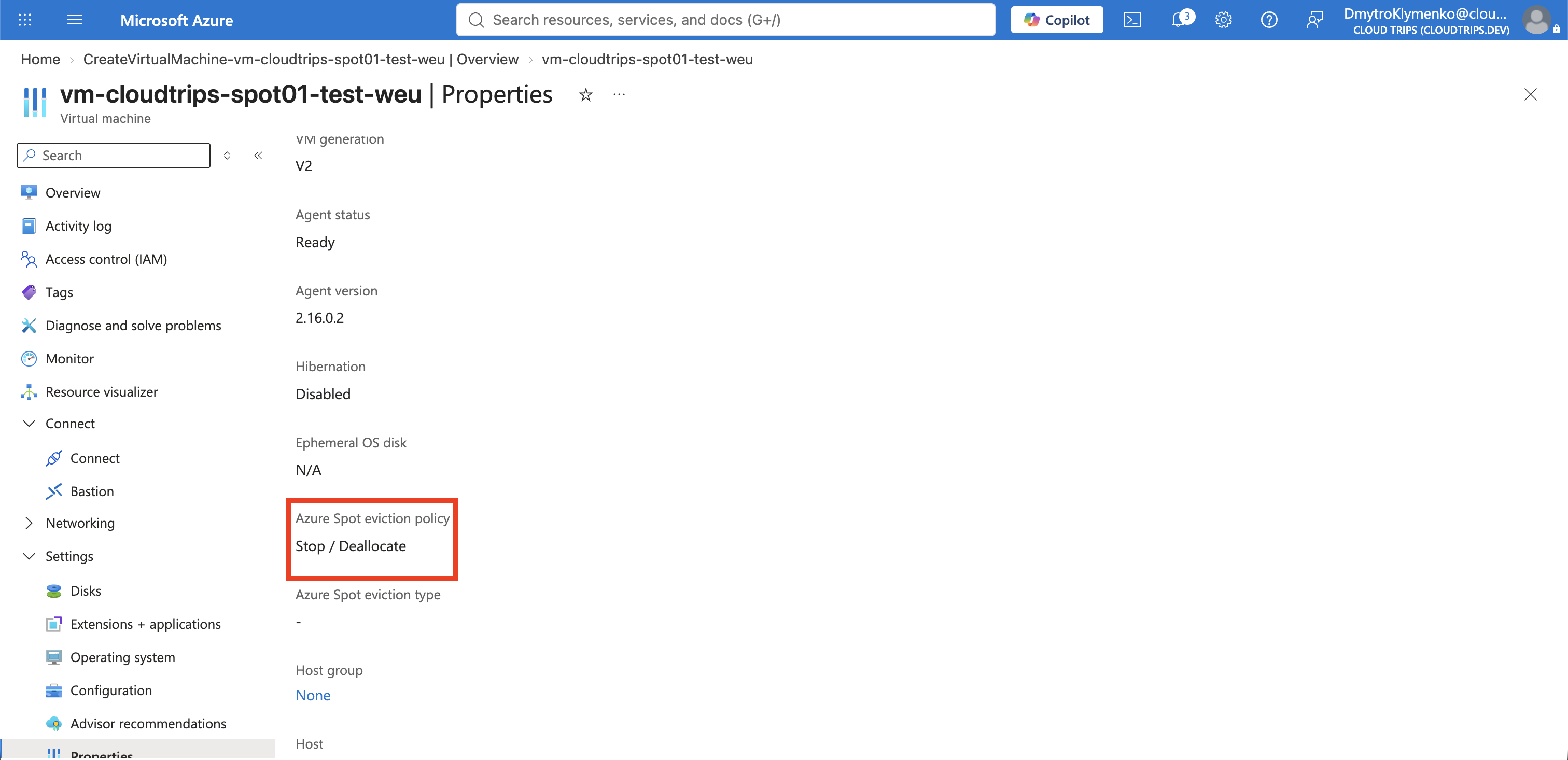
After deployment, open the VM > Overview and confirm it is running. Open Properties or Configuration and verify the values the portal displays:
Azure Spot eviction policy: Stop / Deallocate
Azure Spot eviction type: -
The dash does not mean that Spot is disabled. The portal may also omit
Maximum price. Use the CLI query below to verify the underlying Spot
properties, including Priority and MaxPrice.
You can also query the billing profile:
az vm show \
  --resource-group rg-cloudtrips-spot-test-weu \
  --name vm-cloudtrips-spot01-test-weu \
  --query "{Priority:priority,EvictionPolicy:evictionPolicy,MaxPrice:billingProfile.maxPrice}" \
  --output table
Write a Test Checkpoint
Open Run command > RunShellScript and run:
printf 'CloudTrips Spot checkpoint\nHost: %s\n' "$(hostname)" |
  sudo tee /var/lib/cloudtrips-spot-checkpoint.txt

cat /var/lib/cloudtrips-spot-checkpoint.txt
A real interruptible job should checkpoint progress to durable external storage. This local file demonstrates disk retention with the Deallocate policy but would not survive loss or deletion of the OS disk.
Simulate an Eviction
From Azure Cloud Shell, run:
az vm simulate-eviction \
  --resource-group rg-cloudtrips-spot-test-weu \
  --name vm-cloudtrips-spot01-test-weu
The request should report success. Wait and check the VM state:
az vm get-instance-view \
  --resource-group rg-cloudtrips-spot-test-weu \
  --name vm-cloudtrips-spot01-test-weu \
  --query "instanceView.statuses[?starts_with(code, 'PowerState/')].displayStatus" \
  --output tsv
Expected state:
VM deallocated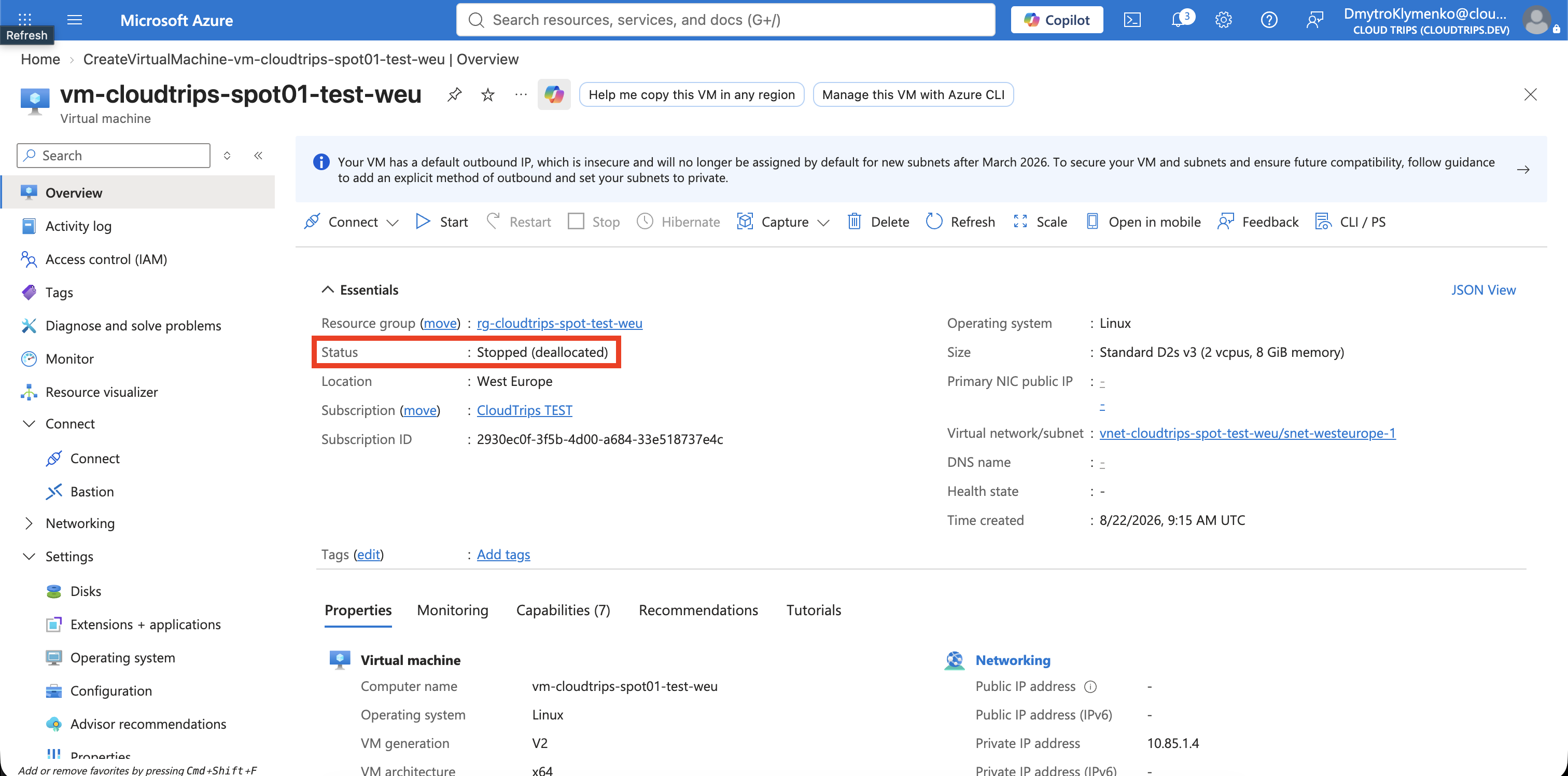
The VM stopped serving work, but its VM resource and OS disk remain. You can try Start; allocation might succeed or fail depending on current Spot capacity. If it starts, use Run Command to confirm the checkpoint file still exists.
Clean Up
Delete the dedicated resource group whether or not the VM can restart:
az group delete \
  --name rg-cloudtrips-spot-test-weu \
  --yes
Verify that az group exists --name rg-cloudtrips-spot-test-weu returns
false.