Sensitive Workload Needs Hardware Isolation? Configure a Confidential VM
CloudTrips processes sensitive data that should remain protected while it is actively used in memory. An Azure confidential VM runs inside a hardware-backed trusted execution environment (TEE: an isolated area where code and data are protected while in use), using technologies such as AMD SEV-SNP or Intel TDX to isolate and encrypt VM memory from the host hypervisor and cloud operators.
Compare the Isolation Options
| Option | Primary protection |
|---|---|
| Standard VM | Logical tenant isolation |
| Trusted Launch VM | Boot integrity with Secure Boot and vTPM (virtual Trusted Platform Module: a protected component that records boot measurements and safeguards cryptographic state) |
| Confidential VM | Trusted Launch protections plus hardware-isolated memory and attestation |
| Dedicated Host | Physical server isn’t shared with another customer’s VMs |
A confidential VM can still run on shared Azure hardware: its TEE protects the workload from the surrounding host environment. A Dedicated Host provides physical tenancy isolation but does not replace confidential memory protection. Choose the control that matches the actual threat model and compliance requirement.
Create the Resource Group
Create:
Subscription: CloudTrips TEST
Resource group: rg-cloudtrips-confidential-test-weu
Region: West Europe
Configure the Confidential VM
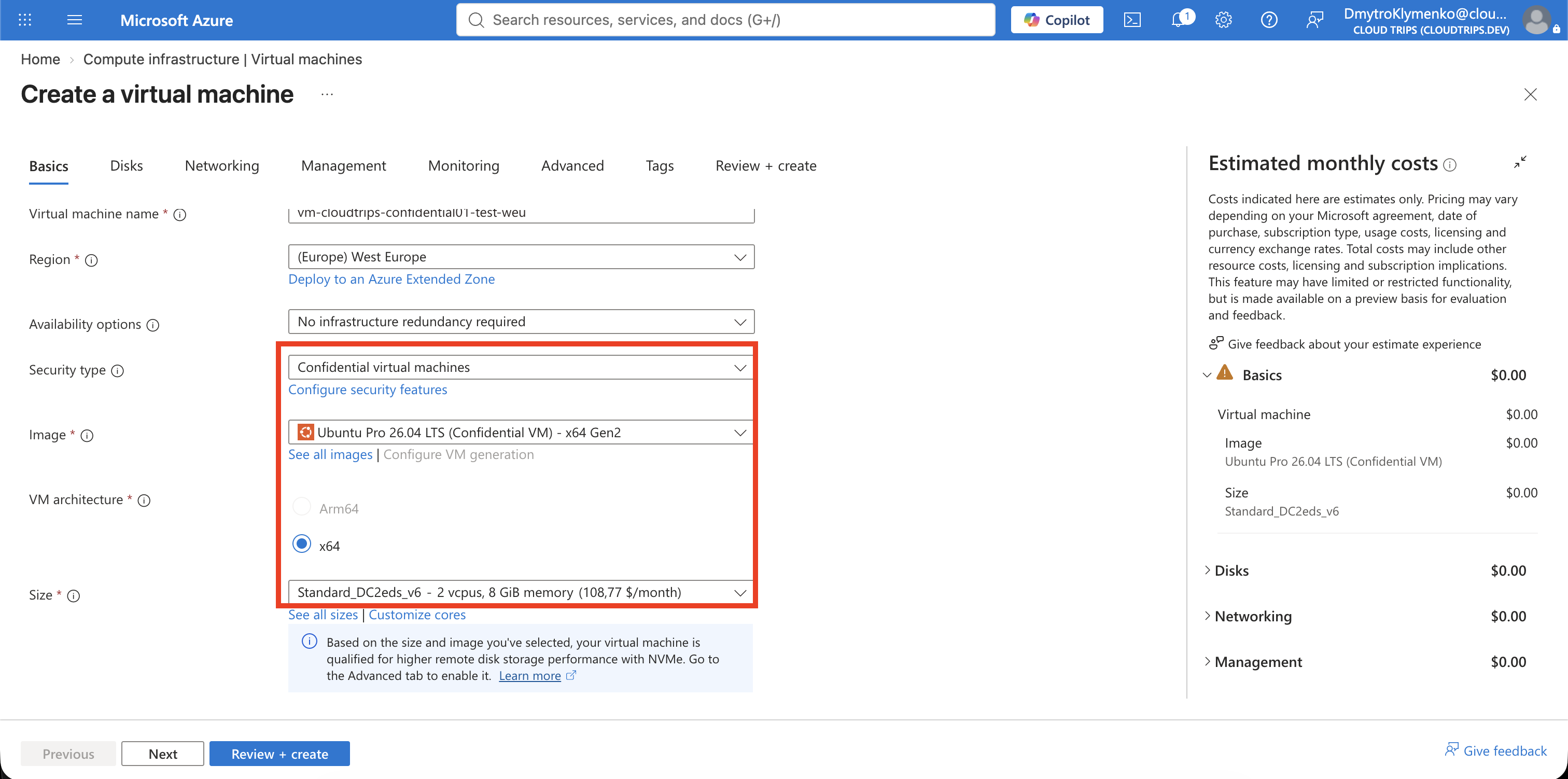
Open Virtual machines > Create > Azure virtual machine. On Basics, configure:
Resource group: rg-cloudtrips-confidential-test-weu
Virtual machine name: vm-cloudtrips-confidential01-test-weu
Region: West Europe
Availability options: No infrastructure redundancy required
Security type: Confidential virtual machines
Image: Select an Ubuntu LTS Gen2 image marked Confidential VM
Size: Standard_DC2eds_v6
Authentication type: SSH public key
Username: azureuser
SSH public key source: Generate new key pair
Key pair name: sshkey-cloudtrips-confidential-test-weu-01
Public inbound ports: None
Use See all images and filter Security type: Confidential. Confidential
VMs require a compatible Generation 2 image and confidential VM family.
Standard_DC2eds_v6 uses Intel TDX and includes local temporary storage. If it
is unavailable, select another offered DCesv6, DCedsv6, or supported
confidential size with at least two vCPUs.
If no confidential size is selectable, check Subscriptions > Usage + quotas for the relevant confidential VM family in West Europe. Free Trial and some development subscriptions have no quota. Do not request quota solely for this lab if the subscription is ineligible.
Configure Confidential Disk Protection
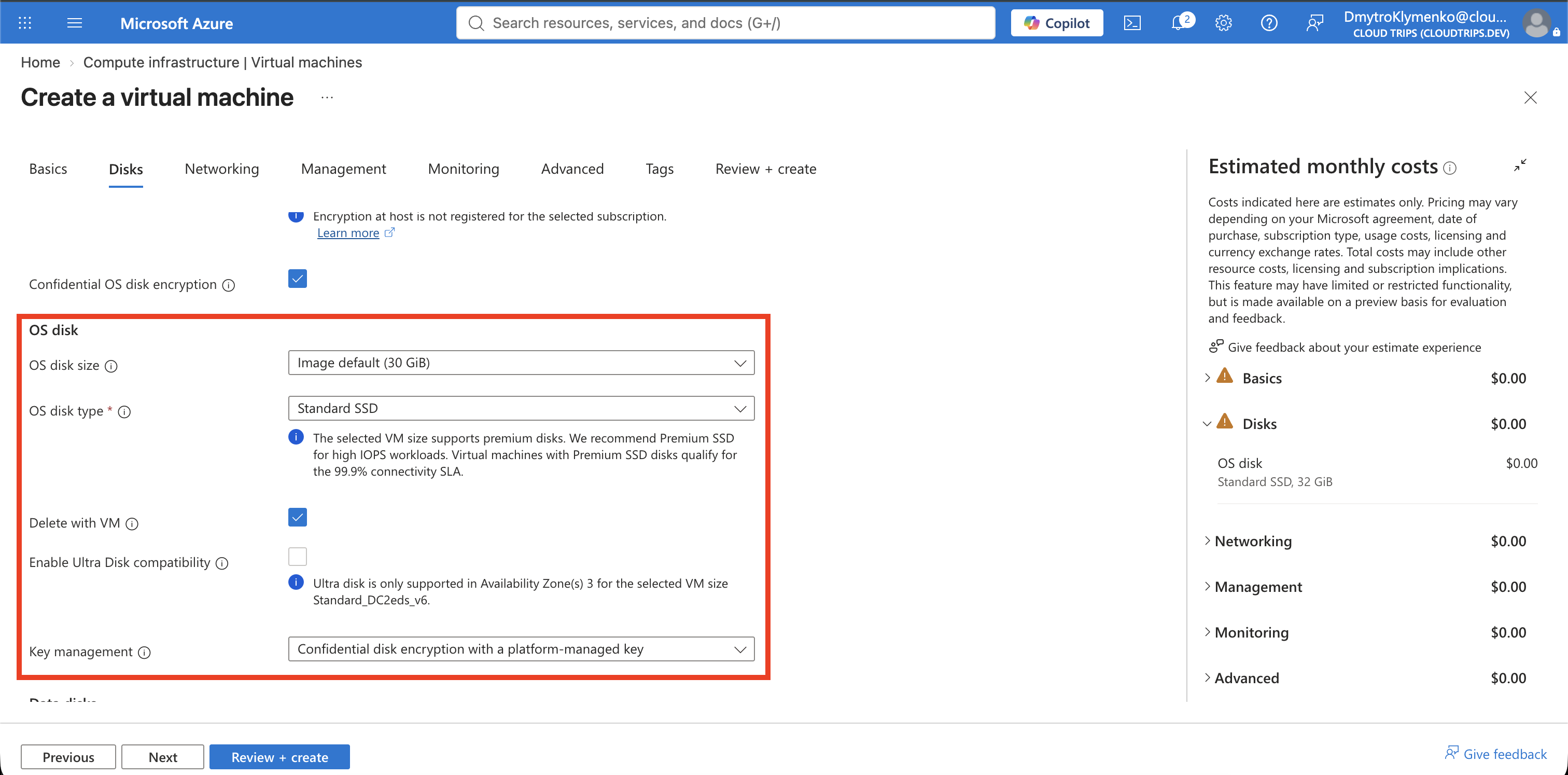
On Disks, configure:
OS disk type: Standard SSD LRS
Confidential OS disk encryption: Enabled
Encryption type: Confidential disk encryption with a platform-managed key
Portal wording can vary. Platform-managed keys keep the lab concise; a customer-managed key requires an eligible Premium Key Vault or Managed HSM, permissions, and additional lifecycle planning. Confidential OS-disk encryption cannot be changed after VM deployment and can cost more than normal managed-disk encryption.
Secure Boot and vTPM should be enabled. Secure Boot permits trusted signed boot components, while vTPM stores measured boot and security state used for attestation and protected key release.
On Networking, create:
Virtual network: vnet-cloudtrips-confidential-test-weu
Address range: 10.88.0.0/16
Subnet: snet-sensitive
Subnet range: 10.88.1.0/24
Public IP: None
NIC network security group: None
Add the usual CloudTrips TEST tags, then select Review + create > Create.
Verify the Security Profile
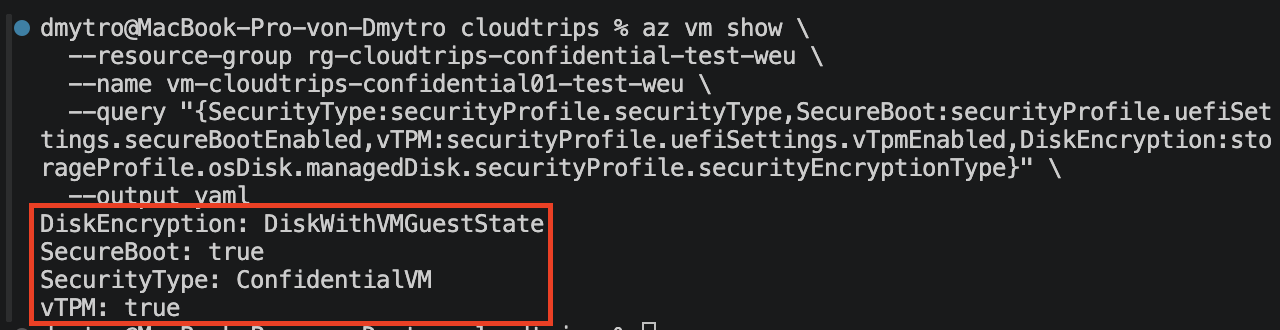
Open the VM > Properties and confirm the confidential security type, Secure Boot, and vTPM. Verify the resource model in Cloud Shell:
az vm show \
  --resource-group rg-cloudtrips-confidential-test-weu \
  --name vm-cloudtrips-confidential01-test-weu \
  --query "{SecurityType:securityProfile.securityType,SecureBoot:securityProfile.uefiSettings.secureBootEnabled,vTPM:securityProfile.uefiSettings.vTpmEnabled,DiskEncryption:storageProfile.osDisk.managedDisk.securityProfile.securityEncryptionType}" \
  --output yaml
Expected values for this configuration:
SecurityType: ConfidentialVM
SecureBoot: true
vTPM: true
DiskEncryption: DiskWithVMGuestState
DiskWithVMGuestState means confidential encryption protects the OS disk and
VM guest-state data. If the portal was configured without confidential OS-disk
encryption, the disk value can instead be VMGuestStateOnly.
Attestation measures whether the VM started with the expected confidential hardware and security configuration. Applications that release high-value secrets should validate attestation evidence rather than trusting the VM name or SKU alone.
Clean Up
Delete the dedicated resource group:
az group delete --name rg-cloudtrips-confidential-test-weu --yesConfirm that az group exists --name rg-cloudtrips-confidential-test-weu
returns false.