PaaS Access Should Stay on the Azure Backbone? Create a Service Endpoint
Azure PaaS services normally use public endpoints. A virtual network service endpoint adds a direct route from a subnet to a supported Azure service over the Microsoft backbone and lets the service identify that subnet.
Configure snet-app for Azure Storage and allow a new Storage account only
from that subnet:
WEB02 in snet-app
    |
    | Microsoft.Storage service-endpoint route
    v
Storage public endpoint over the Azure backbone
    |
    `-- Storage firewall allows snet-app

Other network ---> Storage public endpoint ---> Blocked
This trip builds on Storage Must Stay Private? Create a Private Endpoint. Keep
vnet-cloudtrips-test-weu,snet-app, and WEB02. This lab uses a separate Storage account so the private-only account from the previous trip remains unchanged.
Compare Service and Private Endpoints
Both options keep VNet-to-service traffic on Microsoft’s network, but their network models differ:
| Property | Service endpoint | Private endpoint |
|---|---|---|
| Destination | Service’s public IP address | Private IP address in the VNet |
| DNS change | None | Private DNS normally required |
| Configuration scope | Subnet plus service firewall | Private endpoint NIC plus service approval |
| Access from on-premises | Not directly | Through connected networks and DNS |
A service endpoint does not deploy a NIC or private IP into the VNet. DNS still
resolves <account>.blob.core.windows.net to a public Storage address, while
Azure routes the traffic directly over its backbone and presents the subnet’s
identity to the Storage firewall.
Enable Microsoft.Storage on the Subnet
In the Azure portal, open:
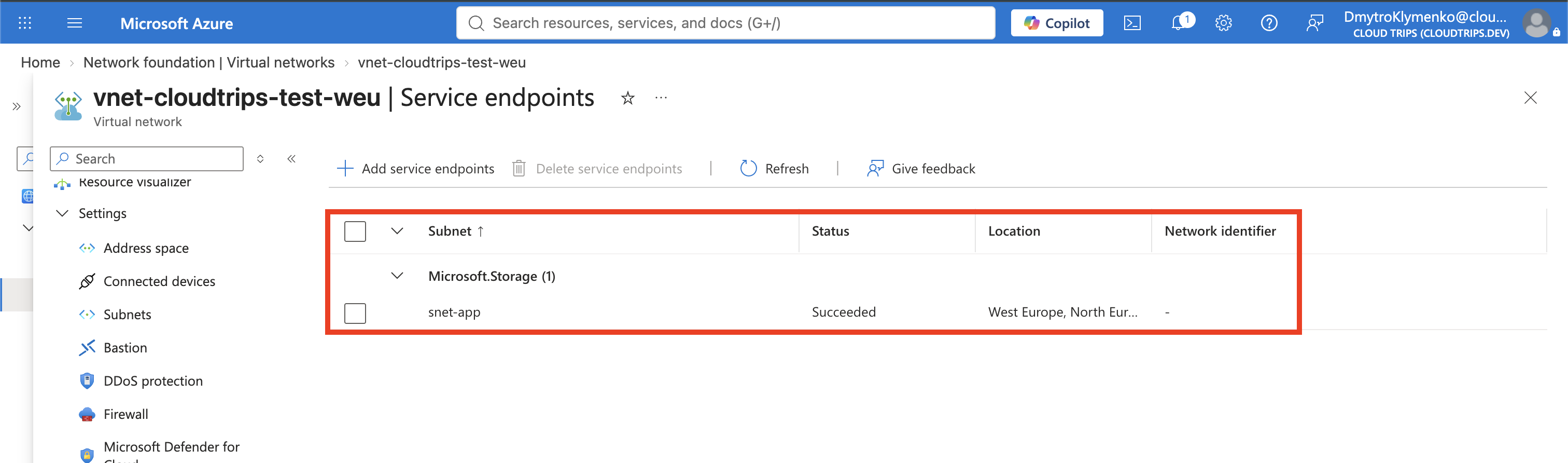
Virtual networks > vnet-cloudtrips-test-weu > Settings > Service endpointsSelect + Add and configure:
Service: Microsoft.Storage
Subnets: snet-app
Select Add and wait until Microsoft.Storage appears for snet-app with a
successful provisioning state.
The equivalent CLI command is:
az network vnet subnet update \
  --resource-group rg-cloudtrips-network-test-weu \
  --vnet-name vnet-cloudtrips-test-weu \
  --name snet-app \
  --service-endpoints Microsoft.Storage
Use either the portal or CLI method. If the subnet already has other service
endpoints, do not replace them with this command; add Microsoft.Storage while
preserving the existing values.
Create a Storage Account for the Service Endpoint
In Cloud Shell, select Bash and generate a globally unique name:
SERVICE_STORAGE="stctse$(az account show --query id --output tsv | tr -d '-' | cut -c1-10)"
printf 'Service-endpoint storage account: %s\n' "$SERVICE_STORAGE"
In the Azure portal, search for Storage accounts, select + Create, and configure:
Subscription: CloudTrips TEST
Resource group: rg-cloudtrips-network-test-weu
Storage account name: the SERVICE_STORAGE value
Region: West Europe
Performance: Standard
Redundancy: Locally-redundant storage (LRS)
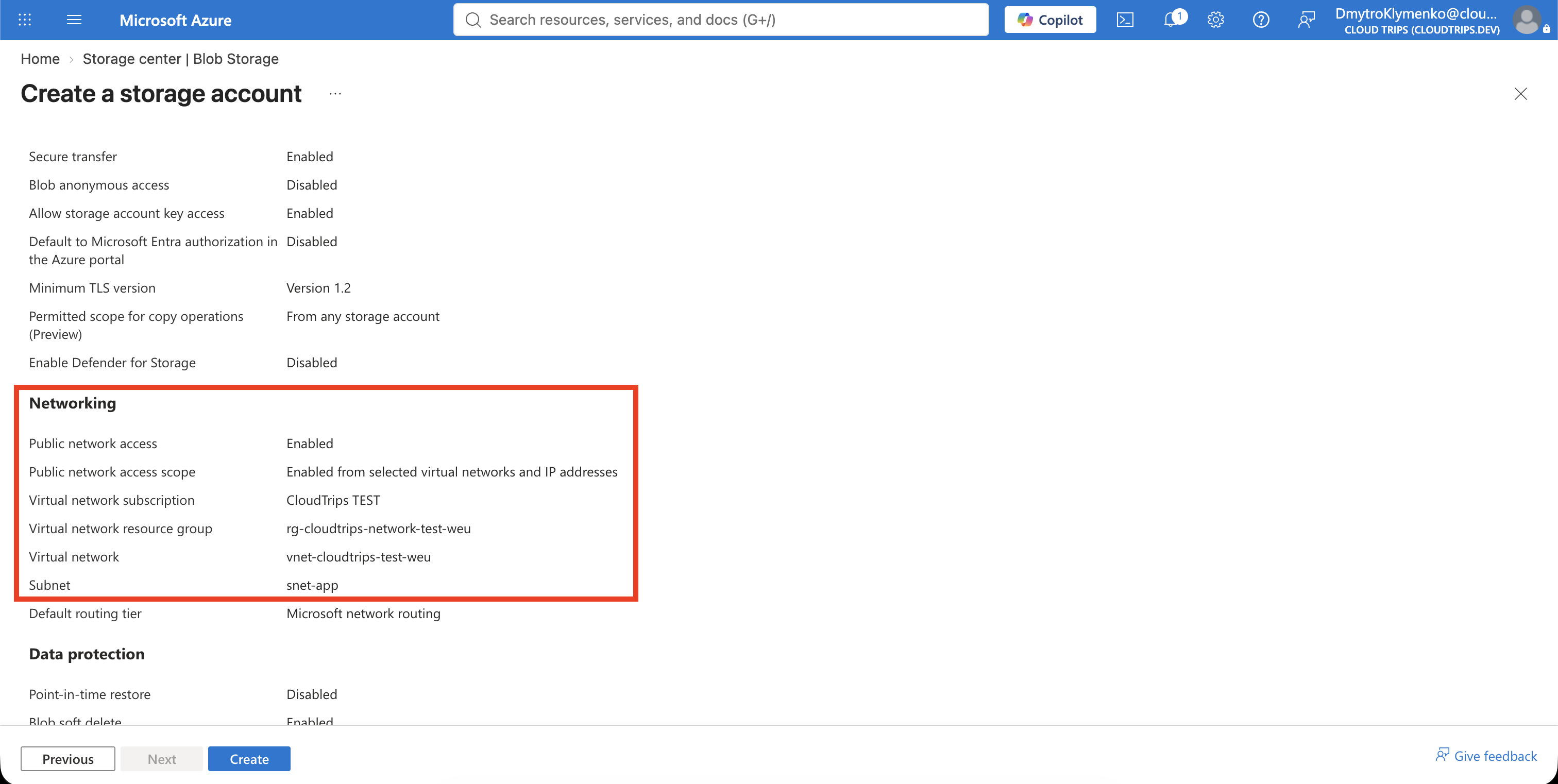
On Networking, configure:
Public network access: Enable
Public network access scope: Enable from selected virtual networks and IP addresses
Virtual network: vnet-cloudtrips-test-weu
Subnet: snet-app
Do not add your client IP and do not enable a trusted-services exception. Select Review + create > Create.
The equivalent CLI flow is:
az storage account create \
  --resource-group rg-cloudtrips-network-test-weu \
  --name "$SERVICE_STORAGE" \
  --location westeurope \
  --sku Standard_LRS \
  --kind StorageV2 \
  --https-only true \
  --min-tls-version TLS1_2 \
  --allow-blob-public-access false \
  --public-network-access Enabled \
  --default-action Deny \
  --bypass None

az storage account network-rule add \
  --resource-group rg-cloudtrips-network-test-weu \
  --account-name "$SERVICE_STORAGE" \
  --vnet-name vnet-cloudtrips-test-weu \
  --subnet snet-app
Verify DNS Has Not Become Private
Start WEB02 if necessary, then resolve the Blob hostname from the VM:
az vm start \
  --resource-group rg-cloudtrips-network-test-weu \
  --name vm-cloudtrips-web02-test-weu

az vm run-command invoke \
  --resource-group rg-cloudtrips-network-test-weu \
  --name vm-cloudtrips-web02-test-weu \
  --command-id RunShellScript \
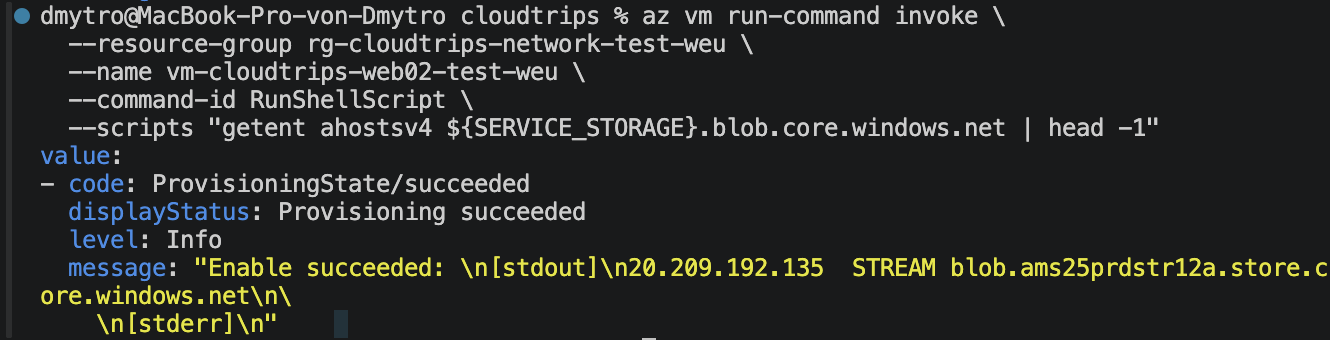
  --scripts "getent ahostsv4 ${SERVICE_STORAGE}.blob.core.windows.net | head -1"
The answer should be a public Azure IP, not a 10.20.x.x address. This is
expected: a service endpoint changes routing and service authorization, not
the service’s DNS record.
Verify the Backbone Route
Find the NIC attached to WEB02 and inspect its effective routes:
WEB02_NIC=$(az vm show \
  --resource-group rg-cloudtrips-network-test-weu \
  --name vm-cloudtrips-web02-test-weu \
  --query 'networkProfile.networkInterfaces[0].id' \
  --output tsv)

az network nic show-effective-route-table \
  --ids "$WEB02_NIC" \
  --query "value[?nextHopType=='VirtualNetworkServiceEndpoint'].{Prefix:addressPrefix[0],NextHop:nextHopType,State:state}" \
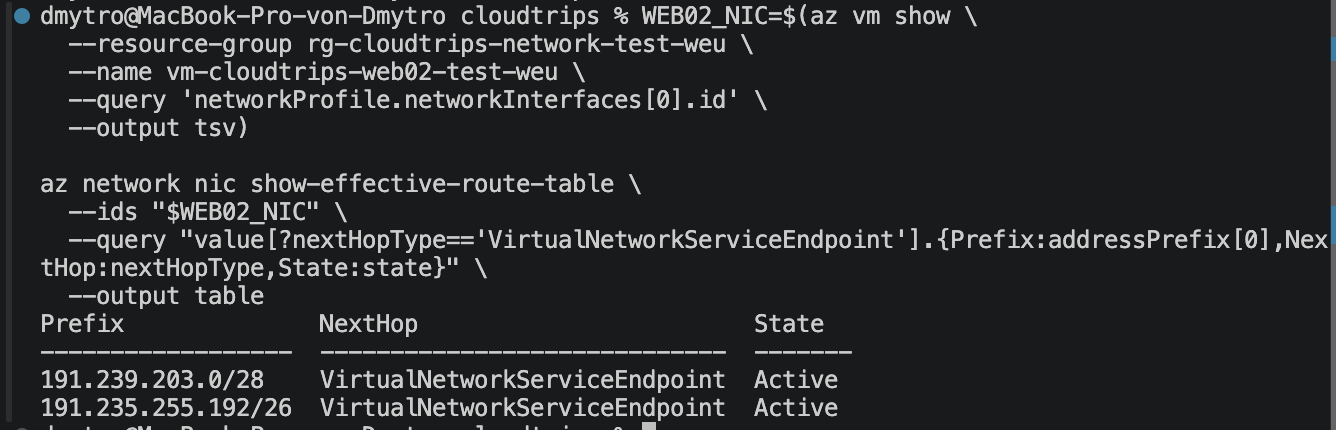
  --output table
Expect one or more active routes whose next hop is
VirtualNetworkServiceEndpoint. Azure publishes service address prefixes, so
the output can contain several rows.
Compare Responses and Verify the Boundary
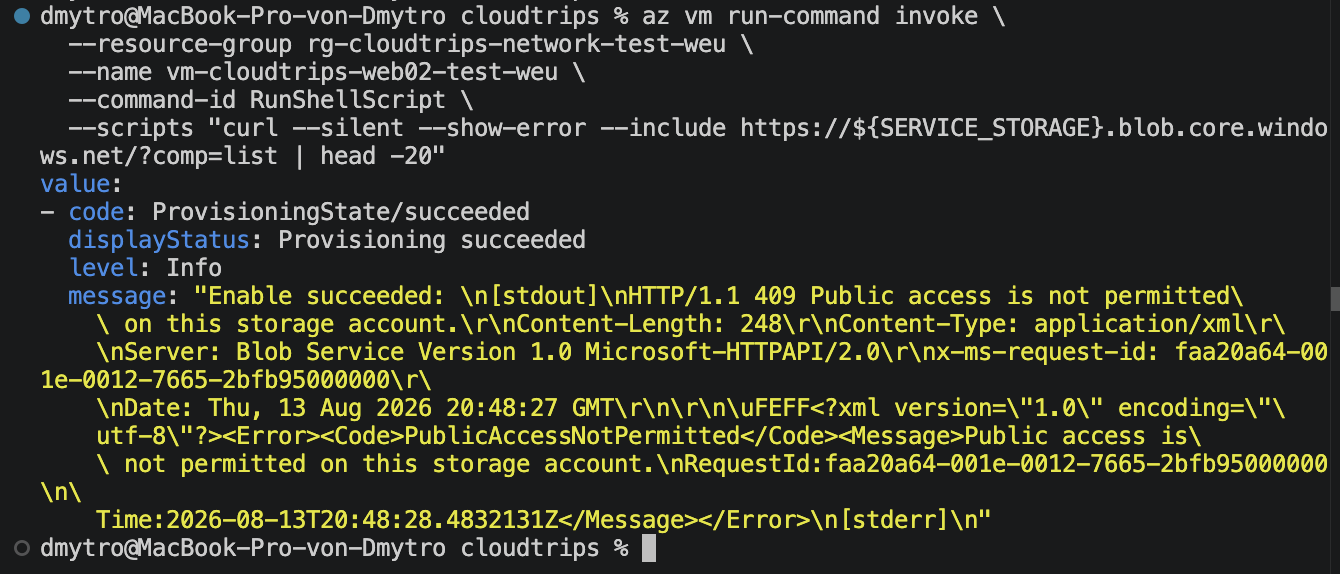
From WEB02, send an unauthenticated HTTPS request:
az vm run-command invoke \
  --resource-group rg-cloudtrips-network-test-weu \
  --name vm-cloudtrips-web02-test-weu \
  --command-id RunShellScript \
  --scripts "curl --silent --show-error --dump-header - --output /dev/null --write-out 'remote_ip=%{remote_ip} http_code=%{http_code}\n' https://${SERVICE_STORAGE}.blob.core.windows.net/?comp=list"
The public remote_ip and Storage response confirm DNS and HTTPS reachability.
Because this request has no Storage credential, however, HTTP 403 and an
x-ms-error-code such as AuthorizationFailure do not by themselves prove
that the Storage firewall accepted the subnet. Storage can use the same status
for authentication, authorization, and network restrictions.
Run the same request from Cloud Shell, which is outside snet-app:
curl --silent --show-error \
  --dump-header - \
  --output /dev/null \
  --write-out 'remote_ip=%{remote_ip} http_code=%{http_code}\n' \
  "https://${SERVICE_STORAGE}.blob.core.windows.net/?comp=list"
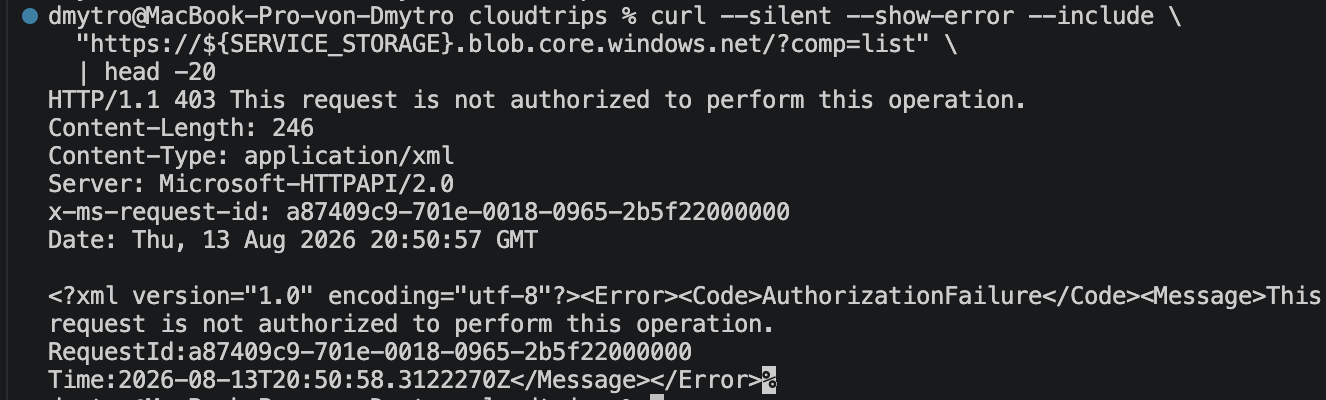
This request also normally returns 403. Inspect the x-ms-error-code header,
but do not call the status alone proof that Cloud Shell was rejected by the
network ACL. The public endpoint still exists; the configured ACL is intended
to admit only the VNet rule.
Confirm both sides of the configuration:
az network vnet subnet show \
  --resource-group rg-cloudtrips-network-test-weu \
  --vnet-name vnet-cloudtrips-test-weu \
  --name snet-app \
  --query 'serviceEndpoints[].service' \
  --output tsv

az storage account network-rule list \
  --resource-group rg-cloudtrips-network-test-weu \
  --account-name "$SERVICE_STORAGE" \
  --query '{DefaultAction:defaultAction,Bypass:bypass,VNetRules:virtualNetworkRules[].{State:state,Subnet:id}}' \
  --output yaml
Expect Microsoft.Storage, DefaultAction: Deny, Bypass: None, and an
enabled rule for snet-app. The effective route and these two control-plane
queries verify that the basic service endpoint and Storage VNet rule are
configured on both sides.
For conclusive data-plane validation, perform the same read with one
short-lived, read-only SAS from WEB02 and from a client outside snet-app. It
must succeed from WEB02 and fail outside. Handle the SAS through your
organization’s approved secret-delivery process; never paste an account key or
SAS into Run Command, screenshots, or this repository. Without that
authenticated comparison, the two curl calls are scoped connectivity and
error-code observations, not standalone allow/deny proof.
Keep or Remove the Service Endpoint Lab
Deallocate WEB02 when testing is complete. Keep the service endpoint and Storage account if a later workload will use them.
To remove this lab, delete the service-endpoint Storage account and remove the
Microsoft.Storage service endpoint from snet-app only when no other
Storage resource depends on it. Keep the VNet, subnet, VM, private endpoint,
and private DNS resources from earlier networking trips.