Storage Must Stay Private? Create a Private Endpoint
An Azure Storage account has a public endpoint by default. Authentication still protects the data, but the endpoint remains reachable from the Internet. A workload that must use private connectivity needs a different boundary.
Create a private-only storage account and connect its Blob service to
snet-data through Azure Private Link:
WEB02 in snet-app
    |
    | storage-account.blob.core.windows.net resolves privately
    v
Private Endpoint NIC in snet-data
    |
    `-- Azure Storage Blob service

Internet client ---> Public endpoint ---> Blocked
This trip builds on Private Service Needs a Private Name? Create a Private DNS Zone. Keep
vnet-cloudtrips-test-weu,snet-app,snet-data, and WEB02. The custominternal.cloudtrips.devzone is not used by Storage; Azure Storage requires its service-specific Private Link zone.
Understand the Three Controls
A complete private Storage path combines three independent controls:
| Control | Purpose |
|---|---|
| Private endpoint | Gives the Blob service a private IP in the VNet |
| Private DNS zone | Resolves the normal Blob hostname to that private IP inside the VNet |
| Disabled public network access | Rejects data-plane traffic through the public endpoint |
The private endpoint does not replace authentication. Clients still need an access key, SAS, or Microsoft Entra data-plane role to read and write data.
This trip creates an endpoint for the blob subresource only. File shares,
queues, tables, and Data Lake Storage dfs operations require their own
private endpoints and DNS zones.
Generate a Storage Account Name
Storage account names are globally unique. In Cloud Shell, select Bash and generate a stable name from the current subscription:
STORAGE_ACCOUNT="stctpe$(az account show --query id --output tsv | tr -d '-' | cut -c1-10)"
printf 'Storage account: %s\n' "$STORAGE_ACCOUNT"
Copy the displayed value. It contains only lowercase letters and numbers and fits the storage-account naming limit.
Create Private-Only Storage
In the Azure portal, search for Storage accounts, select + Create, and configure the Basics tab:
Subscription: CloudTrips TEST
Resource group: rg-cloudtrips-network-test-weu
Storage account name: the STORAGE_ACCOUNT value
Region: West Europe
Performance: Standard
Redundancy: Locally-redundant storage (LRS)
On Networking, set:
Public network access: Disable
Network routing: Microsoft network routing
Select Review + create > Create, then open the storage account. Disabling public access blocks the Storage data plane; it does not prevent the Azure control plane from managing the account.
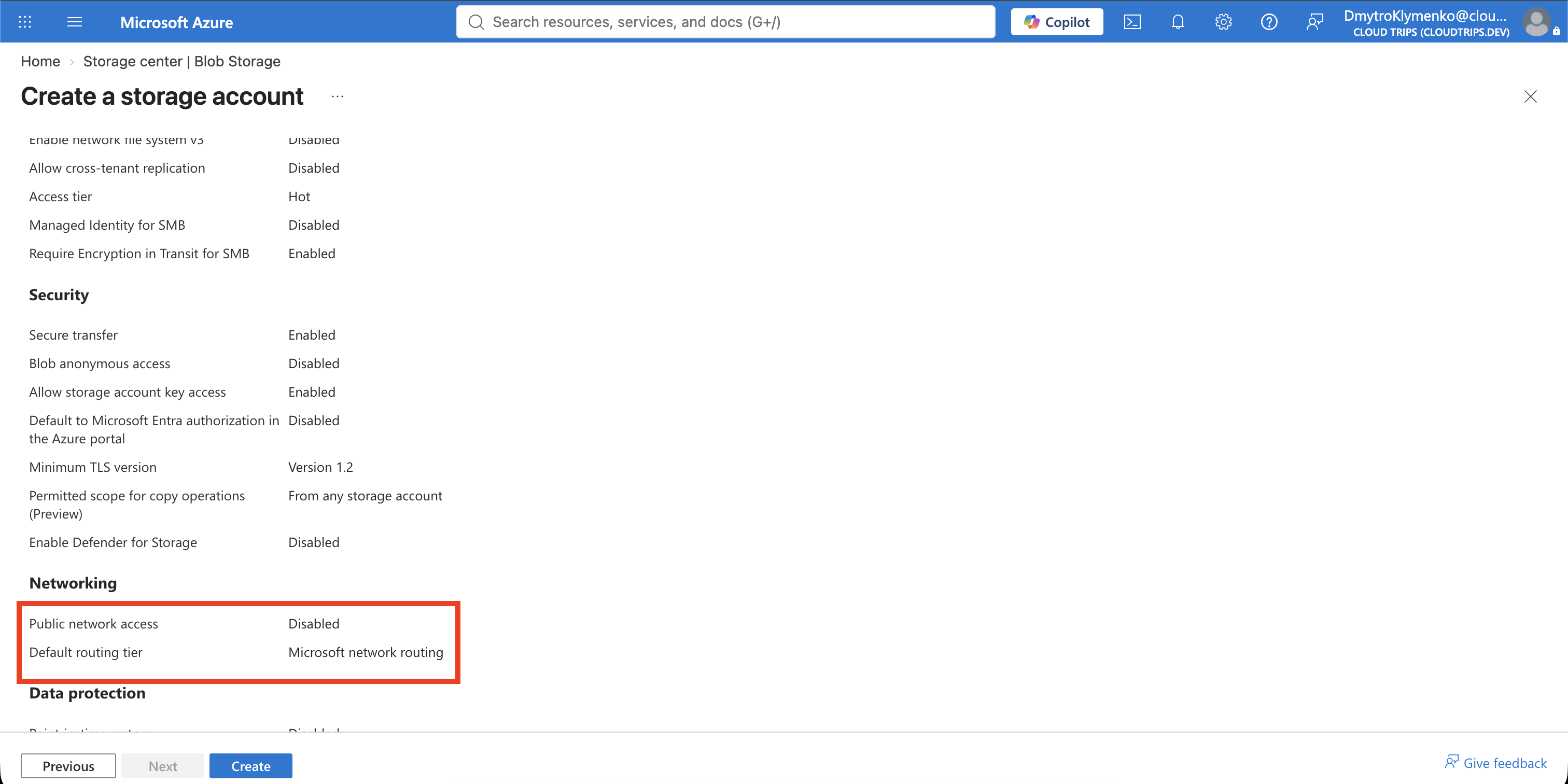
The equivalent CLI command is:
az storage account create \
  --resource-group rg-cloudtrips-network-test-weu \
  --name "$STORAGE_ACCOUNT" \
  --location westeurope \
  --sku Standard_LRS \
  --kind StorageV2 \
  --https-only true \
  --min-tls-version TLS1_2 \
  --allow-blob-public-access false \
  --public-network-access Disabled
Use either the portal or the CLI, not both.
Create the Blob Private Endpoint
In the storage account, open Security + networking > Networking > Private endpoint connections, then select + Private endpoint.
On Basics, configure:
Subscription: CloudTrips TEST
Resource group: rg-cloudtrips-network-test-weu
Name: pep-cloudtrips-storage-blob-test-weu
Network interface name: nic-pep-cloudtrips-storage-blob-test-weu
Region: West Europe
On Resource, keep Connect to an Azure resource in my directory and select:
Resource type: Microsoft.Storage/storageAccounts
Resource: the STORAGE_ACCOUNT value
Target sub-resource: blob
On Virtual Network, configure:
Virtual network: vnet-cloudtrips-test-weu
Subnet: snet-data
Private IP configuration: Dynamically allocate IP address
Application security group: None
On DNS, keep Integrate with private DNS zone set to Yes. Confirm:
Private DNS zone: privatelink.blob.core.windows.net
Resource group: rg-cloudtrips-network-test-weu
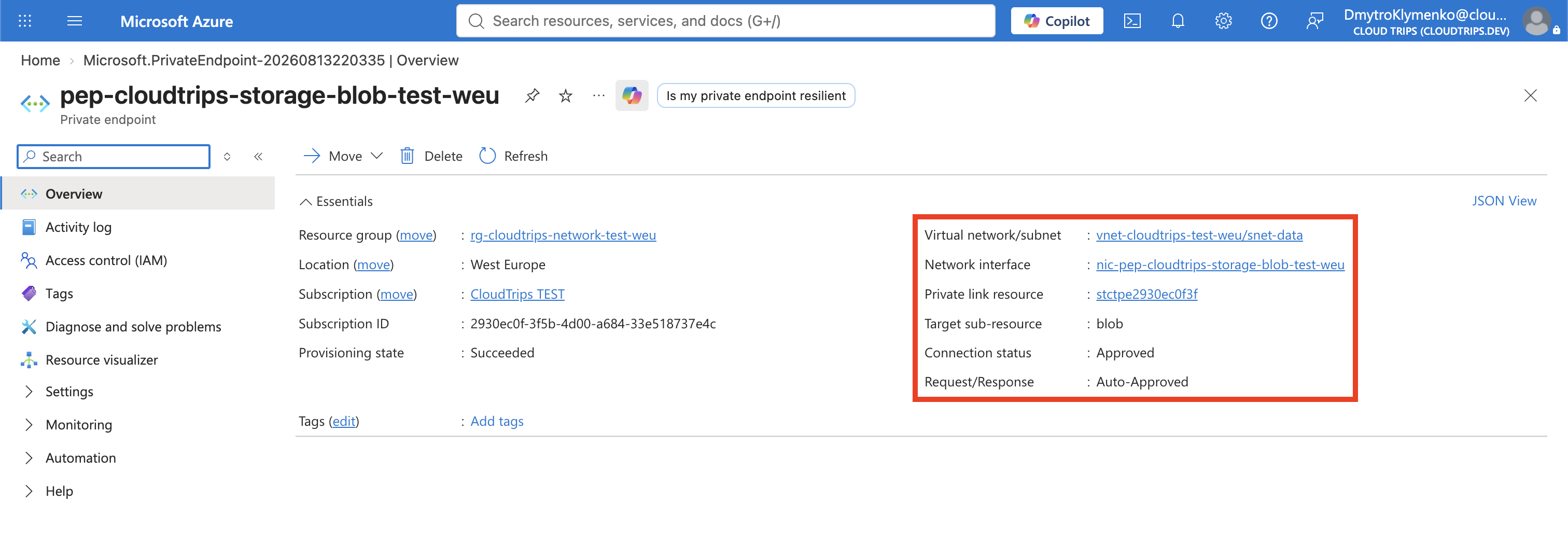
Select Review + create > Create. Because you own both resources, Azure normally approves the private endpoint connection automatically.
Verify the Endpoint and DNS Zone
Return to the storage account’s Private endpoint connections page. Confirm
that pep-cloudtrips-storage-blob-test-weu has status Approved.
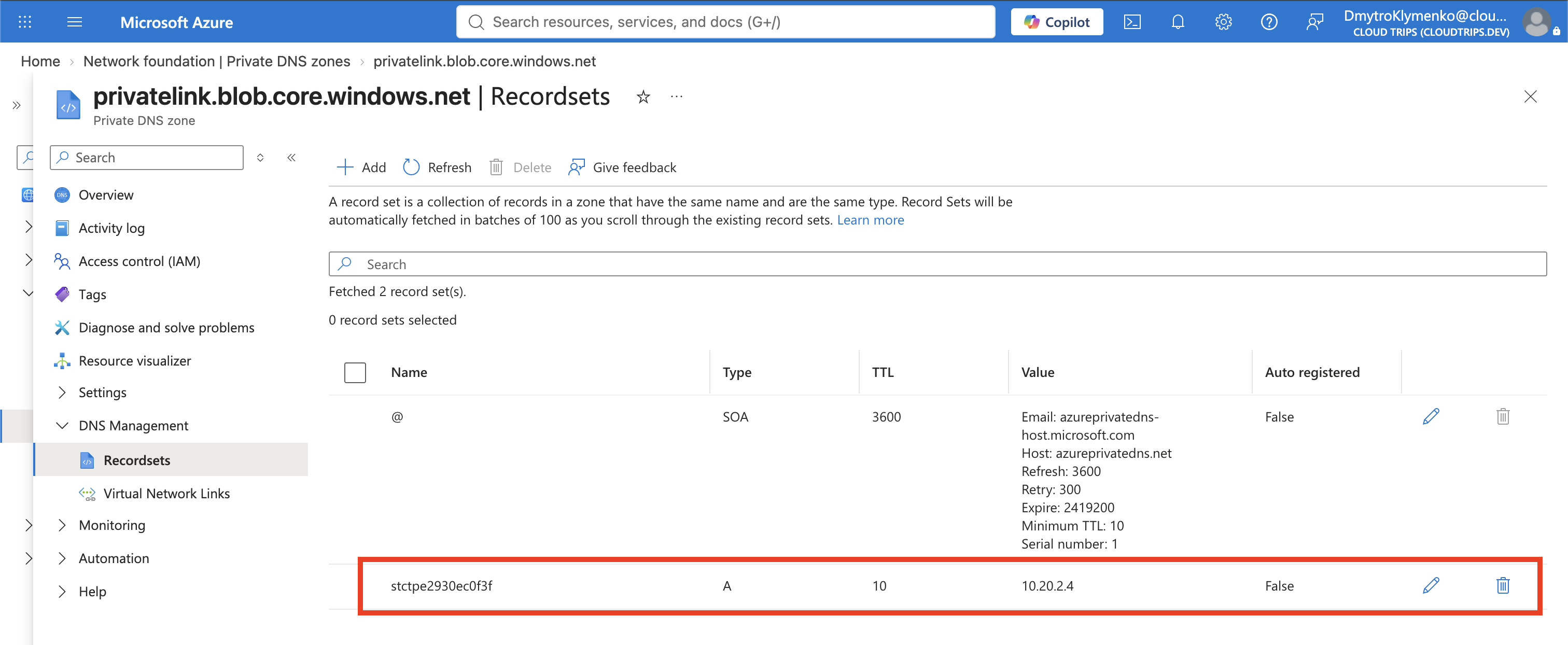
Open Private DNS zones > privatelink.blob.core.windows.net. Confirm that:
- an A record named after the storage account points to a
10.20.2.xaddress - a virtual network link connects the zone to
vnet-cloudtrips-test-weu
The VM requests the normal <storage-account>.blob.core.windows.net hostname,
which DNS resolves to <storage-account>.privatelink.blob.core.windows.net inside the linked VNet. The A record in the private DNS zone then resolves that private name to the private endpoint’s 10.20.2.x IP address.
Azure manages the A record through the private endpoint’s DNS zone group. Do not replace it with a manually maintained record.
Resolve and Connect from the VNet
Start WEB02 if it is deallocated:
az vm start \
  --resource-group rg-cloudtrips-network-test-weu \
  --name vm-cloudtrips-web02-test-weu
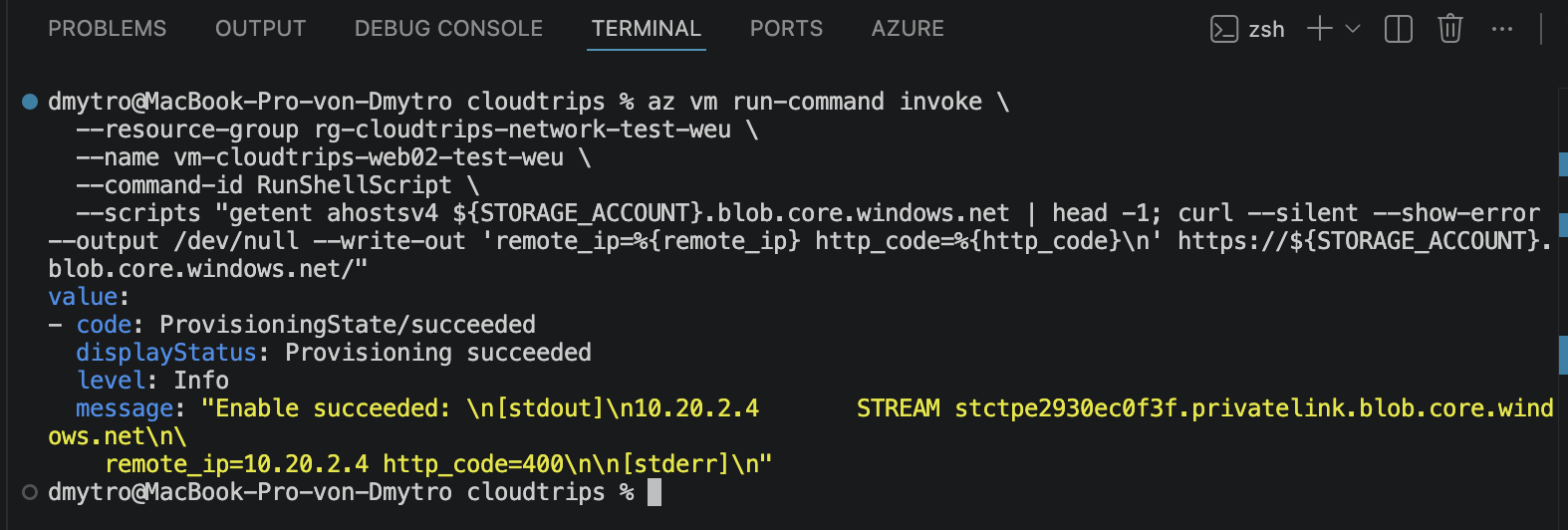
Run DNS and HTTPS checks from that VM:
az vm run-command invoke \
  --resource-group rg-cloudtrips-network-test-weu \
  --name vm-cloudtrips-web02-test-weu \
  --command-id RunShellScript \
  --scripts "getent ahostsv4 ${STORAGE_ACCOUNT}.blob.core.windows.net | head -1; curl --silent --show-error --dump-header - --output /dev/null --write-out 'remote_ip=%{remote_ip} http_code=%{http_code}\n' https://${STORAGE_ACCOUNT}.blob.core.windows.net/"
Both results should show the same 10.20.2.x private endpoint address. An HTTP
400 or 403 response is normal because this request has no Storage
credential. The matching DNS address and remote_ip prove that the HTTPS
connection used the private endpoint; the HTTP status does not prove data
authorization or a firewall decision.
Confirm Public Access Is Disabled
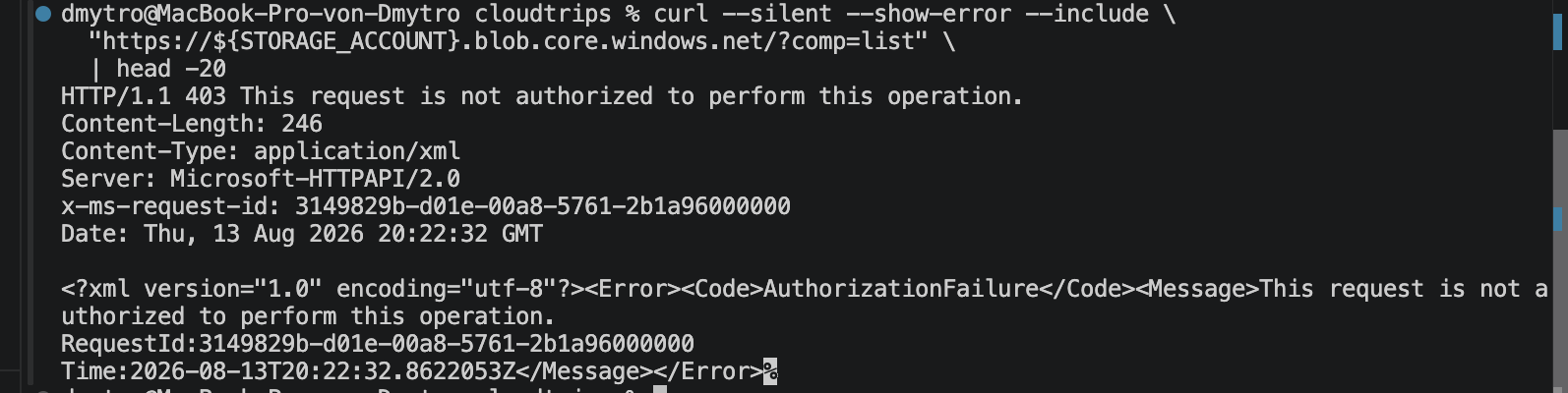
Cloud Shell is outside vnet-cloudtrips-test-weu. Run:
getent ahostsv4 "${STORAGE_ACCOUNT}.blob.core.windows.net" | head -1

curl --silent --show-error \
  --dump-header - \
  --output /dev/null \
  --write-out 'remote_ip=%{remote_ip} http_code=%{http_code}\n' \
  "https://${STORAGE_ACCOUNT}.blob.core.windows.net/?comp=list"
Cloud Shell should resolve and connect to a public Azure address, and the
request normally returns HTTP 403. Inspect any x-ms-error-code header, but
do not treat an unauthenticated 403 by itself as proof of a network block:
Storage also returns 403 for several authentication and authorization errors.
Public DNS remains expected; private-only means that the public data endpoint
rejects data-plane access, not that its public hostname disappears.
Confirm the account setting and private endpoint connection explicitly:
az storage account show \
  --resource-group rg-cloudtrips-network-test-weu \
  --name "$STORAGE_ACCOUNT" \
  --query publicNetworkAccess \
  --output tsv

az network private-endpoint show \
  --resource-group rg-cloudtrips-network-test-weu \
  --name pep-cloudtrips-storage-blob-test-weu \
  --query 'privateLinkServiceConnections[].{Name:name,Status:privateLinkServiceConnectionState.status}' \
  --output table
Expect Disabled and a private endpoint connection with status Approved.
Together with WEB02’s private remote_ip, these settings conclusively verify
the intended public-disabled/private-endpoint configuration.
For a full data-plane enforcement test, use the same short-lived, read-only SAS
or the same managed identity for a read from WEB02 and from a client outside the
VNet. The read must succeed through the private endpoint and fail through the
public endpoint. Handle that credential through your organization’s approved
secret-delivery process; never paste an account key or SAS into Run Command,
screenshots, or this repository. Without that authenticated comparison, label
the Cloud Shell curl result as a diagnostic observation, not standalone proof.

Keep or Remove the Private Endpoint Lab
Keep the resources if the next trip will use private Storage. Deallocate WEB02 when you no longer need it:
az vm deallocate \
  --resource-group rg-cloudtrips-network-test-weu \
  --name vm-cloudtrips-web02-test-weu
To remove only this lab, delete the private endpoint, storage account, and the
Storage-specific Private DNS zone. Keep the VNet, subnets, VMs, and
internal.cloudtrips.dev zone for other networking trips.