A Global Web App Needs an Edge Entry? Create Azure Front Door
The CloudTrips Application Gateway is a regional entry point in West Europe. A user in another part of the world must reach that region before Azure can process the HTTP request. The application also exposes a regional public IP instead of one global application endpoint.
Create Azure Front Door as the public edge entry. Front Door is a global Layer 7 reverse proxy and content-delivery service. A client connects to a nearby Microsoft edge location, and Front Door forwards the request across Microsoft’s network to the configured application origin.
Global user
    |
Azure Front Door edge and HTTPS endpoint
    |
WAF_v2 Application Gateway in West Europe
    |
Private CloudTrips web VMs
Front Door and Application Gateway have different jobs. Front Door is the global edge. Application Gateway remains the regional Layer 7 router and WAF in front of the private VMs.
This trip depends on A Web App Needs OWASP Protection? Enable WAF. Keep
agw-cloudtrips-web-test-weu, its public IP, WAF policy, routing rules, and both web VMs. Start the VMs before continuing.
Front Door adds a recurring profile charge plus request and data-processing charges. The Application Gateway also remains billable. Complete the Front Door trips together and remove both services when the lab sequence is finished.
Confirm the Regional Origin
Retrieve the Application Gateway public IP and confirm that the existing API route is healthy:
APPGW_IP=$(az network public-ip show \
  --resource-group rg-cloudtrips-network-test-weu \
  --name pip-cloudtrips-appgw-test-weu \
  --query ipAddress \
  --output tsv)

printf 'Application Gateway origin: %s\n' "$APPGW_IP"
curl --include "http://${APPGW_IP}/api/health"
The request should return HTTP 200, the CloudTrips health JSON, and
X-CloudTrips-Gateway: ApplicationGateway. Front Door will use this public
address as its first origin.
Create a globally unique endpoint name from the current subscription ID:
AFD_ENDPOINT_NAME="cloudtrips-edge-$(az account show \
  --query id \
  --output tsv | tr -d '-' | cut -c1-8)"

printf 'Front Door endpoint name: %s\n' "$AFD_ENDPOINT_NAME"
Copy the displayed name for the portal. Azure adds the Front Door domain suffix after deployment.
Create the Front Door Profile
Search for Front Door and CDN profiles and select Create. On Compare offerings, select Custom create, then select Continue to create a Front Door.
On Basics, configure:
Subscription: CloudTrips TEST
Resource group: rg-cloudtrips-network-test-weu
Resource group location: West Europe
Name: afd-cloudtrips-test
Tier: Standard
The profile’s resource-group location stores its management metadata. It does not make Front Door regional. The endpoint is deployed across Microsoft’s global edge network.
Standard is sufficient for this lab because the existing Application Gateway WAF already inspects requests in West Europe. Premium is needed when Front Door itself must use managed WAF rules or supported Private Link origins.
Add the Edge Endpoint
Open Endpoint, select Add an endpoint, and enter the globally unique name generated above. Select Add.
An endpoint receives client traffic and gets a default Azure-managed
domain such as cloudtrips-edge-...z01.azurefd.net. A Front Door profile can
contain multiple endpoints, but this lab needs one.
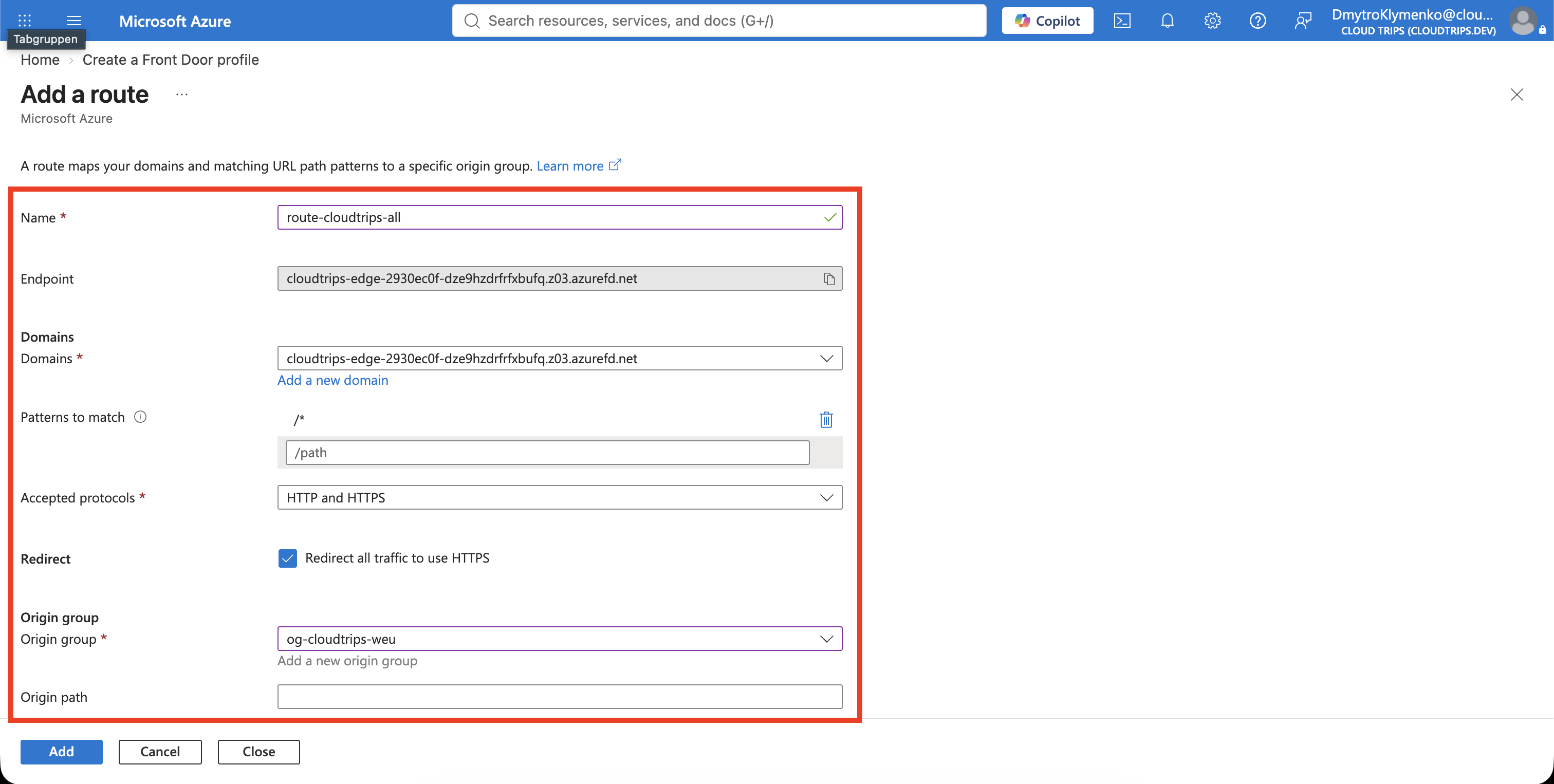
Select + Add a route and begin with:
Name: route-cloudtrips-all
Domains: Select the generated endpoint domain
Link to default domain: Enabled
Patterns to match: /*
Accepted protocols: HTTP and HTTPS
Redirect: Redirect all traffic to use HTTPS
The route connects a domain and URL pattern to an origin group. Linking the
default domain allows the generated azurefd.net hostname to use this route.
/* matches the root path and all existing CloudTrips paths, including
/images/* and /api/*.
Add the Application Gateway Origin
Under Origin group, select Add a new origin group and configure:
Name: og-cloudtrips-weu
Session affinity: Disabled
Health probe status: Enabled
Health probe path: /
Health probe protocol: HTTP
Health probe request type: GET
Health probe interval: 30 seconds
Keep the default load-balancing sample and latency settings. With one origin, Front Door has no alternative destination yet; the health probe only decides whether that origin can receive requests.
Select + Add an origin and configure:
Name: origin-appgw-weu
Origin type: Custom
Host name: Use the APPGW_IP value displayed earlier
Origin host header: Use the same APPGW_IP value
HTTP port: 80
Priority: 1
Weight: 1000
Status: Enabled
Private Link: Disabled
The origin is the service that Front Door contacts. Here it is the public
frontend of agw-cloudtrips-web-test-weu, not either private VM. The existing
basic Application Gateway listener accepts the IP-based host header.
Add the origin, then add the origin group. Complete the route with:
Origin path: Leave empty
Forwarding protocol: HTTP only
Caching: Disabled
Rules: None
Clients use HTTPS to Front Door, but this lab forwards from Front Door to the existing HTTP-only Application Gateway listener. That is adequate for the exercise, but it is not end-to-end TLS. A production design should add an HTTPS listener and trusted certificate to the origin and then use HTTPS as the forwarding protocol.
Caching remains disabled because the current API responses are dynamic. A later design can enable caching only for paths whose responses are safe to reuse.
Deploy the Global Edge
Do not add a security policy in this trip. The WAF policy already associated with Application Gateway continues to inspect the requests after Front Door forwards them to West Europe.
Select Review + create, then select Create. Open
afd-cloudtrips-test after deployment and wait until the profile and endpoint
show Succeeded and Enabled. Front Door configuration can take several
minutes to reach all edge locations.
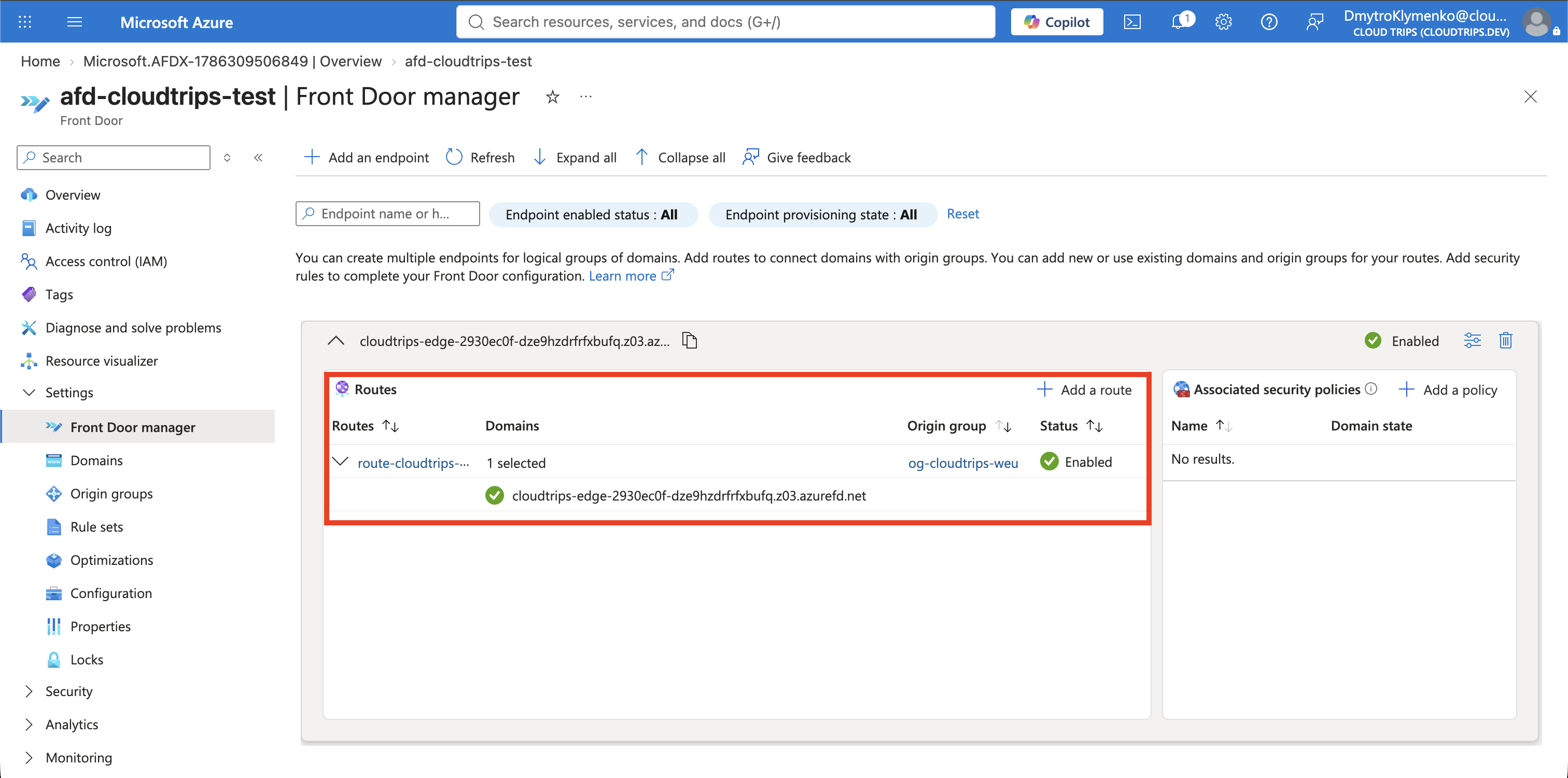
Open Front Door manager and confirm this chain:
Endpoint: cloudtrips-edge-...
Route: route-cloudtrips-all
Origin group: og-cloudtrips-weu
Origin: origin-appgw-weu
The profile is global even though its only origin is currently in West Europe. This trip creates a global entry point; it does not yet make the application multi-region.
Test the Front Door Endpoint
Retrieve the generated hostname without having to type its unique suffix:
AFD_HOST=$(az afd endpoint list \
  --resource-group rg-cloudtrips-network-test-weu \
  --profile-name afd-cloudtrips-test \
  --query '[0].hostName' \
  --output tsv)

printf 'Front Door hostname: %s\n' "$AFD_HOST"
First confirm that the HTTP endpoint redirects the client to HTTPS:
curl --head "http://${AFD_HOST}/api/health"The response should contain a Location header beginning with
https://${AFD_HOST}. Now use the secure endpoint:
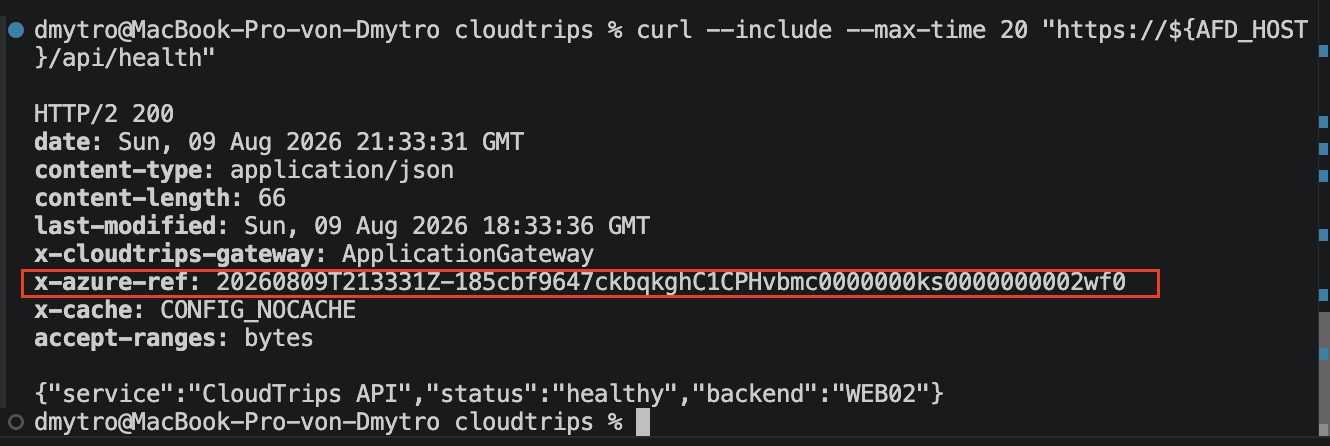
curl --include --max-time 20 "https://${AFD_HOST}/api/health"The request should return HTTP 200, the health JSON, and these identifying
headers:
X-Azure-Ref: ...
X-CloudTrips-Gateway: ApplicationGateway
X-Azure-Ref proves that Front Door handled the request. The CloudTrips
header proves that Front Door then reached the existing Application Gateway
route and rewrite configuration.
The Application Gateway public IP is still directly reachable. Front Door is now the preferred edge endpoint, but creating it alone does not hide or lock down the origin. Origin-access restrictions require an additional design that allows Front Door traffic while preserving its health probes.
Keep afd-cloudtrips-test, its endpoint, route, and
og-cloudtrips-weu for the next Front Door trips. The following origin-group
trip adds a low-cost maintenance origin and demonstrates primary and fallback
priorities without deploying another Application Gateway.