A Private API Needs a Nearby Gateway? Deploy an API Management Self-Hosted Gateway
A self-hosted gateway runs near your API while Azure API Management remains the place where you configure it. For example, a warehouse API can stay on the warehouse network. Local applications call a nearby gateway, which applies APIM policies and forwards requests to that API. Those requests do not have to travel through the Azure-hosted gateway.
The gateway is a container you operate. Azure supplies its configuration; you provide its runtime, networking, updates, and availability. Creating the gateway entry in the portal alone does not start a container.
In this lab, your computer represents the private site:
Azure APIM configuration → local gateway container

curl on your computer → localhost:8080 → gateway → private API container
The backend serves a small JSON response on a Docker network, with no published host port. The gateway publishes only 127.0.0.1:8080, so other computers cannot connect to it through that port. This is a local connectivity demonstration, not a production authentication design.
Prepare the Lab
You need Docker running Linux containers, a terminal with Bash, and curl on the same computer. Use Terminal on macOS/Linux or a WSL Bash terminal on Windows with Docker integration enabled. Run all shell commands there, not in Azure Cloud Shell. Check docker info before continuing; it must connect to a running Docker engine.
The gateway image is Linux x86-64. On an ARM computer such as an Apple Silicon Mac, Docker must support amd64 emulation; the command below requests that architecture explicitly. If emulation is unavailable, use an x86-64 Docker machine.
The previous Consumption APIM instance cannot host this gateway configuration. Create a separate Developer (classic) instance for the lab. Developer is billed while provisioned, including when your local containers are stopped, and is for development/testing. Review the portal’s price before creating it and delete the instance after the lab. No Kubernetes cluster or Azure VM is required for this approach.
Create the APIM Instance
In the Azure portal, open API Management services → Create:
Subscription: CloudTrips TEST
Resource group: rg-cloudtrips-selfhosted-test-neu (new)
Region: North Europe
Resource name: apim-ctselfhosted-neu (must be globally unique)
Organization name: CloudTrips
Administrator email: your email
Pricing tier: Developer (classic)
Use public connectivity and no VNet integration for this lab. Complete creation and wait for the service to be ready; dedicated APIM provisioning can take a while. Keep the earlier Consumption instance separate.
Start the Private Backend
The local lab lives in examples/apim-selfhosted inside your cloudtrips project; the commands assume the project is at ~/Development/cloudtrips (adjust this path if needed). In your computer’s Bash terminal, run:
mkdir -p ~/Development/cloudtrips/examples/apim-selfhosted/backend
cd ~/Development/cloudtrips/examples/apim-selfhosted
printf '%s\n' '{"service":"private-orders","location":"local-docker","status":"ok"}' > backend/status.json

docker network create ct-apim-local
docker run -d --name ct-private-api \
  --network ct-apim-local \
  --mount "type=bind,src=$PWD/backend,dst=/usr/share/nginx/html,readonly" \
  nginx:stable-alpine
ct-private-api is the backend’s Docker DNS name. Containers on ct-apim-local can reach it at http://ct-private-api. We deliberately omitted -p, so the backend has no published host port. The gateway will reach it over the shared Docker network.
If a command reports that a container or network already exists, check docker ps -a and docker network ls; reuse your existing lab setup or remove only the named lab resources before rerunning.
Define the API in Azure
In the new APIM instance, open APIs → APIs → Add API → HTTP (the empty HTTP API option):
Display name: CloudTrips Private Orders
Name: ct-private-orders
Web service URL: http://ct-private-api
API URL suffix: private-orders
Create the API. Under Settings → URL scheme / Protocols, select HTTP or HTTP and HTTPS, then save: the local test calls http://127.0.0.1:8080, and an HTTPS-only API will not match that request, returning 404. Under Settings, leave Products empty and turn Subscription required → Off, then save. Subscription required → Off removes the requirement for an APIM subscription key; it does not disable your Azure subscription or stop billing. The gateway’s loopback binding limits access to your computer; for a real deployment, configure TLS and client authentication before exposing it to other machines.
Under Design → Add operation, create:
Display name: Get status
Name: get-status
Method: GET
URL: /status.json
Save. Select All operations → policy code editor and set:
<policies>
  <inbound>
    <base />
  </inbound>
  <backend>
    <base />
  </backend>
  <outbound>
    <base />
    <set-header name="X-CloudTrips-Gateway" exists-action="override">
      <value>self-hosted</value>
    </set-header>
  </outbound>
  <on-error>
    <base />
  </on-error>
</policies>
Save. The response header will show that the gateway applied the policy. The backend’s JSON file does not contain that header.
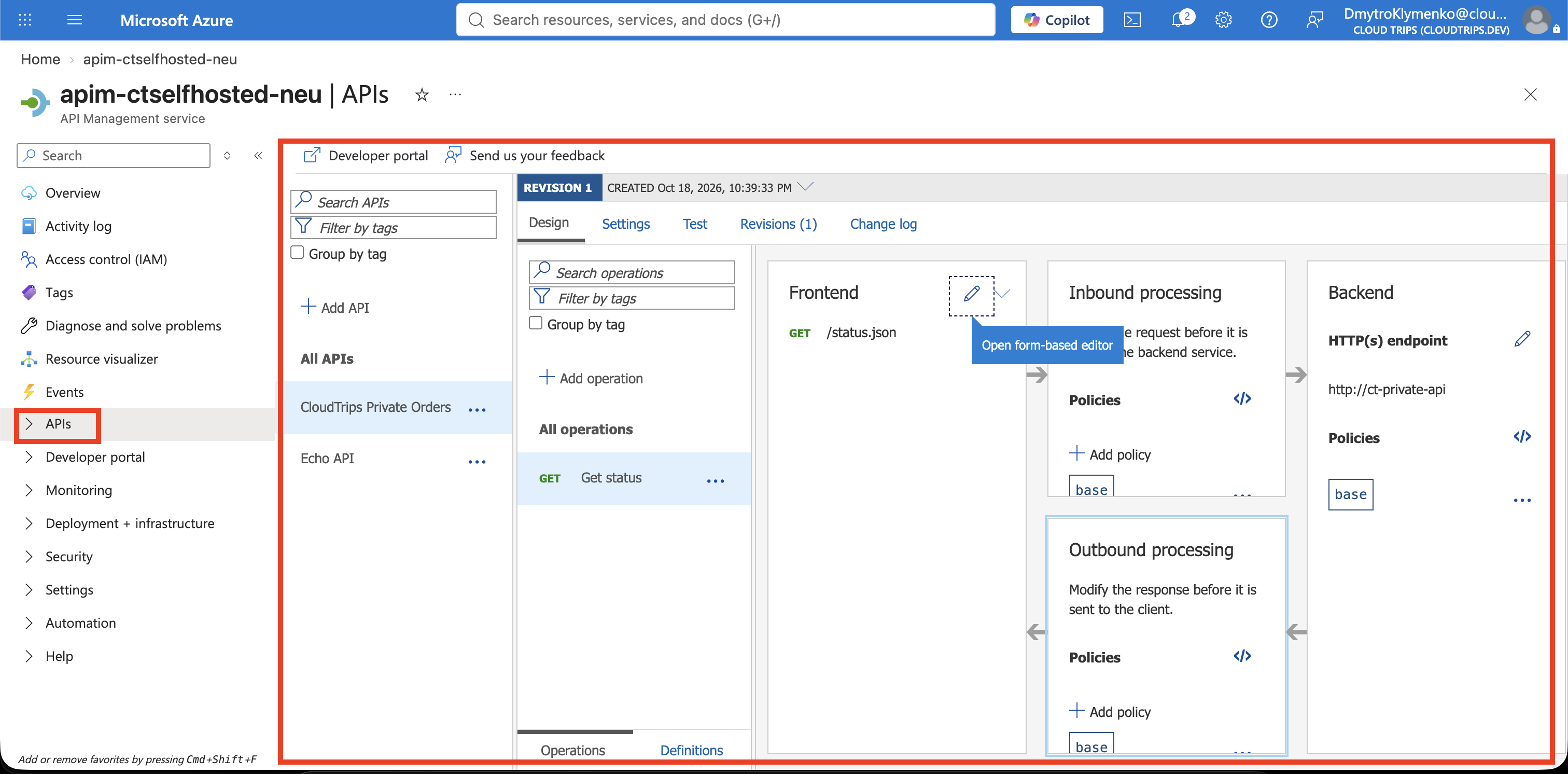
The hostname ct-private-api resolves inside Docker. The Azure-hosted gateway cannot resolve or reach this local backend. Test using the local URL below rather than the portal’s default Azure gateway URL.
Register and Start the Gateway
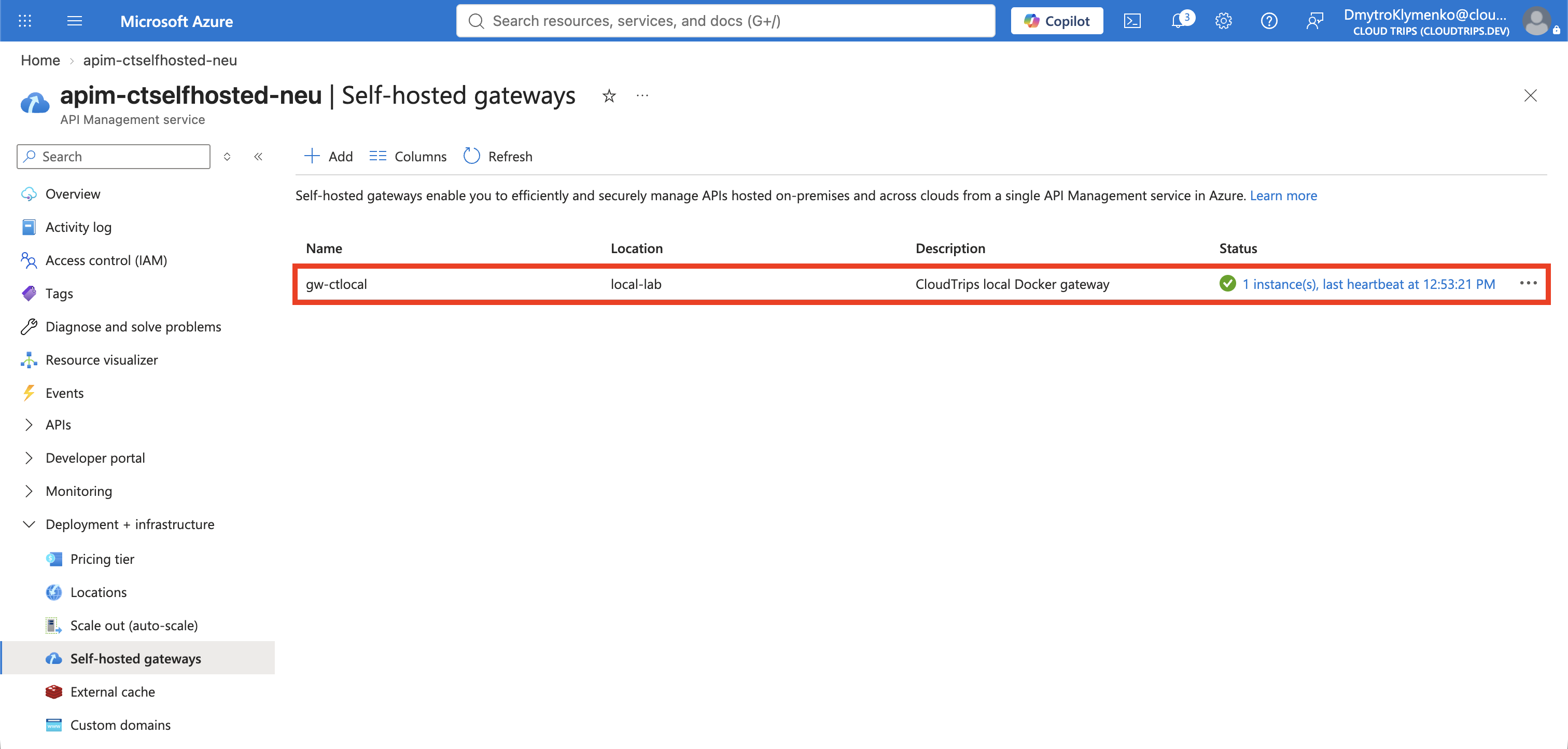
In the new APIM instance, open Deployment + infrastructure → Self-hosted gateways (or Gateways) → Add:
Name: gw-ctlocal
Region: local-lab
Description: CloudTrips local Docker gateway
APIs: CloudTrips Private Orders
Here Region is a descriptive location label; it does not deploy an Azure resource into that region. Associate CloudTrips Private Orders explicitly. An API that is not assigned to this gateway will return 404 through it.
Open gw-ctlocal → Deployment (under Settings if grouped). Choose Docker, generate/use a token with an expiry covering this lab, and download env.conf. This file contains the gateway’s credential for downloading configuration; it is not a client API key. Keep it private and out of screenshots and Git.
Move the downloaded env.conf into ~/Development/cloudtrips/examples/apim-selfhosted. In Bash, run:
cd ~/Development/cloudtrips/examples/apim-selfhosted
chmod 600 env.conf
docker run -d --name ct-local-gateway \
  --platform linux/amd64 \
  --network ct-apim-local \
  -p 127.0.0.1:8080:8080 \
  --env-file ./env.conf \
  mcr.microsoft.com/azure-api-management/gateway:v2

docker ps
docker logs --tail 30 ct-local-gateway
This command uses the portal environment file, adds the shared backend network, and maps the gateway’s HTTP port to localhost. The v2 tag follows gateway v2 updates and is convenient for this lab; a production deployment should use a tested, specific image version.
The container needs outbound HTTPS access to its APIM configuration endpoint,
Refresh the gateway’s Overview in Azure until it shows a healthy connected instance/recent heartbeat. Initial configuration download and status reporting are not instantaneous.
Test the Local Route
On the same computer, run:
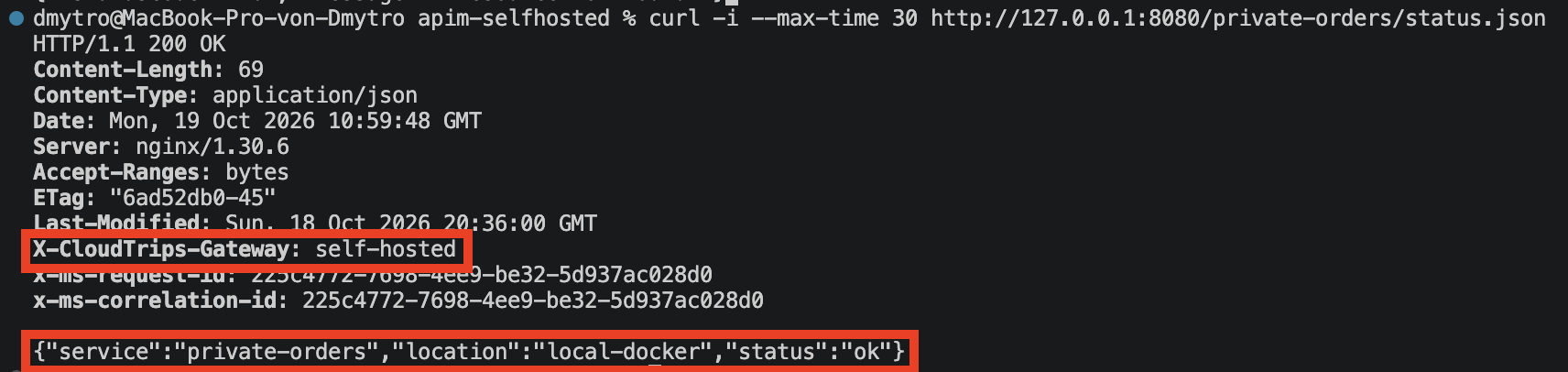
curl -i --max-time 30 http://127.0.0.1:8080/private-orders/status.jsonExpect HTTP 200, header X-CloudTrips-Gateway: self-hosted (header casing may vary), and:
{"service":"private-orders","location":"local-docker","status":"ok"}This shows that the local gateway routed to the backend and applied the Azure-configured policy. You did not call the APIM azure-api.net gateway address.
For a quick configuration test, change the header value in Azure All operations to self-hosted-updated, save, wait for synchronization, then repeat curl. The changed response header demonstrates configuration flowing from Azure to the local gateway without moving the backend to Azure.
If the Request Fails
- Connection refused: check Docker is running,
docker ps, the container logs, and whether port 8080 is already occupied. Run curl on the Docker host, not in Cloud Shell. - 404: ensure the API allows HTTP, not only HTTPS; then check the API is assigned to gw-ctlocal, suffix private-orders, and operation GET /status.json. Allow configuration to synchronize.
- 401: check Subscription required is Off on this new API. This lab does not use the previous OAuth API or its policies.
- 502/other backend error: both containers must be on ct-apim-local, and the backend URL must be http://ct-private-api, not localhost. Inside the gateway container, localhost means the gateway itself.
- Gateway unhealthy: check
docker logs --tail 50 ct-local-gateway, token expiration, the downloaded env.conf, DNS, and outbound HTTPS connectivity. Download a fresh environment file and recreate the gateway container if the credential expired. Never post the token when sharing logs.
Clean Up
In your local Bash terminal:
docker rm -f ct-local-gateway ct-private-api
docker network rm ct-apim-local
rm -f ~/Development/cloudtrips/examples/apim-selfhosted/env.conf
Also delete any extra downloaded copies of env.conf. The small backend JSON directory can be removed when no longer needed.
In Azure, delete rg-cloudtrips-selfhosted-test-neu after finishing. Removing only the gateway entry or local containers does not stop charges for the Developer APIM instance. Your earlier APIM instance is in a different resource group.