Removing Bicep Code Does Not Always Remove the Resource? Use Deployment Stacks
CloudTrips removes a temporary blob container from Bicep, but a normal incremental deployment leaves the existing container in Azure. The code and the environment now disagree, and nobody clearly owns the leftover resource.
Use an Azure deployment stack for resources whose lifecycle must follow the Bicep definition. A deployment stack is an Azure resource that records the resources deployed through it. When a managed resource disappears from the template, the stack can detach it or delete it.
This lab intentionally deletes a blob container. Use the dedicated resource group below, not an existing CloudTrips environment.
This trip builds on: Use Conditions and Loops. That trip demonstrates why a normal incremental deployment can leave a removed conditional resource behind; this isolated lab shows how a deployment stack changes that lifecycle.
Prepare the Disposable Lab
From the repository root, select the CloudTrips TEST subscription and create the empty lab resource group:
az account set \
  --subscription "<CloudTrips TEST subscription name or ID>"

az group create \
  --name rg-cloudtrips-bicep-stack-test-weu \
  --location westeurope
The cloudtrips-bicep/deployment-stacks/initial.bicep template creates one
storage account with two private containers:
resource uploadsContainer 'Microsoft.Storage/storageAccounts/blobServices/containers@2025-06-01' = {
  parent: blobService
  name: 'uploads'
  properties: {
    publicAccess: 'None'
  }
}

resource temporaryContainer 'Microsoft.Storage/storageAccounts/blobServices/containers@2025-06-01' = {
  parent: blobService
  name: 'temporary'
  properties: {
    publicAccess: 'None'
  }
}
The companion
cloudtrips-bicep/deployment-stacks/without-temporary-container.bicep defines
the same storage account, Blob service, and uploads container, but contains no
temporary container resource.
Lint both states before using them:
az bicep lint \
  --file cloudtrips-bicep/deployment-stacks/initial.bicep

az bicep lint \
  --file cloudtrips-bicep/deployment-stacks/without-temporary-container.bicep
Create the Deployment Stack
Create a resource-group-scoped stack from the initial template:
az stack group create \
  --name stack-cloudtrips-storage-lifecycle-test \
  --resource-group rg-cloudtrips-bicep-stack-test-weu \
  --template-file cloudtrips-bicep/deployment-stacks/initial.bicep \
  --action-on-unmanage deleteResources \
  --deny-settings-mode none \
  --yes
deleteResources tells the stack to delete a managed Azure resource when that
resource is removed from a later template. deny-settings-mode none avoids
adding deny assignments; this lab focuses only on lifecycle management.
Inspect the stack and the resource IDs it manages:
az stack group show \
  --name stack-cloudtrips-storage-lifecycle-test \
  --resource-group rg-cloudtrips-bicep-stack-test-weu \
  --query "{state:provisioningState,managedResources:resources[].id}" \
  --output yaml
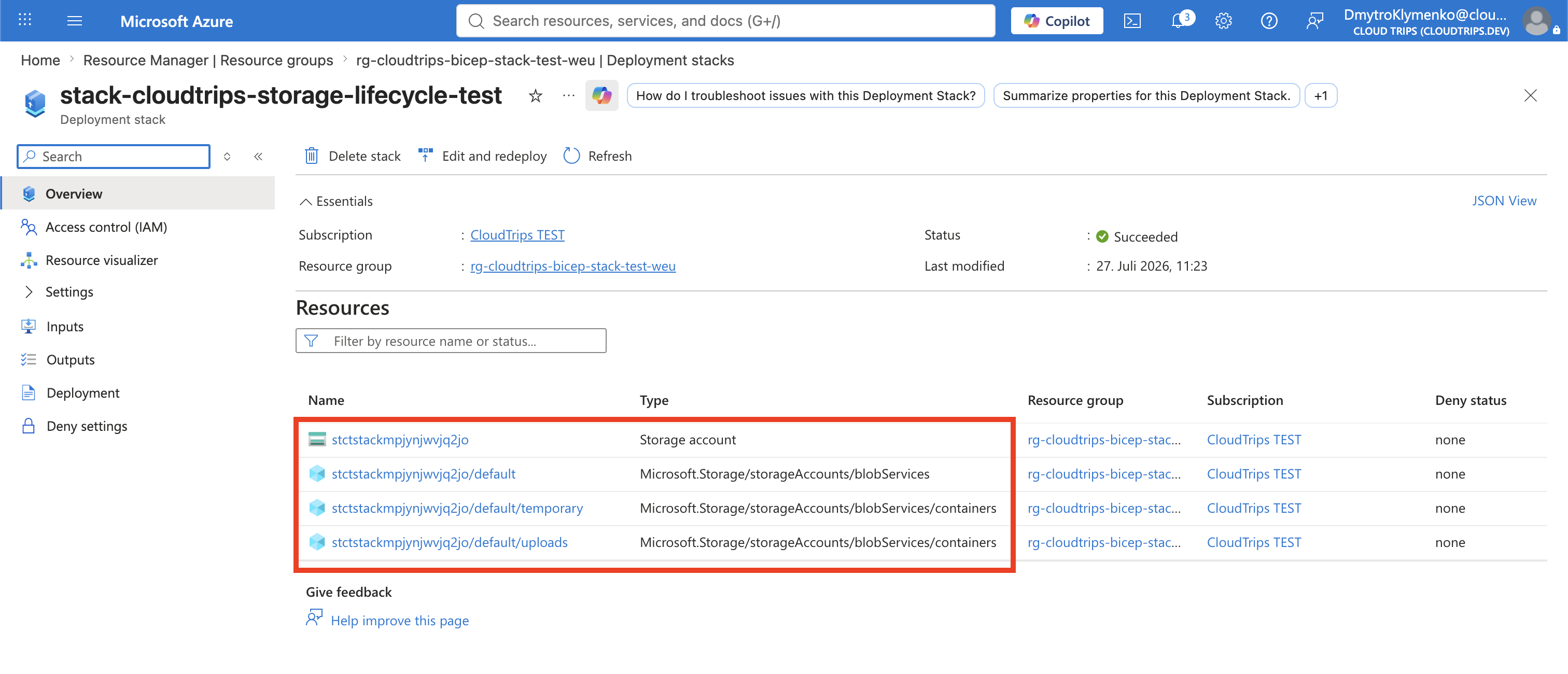
The state should be succeeded, and the managed resources should include both
the uploads and temporary containers. In the Azure portal, open the resource
group and select Deployment stacks >
stack-cloudtrips-storage-lifecycle-test to see the same managed-resource
list.
Prove Why a Normal Deployment Is Not Enough
Preview the template that no longer contains the temporary container as a normal resource-group deployment:
az deployment group what-if \
  --resource-group rg-cloudtrips-bicep-stack-test-weu \
  --template-file cloudtrips-bicep/deployment-stacks/without-temporary-container.bicep
The ordinary incremental preview does not propose deleting temporary.
Resources absent from an incremental template are normally left in Azure.
Now update the existing stack with that same template:
az stack group create \
  --name stack-cloudtrips-storage-lifecycle-test \
  --resource-group rg-cloudtrips-bicep-stack-test-weu \
  --template-file cloudtrips-bicep/deployment-stacks/without-temporary-container.bicep \
  --action-on-unmanage deleteResources \
  --deny-settings-mode none \
  --yes
This is an update because the stack name and scope already exist. Azure compares
the stack’s previous managed-resource list with the new template. The
temporary container is now unmanaged, so deleteResources deletes it. The
storage account, Blob service, and uploads container remain managed.
Inspect the result:
az stack group show \
  --name stack-cloudtrips-storage-lifecycle-test \
  --resource-group rg-cloudtrips-bicep-stack-test-weu \
  --query "{state:provisioningState,deletedResources:deletedResources[].id,managedResources:resources[].id}" \
  --output yaml
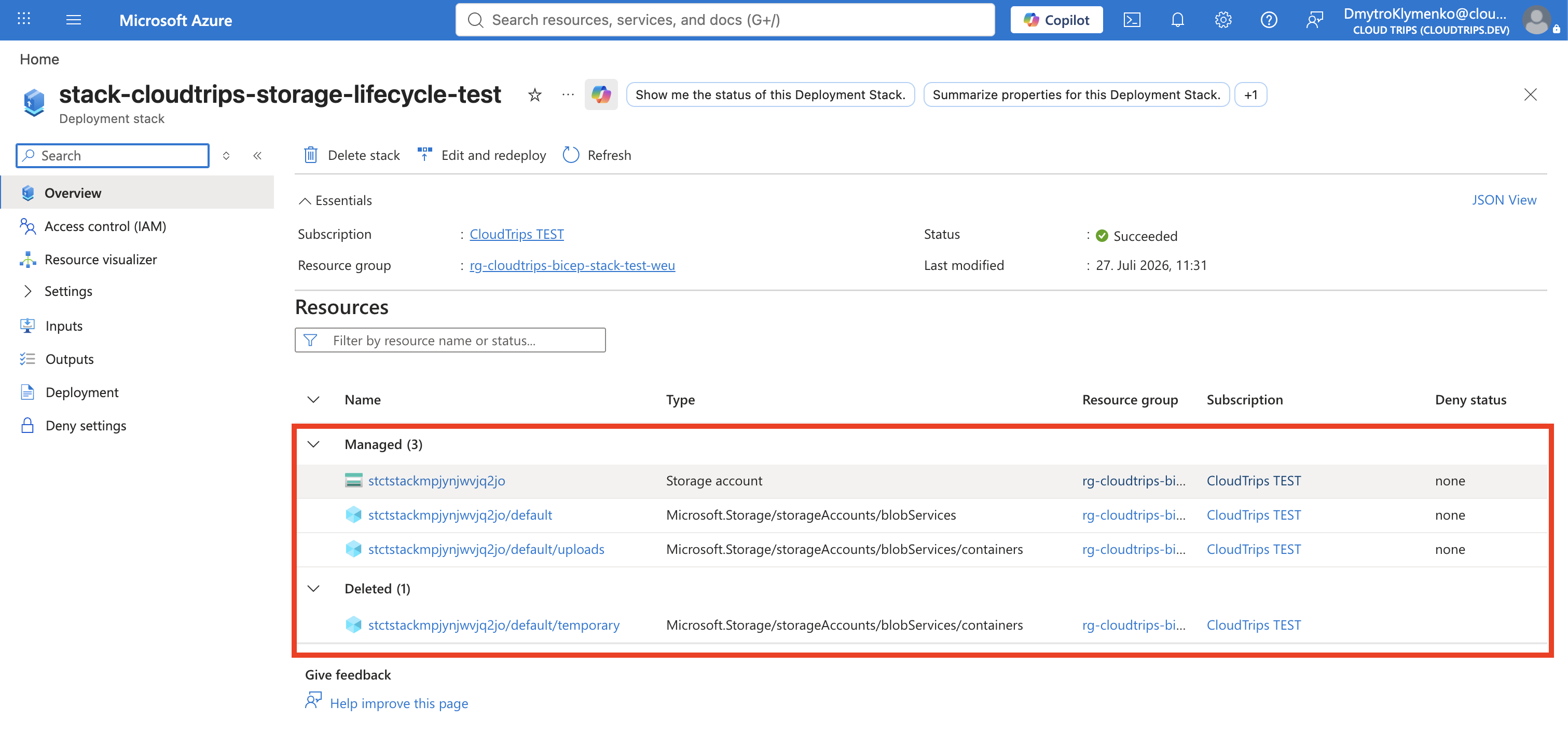
The state should again be succeeded. The deleted-resource list should contain
the temporary container, while the managed-resource list should still contain
uploads.
Choose the Lifecycle Behavior Deliberately
--action-on-unmanage controls what happens when a resource leaves the
template or when the stack itself is deleted:
| Value | Result |
|---|---|
detachAll |
Keep the resources in Azure but stop managing them with the stack |
deleteResources |
Delete managed resources but not managed resource groups |
deleteAll |
Delete managed resources and any resource groups managed by a broader-scope stack |
Use detachAll when ownership should transfer without deleting anything. Use a
delete option only when the stack is intended to own the complete lifecycle and
the deletion has been reviewed.
Remove the Disposable Lab
Delete the stack and its remaining managed resources:
az stack group delete \
  --name stack-cloudtrips-storage-lifecycle-test \
  --resource-group rg-cloudtrips-bicep-stack-test-weu \
  --action-on-unmanage deleteResources \
  --yes
Then delete the empty lab resource group:
az group delete \
  --name rg-cloudtrips-bicep-stack-test-weu \
  --yes
CloudTrips has now demonstrated the difference between deploying a template and
managing a resource lifecycle. Removing a definition from a normal incremental
deployment leaves the resource behind; removing it from a stack configured with
deleteResources deletes the resource intentionally.